When I first started my affiliate marketing journey, I was excited but confused. I joined a few affiliate programs, copied my links, and shared them on my blog and social media. But soon I saw a problem. Hardly anyone clicked on my links.
At first, I thought people did not like the products. Later, I found out the real issue was my links. They were long, messy, and looked unsafe. Some readers even thought they were spam.
Then I learned about link cloaking. It was a simple idea that made a big difference. My links became short, clean, and branded with my own domain. More people started to click. My traffic and income both went up.
If you are new to affiliate marketing, you might have the same problem. This guide will help you fix it. You will learn what link cloaking means, why it matters, and how to use it step by step. You will also see the best free tools and my favorite plugin for 2026.
Related Reading: How to Write Your First Affiliate Blog Post
Also Read: Pretty Link Review: 5 Powerful Reasons It’s the Best Tool to Cloak Affiliate Links
Table of Contents
What Is Link Cloaking?
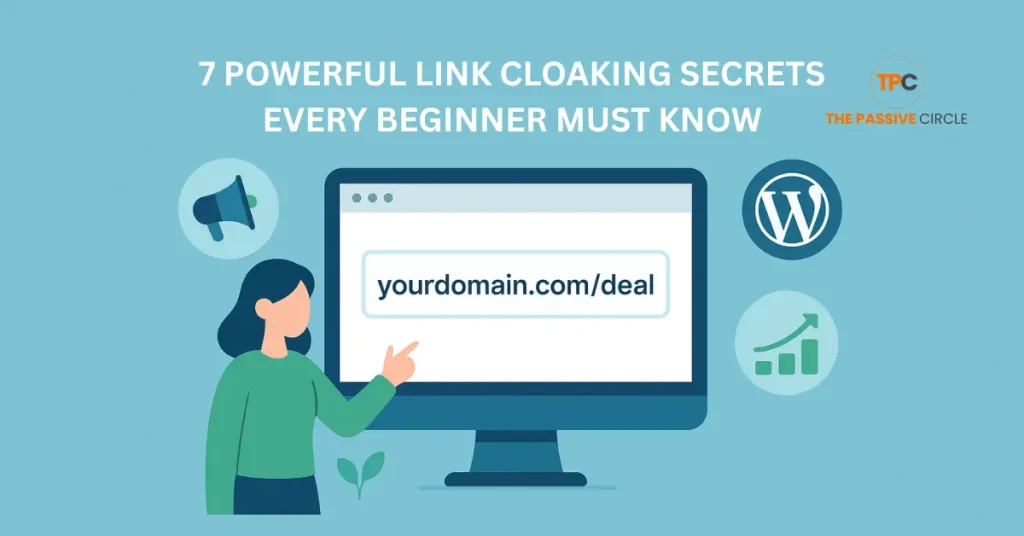
Link cloaking is the process of converting long, messy affiliate URLs into short, clean, branded links. It helps you make your links look professional and safe. Readers trust links that look simple and use your own domain name.
Here is a quick example:
❌ https://example.com/product?id=8943&ref=affiliate123
✅ https://yourblog.com/deal
Both links lead to the same product. But the second one looks neat, easy to remember, and more trustworthy. That is the power of link cloaking.
A link cloaker is a tool or plugin that hides the extended tracking code inside your affiliate link. It keeps your site looking clean while still tracking every click. When readers click the short link, they are sent to the real affiliate page without seeing the long URL.
How Link Cloaking Works
When someone clicks your cloaked link, the tool redirects them to your target URL immediately. You can choose how the redirect works:
- 301 Redirect means the link is permanent.
- 302 Redirect means it is temporary and can change later.
Both types are safe to use for affiliate links.
Each click is also tracked inside your link cloaker dashboard. You can see how many people clicked, where they came from, and which links get the most attention.
This tracking helps you learn what works best so you can focus on the links that bring real results.
Is Link Cloaking Allowed?
Many affiliate programs offer link cloaking, but not all do. Each program has its own rules, so you must always read its terms before using it. Cloaking links is safe when done correctly. It helps your readers and keeps your links clean, but it should never be used to hide a link’s destination.
You should also use the correct link settings for SEO. Always add the nofollow and sponsored tags to your affiliate links. These tags tell search engines that the links are paid or promotional. It keeps your site honest and protects it from penalties.
A simple example:
In HTML it look like this:
<a href=”https://yourblog.com/deal” rel=”nofollow sponsored”>Check the Deal</a>
This keeps your link SEO-friendly and clear to both Google and your visitors.
Amazon and Other Strict Programs
Some programs have stricter rules. The best example is Amazon Associates. Amazon does not allow link cloaking. They want you to use their original affiliate links directly from your dashboard.
If you are part of Amazon or similar programs, always check their policies first. You can still make your links look neat by adding them naturally in your content.
For other programs, such as ShareASale, ClickBank, or Impact, affiliate link cloaking is usually allowed as long as you follow the rules and use proper tags.
When in doubt, ask your affiliate manager before you start cloaking. Staying safe and compliant is better than risking your account.
Why Cloak Affiliate Links
If you are new to affiliate marketing, you might wonder why you should cloak your links at all. The truth is, link cloaking helps you build trust, track results, and keep your site clean. Let’s look at the main reasons why every beginner should use it.
1. Trust and Higher Clicks
People don’t like clicking on long or strange-looking links. When a link is full of numbers, random letters, and tracking codes, it looks unsafe. A clean, short link tells your readers it comes from a trusted source — you.
For example:
❌ https://store.com/product/?ref=234affxyz93
✅ https://yourblog.com/product
The second link looks natural and easy to understand. It matches your brand and feels safe to click. That trust can lead to higher click rates and more sales.
When your readers trust your links, they will also trust your recommendations. That is how affiliate marketing starts working for you.
2. Tracking and Analytics
A good link cloaker plugin not only hides long URLs but also tracks every click. You can see how many people clicked, where they came from, and which content prompted them to click.
This tracking helps you understand what works. You will learn which blog posts bring the most traffic and which links convert the best. Over time, this data enables you to make better decisions and improve your affiliate strategy.
You don’t have to guess what works anymore. Your link cloaking tool gives you the answers.
3. Branding and User Experience
Branded links look clean, short, and professional. When readers see your domain name in every link, it helps build your brand identity.
It also makes sharing easier. A short link looks better in emails, social posts, and YouTube descriptions. People remember it and are more likely to type it again later.
Using your own domain gives you complete control over your affiliate links. If you ever change your affiliate partner, you can update the target URL inside your cloaking tool instead of editing every blog post.
This saves time and keeps your site organized. It also improves user experience because visitors can trust where each link leads.
7 Powerful Link Cloaking Secrets Every Beginner Must Know
Link cloaking is more than just shortening URLs. When used wisely, it can build trust, increase clicks, and simplify your affiliate workflow. Here are seven powerful secrets that every beginner should know this year.
1. Always Brand Your Links
Use your own domain name in every affiliate link. A branded link like yourblog.com/deal looks professional and builds instant trust. It also improves recognition when people share your links on social media.
2. Track Every Click
Never share links without tracking them. Plugins like Pretty Links and ThirstyAffiliates show detailed reports about clicks, sources, and visitor activity. These insights help you focus on content that brings real results.
3. Use the Right Redirect Type
Choose 301 redirects for long-term offers and 302 redirects for temporary promotions. The proper redirect keeps your SEO safe and helps manage links more efficiently.
4. Disclose Every Affiliate Link
Always be transparent. Add a short note like “This post contains affiliate links” to stay compliant with FTC rules. Honesty builds loyalty, and loyal readers buy again.
5. Organize Links by Category
When you start promoting multiple products, things can get messy. Group your links by category inside your cloaking plugin. For example, “Web Hosting,” “SEO Tools,” or “AI Software.” It keeps your dashboard clean and saves time later.
6. Refresh and Update Your Links
Check your links every few months. Offers change, and old URLs can stop working. Regular updates protect your income and your readers’ trust.
7. Automate as You Grow
Once you start earning, save time with Pretty Links Pro features like auto keyword linking, split testing, and link expiration. Automation lets you focus on content instead of manual link updates.
Pro Tip: Don’t think of link cloaking as “hiding.” Think of it as organizing and branding. It’s the bridge between professionalism and profit.
Free Ways to Cloak Links
You don’t need expensive tools to start with link cloaking. Many free plugins and services make it easy for beginners to shorten and track links. These tools help you look professional and build trust even when you are just starting.
Here are a few of the best free options you can try today.
Pretty Links Free
Pretty Links is one of the most popular WordPress tools for affiliate link cloaking. It is fast, beginner-friendly, and perfect for anyone who wants to keep things simple.
You can create short branded links that use your own domain name. The free version also tracks clicks and lets you organize your links neatly in your dashboard.
To use it, install the Pretty Links plugin, add your affiliate URL, choose a short slug, such as/go/product, and save. Your new branded link is ready to share.
ThirstyAffiliates Free
ThirstyAffiliates is another excellent plugin for WordPress users. It’s made for bloggers who post often and want quick access to their affiliate links while writing.
The plugin adds an easy “Insert Link” button inside your blog post editor. You can pick any link from your list and add it to your post without leaving it. It saves time and keeps everything organized.
It also helps you Group links into categories, so you can manage them better as your site grows.
Simple 301 Redirects
If you run a small site or need fundamental link redirection, Simple 301 Redirects is a good choice. It doesn’t have advanced tracking, but it does the job.
This plugin is excellent for beginners who want a clean way to redirect one URL to another without needing any technical setup. It’s light and easy on your site’s speed.
Bitly for Non-WordPress Users
If you don’t use WordPress, Bitly is a free, simple online link cloaking tool. It helps you shorten long links and see basic click data.
Bitly links are easy to share on social media, YouTube, or email. If you upgrade later, you can also add your own custom domain for branding.
This tool works well for affiliate marketers who prefer to manage their links outside of WordPress.
Each of these tools can help you make your links shorter, cleaner, and more trusted. Start with one that fits your setup and goals.
Best Link Cloaker Tools in
| Tool | Platform | Free Plan | Best For |
|---|---|---|---|
| Pretty Links | WordPress | Yes | Beginners who want easy link cloaking |
| ThirstyAffiliates | WordPress | Yes | Bloggers who share many affiliate links |
| Replug | Cloud | Limited Free | Marketers using paid ads and retargeting |
| Lasso | WordPress | No | Pro bloggers who want stylish product displays |
My Pick for Beginners
I use Pretty Links every day. It’s fast, easy, and free to start.
You can upgrade later when your business grows.
Step-by-Step: Cloak a Link in WordPress
If you use WordPress, cloaking your affiliate links is very simple. You don’t need to know coding or technical setup. Follow these easy steps to start creating clean, branded links that your readers will trust.
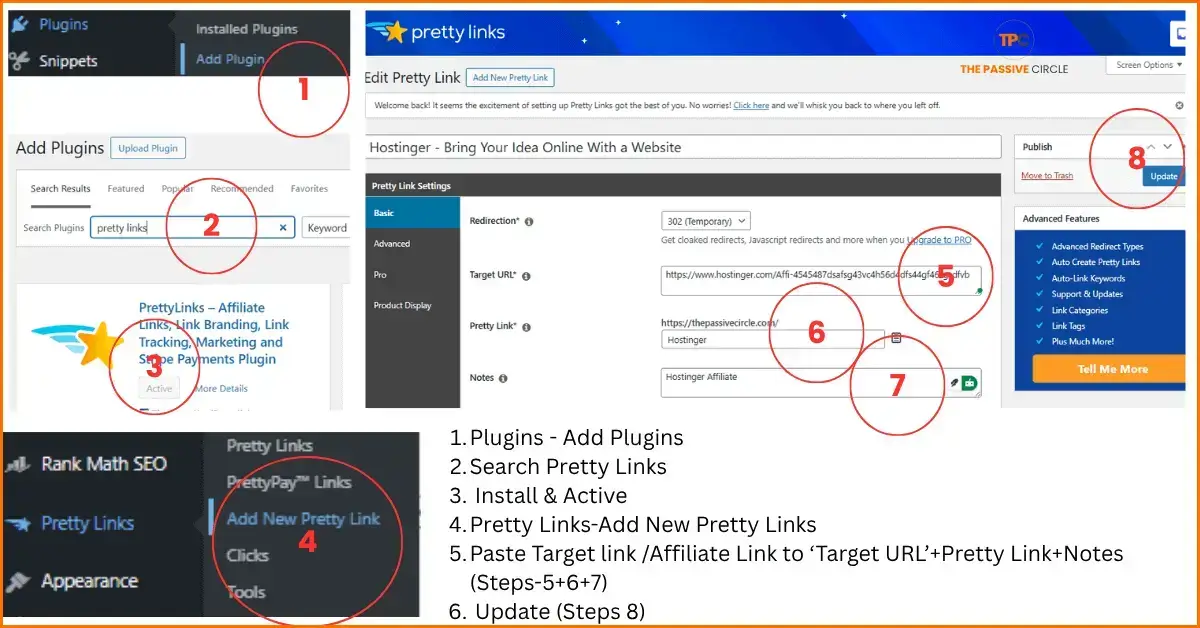
Step 1: Install Pretty Links
Go to your WordPress dashboard.
Click Plugins → Add New, then search for Pretty Links.
Once you find it, click Install and then Activate.
The plugin will appear on your left menu. It is now ready to use.
Pretty Links works right out of the box, so you can start cloaking links within minutes.
Step 2: Create a New Pretty Link
In your WordPress menu, click Pretty Links → Add New.
You will see a simple screen where you can paste your affiliate link.
- In the Target URL box, paste your full affiliate link.
- In the Pretty Link field, type your custom slug — for example, /deal, /offer, or /product.
- Add a title or note to help you remember what the link is for.
When done, click Update or Create to save your new link.
You now have your first branded link using your own domain name.
Example:
✅ https://yourblog.com/deal
Step 3: Choose Redirect Type
Pretty Links gives you a few redirect options.
- Use 301 Redirect for permanent links, such as long-term affiliate products or evergreen offers.
- Use 302 Redirect for short-term promotions or time-limited deals.
Both work well for affiliate marketing, but using the right one helps you stay organized.
Step 4: Test and Track
Before you share your link, test it. Click your new cloaked link to make sure it redirects correctly to the product or offer page.
Then open your Pretty Links dashboard to see your stats. You can view how many clicks your links get, which links are most popular, and where your traffic comes from.
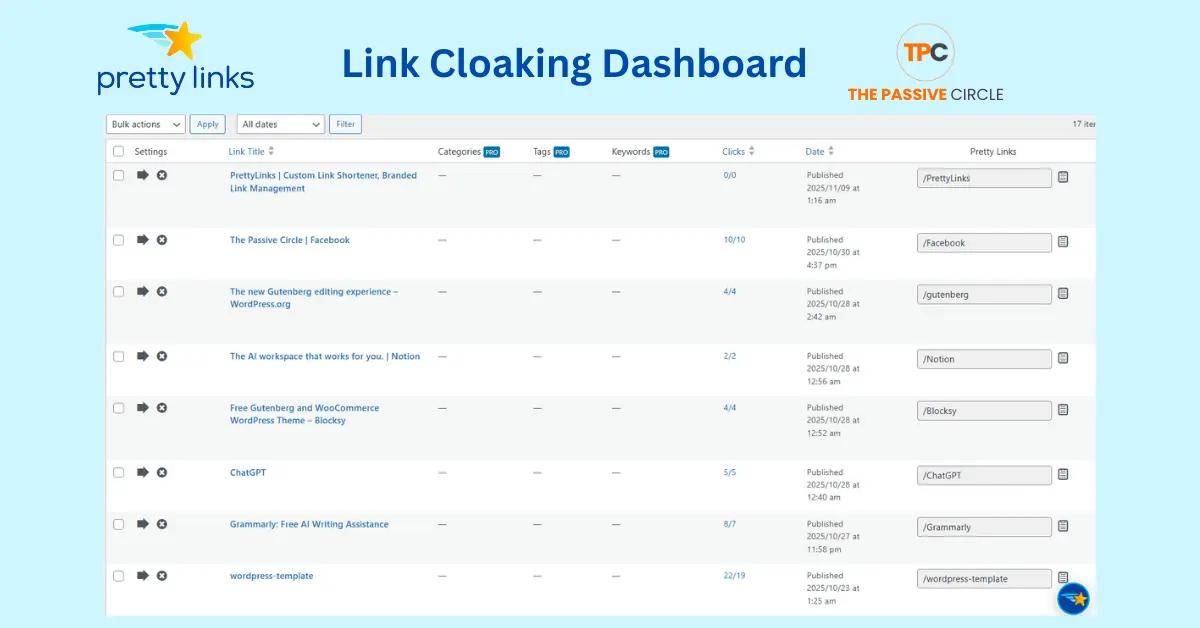
These insights will help you understand what content drives the best results.
Pro Tips
✔ Keep your link slugs short and straightforward, such as /go, /deal, or /offer.
✔ Group your links by topic or category. It makes tracking easier as your list grows.
✔ Add short notes or tags to each link so you always remember what it promotes.
With these steps, you can manage your affiliate links like a pro. It’s fast, simple, and completely beginner-friendly.
Non-WordPress Options
Not everyone builds a site on WordPress, but that should not stop you from using link cloaking. There are great tools that work outside of WordPress. They help you shorten, brand, and track your links just as easily.
Here are a few options that work well for non-WordPress users.
Replug
Replug is a cloud-based link cloaker designed for marketers running ads, social media campaigns, or email promotions. You don’t need to install anything. Just sign up, shorten your links, and start tracking results in your online dashboard.
Replug lets you:
- Add retargeting pixels to your short links.
- Track clicks, sources, and engagement in real time.
- Add call-to-action banners to shared links.
- Create branded short URLs for social platforms.
It is great for affiliate marketers who share links across multiple channels, such as Facebook, YouTube, or paid ads. Replug also supports UTM tags, which help you measure campaign results more accurately.
Short.io and Bitly
If you need something quick and straightforward, Short.io and Bitly are both good choices. These tools are easy to use and ideal for beginners who want free link cloaking with no setup.
Short.io lets you:
- Create short branded links with your own domain.
- Track clicks and visitor locations.
- Manage links for teams or clients.
Bitly, on the other hand, is one of the most popular link shorteners online. It is fast, free, and works well for social sharing. You can start with the free version, then upgrade later to unlock more analytics and branded links.
Both tools give you basic click tracking and analytics, even on the free plan.
If you are not using WordPress, these options will still let you manage your affiliate links like a pro. You can track performance, test link variations, and keep everything neat and branded, all from your browser.
Common Mistakes to Avoid
Even though link cloaking is simple, many beginners make small mistakes that can cause problems later. These errors can hurt your SEO, break your affiliate rules, or confuse your readers. Here are the most common ones you should avoid.
1. Hiding Affiliate Intent
Never use link cloaking to trick people. Your readers must know that a link is an affiliate link. Always include a short disclosure on your site or near the link.
For example:
“This post contains affiliate links. I may earn a small commission at no extra cost to you.”
Being honest builds trust and keeps you in compliance with FTC and affiliate program guidelines.
2. Cloaking When Your Program Forbids It
Some affiliate programs, like Amazon Associates, do not allow link cloaking. If you ignore this rule, your account can be banned.
Always read the program terms before you start cloaking. If they say “no redirects,” share the raw link instead.
3. Forgetting Nofollow and Sponsored Tags
If you do not add the nofollow and sponsored tags, Google might treat your affiliate links as paid links. That can hurt your SEO.
Always use this format:
<a href=”https://yourblog.com/deal” rel=”nofollow sponsored”>Buy Here</a>
This simple step keeps your site safe from search engine penalties.
4. Adding Too Many Redirects
Using too many redirect plugins or layers can slow down your site. It can also confuse tracking tools and reduce clicks.
Keep your setup simple. One redirect per link is enough. Test your links regularly to ensure they load quickly.
5. Using Unclear or Random Slugs
Your slug should be short and meaningful. Avoid random letters or numbers. Instead of /a1b2c3, use /deal, /offer, or /product.
Clear slugs look cleaner and help readers remember links more easily.
If you avoid these small mistakes, your affiliate link cloaking will work smoothly. You’ll build more trust, protect your SEO, and stay fully compliant with affiliate rules.
Risks and Downsides of Link Cloaking
Link cloaking is safe when done correctly, but using it carelessly can cause problems. Many beginners make small mistakes that hurt their results. Here are the main risks to watch out for and how to avoid them.
1. Breaking Affiliate Program Rules
Some programs, such as Amazon Associates, do not allow link cloaking. If you use redirects where they are not allowed, your account could be banned.
How to stay safe:
Always read your affiliate program’s terms. If the rules say “no redirects,” share the original link directly.
2. SEO Problems from Misuse
If you use cloaking to trick search engines or hide spammy pages, Google can penalize your site. Cloaking should never be used to hide the real destination.
How to stay safe:
Use nofollow and sponsored tags for all affiliate links. Be clear about where your links go.
3. Lost Data or Broken Links
If your link cloaking plugin gets removed or crashes, your redirects may stop working. That can cause broken links and lost clicks.
How to stay safe:
Back up your site often. Keep your plugins updated. Avoid using too many redirect tools at once.
4. Slower Site Speed
Every redirect adds a slight delay when someone clicks a link. Too many redirects can slow down your site.
How to stay safe:
Use only one redirect per link and test your site speed regularly.
5. Losing Trust by Hiding Intent
If readers feel that your cloaked links hide something, they might lose trust in you. Always be honest about affiliate links and include a clear disclosure.
How to stay safe:
Tell your readers that your links are affiliate links and explain how they help support your content.
When used correctly, link cloaking is a great tool for affiliate marketing. Just stay transparent, follow the rules, and keep your setup simple. That is how you build trust and keep your site strong for the long term.
Pretty Links Free vs Pro
If you plan to use Pretty Links for your affiliate marketing, it helps to know what’s included in the free version and which extra features you get with the Pro plan. Both versions link cloaking, but the Pro version gives you more control, tracking, and automation.
Let’s look at what each one offers.
What You Get Free
The free version of Pretty Links is perfect for beginners. It includes everything you need to start cloaking and tracking affiliate links.
Here is what you can do:
- Create short, branded affiliate links.
- Use 301 (permanent) and 302 (temporary) redirects.
- Track total clicks and unique clicks inside your dashboard.
- Manage all links from a straightforward place in WordPress.
The free version is fast, light, and easy to set up. It gives you a clean start without any cost.
What Pro Adds
As your site grows, the Pretty Links Pro version helps you save time and improve results.
Here are the top features that come with the Pro plan:
- Auto Keyword Linking: Turns selected keywords in your blog posts into affiliate links automatically.
- Link Expiration: Sets a date for links to expire after a sale or campaign ends.
- Split Testing: Lets you test different links or landing pages to see which one converts better.
- Conversion Reports: Tracks how many clicks turn into sales or actions.
- Tags and Categories: Keeps a large number of links organized and easy to find.
These features are handy when you manage many products or run multiple campaigns.
When to Upgrade
You can stay on the free version as long as you only manage a few links. But as your affiliate business grows, upgrading to Pretty Links Pro will save you time and boost your earnings.
It’s worth upgrading when:
- You publish content regularly.
- You have many affiliate programs or links.
- You want deeper tracking and automation.
If you are serious about affiliate marketing and want to scale your income, Pretty Links Pro is a wise investment.
How to Promote Cloaked Links for More Clicks and Sales
Cloaking your links is only the first step. To make money, you must promote them in the right way. The goal is to get more people to click and buy while keeping your content natural and honest.
1. Place Links Where They Fit Naturally
Add your cloaked links inside helpful content, not random spots. Use them in:
- Blog posts that solve a problem
- Tutorials and step-by-step guides
- Tool reviews and list posts
When readers see the link as part of a real solution, they are more likely to click.
2. Use Clear and Honest Call-to-Actions
Tell people what to do. Use short and precise words like:
- “Try this tool for free.”
- “Get your discount here.”
- “Download the plugin now.”
Never hide what will happen when they click. This keeps readers’ trust.
3. Share on Multiple Platforms
Use your cloaked links on places like:
- YouTube video descriptions
- Pinterest pins
- Facebook or Instagram posts
- Email newsletters
Each platform brings new visitors and helps your links reach more people.
4. Track What Works Best
Check your link stats often. See which pages get the most clicks.
If one post performs well, update it or write a new one on a similar topic.
Tracking helps you focus on the content that converts.
5. Add Context Around Each Link
Never drop a link without a reason. Add one or two lines that explain how the product helps your reader.
Example:
“I use this tool to track my links and save time. You can try it free using my link below.”
Simple context increases trust and conversion.
6. Keep Testing and Improving
Try different link placements, CTAs, and visuals. What works for one post may not work for another.
Keep testing until you find what gets the best click rate.
Pro Tip:
The key to success is trust. Use cloaked links like recommendations, not ads. People buy from those they trust.
Legal and SEO Best Practices
Before you start using link cloaking, it’s essential to follow a few legal and SEO rules. Doing this keeps your site safe, trusted, and professional. These best practices protect you from penalties and help build long-term success in affiliate marketing.
1. Always Disclose Affiliate Links
You must always tell your readers when a link is an affiliate link. This is required by law in many countries, including under the Federal Trade Commission (FTC) guidelines.
You can do this by adding a short note near your links or at the top of your post. For example:
“This post contains affiliate links. I may earn a small commission if you buy through them. It helps support my blog at no extra cost to you.”
This simple line builds trust and keeps you honest with your audience.
2. Keep Cloaking Transparent
Link cloaking is not meant to hide or trick. It should make your links look clean and easy to manage, not hide where they lead. Always make sure the user knows what to expect when they click a link.
If you recommend a product, make it clear where the link goes. A reader should never feel misled.
3. Add Nofollow and Sponsored Attributes
Search engines like Google expect all affiliate links to include special tags. These tags tell them the link is paid or promotional. This keeps your SEO healthy and avoids penalties.
Here’s what it should look like:
<a href=”https://yourblog.com/deal” rel=”nofollow sponsored”>Check the Deal</a>
Always include both nofollow and sponsored on your affiliate links. It’s a small step that makes a big difference.
4. Never Use Cloaking to Mislead or Hide Harmful Content
Some marketers use cloaking to hide spam or unsafe pages. This is unethical and can get your site banned. Only use affiliate link cloaking for genuine, trusted products that add value to your readers.
If your readers trust you, they’ll come back and buy again. That trust is worth more than any short-term trick.
Following these simple legal and SEO best practices will help you stay safe, grow your audience, and build a strong, lasting affiliate brand.
Frequently Asked Questions (FAQ)
Here are the most common questions beginners ask about link cloaking. Each answer is short, clear, and focused on helping you understand the basics and stay SEO safe.
1. What is cloaking a link?
Cloaking a link means hiding a long affiliate URL behind a short, branded one. It helps make your links look clean, safe, and easy to remember.
2. How to cloak a link for free?
You can use free tools like Pretty Links Free, ThirstyAffiliates, or Bitly. They let you shorten and track links without paying.
3. What is the best link cloaker?
For WordPress users, Pretty Links is the best choice. It’s easy to use and works well for beginners. For non-WordPress users, Replug or Short.io are great options.
4. Is there a way to hide a URL?
Yes. A link cloaker tool hides your long URL behind your domain name while still tracking clicks.
5. What is link cloaking?
It’s the process of changing long affiliate links into short branded ones. It helps build trust and organize your links better.
6. Is link cloaking free?
Yes. You can start link cloaking for free using plugins like Pretty Links or ThirstyAffiliates.
7. What is a link cloak?
A link cloak is a short, branded URL that replaces a long affiliate link.
8. What is a link cloaker?
A link cloaker is a tool or plugin that creates and tracks shortened affiliate links.
9. Is link cloaking safe for SEO?
Yes, it is safe if you use nofollow and sponsored tags. Never use cloaking to trick search engines or hide harmful pages.
10. Can I cloak Amazon links?
No. Amazon’s affiliate program does not allow link cloaking. Always use their original links.
11. How do I create a cloaked link?
Install Pretty Links, click “Add New,” paste your affiliate URL, choose a short slug, and save.
12. What is a link cloaking website?
It’s a site or tool that lets you create short, clean, trackable links — like Bitly or Replug.
13. What is link cloaking free?
It means using free plugins or tools to create short affiliate links without paying for premium features.
14. What is a link cloaking tool?
It’s software or a plugin that helps shorten and track affiliate URLs. Examples include Pretty Links and ThirstyAffiliates.
15. What is link cloaking affiliate?
It’s the use of cloaked links in affiliate marketing to make them look trustworthy and easier to manage.
16. What are link cloaking affiliate links?
They are affiliate URLs that have been shortened and branded for clean presentation.
17. What is the best free link cloaker?
Pretty Links Free and ThirstyAffiliates Free are the best free options for WordPress users. Bitly is suitable for non-WordPress sites.
18. What is a URL cloaking script?
It’s a piece of code that hides a long URL behind a short one. Most marketers use plugins instead of scripts because they are easier to manage.
19. Can I disguise a link?
Yes, but always do it ethically. Use a link cloaker to make links clean and branded, not to hide where they go.
20. How to mask a URL link?
Use a link cloaking plugin like Pretty Links or ThirstyAffiliates. Add your long link and create a short one using your domain name.
21. What additional features does the Pro version of Pretty Links offer compared to the free version?
The Pro version adds advanced tools, including auto-keyword linking, link expiration, split testing, and detailed conversion tracking. It also helps you organize links with tags and categories for faster management.
22. How does Pretty Link ensure the security and privacy of my affiliate links?
Pretty Links uses WordPress-based redirection, which keeps your links private and safe. Your data stays on your website instead of on third-party servers.
23. Can I use Pretty Link for non-affiliate links as well?
Yes. You can use Pretty Link to shorten and track any type of link, including blog posts, social media URLs, and YouTube videos.
24. What specific features are included in the Pro version of Pretty Link?
The Pro plan gives access to auto keyword linking, link scheduling, link groups, A/B split testing, and advanced analytics to measure conversions.
25. How does Pretty Link compare to other link cloaking tools available?
Pretty Links is easier to use and integrates directly with WordPress. Tools like RePlug or Lasso are great too, but Pretty Links is the best choice for beginners because it offers both free and paid versions.
26. Can Pretty Link work with platforms other than WordPress?
No. Pretty Links is made only for WordPress. If you don’t use WordPress, tools like Replug, Bitly, or Short.io are good alternatives.
27. How does link cloaking affect affiliate tracking?
When you cloak a link, it still tracks your clicks and sales. The redirection doesn’t stop affiliate networks from recording conversions. It makes your links clean and easy to manage.
28. Can link cloaking improve my conversion rate?
Yes. Short, branded links look more trustworthy, so more people click them. When readers feel safe, conversions naturally go up.
29. Are there any risks with link cloaking?
Only if you misuse it, avoid hiding where the link goes or using cloaking on programs that forbid it, such as Amazon Associates. Always be transparent with your audience.
30. What is the best way to stay compliant when using cloaked links?
Always disclose affiliate links, use the nofollow and sponsored tags, and check your affiliate program’s terms before using redirects. Honesty and compliance protect your reputation and your earnings.
Link cloaking is one of the smartest and easiest things you can do as a beginner in affiliate marketing. It makes your links look professional and helps you earn more by building trust with your readers.
Clean, branded links show that you care about your audience. They feel safer clicking your links, and that can lead to higher conversions. You also save time by managing all your affiliate URLs in one place.
If you are new, start with free link cloaking using the Pretty Links plugin. It is simple, beginner-friendly, and takes only a few minutes to set up. Once your traffic grows, you can upgrade to the Pro version to unlock advanced features like link tracking, automation, and split testing.
This small change can make a big difference in your affiliate journey. It keeps your site organized, improves your SEO, and makes your content look professional.
If your goal is to build a real online business and move closer to freedom, start with your first cloaked link today.
Ready to Begin?
Download Pretty Links and create your first branded affiliate link. Clean links. More clicks. More trust.