How to Build a Website for Beginners (The Simple Path I Recommend)
When I started building my first website in June 2025, I felt completely lost.
Hosting, domain names, WordPress, themes, plugins. Every tutorial explained things differently. Some helped, but many made things even more confusing.
If you feel overwhelmed right now, you are not alone. I went through the same confusion while building The Passive Circle.
The good news is simple. You do not need to understand everything at once. You only need to follow a clear beginner path.
If you are completely new to this idea, I explained the full journey in How Affiliate Marketing Became My Path to Freedom. There I share how blogging and affiliate marketing can turn a website into an online income source.
If you are short on time, here is the beginner-friendly path to launch your website.
- Buy hosting and a domain (Hostinger or ExonHost)
- Install WordPress using one-click setup
- Choose a theme to design your website
- Publish helpful blog content
- Grow traffic using SEO
Your website can be live within a few hours. After that, you improve it step by step.
The Safe Beginner Path to Build Website
Most beginner bloggers launch their first website with a simple setup like this. You do not need complicated tools or technical knowledge. You only need the right starting path.
| Step | What you do | Beginner tool |
|---|---|---|
| 1 | Buy hosting and a domain name | Hostinger or ExonHost |
| 2 | Install your website platform | WordPress |
| 3 | Choose a website design | WordPress theme |
| 4 | Start publishing helpful content | Blog posts |
This simple process is used by millions of bloggers and affiliate marketers. You do not need coding knowledge or expensive tools. You only need the right setup and the willingness to learn step by step.
Choosing Hosting: Hostinger vs ExonHost
If you are starting your first website, these two hosting providers are beginner-friendly and easy to set up.
| Hosting | Best for | Why beginners choose it | Start here |
|---|---|---|---|
| Hostinger | Global websites | Affordable plans, fast servers, beginner dashboard | Check plans |
| ExonHost | Bangladesh beginners | BDIX speed, local payment methods, local support | View plans |
Tools That Make Website Building Easier
Once your website is live, a few tools can help you grow faster.
- WordPress: the platform that powers your website
- Email marketing: build an email list using systeme.io
- Keyword research: find traffic opportunities with SE Ranking or LowFruits
If it all still feels confusing, that is normal. For keyword research, read How to Do Keyword Research for Free. For a beginner SEO tool, see How to Use Ubersuggest for SEO.
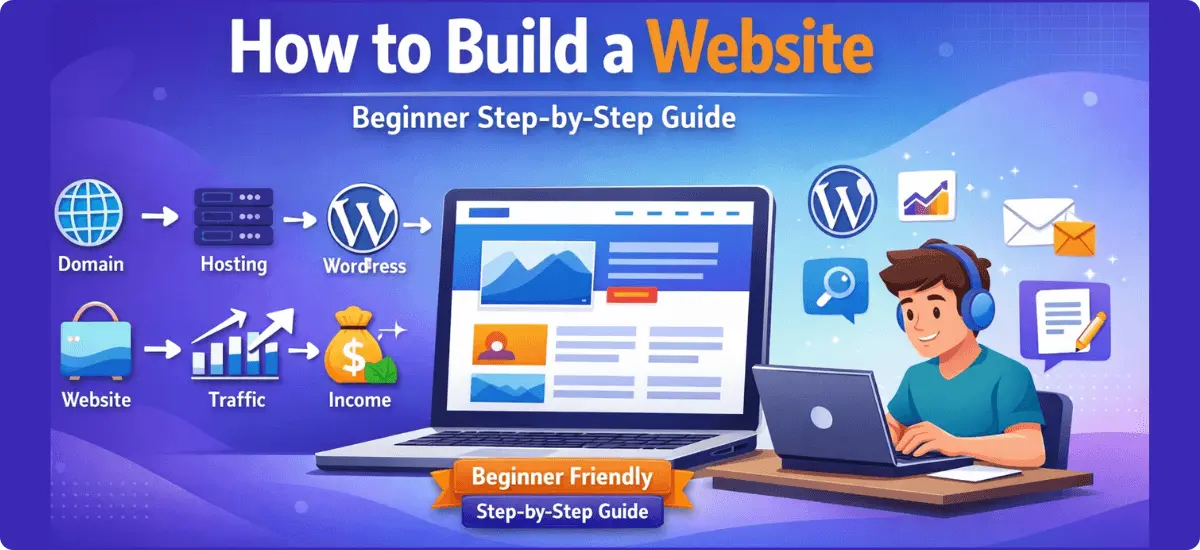
What the Website Building Process Looks Like
Think of building a website like building a small online system. Each step leads to the next one.
- Domain name
- Web hosting
- WordPress website
- Publish content
- Grow traffic
- Affiliate income
The first three steps are technical setup. After that, the real journey begins. If you want the basics first, read my Affiliate Marketing Guide for Beginners.
Find the Right Build Guide for Your Step
This page is the map. Each guide below goes deeper on one step, so start with the group that matches where you are today.
1. Pick hosting and a domain
2. Connect your domain (DNS)
3. Set up WordPress
4. Publish and grow
5. When your site outgrows basic hosting
6. Hosting for Bangladesh readers
On This Page
- Why I Started Building a Website
- The Biggest Beginner Confusions I Faced
- What I Learned From These Confusions
- The 4-Step Process to Build a Website
- Why This Process Works for Beginners
- Tools That Helped Me Build My Website
- Common Beginner Mistakes When Building a Website
- A Simple Website Setup Checklist
- My Honest Advice for Beginners
- Frequently Asked Questions
- Final Thoughts
Why I Started Building a Website
In June 2025, I started learning how to build my first website.
At that time, I was working a regular job and living away from my family. My daily routine felt simple but exhausting. I would wake up early, go to work, return home tired, and repeat the same cycle the next day.
After some time, I started asking myself a serious question. “Is this the only way to live?”
Many people reach this stage in life. You work hard every day, but your time does not really belong to you. Simple things start to feel difficult:
- Traveling when you want
- Spending enough time with your family
- Choosing how you want to use your time
For me, it started to feel like a rat race. Not because work itself is bad, but because life felt restricted. I realized that if I wanted more freedom in the future, I needed to start building something of my own.
Discovering Online Business
Around that time, I discovered that many people were building websites and earning income through blogging, affiliate marketing and digital businesses.
At first, it sounded unrealistic. But the more I researched, the more I noticed one thing. Almost every online business starts with a website.
A website gives you a place to publish your ideas, share knowledge, recommend useful tools, and connect with people looking for the same information. In simple words, a website becomes your home on the internet.
The Beginning Was Confusing
Starting was not easy. I knew almost nothing about websites. Terms like hosting, domains, WordPress, themes and plugins sounded technical and confusing. In the beginning, I struggled with questions like:
- What exactly is web hosting?
- How do you choose a domain name?
- Should I use WordPress.com or WordPress.org?
- What are themes and plugins used for?
Every tutorial explained things differently. Sometimes I spent hours researching just one simple question.
Learning by Doing
I told myself something simple. If other beginners can learn this, I can learn it too.
My first website setup was far from perfect. I made mistakes, broke things, and spent many late nights fixing problems I did not fully understand. But every mistake taught me something new, and slowly the confusion turned into confidence.
That journey led to the creation of The Passive Circle. Today I share it here to help beginners who are starting from exactly where I once was.
The Biggest Beginner Confusions I Faced
When I decided to build my first website, I thought the hardest part would be writing blog posts. Very quickly I found that the real confusion begins before the website even goes live.
Most tutorials show the final result. They rarely talk about the messy stage at the beginning, when a beginner tries to understand dozens of unfamiliar terms. These were my questions:
- What exactly is a domain name?
- What does web hosting actually do?
- Should I use WordPress.com or WordPress.org?
- What is BDIX hosting?
- Which hosting plan should beginners choose?
Choosing the Right Domain Name
The first challenge was choosing a domain name. It is the address people type into their browser to visit your website. Mine is thepassivecircle.com.
I asked myself several questions before I decided:
- Should the domain include keywords?
- Should the name be short or descriptive?
- Is the .com version available?
- Will the name still make sense in the future?
I realized a good domain name does not need to be perfect. It needs to be easy to remember, easy to spell, and flexible enough to grow with your website.
A domain is not the same as hosting, and mixing them up is very common. I explain the difference in What Is Web Hosting?
WordPress.com vs WordPress.org
Many tutorials say “build your website with WordPress”, but there are two different platforms with very different purposes.
| Platform | What it means |
|---|---|
| WordPress.com | A hosted platform with limited customization |
| WordPress.org | A self-hosted website with full control |
For blogging and affiliate marketing, most beginners choose WordPress.org. You can install themes, use plugins, monetize your content, and grow without platform restrictions.
Local Hosting vs Global Hosting
While researching hosting, I kept seeing terms like global hosting, local hosting and BDIX hosting.
- Global hosting: providers serving websites worldwide
- Local hosting: companies focused on a specific country
- BDIX hosting: a faster connection for users inside Bangladesh
The idea is simple. Global providers such as Hostinger are usually better if your audience comes from different countries. Local providers such as ExonHost can help if you prefer local support, local payment methods and faster connections inside Bangladesh.
For a full comparison, read Hostinger vs ExonHost: Which Hosting Is Better for Beginners?
Choosing the Right Hosting Plan
Once I chose a provider, another question appeared. Which plan should I choose? Most hosting companies show several options, such as single website, premium and business hosting.
In reality, most beginner blogs start with a basic plan. As your website grows, you can upgrade later. To compare providers first, see Best Web Hosting Services for Beginners. For prices, read the web hosting cost guide.
Payment and Setup Confusion
If you are buying hosting for the first time, you may worry about whether your card will work, whether the payment is secure, or what happens after the purchase. I had the same questions.
Once the payment was done, the setup was much simpler than I expected. Most hosting providers guide you step by step, and many offer one-click WordPress installation.
What I Learned From These Confusions
All these questions felt overwhelming at the beginning. But they also helped me understand how websites work.
Once you move past these early decisions, you can focus on what matters: creating helpful content, learning SEO, and growing your audience. The confusing stage usually happens only at the beginning.
Search engine optimization (SEO) helps your website appear in Google results when people search for topics related to your content. Google explains the basics in its SEO Starter Guide.
The 4-Step Process to Build a Website
When I first researched how to build a website, every tutorial introduced new tools and new steps. After going through it myself, I found it is much simpler than it looks.
- Domain and hosting
- Install WordPress
- Customize your website
- Publish content
Before you build, it also helps to choose the right niche. I explain this in How to Find a Profitable Niche for Affiliate Marketing Beginners.
Step 1: Choose a Domain Name and Web Hosting
Your domain name is the address people type to visit your website. Web hosting is the service that stores your website files and keeps your site online. Without hosting, your website cannot exist online.
If your audience is international, Hostinger is usually a good starting option. If you prefer local support and payment options in Bangladesh, ExonHost can be a practical choice. Both offer one-click WordPress installation.
Not sure how to choose? Read How to Choose Web Hosting first.
Still mixing up the domain and the hosting? Read domain vs hosting.
Step 2: Install WordPress
Once your hosting account is ready, install WordPress. It lets you build and manage your website without writing code. You get a dashboard where you can create pages, publish posts and customize your design.
Most hosting providers install WordPress during setup, so you can start working within minutes. For the full walkthrough, follow How to Set Up a WordPress Website for Beginners.
If your domain shows a parking page or an error after setup, read what DNS is and my real notes in Hostinger Website Setup for Beginners.
Step 3: Customize Your Website
After you install WordPress, your site is technically live, but it looks very simple. Themes control the layout and style. Plugins add features such as SEO tools, speed tools, contact forms and analytics.
I personally use Blocksy. Read my Blocksy Theme Review to see why it works well for beginner blogs.
When I built my own site, I redesigned the menu several times and tested different plugins before I found a setup that worked. Those experiments were part of learning. Take a backup before big changes, using my WordPress backup guide.
Step 4: Publish Content and Grow Your Website
Once your design is ready, the most important part begins: creating helpful content. When people search Google for answers, they find websites with useful information.
For bloggers and affiliate marketers, this usually means tutorials, product reviews, comparison guides and beginner guides. Over time, these articles bring readers from search engines and build trust.
To write your first article, read How to Write Your First Affiliate Blog Post. The growth path usually looks like this:
- Create website
- Publish helpful content
- Get Google traffic
- Build email list
- Earn affiliate income
This does not happen overnight, but with steady effort your website can grow into a valuable online asset.
Why This Process Works for Beginners
Many tutorials make website building sound complicated. In reality, most beginners succeed with the same simple structure. They choose reliable hosting, install WordPress, customize the design, and then focus on helpful content.
Once your website is live, the rest of the journey is about learning and improving step by step. That is exactly what happened while I built The Passive Circle.
Tools That Helped Me Build My Website
I assumed I would need dozens of complicated tools. The reality was very different. Most beginner websites need only a few reliable ones.
Web Hosting: Which One Fits You?
Choose the hosting that matches where your visitors are located. Both providers allow one-click WordPress installation.
Choose Hostinger if:
- You want to target global audiences (USA, UK, EU)
- You are building an English blog
- You want an easier beginner dashboard
- You plan to scale internationally
Choose ExonHost if:
- Your audience is mainly in Bangladesh
- You prefer local payment options
- You want regional support
- You want predictable pricing
Website Platform: WordPress
WordPress lets you publish articles, create pages, install plugins and customize your layout from one dashboard, without writing code. It is one of the most widely used website platforms in the world.
Email Marketing and Funnels
Once your website gets visitors, an email list becomes important. It keeps you connected with readers when you publish new content or recommend useful tools.
One beginner-friendly platform I explored is systeme.io, which combines email marketing, landing pages and sales funnels in one dashboard. See my Systeme.io Ultimate Guide and The Secret to Building a Powerful Email List from Day 1.
Keyword Research Tools
Keyword research shows what people search for on Google. Writing articles around those topics increases your chance of organic traffic.
| Tool | Best for | Why bloggers use it | Learn more |
|---|---|---|---|
| SE Ranking | SEO tracking and keyword research | Find keywords, track rankings and analyze competitors | Explore plan |
| Ubersuggest | Beginner keyword research | Simple tool for keyword ideas and traffic opportunities | Read guide |
| LowFruits | Low-competition keywords | Helps bloggers find easy keywords they can rank for faster | Explore plan |
To understand how search engines rank posts, read What Are Backlinks: Simple Ways to Rank Faster.
What I Learned From Using These Tools
You do not need dozens of tools to start a website. In the beginning, you only need a reliable hosting provider, WordPress, and a simple keyword research tool. Everything else can come later, so you can focus on helpful content.
Common Beginner Mistakes When Building a Website
I made several mistakes when I built my first website. They felt frustrating then, but most beginners go through the same learning process. If you know them early, you can avoid wasting time.
- Trying to learn everything at onceMany beginners try to understand SEO, plugins, speed and keyword research all at the same time. That creates confusion instead of progress. Start with a domain, hosting, WordPress and your first article. Once your site is live, you can practice on your own website.
- Installing too many pluginsI installed several plugins just to test features, and my website became slower and harder to manage. Too many plugins can cause slower loading, plugin conflicts and security risks. Keep your site simple and install only what is necessary.
- Ignoring website structureMany beginners focus only on writing. A website also needs organized categories, clear menus and internal links between related posts. This helps visitors and search engines understand your content.
- Expecting fast resultsSearch engines need time to discover and index your pages, and readers need time to trust you. This can take several months. If you stay consistent, your site can slowly gain visibility. I documented my first readers in How I Finally Got My First 100 Visitors with Zero Budget.
Looking back, these mistakes were valuable lessons. You do not need to build the perfect website on day one. You only need to start, learn step by step, and keep improving. For more, see Avoid These 10 Affiliate Marketing Mistakes Beginners Always Make.
A Simple Website Setup Checklist
Here is a quick summary of the process in this guide.
- Choose a domain name. Pick a name that is easy to remember and fits your idea.
- Buy web hosting. Choose a reliable provider to keep your website online.
- Install WordPress. Use one-click installation to set up your platform.
- Customize your website. Choose a theme, adjust the layout and add essential plugins.
- Publish helpful content. Write articles that answer real questions people search for.
- Grow traffic. Learn basic SEO and share useful content consistently.
| Step | What you need | Recommended option |
|---|---|---|
| 1 | Web hosting | Hostinger or ExonHost |
| 2 | Website platform | WordPress |
| 3 | Email marketing | systeme.io |
| 4 | Keyword research | SE Ranking, Ubersuggest, LowFruits |
Start Your Website with Hostinger
My Honest Advice for Beginners
Starting a website is not impossible, but it is not effortless either. Many tutorials make it look extremely simple, but the first steps can feel confusing. You will spend time on domain names, hosting plans, WordPress setup, themes and plugins. That is completely normal.
Learn by Doing
I did not have the budget to hire developers or designers, so I learned everything myself. Some experiments caused problems, but they also helped me learn faster. For example:
- I lost my sitemap more than once
- I slowed down my website by installing the wrong plugins
- I used affiliate links before understanding link cloaking
At the time these mistakes felt frustrating. Looking back, each one helped me understand how websites actually work.
Consistency Is More Important Than Perfection
You do not need to build the perfect website on your first day. What matters is consistency. Start small, learn step by step, and keep improving as you gain experience. If you stay consistent, your website will grow along with your knowledge.
What Comes Next
Building a website is only the beginning. After it is live, you learn the skills that help it grow:
- creating helpful content
- understanding basic SEO
- attracting readers from search engines
- building an email list
- recommending useful tools and resources
Over time, these skills can turn your website into a valuable online asset. That is the journey I continue to document here on The Passive Circle.
Frequently Asked Questions
1. How much does it cost to start a website?
A beginner website is usually very affordable. A domain name costs around $10 per year, and hosting costs about $2 to $5 per month. Many beginners can start for less than $50 per year. For current prices, see the web hosting cost guide.
2. Do I need coding skills to build a website?
No. Platforms like WordPress let beginners build websites without coding. You can create pages, publish articles and customize the design with themes and plugins.
3. How long does it take to build a website?
A basic website can be created in a few hours. A successful website takes time. Most bloggers spend months learning, experimenting and improving.
4. Do I need to buy my domain and hosting from the same company?
No. Many sites keep the domain at one company and the hosting at another, then point the domain to the host. I do this myself: my domain is at Namecheap and my hosting is at Hostinger.
5. Is blogging still worth it today?
Yes. Every day people search Google for answers. If your article solves their problem, they can find your website. With helpful content and consistency, blogging can still become a powerful online asset.
Final Thoughts
Building my first website felt confusing at the beginning. There were many things I did not understand. But once I took small steps, the process became easier.
Every mistake became a lesson. Every experiment increased my confidence. Today I continue learning and improving my website.
If you are starting your own website today, remember one thing. You do not need to know everything before you begin. You just need to start building.
How to Set Up a WordPress Website for Beginners (Step-by-Step)
Follow this beginner guide to install WordPress and launch your first website.