When do you need VPS hosting? It often starts like this: your hosting dashboard shows a resource warning, a visitor reports a 503 error, and a support agent suggests the next plan up, which happens to be a VPS.
Before you decide, check three things: whether your current plan repeatedly reaches its limits, whether your application needs server-level control, and whether you can manage the extra cost and maintenance. A VPS can solve some hosting problems, but it will not automatically make a slow website faster.

Short answer: When do you need VPS hosting? You may need it when your current plan repeatedly runs out of resources, your application requires server-level control, or your workload needs a level of resource allocation your current plan cannot provide. Before upgrading, check whether optimization or a larger shared hosting plan would solve the problem. VPS hosting does not automatically make a website faster.
This guide helps you decide before you spend money. It is not a provider ranking or a price comparison. If you are still choosing a first host, start with our broader guide on how to choose web hosting.
Disclosure: this article contains affiliate links to Hostinger and ExonHost. If you buy through them, I may earn a commission at no extra cost to you. It does not change what I recommend.
What Actually Changes When You Move to VPS Hosting?
Moving to a VPS changes how your resources are allocated, how isolated your site is, and how much control you have over the server. It does not automatically make your site faster.
On shared hosting, many customer accounts run on the same server environment. Each account gets plan limits for things like CPU (processing power), memory (RAM), processes, and disk activity.
A VPS, or virtual private server, works differently. Google Cloud describes a VPS as a virtual machine on a physical server that other users also share. A layer of software called a hypervisor divides that physical server into separate virtual compartments.
Shared hosting
One server environment, many accounts
Physical server
Customer account A (plan limits)
Customer account B (plan limits)
Customer account C (plan limits)
VPS hosting
Separate virtual servers, allocated resources
Physical server
Hypervisor
Virtual server A (own OS, allocated resources)
Virtual server B (own OS, allocated resources)
Simplified diagram. Shared plans also enforce resource limits, and VPS products differ in how they allocate hardware.
In practice, three things can change:
- Resource allocation: your plan gets allocated virtual resources (CPU, memory, and storage) instead of limits inside a shared account environment.
- Isolation: your virtual server runs its own operating system, separate from other virtual servers on the same hardware.
- Control: depending on the plan, you may get root access, which is full administrative control of the server.
The exact level of each depends on the provider, the infrastructure, and the plan. Some providers describe resources as reserved. Others allow bursting above a baseline. IONOS also notes that VPS network connections are shared between virtual servers.
CPU limits can have conditions too. For example, Hostinger documents that its VPS plans can use 100% of their allocated vCPUs while CPU credits last, then drop to 20% of that capacity until credits rebuild. That is one provider’s design, so read the terms of any plan you consider.
What a VPS does not change: A VPS still runs on shared physical hardware. It does not fix inefficient plugins, slow database queries, missing caching, or application errors, and it does not guarantee faster pages. Performance depends on your workload, the provider’s infrastructure, and your configuration. More control also means more responsibility, because someone has to keep the server updated and secure.
When Do You Need VPS Hosting? 5 Situations Where It May Make Sense
So, when do you need VPS hosting? Not by default. None of these situations is a universal requirement. Each one is a reason to investigate. For each, we cover the problem, why a VPS might help, what to check first, and when it will not help.
1. Your website repeatedly reaches hosting resource limits
Problem Your plan has fixed ceilings. When the site reaches them, pages slow down or visitors see a 503 error, which means the server is temporarily unable to handle the request. Hostinger’s documentation calls reaching its process or RAM limits 10 to 20 times in one month a very strong sign that a site needs a larger pool of resources. That is guidance for Hostinger’s own plans, not a universal threshold.
Why a VPS may help A VPS plan can offer a larger, separately allocated pool of CPU and memory than an entry-level shared plan.
Check first Does the same limit trigger at the same time of day, on the same page, or after the same plugin runs? The same Hostinger page says high CPU usage is usually caused by poorly optimized website code, and its advice is to optimize first and then upgrade your hosting plan, which is not always a VPS. A larger shared plan, or a temporary boost if your host offers one, may be a smaller step.
Will not help when One heavy plugin or query causes the spike. A bigger server just delays the problem and raises the bill.
2. Your application needs server-level configuration or software that shared hosting does not support
Problem Shared plans restrict what you can install. IONOS notes that a VPS lets you install software that shared packages typically leave out, such as Node.js, Ruby on Rails, NoSQL databases, or Windows.
Why a VPS may help With root or administrator access (full control of the server), you can often choose the operating system, runtime, and versions. Software support still depends on the operating system, the plan’s resources, licenses, and the provider’s rules.
Check first Is this a hard requirement from the software’s own documentation, or a preference? Does your current host offer that runtime in another plan type?
Will not help when You only need to change a PHP setting such as upload size or memory limit. Many shared hosts expose those settings in the control panel or through support.
3. Your workload needs more predictable resources or isolation
Problem Some sites cannot serve most requests from a page cache. Think of membership areas, logged-in users, carts, checkouts, and course platforms. Load grows with real user activity, not only with page views. These workloads can be more demanding, but they do not always require a VPS.
Why a VPS may help Allocated resources in a separate virtual server can give you a clearer ceiling and less dependence on activity from other accounts. How strong that effect is depends on the provider.
Check first Measure peak activity, not monthly visits. Confirm which pages bypass caching. Ask the provider whether resources are guaranteed or burstable.
Will not help when The slowness comes from a slow external service, an inefficient database design, or a heavy theme.
4. You run several websites or a heavier application, and you have confirmed the plan is the bottleneck
Problem Sites on one shared account usually draw from the same set of limits. One busy site can use up the allowance the others need.
Why a VPS may help You decide how to split resources between sites, or you can move the busiest site to its own virtual server.
Check first Which site actually consumes the resources? Moving only that site may cost less than moving everything. Count your own admin time as part of the cost.
Will not help when You host several small, low-traffic sites. A plan built for multiple sites may be enough, and a VPS adds server work for each of them.
5. You need specific deployment, background-processing, or administration capabilities
Problem Examples include long-running background workers, custom firewall rules, shell-based deployment tools, or a self-hosted application that needs its own services running continuously.
Why a VPS may help Server-level access lets you run and configure those services yourself.
Check first Does your current plan already offer SSH, scheduled tasks, or the runtime you need? Many hosts include some of these. Also decide who will maintain the setup.
Will not help when Nobody involved is comfortable maintaining a Linux or Windows server. In that case, look at managed options or a different type of plan.
Notice what is missing from this list: “my site is getting more visitors.” Visitors alone do not decide when do you need VPS hosting. What matters is whether your workload hits a limit or needs a capability that your current plan cannot provide.
When Shared Hosting Is Still Enough
Shared hosting is often enough when your site stays within its plan limits, supports the software you need, and does not require server-level control. A growing site is not a failing site. Common examples:
- Small blogs, portfolios, and brochure websites.
- Ordinary WordPress sites with sensible caching and a modest plugin list.
- Early-stage projects where traffic is still low or uneven.
- Owners who do not need server-level control and do not want server maintenance.
A temporary traffic spike also does not prove you need a VPS. If it happens once and the site recovers, the better question is whether caching and optimization are in place. If you are still building your first site, our guide to setting up a WordPress website covers the basics without any server work.
If you are starting out and want a low-cost plan with room to grow, see Hostinger’s current shared and VPS plans. It offers both plan types, so you can compare the upgrade path before you need it. Check the current limits and renewal prices on its site.
Shared servers have real trade-offs because multiple customer accounts use the same underlying infrastructure. Our guide to what you actually share on a shared hosting plan explains resource limits, account-level restrictions, and what those limits mean in practice.
Is Your Website Really Outgrowing Shared Hosting?
Not necessarily. Many slowdowns come from plugins, caching, or database problems rather than the hosting plan, so find the cause before you upgrade.
These are possible causes to investigate, not definitive diagnoses. If the cause is unclear, check your hosting logs or ask your hosting provider or developer for help.
| What you see | Possible cause | Check first | Is a VPS likely to help? |
|---|---|---|---|
| 503 errors or slowdowns when the usage graph reaches a limit | Plan limit reached | Resource usage graph and error timestamps | Possibly, if it keeps happening after cleanup |
| Slow only on certain pages | Heavy plugin, large images, slow query | Test with plugins disabled on a staging copy (a private test copy of your site) | Usually not |
| Slow everywhere, but resource graphs look low | Weak caching, heavy theme, external scripts, visitor distance | Speed test and caching setup | Usually not |
| Slow admin area or heavy database activity | Bloated tables, inefficient queries | Database cleanup and a plugin that shows slow database queries | Only if memory is the real limit |
| Several sites on one account slow down together | One busy site using the shared allowance | Resource usage per site, if your host shows it | Possibly, if moving the busy site is not enough |
| One short spike after a popular post | Temporary traffic | Does it repeat? Is page caching on? | Usually not |
| CPU spikes with unusual requests | Bots, loopback requests, possible attack | Access logs and analytics | Not as the first fix |
| Errors right after an update | Configuration or code error | PHP error log, then roll back the change | No |
The Hostinger page mentioned earlier also tells owners to check analytics for loopback requests or signs of a DDoS attack when CPU is high. Hostinger recommends keeping CPU usage below 80% during its busiest hours. That is Hostinger’s guidance for its plans, not an industry standard.
A simple order of investigation
- Open your host’s resource usage page and note which limit is reached, and when.
- Match those times with traffic, scheduled tasks, backups, or plugin updates.
- Fix the obvious causes: page caching, oversized images, unused plugins.
- Ask support exactly which limit was hit, and what the next plan up changes.
- Watch usage for a few weeks. If the same limit keeps getting hit, an upgrade becomes a reasonable decision.
Not every problem can be solved without upgrading. If you have done the basics and the limit keeps returning, upgrading is sensible. If you cannot find the cause, a developer or your host’s support team can read logs and profile the site faster than guessing can.
Managed VPS vs Unmanaged VPS
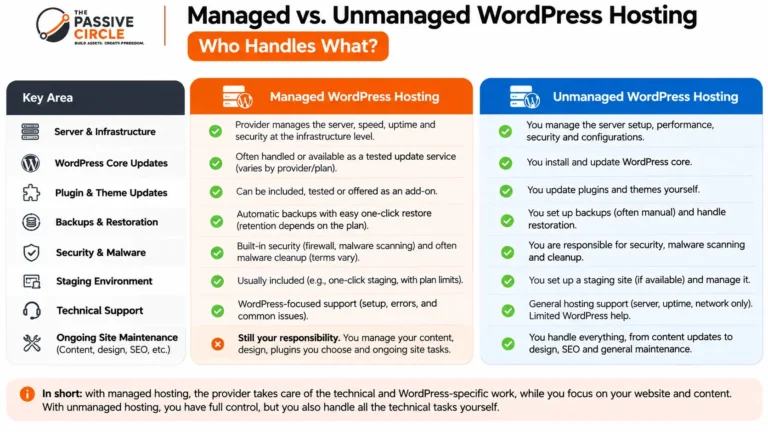
The difference is who does the server administration. On a managed VPS, the provider handles many routine tasks. On an unmanaged VPS, you handle them yourself. Hosting.com’s documentation explains that an unmanaged VPS gives you full root access and makes you responsible for configuring, securing, maintaining, and troubleshooting the server. Support on an unmanaged plan generally covers the underlying infrastructure, not your software.
| Task | Often included in managed plans | Unmanaged VPS (typical) |
|---|---|---|
| Operating system installation and updates | Often provider-handled, depending on scope | You |
| Security patches | Often provider-handled, depending on scope | You |
| Firewall and security settings | Varies by provider | You |
| Server monitoring | Often included, confirm scope | You |
| Backups | Sometimes included, depends on the plan | You |
| Troubleshooting your software | Varies by provider | You |
| Root access | Varies by provider | Usually full |
| Typical price | Higher, because services are included | Lower |
The word “managed” is not standardized. One provider may handle only operating system updates. Another may also monitor the server and help with performance. Hosting.com’s documentation, for example, lists managed plans without root access, and other providers may differ. Ask for the written scope of support before you buy.
An unmanaged VPS usually requires more technical knowledge and direct administration. For a beginner who does not want to administer a server, it is usually a poor fit. Missed updates and misconfigured firewalls are real risks, and nobody else will fix them for you.
What to Check Before Buying a VPS
Before buying, check what resources you actually get, who manages the server, how backups and restores work, and what the plan costs after renewal.
- CPU and memory allocation: how many virtual cores and how much RAM, and whether they are reserved or burstable.
- Storage type and capacity: the type of drive and whether you can add more later.
- Backups and restore process: how often backups run, where they are stored, and whether you can restore them yourself.
- Server location and network: where the data center is, relative to your visitors. If most of your visitors are in Bangladesh, a local provider such as ExonHost is worth checking for local plans and support.
- Operating system and control panel: which options are available, and whether a panel adds a license fee.
- Managed support scope: exactly what the provider will and will not fix.
- Renewal pricing and extra fees: the first-term price is rarely the long-term price. Our web hosting cost guide explains how to compare total cost.
- Migration requirements: who moves your site, how long it takes, and what happens to email and DNS.
- Security and maintenance responsibilities: who applies patches, and how often.
- Upgrade path: whether you can add resources later without rebuilding the server.
Specifications do not guarantee performance. Two plans with the same numbers can behave differently because of processor generation, storage speed, network quality, and how crowded the host machine is. Check the refund terms so you can measure your own site on the new server before you commit long term.
A Simple Decision Checklist
Use these three outcomes to answer one question for your own site: when do you need VPS hosting, and when should you wait?
Stay on shared hosting
The current plan meets the site’s needs, and no confirmed limitation requires VPS capabilities.
Next step: Confirm the plan meets the site’s requirements. Check plan limits and keep routine backups.
Investigate the bottleneck
You see resource warnings or slowdowns, but the cause is unclear.
Next step: Record resource warnings, error times, and affected pages. Check relevant logs or ask your hosting provider or developer for help.
Consider VPS hosting
A verified limit, workload, or configuration requirement justifies the extra cost and responsibility.
Next step: Compare required resources, management responsibilities, migration requirements, and total cost before upgrading.
Frequently Asked Questions
When do you need VPS hosting?
When a specific limit or requirement cannot be met by your current plan. Examples include repeated resource-limit errors that remain after optimization, or software that needs server-level control. If the cause is unclear, investigate first.
Is VPS hosting faster than shared hosting?
Not necessarily. VPS hosting may improve performance when your current hosting plan is the bottleneck and the VPS provides suitable resources. It will not automatically fix slow code, database problems, or poor caching.
Is VPS hosting suitable for beginners?
It can be, especially with a managed VPS plan that includes the support you need. An unmanaged VPS usually requires knowledge of server setup, updates, security, and troubleshooting. Check exactly what the provider manages before buying.
Can a small WordPress website use VPS hosting?
Yes, technically. Whether it should depends on the reason. A small site with no limit problems usually gains little from a VPS and takes on extra cost and responsibility.
Does VPS hosting require technical knowledge?
It depends on the plan. Unmanaged plans require comfort with server administration. Managed plans reduce that work, but the amount they remove varies by provider.
Is managed VPS hosting worth the extra cost?
It can be, if you need a VPS but cannot or do not want to maintain a server. Compare what the managed plan actually includes against the price difference, and against the value of your own time.
The Bottom Line
So, when do you need VPS hosting? Only when a verified limit or requirement cannot be met by your current plan. Do not upgrade because a VPS sounds more powerful. If you are unsure which of the three outcomes fits your site, the hosting selection guide is a good place to reset your thinking.
If you have confirmed that you need more resources or server control, compare Hostinger’s VPS plans against your checklist before you commit.
Sources and checks: The provider pages cited here were opened and read on 17 October 2026. Provider-specific limits and policies can change, so confirm current terms on the provider’s own site. Sources: Google Cloud, Hostinger Support (limits reached), Hostinger Support (plan parameters), Hosting.com Knowledge Base, IONOS Digital Guide.