When I started blogging a few months in, I made myself a promise: do not spend money on tools I do not know how to use yet. I work full-time in accounts operations and was building The Passive Circle during evenings and weekends after office hours. Every bad spending decision came directly out of my personal income. That one promise probably saved me from wasting a few hundred dollars in the first year. It also forced me to actually learn the craft before automating it.
This is the complete set of free blogging tools for beginners I used to build The Passive Circle from zero. Not a list of every tool that exists. The specific tools I opened every single week, why I kept them, and honestly, what I wish I had skipped.
If you are working a regular job and trying to build something on the side, or just starting your first affiliate blog with a limited budget, this guide is written for exactly that situation. Because that is exactly the situation I was in.

You need fewer tools than you think. These 7 are enough to launch and grow.
- Claude and ChatGPT together are more powerful than either one alone
- Grammarly, Canva, and Ubersuggest cover writing, design, and SEO for free
- Systeme.io is the only email and funnel tool a beginner needs from day one
- The biggest mistake is adding tools before building a publishing habit
The Free Blogging Tools for Beginners I Use in 2026
Here is exactly what I use to run The Passive Circle. Every tool in this list has a specific job. Nothing is on here because a YouTube review said it was good. These are the tools I open every week.
| Job | Tool | Free? | How I Use It |
|---|---|---|---|
| Strategy + Planning | Claude AI | Free tier | Content planning, audits, SEO strategy |
| Drafting | ChatGPT | Free tier | First drafts, outlines, rewriting sections |
| Editing | Grammarly | Free tier | Grammar, readability, tone checks |
| Graphics | Canva | Free tier | Blog banners, Pinterest pins, featured images |
| Keyword Research | Ubersuggest | Free tier | Search volume, keyword difficulty, content gaps |
| Email + Funnels | Systeme.io | Free up to 2,000 | Email list, opt-in pages, welcome sequences |
| Hosting | Hostinger | From $2.99/mo | Fast, beginner-friendly WordPress hosting |
| SEO Plugin | RankMath | Free tier | On-page SEO, schema, focus keyword tracking |
| Analytics | Google Analytics + Search Console | Free | Traffic tracking, keyword rankings |
That is the full toolkit. Nine tools. Not fifteen, not thirty. If you are overwhelmed already, start with just four: ChatGPT for drafting, Grammarly for editing, Canva for graphics, and Ubersuggest for keyword research. Add the rest as you actually need them.
One thing worth noting: this exact same toolkit is what I use for my second project, KorSheba.com, a Bangladesh tax education site I am building alongside The Passive Circle. The same nine tools, the same workflow, a completely different niche. If you worry that this toolkit only works for affiliate blogs, it does not. It works for any content site a solo creator is building from scratch.
For a deeper look at how these tools connect into a publishing system, read my article on the AI workflow I actually use to build my affiliate blog.
Writing Tools: What I Use to Draft Every Post
Writing is the core of everything. The good news is that the free options here are genuinely excellent. I have not found a paid writing tool that justifies the cost at the beginner stage.
Google Docs
I draft everything in Google Docs first. It is free, saves automatically, works on any device, and makes it easy to share drafts for feedback. The voice typing feature is underrated if you think faster than you type. Once the draft is ready, I paste it into my HTML system before WordPress. No special formatting needed.
Grammarly
As someone writing in a second language, Grammarly has been one of the most important tools in my stack. I write directly inside Grammarly so corrections appear live. It catches grammar errors, awkward phrasing, and overly long sentences. I once published a post I thought was perfect and found three grammatical issues an hour later. That does not happen anymore. The free version covers everything a beginner needs. I have never upgraded to Grammarly Pro.
Hemingway Editor
Hemingway does one thing: it shows you where your writing is too complicated. It highlights long sentences, passive voice, and adverbs. My target is a Grade 6 to 7 reading level. Blogging for beginners means writing like you are talking to a friend, not writing an essay. Paste your draft into Hemingway before publishing. It takes two minutes and makes a real difference.
Claude AI for Bloggers: Why I Added It to My Toolkit
I started blogging with ChatGPT as my only AI tool. It worked well enough for a long time. What pushed me toward adding Claude was a specific problem: my ChatGPT drafts were readable, but they had no real point of view. Every article sounded like a polished summary of what everyone else had already written. Correct. Generic. Forgettable.
Claude solved a different problem than ChatGPT does. Not drafting. Thinking.
When I gave Claude my published content list and asked where I had gaps in my strategy, it identified that I had built dozens of SEO tutorial posts with almost nothing connecting them to actual affiliate income outcomes. That single observation changed my entire content plan. Four new articles and two major rewrites came directly from that one conversation. No keyword tool surfaced that problem. Claude did.
I now use Claude for content planning, article auditing, SEO strategy decisions, and building the HTML design system this blog runs on. I use ChatGPT for writing first drafts quickly. The two tools serve different jobs and I would not replace either one with the other. I use the same combination for KorSheba, where Claude helped me plan an entirely different content architecture around Bangladesh tax topics from scratch.
Claude vs ChatGPT for Beginner Bloggers
| Task | Claude | ChatGPT | Better for |
|---|---|---|---|
| Writing a first draft fast | Good, slower | Fast, flexible | ChatGPT |
| Content strategy and planning | Strong, connects ideas | Surface-level | Claude |
| Auditing an existing article | Detailed, honest | Often too agreeable | Claude |
| Pushing back on weak ideas | Yes, regularly | Rarely | Claude |
| Brainstorming topic angles | Strong | Strong | Both work |
| Building HTML and code | Excellent | Good | Claude |
| Free plan generosity | More restricted | More generous | ChatGPT |
| Natural, beginner-friendly tone | More natural | Can sound corporate | Claude |
- Thinks through strategy, not just content
- Pushes back when my idea is weak
- Excellent for auditing existing articles
- Builds HTML and design systems cleanly
- Connects SEO data to real decisions
- Free tier is more restricted than ChatGPT
- Slower for quick first drafts
- No image generation
- May not know newest tool pricing
Design Tools: Canva and Free Stock Photos
Early on I made a mistake that embarrassed me later. I grabbed images from Google search results without checking copyright. I did not know that most images online are protected. Once I discovered Unsplash and Pexels, I never went back to Google image search for blog photos. Both sites provide professional-quality photos that are free to use commercially.
Canva
Canva is the design tool I recommend to every beginner without hesitation. I use it for every image on this blog: hero banners at 1200x600px, Pinterest pins, CTA banners, and social media graphics. The free version has enough templates to cover everything a new blogger needs. My one tip is to pick two or three brand colors early and stick to them in every design. Consistency makes a blog look more professional than any premium template.
I create all four article images in Canva before I start writing. Having the visuals ready before drafting actually makes the writing faster because the article has a visual identity before a single word is typed.
Free SEO Tools for Bloggers: What Actually Moves the Needle
When I first heard the word “SEO” I thought it was something only technical people could understand. It is not. At the beginner level, SEO comes down to one question: is anyone actually searching for what I am about to write? These free tools help you answer that before you spend five hours on a post.
Ubersuggest
Ubersuggest was the first SEO tool that made keyword research click for me. I typed in “affiliate marketing for beginners” and saw exactly how many people searched for it monthly and how hard it would be to rank. That number, keyword difficulty, became the filter I use for every post idea. If the difficulty is too high for my current domain authority, I find a longer-tail version of the keyword first.
The free plan limits daily searches, which is enough when you are planning one or two posts per week. Once your blog starts earning, the paid plan is worth considering. Read my guide on how to do keyword research for free for the full process I follow.
LowFruits
LowFruits is the tool I wish I had found earlier. It is specifically designed to find low-competition keywords that bigger authority sites are not targeting. For a new blog with low domain authority, this is the practical path to first-page rankings. I use it alongside Ubersuggest: Ubersuggest to understand the landscape, LowFruits to find the specific gaps I can actually win. Read my full LowFruits review to see how I use it in practice.
Try LowFruits and find low-competition keywords →SE Ranking
Once you are publishing regularly and want a fuller picture of your rankings and competitor traffic, SE Ranking is the tool I moved to before premium options like Ahrefs. It has a generous trial and affordable plans. I cover the full comparison in my SE Ranking review. It is not a day-one tool. Add it when keyword research becomes a weekly habit, not an occasional task.
Google Search Console
Search Console is free and shows you exactly which keywords are bringing people to your site, how often your pages appear in search results, and any technical issues Google finds. I set it up on day one and check it every week. Even before your traffic grows, the data it gives you shapes what to write next. It is the most honest feedback loop a new blogger has.
Free WordPress Tools Every Beginner Blogger Needs
Moving from a free blogging platform to WordPress.org on real hosting was the decision that made everything feel serious. Blogger and WordPress.com are fine for testing. For an affiliate blog you want to grow and monetize, self-hosted WordPress is the only real option.
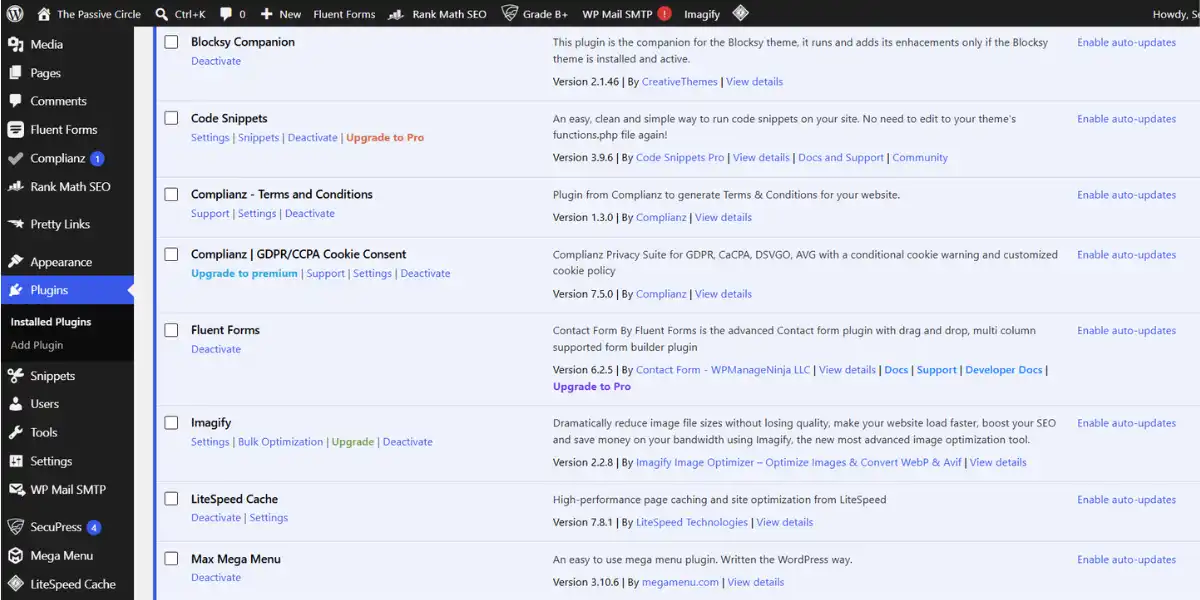
Here is what I have installed and why. For the full technical setup walkthrough, my WordPress setup guide for beginners covers every step.
Hostinger (Hosting)
Hosting is not free, but it is the one essential cost you cannot avoid. My first host was ExonHost, a Bangladesh-based provider I chose because it was affordable and local payment was straightforward. At the start it worked well. As The Passive Circle grew and my content library expanded, I started hitting storage constraints and resource limitations that made me think about the next step.
I migrated to Hostinger Business Hosting after researching alternatives. The migration took planning and the backup work I had done with WPvivid made it much less stressful than it could have been. The practical lesson I took from that experience: hosting is only cheap until your site grows. Choosing something scalable from the beginning saves you the hassle of migrating later when you have more content to protect.
Hostinger costs from $2.99 per month on the basic plan and setup is genuinely beginner-friendly even without a technical background. Read my full Hostinger review for the real setup experience including the DNS mistakes that cost me three days, and my Hostinger vs ExonHost comparison if you are based in Bangladesh and deciding between the two. If budget is the main concern, I also have a guide on cheap web hosting in Bangladesh that covers your options honestly.
Blocksy Theme
I tried several free themes before landing on Blocksy. Most felt limiting in ways I only noticed after a few weeks. Blocksy is lightweight, fast, and customizable without needing to touch code. The free version includes a header and footer builder, global color and font controls, and starter site templates. It is the theme this blog runs on and I have no plans to change it.
RankMath SEO (Free)
I started with Yoast because everyone recommended it. I switched to RankMath after two weeks and have not looked back. The free version of RankMath gives you multi-keyword focus tracking, schema markup, readability scores, and an SEO checklist for every post. It holds your hand through optimization without requiring you to understand everything at once. For a beginner, this is the right SEO plugin.
Essential Free WordPress Plugins
Shortens messy affiliate URLs into clean branded links like yoursite.com/go/tool. Builds reader trust and makes link management much easier when you have multiple affiliate relationships.
Free backups that run automatically. When I migrated The Passive Circle from ExonHost to Hostinger, having clean WPvivid backups turned a potentially stressful process into a manageable one. Install this before you publish anything.
Shows who is visiting, which pages they read, how long they stay, and where they came from. Even when numbers are small, watching real visitors arrive from different countries was the motivation I needed to keep publishing in the early months.
If you are on Hostinger, LiteSpeed Cache is available and free. It significantly improves page load speed, which affects both user experience and Google rankings. Install it before you start publishing.
Email Marketing: The Tool I Should Have Started Earlier
I made a mistake many new bloggers make. I told myself I would set up email marketing “once I had more traffic.” That thinking cost me months of list building I cannot get back. Here is what I know now: the best time to start your email list is before you think you need one. The second best time is today.
Social media algorithms change. Search rankings shift. Your email list is the only audience asset you actually own. One subscriber who reads every email is worth more than a hundred visitors who bounce and never return.
Systeme.io
Systeme.io is the email and funnel tool I use and the one I recommend to every beginner. The free plan covers up to 2,000 contacts, includes landing pages, email automation, and sales funnels — everything you need to run an email list without paying anything until you have real traction.
What I like most is that it replaces several tools at once. Instead of a separate email provider, funnel builder, and landing page tool, Systeme.io handles all three. For someone building a blog in the hours between a full-time job and sleep, that simplicity is not a convenience. It is a necessity. I use it for The Passive Circle and plan to connect KorSheba to it as well. Read my full Systeme.io review to see exactly how I have it set up.
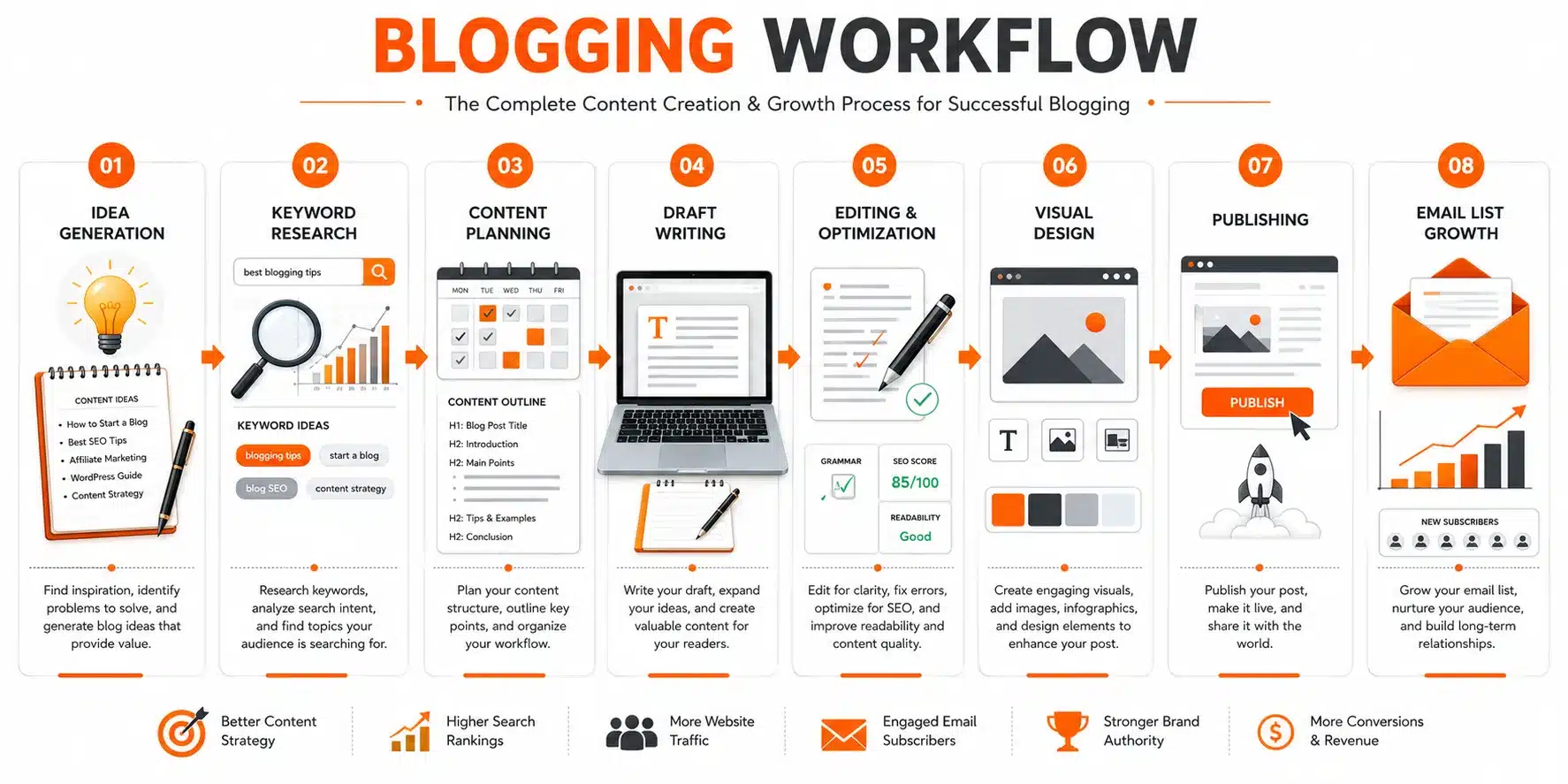
My Complete Blogging Workflow: How All the Tools Connect
Tools without a workflow are just more apps to switch between. Here is the exact sequence I follow from idea to published post. This is what turned a scattered process that took eight hours per article into something I can complete in three to five hours.
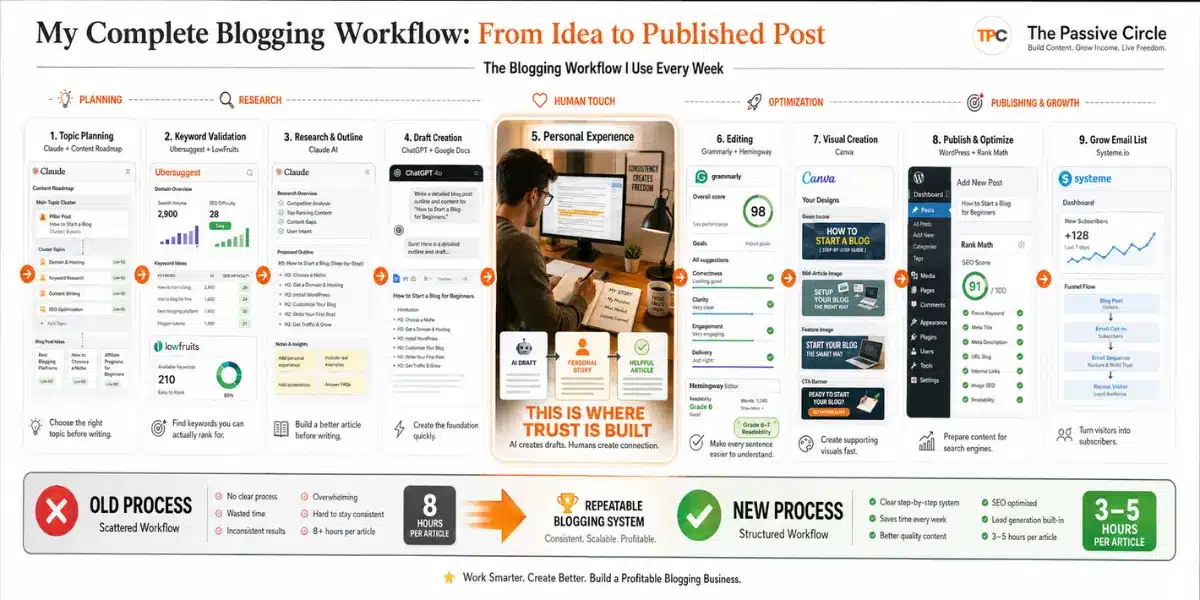
Find the topic (Claude + content roadmap)
I work from a planned content roadmap I built with Claude’s help. Every post fills a specific gap, targets a specific keyword, or supports an existing article. I do not chase random ideas. Choosing what to write before you write anything is the step most beginners skip and the one that matters most.
Validate the keyword (Ubersuggest + LowFruits)
Before writing a word, I check search volume and keyword difficulty in Ubersuggest. If the keyword is too competitive for my current domain authority, I use LowFruits to find a lower-competition version I can actually rank for. This one habit has saved me from writing posts that would never get traffic regardless of quality.
Plan and research (Claude)
I tell Claude the topic, target keyword, my audience, and what I already have on the site. I ask what the article needs to cover to be better than what is already ranking. Claude identifies angles and gaps. I add personal experience the tool could not know about. The plan takes 20 to 30 minutes and makes everything else faster.
Write the first draft (ChatGPT + Google Docs)
I paste the outline into ChatGPT with clear tone instructions: warm, beginner-friendly, short sentences, no corporate language. The draft goes into Google Docs. It is never published as-is. Think of it as useful raw material that still needs to become real writing with a real voice.
Rewrite in my own voice
This is the step that separates a blog that builds trust from one that blends in. I read every paragraph and rewrite anything that does not sound like something I would say in a real conversation. I add specific details from my own experience, honest mistakes, and moments where I was confused before things clicked. This is the part AI cannot do for you.
Edit and simplify (Grammarly + Hemingway)
Grammarly catches grammar and punctuation errors. Hemingway highlights sentences that are too long or too complex. I aim for Grade 6 to 7 reading level across all articles. If a sentence needs three readings to understand, I cut it in half.
Create images (Canva)
Four images per article: hero banner at 1200x600px, mid-article at 800x450px, feature image at 600x400px, CTA banner at 1200x400px. Canva templates keep this to about 20 minutes. I save as .webp for speed. All images get descriptive alt text that includes the focus keyword naturally.
Publish on WordPress (Hostinger + RankMath)
Paste into a Custom HTML block, set the slug, write the meta description in RankMath, set the focus keyword, and write the excerpt manually. The excerpt setting in the WordPress sidebar matters: without it, WordPress shows raw HTML code in your blog listing pages.
Capture leads (Systeme.io)
Every post that generates genuine reader interest links to an opt-in that connects to my Systeme.io email sequence. Building the list from the first post is the advice I most wish I had followed from day one. A reader who subscribes is a reader you can reach again. One who leaves is traffic you may never recover.
What I Would Skip If I Started Blogging Again
This is the section I wish someone had written for me before I started. Every item below is a tool or habit I either wasted time on or wish I had avoided in my first six months.
⚠️ Trello, Notion, and productivity apps
I spent two weeks setting up a Notion workspace before writing a single post. Organizing your tools is not the same as using them. A simple Google Doc with a list of post ideas is all you need in the first three months. Productivity tools can wait until you have a publishing habit to organize.
⚠️ Elementor and page builder plugins
I installed Elementor because I saw it in every “best WordPress plugins” list. I used it for about a week before realizing I did not need a custom page builder for a blog. Blocksy and the default WordPress editor are enough. Elementor adds load time and complexity without meaningful benefit at the beginner stage.
⚠️ Too many SEO plugins at once
I had RankMath, Yoast, and a third SEO tool installed simultaneously at one point. They conflict with each other and slow the site down. Pick one SEO plugin and use it properly. RankMath free is the right choice for beginners.
⚠️ AI image generators in the first year
I spent time testing AI image generators trying to create unique blog graphics. Canva is faster, more consistent, and produces images that match my brand colors. AI-generated images are a nice-to-have. Canva templates are a reliable system.
⚠️ Copying AI drafts without editing
This is not a tool, but it is the most expensive mistake I made. My first ten articles were heavily AI-generated with minimal editing. They sounded like every other AI article. No personality, no specific experience, no real reason for a reader to trust them over the thousands of similar posts already ranking.
⚠️ Waiting to start an email list
I told myself I would set up email once my traffic was “worth it.” That thinking delayed my list building by three months. Systeme.io is free for up to 2,000 contacts. There is no good reason to wait. The right time is your first published post.
The Biggest Blogging Tool Mistake I Made
I added tools before I had a publishing habit.
In my first two months of blogging, I spent more time researching tools than writing posts. I was working full-time and had maybe two hours on a weekday evening to spend on The Passive Circle. A significant portion of that time went into setting up a colour-coded Notion workspace, testing three SEO plugins simultaneously, and signing up for two email marketing tools I never actually configured. My publish count at the end of those two months: four posts.
For someone with limited evening hours, that ratio is a disaster. Two months of focused evenings for four published posts. The problem was not effort. The problem was that I confused tool setup with progress. They are not the same thing.
The blogger who publishes ten posts with just Google Docs, Grammarly, and Canva will outrank the blogger who spends two months building the perfect tool setup with nothing published. Search engines rank content, not tool configurations.
The rule I now follow: do not add a new tool until you have felt the specific problem it solves. If you have never run out of Ubersuggest searches, you do not need to upgrade. If your email list does not exist yet, you do not need advanced segmentation features. Add tools when actual problems appear, not as a preventive measure against problems you imagine might appear.
When to Upgrade from Free Tools
Free tools are not a compromise. They are where every successful blogger I know started. But there does come a point where upgrading one specific tool makes your work meaningfully easier or opens a door that was previously closed.
Upgrade when you are:
- Publishing at least twice a month consistently
- Hitting Ubersuggest’s daily search limit regularly
- Building an email list past 1,500 contacts
- Earning enough from the blog to cover the tool cost
- Spending more time on workarounds than on writing
Do not upgrade yet if you are:
- Still publishing your first ten posts
- Not yet hitting free tier limits
- Buying tools to feel more productive
- Not earning anything from the blog yet
- Confused about which problem the upgrade solves
My personal upgrade order: SEO tool first (better keyword data brings more readers), then email marketing (when my list approaches 2,000 contacts on Systeme.io’s free plan), then hosting when the site outgrows the basic plan. My own experience migrating from ExonHost to Hostinger Business Hosting taught me that waiting too long on hosting has a real cost in time and stress. You can read the Hostinger pricing breakdown to understand what each plan includes before you decide where to start. Everything else upgrades only when I feel a specific limitation blocking my growth.
Ready to build your blogging toolkit?
Start with the tools that cost nothing. Systeme.io gives you email marketing, landing pages, and funnels free for up to 2,000 contacts. No credit card required to get started.
Start free with Systeme.io →Frequently Asked Questions
What are the best free blogging tools for beginners in 2026?
The core free toolkit is: ChatGPT for drafting, Grammarly for editing, Canva for graphics, Ubersuggest for keyword research, RankMath for on-page SEO, Google Analytics and Search Console for tracking, and Systeme.io for email marketing. These seven tools cover every essential job a beginner blogger needs without spending anything except on hosting.
Do I need to pay for tools to start a blog?
The only non-negotiable cost is hosting. Everything else in the list above has a free tier that is genuinely sufficient for a new blogger. I started on ExonHost which is affordable and works well for Bangladesh-based bloggers starting out. I later migrated to Hostinger Business Hosting as The Passive Circle grew. Hostinger starts from $2.99 per month. All writing, design, SEO, and email tools can stay free until your blog generates enough income to justify upgrading.
When should I switch hosting providers?
When you start hitting storage limits, resource constraints, or your site speed is affecting your Google rankings. I migrated The Passive Circle from ExonHost to Hostinger Business Hosting as my content library grew. The migration itself was manageable because I had WPvivid backups ready. The lesson: choose hosting that can scale with you, and keep daily backups running from day one so any migration is planned rather than forced. My Hostinger vs ExonHost comparison covers what drove that decision in detail.
Is Claude better than ChatGPT for blogging?
They are better at different things. Claude is stronger for content strategy, auditing existing articles, and thinking through problems. ChatGPT is faster for writing first drafts. The best approach is to use both: Claude to plan and think, ChatGPT to draft quickly. Neither should be published without editing in your own voice.
What is the best free WordPress theme for new bloggers?
Blocksy is my recommendation. It is lightweight, fast, customizable without coding, and works well for affiliate blogs. The free version includes a header and footer builder, global styling controls, and starter templates. It is the theme this site runs on.
When should I start building an email list?
From your first published post. This is the advice I ignored and regret. Systeme.io is free for up to 2,000 contacts so there is no cost barrier. A reader who joins your email list is someone you can reach directly every time you publish. A reader who leaves your site without subscribing may never return regardless of how good the content was.
Can I use AI tools like ChatGPT for blog posts?
Yes, but not without editing. AI drafts are a useful starting point. They are not finished articles. The editing step — where you add your personal experience, rewrite in your own voice, and cut anything generic — is what separates content that builds trust from content that blends in. Google rewards content that demonstrates real experience. AI alone cannot produce that.
What free SEO tools should beginner bloggers use?
Start with Ubersuggest for keyword research and Google Search Console for tracking what your blog already ranks for. Add LowFruits when you want to systematically find low-competition keywords that bigger sites are ignoring. That combination covers keyword research, ranking tracking, and gap analysis without spending anything.
How many tools do I actually need to start a blog?
Four tools cover the basics: one for writing (ChatGPT or Google Docs), one for editing (Grammarly), one for design (Canva), and one for keywords (Ubersuggest). Add hosting and a WordPress SEO plugin and you have everything needed to publish your first posts. Every other tool can wait until you feel a specific problem that tool solves.
What is the best free email marketing tool for bloggers?
Systeme.io. The free plan includes up to 2,000 contacts, email automation, landing pages, and sales funnels. It replaces several tools a beginner would otherwise need to manage separately. MailerLite is a solid alternative if you prefer a simpler email-only interface.
When should I upgrade from free blogging tools?
Upgrade when you are consistently hitting the limits of the free tier, publishing at least twice a month, and earning enough from the blog to cover the tool cost. My upgrade priority: SEO tool first because better keyword data drives more traffic, then email marketing when my list approaches 2,000 contacts, then hosting if I need more speed or storage.
I am Selim Reza Sumon. I work full-time in accounts operations and build websites in my spare time. The Passive Circle is my affiliate marketing blog. KorSheba is my Bangladesh tax education project. Both run on the same toolkit described in this article. Neither required expensive software to get started.
If you are just getting started, the beginner affiliate marketing guide walks through the full process of turning a blog into an income source in seven steps. If you have the tools set up but want a complete publishing workflow, read how I use the AI workflow I actually use to build this blog. Either way, start publishing. The tools are ready. The only thing left is the first post.