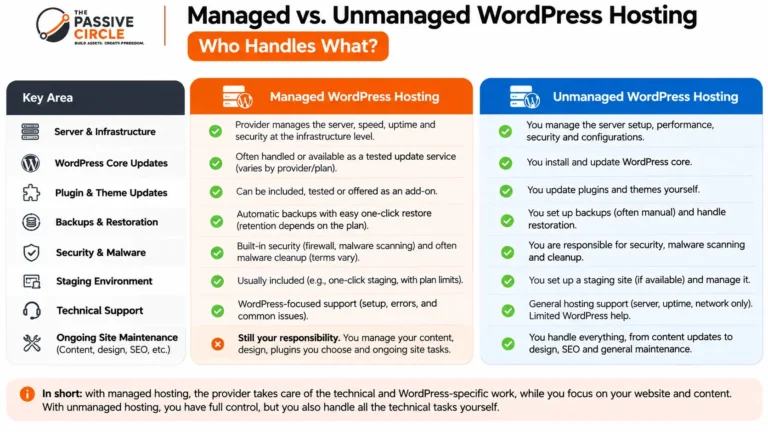
Your store runs a weekend promotion. Traffic climbs, pages start timing out, and someone in a forum tells you to “just move to cloud hosting.” It sounds sensible. Cloud hosting is marketed as scalable, reliable and flexible, but those words do not tell you whether you need it.
Cloud hosting is designed to solve capacity, scaling and resilience problems by running a website on virtualized resources that can be resized, added or replaced. It helps only when your problem is one of those, and only when the product you buy actually includes the features you are counting on. If you cannot name the constraint yet, you are not ready to choose the infrastructure.
That is the rule this guide follows: identify the constraint before choosing the infrastructure. If you are still working out the basics, start with how to choose the right hosting plan, then come back here.
What Is Cloud Hosting, in Plain English?
Cloud hosting means running a website or application on virtualized computing resources that you rent on demand from a cloud provider. Instead of relying on one physical machine, the provider uses virtualization to divide hardware into isolated virtual machines (VMs) and hands you the capacity you ask for.
The catch is that “cloud hosting” is a label, not a single product. AWS describes it as covering several models: a single fixed-capacity virtual server, a network of servers across locations, or a serverless service that the provider manages and scales for you. Those are very different things to own and operate.
- A single cloud VM: one virtual server in a provider’s data center. It can be resized, but it is still one server.
- A distributed setup: several servers behind a load balancer (a system that spreads visitors across servers), usually with shared storage and a shared database.
- A managed cloud hosting product: a host builds and maintains one of the above for you, and its features depend on the plan.
Do not assume that anything marketed as cloud hosting includes multiple servers, automatic scaling, load balancing or failover. Check the plan.
A single cloud VM can behave much like a VPS, and AWS itself notes that VPS-style hosting can run as cloud hosting. The two categories overlap, so they are not strict opposites.
What Problems Is Cloud Hosting Designed to Solve?
Cloud hosting is designed to address five problems: hard resource limits, changing demand, single points of failure, weak recovery planning and rigid spending. Lists of cloud hosting benefits and advantages often read as if these arrive automatically. They do not, because each depends on the product and how it is set up. For each problem, ask a second question: is this actually what is hurting my site?
Hardware Bottlenecks and Resource Limits
Every website runs on four basic resources: CPU (processing power), RAM (working memory), storage and network capacity. When a site hits a limit on one of them, pages slow down or fail. Cloud providers let you choose a larger virtual machine instead of waiting for hardware to be swapped.
But a resource limit is not the same as a slow site. Heavy plugins, uncached pages, inefficient database queries and slow third-party scripts can all make a site feel like it is out of capacity. Check your host’s resource graphs first. If CPU or memory sits near the limit during normal traffic, you have a capacity problem. If usage is low and the site is still slow, a bigger server will not fix it.
Resizing is also not always seamless. Google Cloud’s guidance on cloud scalability says that vertical scaling, which means giving one server more CPU or RAM, may cause a brief service interruption during the change.
Takeaway: a bigger server only helps if a resource limit is the real problem, so measure before you resize.
Traffic Spikes and Changing Demand
There are two ways to add capacity. Vertical scaling makes one server bigger. Horizontal scaling adds more servers and spreads visitors across them. Google Cloud describes both in its scalability overview, and notes that horizontal scaling is more complex because you manage several servers and a load balancer.
Whether capacity changes automatically depends on the product and how it is set up. In AWS, for example, EC2 Auto Scaling works within a minimum and maximum number of instances that you define, and adds or removes instances only if you have created scaling policies. That is one provider’s service, not a promise from every cloud host.
The application matters too. A site can only run on several servers if its files, database and sessions are designed to be shared between them. Many standard WordPress installations are not set up that way by default, so adding servers is not a one-click fix.
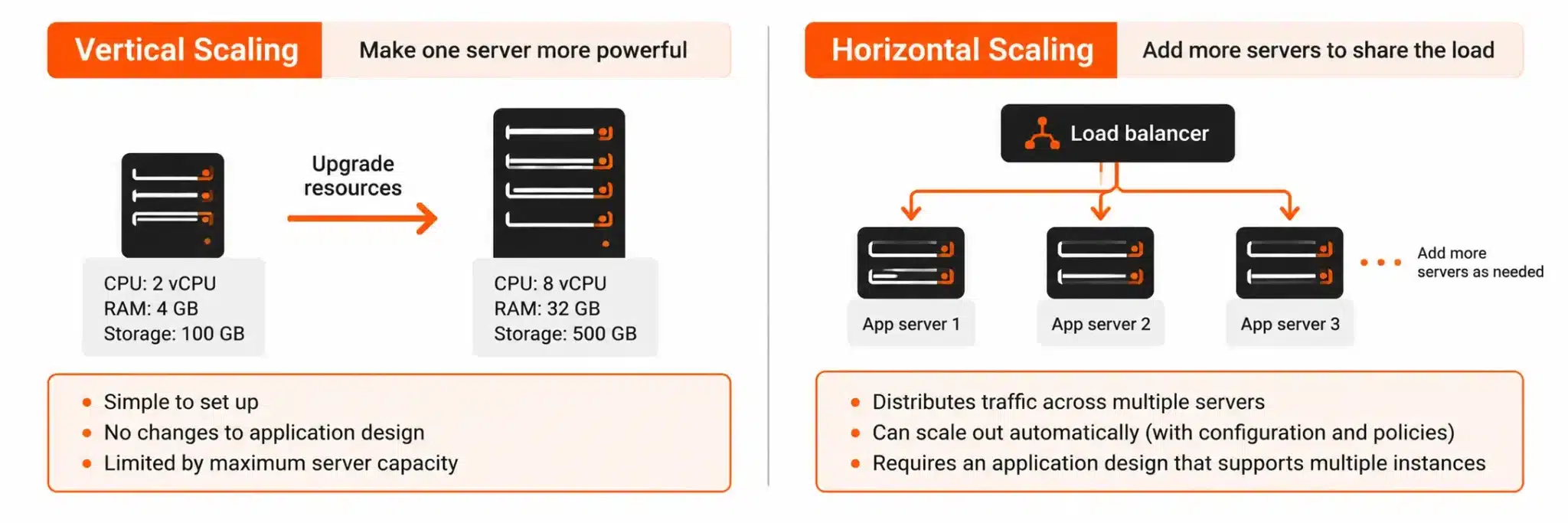
Takeaway: scaling is a design and configuration choice, not something the word “cloud” provides by itself.
Single Points of Failure and Availability
A single point of failure is one component that, if it breaks, takes the whole site down. A site on one server has one. Redundancy means having a second component ready to take over, and a failure domain is the part of the system that can fail together, such as one machine or one data center.
Google Cloud’s scalability guide notes that a single vertically scaled machine remains a single point of failure. A single cloud VM can fail just like any other server. Real resilience comes from design: AWS Auto Scaling, for instance, can spread instances across several Availability Zones and replace unhealthy ones, but only if you configure the group that way.
Google’s infrastructure reliability guide lists what an application’s reliability depends on: its own design, the components it relies on, the infrastructure, the capacity provisioned and how it scales, and the operational processes around it. The data center is only one item on that list.
Backups and Disaster Recovery
These four ideas are often mixed up, so keep them separate:
- Backup: a separate copy of your data that you can restore from.
- Redundancy: duplicate components, so one failure does not stop the site.
- High availability: a design intended to keep the site serving through failures.
- Disaster recovery: a plan for restoring service after a serious outage or data loss.
If a plugin corrupts your database or someone deletes your content, redundant systems may faithfully copy the damage.
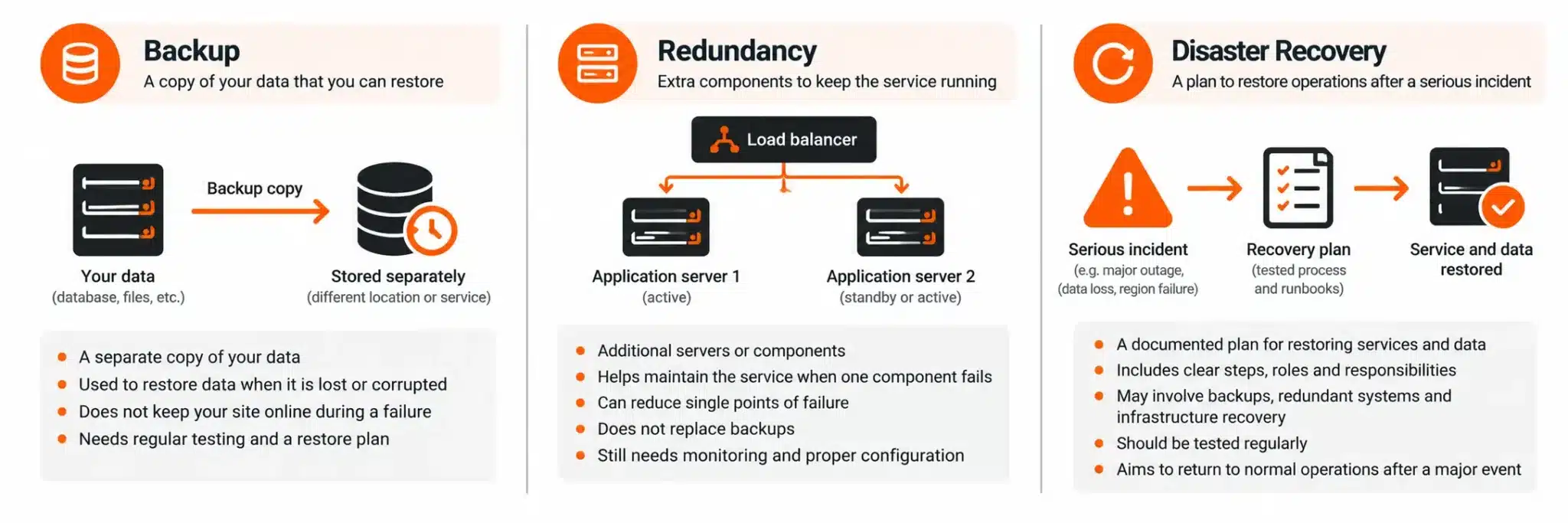
Google’s reliability guide notes that disaster recovery planning is related to reliability and points to a separate planning guide for it. Do not assume a cloud hosting plan includes a complete recovery setup. Ask what is backed up, how often, where the copies live and how you restore them.
Infrastructure Flexibility and Spending
Cloud services usually let you choose resources and billing models more flexibly than a fixed hosting plan. You can often pay for what you use rather than a flat monthly fee. That flexibility is useful when demand changes, and less useful when your needs are stable.
The bill can include compute, storage, backups, data transfer, load balancing and extra services. AWS states that EC2 Auto Scaling has no additional fee, but you pay for the resources it uses, such as instances, storage volumes and monitoring alarms.
For a small steady site, a fixed-price plan can be cheaper and easier to predict. For a rough sense of typical prices, see how much web hosting costs.
Does Cloud Hosting Automatically Make a Website Faster?
No. Cloud hosting is not inherently faster than shared hosting or a VPS. Speed depends on several things working together:
- Application code, theme and plugins
- Caching, so pages are not rebuilt for every visit
- Database behavior and query efficiency
- Available CPU and memory
- Network distance between the server and your visitors
- Server and software configuration
Changing infrastructure can help when
- CPU or memory is exhausted at peak times
- You can place servers closer to your audience
- Extra capacity is configured to follow demand
It does little when
- Images are unoptimized
- Pages are not cached
- Slow external scripts hold pages back
Those problems follow you to any host. For the on-site side of the problem, see page speed and SEO.
Is Cloud Hosting Better Than Shared Hosting or VPS Hosting?
Not as a rule. These categories describe different things, and they overlap. A VPS may run on cloud infrastructure, and a well-run shared plan can serve a small, stable site perfectly well. The better question is which option fits your constraint.
Scroll sideways if the table does not fit your screen.
| Hosting option | Suitable situation | Main advantage | Important limitation | What to check before choosing |
|---|---|---|---|---|
| Shared hosting | Small or new site, steady traffic | Low cost, simple to manage | Shared resources, host-set limits | Resource limits, fair-use terms, upgrade path |
| VPS hosting | Has outgrown shared limits | Allocated resources, more control | Fixed capacity, more management | CPU and RAM, managed or not, backups |
| Single cloud VM | Wants easy resizing or a chosen location | Flexible size and billing | Still one server, a single point of failure | Resize downtime, backups, full cost |
| Cloud architecture with scaling and redundancy | Variable load or a need for designed availability | Capacity and failure handling designed in | More setup and cost; the application must support it | Is scaling automatic? Failover design, skills, total cost |
When Is Cloud Hosting Worth Considering?
Cloud infrastructure is worth considering when demand varies sharply or grows quickly, when your application can run on several servers, or when you need availability that one server cannot provide. Traffic volume alone does not decide this: a steady site with many visitors can run well on a properly sized plan, while a smaller site with sharp, unpredictable spikes may need more flexibility. The situations below are illustrative, not tests of any specific provider.
An online store with promotion spikes. Imagine a shop that is quiet most weeks and busy for a few days when it runs a sale. If checkout slows or fails at peak and resource graphs show the server maxed out, flexible capacity could help. A planned vertical upgrade before the sale may be enough. Horizontal scaling becomes relevant when one large server is not enough or too risky.
A growing site that keeps hitting limits. If you repeatedly see CPU, memory or process-limit errors after optimization, you have outgrown the plan. A VPS or a single cloud VM may be the next step. Move to a multi-server design only when one server is no longer practical.
A business that needs better resilience. If an hour of downtime would cost real money, designed redundancy deserves attention. That means more than buying a “cloud” label. It means servers in separate failure domains, a way to route traffic away from a failed one, tested recovery and monitoring.
- Step 1 Identify the actual problem Write down what is slow or failing, when it happens and what error or symptom you see. Then continue to Step 2.
-
Step 2 Could code, database queries, caching, plugins or configuration be causing it?
- Yes, or not sure: rule these out first, because a hosting change may not fix them. Outcome: optimize, then measure again.
- No: continue to Step 3.
-
Step 3 Do resource limits, traffic patterns or provider restrictions show that your current plan is at its limit?
- No: keep investigating the cause. Outcome: stay on your current plan for now.
- Yes: continue to Step 4.
-
Step 4 Would a larger shared plan, a VPS or a single cloud VM be enough?
- Yes: Outcome: choose the simplest of these that covers the need, then go to Step 6.
- No: continue to Step 5.
-
Step 5 Do your workload, availability needs or scaling needs justify the extra complexity of a distributed architecture?
- Yes: Outcome: evaluate a properly designed distributed cloud architecture, then go to Step 6.
- No: Outcome: revisit Steps 2 to 4 before spending more.
- Step 6 Before migrating, check the responsibilities that come with your choice Cost, maintenance, backups, monitoring, security, recovery, and whether your application supports the setup.
When Shared Hosting or a VPS Is Still Enough
Often, yes. Growth by itself is not a reason to switch, and shared hosting or a VPS remains a reasonable answer in several situations:
- A small WordPress blog with stable traffic. If pages load well and resource usage stays comfortably under the limits, there is no capacity problem to solve.
- A site that has not used up its current plan. Check usage before paying for more.
- A site slowed by poor optimization. Image sizes, caching, plugin load and database queries are cheaper to fix than infrastructure.
- An owner who prefers simpler management. More flexible infrastructure usually means more decisions and more responsibility.
Upgrading later is a normal part of running a website. Buying enough for today, with a clear path to upgrade, is usually a sound approach.
If your checks point to a plan upgrade rather than a distributed setup, compare the shared, VPS and cloud plans at Hostinger against your own resource numbers. Check what each plan actually includes before you buy.
If you are based in Bangladesh, you can also compare ExonHost plans against the same checks.
What to Check Before Moving to Cloud Hosting
Before moving, confirm the constraint, whether your application fits the architecture, how recovery works and what the full bill will be. Work through these nine points in order.
- Identify the actual bottleneck. Is it CPU, memory, storage, database, network, or application code?
- Check current usage and limits. Look at the resource graphs and the limits of your present plan.
- Review logs, errors and support advice. Support teams can often tell you which limit you are hitting.
- Confirm the application supports the architecture. Multi-server setups need shared files, a shared database and sensible session handling.
- Understand backup and recovery. Know what is backed up, how often, and how long a restore takes.
- Confirm scaling behavior. Is it automatic, scheduled or manual? What are the minimum and maximum limits?
- Clarify management and support scope. Who patches the server, monitors it and responds when something breaks?
- Estimate the full cost. Include compute, storage, backups, data transfer, load balancing and extra services.
- Plan the move. Include testing, a rollback option and monitoring after launch.
Security needs the same care. Protection depends on configuration, access controls, updates, application security and backups, and responsibility is split between you and the provider. AWS documents this as a shared responsibility model: the provider secures the underlying infrastructure, while the customer’s duties, such as updating the guest operating system and managing application software on a virtual server, depend on which services they choose.
Final Verdict: Solve the Problem, Not the Buzzword
Use the symptom to decide, not the label.
- Stay on shared hosting if traffic is steady, resource usage is well under the limits and the site performs acceptably. Optimize first.
- Investigate a VPS (or a single cloud VM) if you repeatedly hit resource limits after optimization and need more consistent, allocated resources.
- Consider a designed cloud architecture if demand varies sharply, your application can run on multiple servers, or you need availability that one server cannot provide, and you have the budget and skills to run it or pay someone who does.
Now that you know what cloud hosting is meant to solve, write down your constraint and check it against the list above. If a provider cannot explain how its plan addresses that specific constraint, keep looking.
I host this site on Hostinger, so that is the host I can speak about first-hand. Whatever you choose, match the plan to your constraint and upgrade only when your usage numbers say so.
Frequently Asked Questions
What is cloud hosting used for?
It is used to run websites and applications on virtualized, on-demand resources. Typical reasons include resizing capacity as demand changes, running across several servers or locations, and building redundancy. What a given product actually includes varies by provider and plan.
Is cloud hosting faster than shared hosting?
Not automatically. Speed depends on code, caching, database behavior, resources, networking and configuration. Cloud hosting can help when the real bottleneck is capacity or distance, but it will not fix an unoptimized site.
Is cloud hosting more reliable than VPS hosting?
Not by default. Reliability comes from design choices such as redundancy, separate failure domains, health checks, backups and tested recovery procedures, so a single cloud VM has no built-in advantage over a single VPS.
Is cloud hosting cheaper than traditional hosting?
Not always. Pay-as-you-go billing can save money when demand varies, but costs can include compute, storage, backups, data transfer and load balancing. A fixed plan is often cheaper and more predictable for a small, steady site.
Does cloud hosting automatically scale with traffic?
Only if the specific product supports it and it has been configured. Some services scale on their own within limits you set, while others require manual resizing. Check the exact behavior before relying on it.
Does a small WordPress website need cloud hosting?
Usually not. A small site with stable traffic is typically well served by shared hosting or a modest VPS. Consider cloud infrastructure when you can point to a real capacity, scaling or resilience problem.