
Suppose you choose managed WordPress hosting to avoid technical headaches. Then, a month later, a plugin update breaks your homepage. Who is responsible for fixing it?
Many beginners think “managed” means the provider handles everything on the website. That’s only partly true. The provider takes care of some tasks, but you are still responsible for others.
This guide answers one question: when you buy managed WordPress hosting, what are you actually handing over? We will look at updates, backups, security, support and staging. For each one, we ask what the provider does, what you still do, and when it is worth paying extra.
I have used Hostinger Business hosting for my own WordPress work. I have not run sites on WP Engine, Kinsta or SiteGround, so those parts rely on each provider’s published documentation, not personal testing.
How this was researched: The comparison uses official provider pages and support documents reviewed on 21 November 2026. Where an official page could not be read, the table says so. Prices and plan names change often, so confirm them on the provider’s own page before you buy.
Prices and promotional offers were checked on 21 November 2026. They may change by country, billing term, and checkout location.
What Is Managed WordPress Hosting?
Managed WordPress hosting is a hosting service where the provider handles part of the technical work for a WordPress site. That usually includes server care, some WordPress updates, backups and some security. The exact list depends on the provider and the plan.
The word “managed” hides three different layers of work. They are often sold together, but they are not the same job.
The server, operating system, PHP version, database system and network. This is almost always the provider’s job.
WordPress core updates, backups, staging tools and platform-level security. Depth varies a lot by plan.
Content, design, plugin conflicts, forms and custom code. This usually stays with you or a developer.
Most hosts do layer one well. Layer two is where plans differ. Layer three is rarely included. If you want the basics of how servers and sites fit together first, read how web hosting works.
What Are You Actually Paying For?
Here is the simple test I use for every feature. Ask three questions. What does the provider do? What do I still do? Is it worth paying extra for?
WordPress Core, Plugin and Theme Updates
What the provider does: It depends on the provider. WP Engine lists managed WordPress, PHP and MySQL updates on its plans page. SiteGround advertises WordPress auto-updates. Kinsta is different. Its support documentation says it does not update WordPress core, plugins or themes for you. It sells a paid add-on called Automatic Updates for plugins and themes instead.
What you still do: You choose and maintain your plugins. WordPress has a built-in option to switch on auto-updates for each plugin and each theme. It is off until you turn it on, and WordPress runs it twice a day by default. The WordPress documentation describes turning these updates on or off. It does not describe any visual testing of your site afterwards.
A hosting provider’s tested update service is a separate product. Tested updates compare screenshots before and after each update and roll back if something looks wrong. Kinsta offers this as an add-on at $3 per environment per month. WP Engine sells Smart Plugin Manager as an add-on on some plans and includes it on higher ones.
When it is worth paying: If a broken update would cost you sales or leads, tested updates with rollback are worth real money. For a small hobby blog, automatic updates plus a good backup are often enough.
Automatic Backups and Website Recovery
A backup is a saved copy of two things: your website files and your database. The database holds your posts, pages and settings.
What the provider does: It creates backups on a schedule, and the schedule differs a lot.
- Hostinger: Entry plans such as Single list weekly backups. Daily backups come with Business-level plans or as a paid add-on. Hostinger’s support pages say weekly backups are kept for 6 weeks and daily backups for 7 days. They also say daily backups are stored separately from your hosting disk space. That does not tell us where they are physically stored.
- SiteGround: Standard shared hosting includes up to 30 daily backup copies. Manual on-demand backups are a separate feature. GrowBig and higher plans include 5 free manual backup slots. On StartUp, extra manual slots come with SiteGround’s paid Premium Backup service.
- WP Engine: Daily and on-demand backups. WP Engine’s support document states that it keeps 30 days of backups. If you need access to older backups than the ones shown in the portal, you have to contact support.
- Kinsta: Daily automatic backups kept for 14 days on the entry plan. Hourly and 6-hour backups are paid add-ons. An external backups add-on can send copies to Google Cloud Storage or Amazon S3.
What you still do: Creating a backup and restoring one are different things. A restore overwrites the current site to match the backup you choose, so changes made after the backup date can be lost. Test a restore before you need one. Keep your own copy outside the hosting account too. See how to back up a WordPress website.
When it is worth paying: If you publish often or take orders, daily backups with longer history matter. Imagine a bad update on Thursday that you notice on Monday. A weekly backup may leave you with older content.
Security Monitoring and Malware Protection
What the provider does: It protects the server layer. This can include a firewall, DDoS protection and malware scanning. Kinsta’s documentation describes a free malware cleanup policy with conditions. It does not cover sites using nulled plugins or themes. You must complete follow-up steps. Kinsta also says one round of cleanup may not be enough in rare cases. WP Engine tells customers to contact support if a site is infected, and also points to security plugins or third-party services for cleaning.
Hostinger needs a closer look. Its Malware Scanner is included on Web and Cloud Hosting plans. It scans your website files and can detect and clean infected files. It does not scan or clean your database, and Hostinger says a clean scan result does not rule out a database infection. For WordPress sites with the domain pointed to Hostinger, there is a separate Site Cleanup service. The documentation I reviewed lists it at $95, and says it includes MySQL injection cleanup. So the included scanner is a first layer, not a complete cleanup. SiteGround lists scanning and firewall features, but its cleanup scope was not clearly specified in the pages reviewed.
What you still do: You protect your accounts and your add-ons. Kinsta’s own malware documentation lists three ways its hosted sites get infected: stolen credentials, nulled plugins or themes, and exploits in outdated software. Server protection does not remove those risks. Managed hosting lowers risk. It does not make a site fully secure.
When it is worth paying: When your site earns money or holds customer data. A written malware cleanup policy is a useful tie-breaker between two providers.
Server Maintenance and Performance
What the provider does: It maintains the servers and the software they run, including PHP versions and the database system. Most plans add caching and often a CDN. A CDN stores copies of your files in many places so pages load faster for visitors far away.
What you still do: You still control images, plugins and page design. A heavy theme on fast hosting is still a slow site. Managed hosting does not automatically make every website faster. For the content side of speed, see page speed and SEO.
When it is worth paying: When traffic grows, or when shared hosting limits start to hurt. If you outgrow managed plans entirely, when you need VPS hosting explains the next step.
WordPress Support and Troubleshooting
This is where “managed” is most often misunderstood. Support comes in layers.
- Hosting support: Server down, account problems, platform features.
- WordPress platform help: Error messages, backups, staging, PHP versions.
- Plugin and theme troubleshooting: Often limited to finding the likely cause.
- Custom code and development: Usually not included.
- Ongoing maintenance: A separate service in most cases.
Take the example from the start. A plugin update breaks your homepage. Kinsta’s support documentation says its team will help identify the PHP file causing a fatal error and disable the problem plugin or theme. Fixing the plugin’s code is up to its developer. WP Engine’s scope of support lists plugin and theme bugs and conflicts as outside its support, and does not cover custom code. In both cases, the host can help you get back online. A developer is still needed to repair the root cause.
Support channels also differ. WP Engine offers 24/7 chat and tickets, but its support page says phone support is unavailable on Lite and Startup plans. Kinsta support is 24/7 through chat inside its dashboard. Hostinger and SiteGround also advertise 24/7 support, with details depending on the plan.
When it is worth paying: When you cannot afford to wait for a forum answer. Remember that no provider fixes every WordPress problem.
Staging Environment and Safe Testing
A staging site is a private copy of your website. You test changes there first, then move them to the live site.
What the provider does: It gives you the copy and a way to push changes live. This often depends on the plan. SiteGround’s staging tool is available on GrowBig and GoGeek, not StartUp. On Hostinger’s UK pricing comparison, staging is not listed on the entry Single plan. Kinsta lists free one-click staging, and counts a site as a live and a staging environment. WP Engine’s materials list staging and development environments, but the exact number was not verified for the entry plan.
What you still do: You still have to test. A staging copy only helps if you click through the pages, forms and checkout.
When it is worth paying: If you change themes, add plugins or edit code often. A simple blog that rarely changes can live without it.
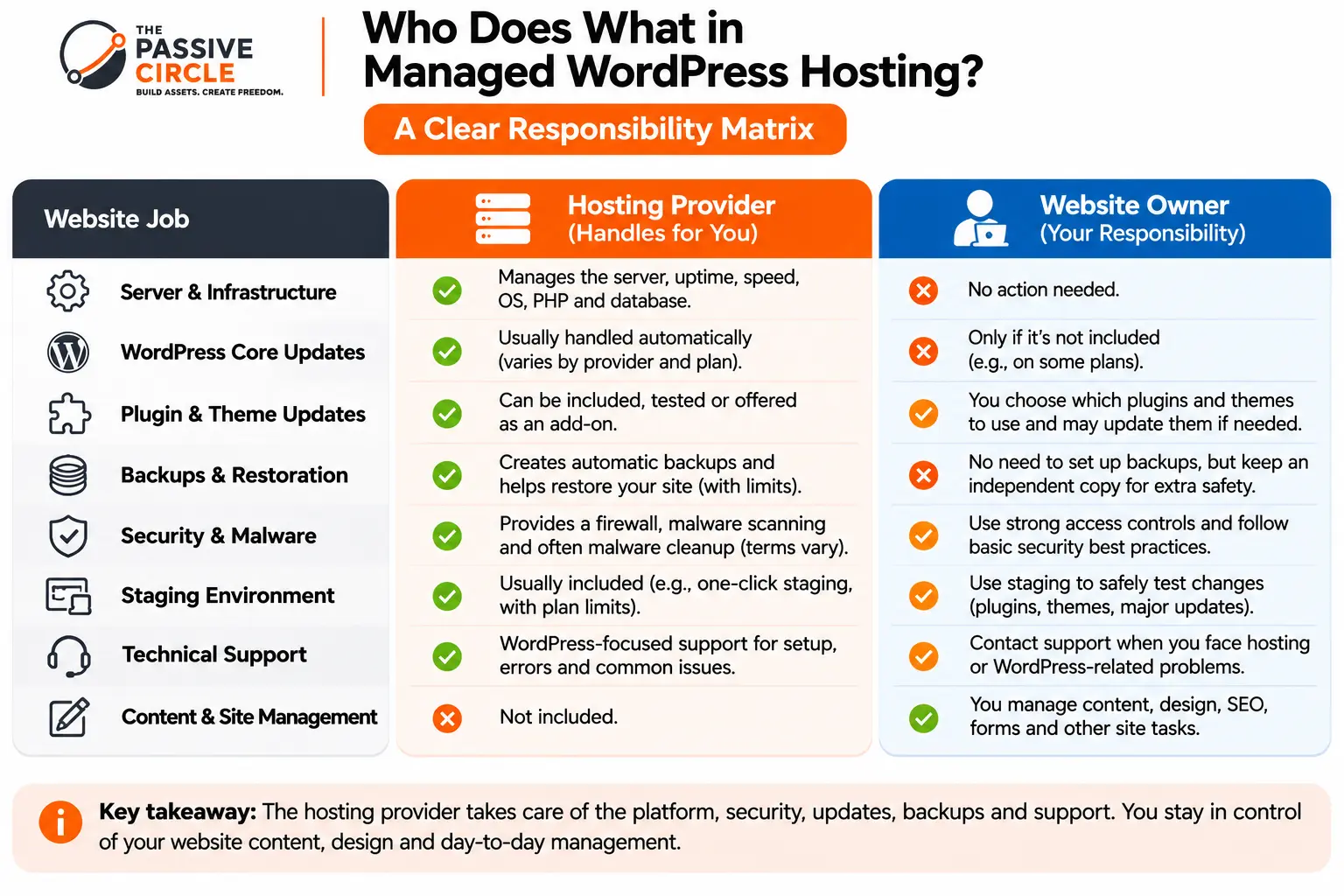
Who Does What? A Simple Responsibility Table
| Job | Usually the provider | Usually you |
|---|---|---|
| Server software, PHP and database | Yes | Choose a PHP version if offered |
| WordPress core updates | Depends on provider | Check the site after updates |
| Plugin and theme updates | Depends on plan or add-on | Choose and maintain them |
| Backups | Created on a schedule | Test restores, keep your own copy |
| Firewall and malware scanning | Often included | Passwords, user accounts, clean plugins |
| Plugin conflicts and custom code | Rarely | You or a developer |
| Content, SEO and design | No | Always you |
Managed Hosting vs. WordPress Maintenance Services
These are two different things, and search results often mix them up. A hosting provider manages the platform your site runs on. A maintenance service manages the website itself.
A maintenance service may update plugins, test pages after each update, check forms, review uptime and fix broken features. Prices vary widely by provider and scope, so compare the written scope, not only the monthly price.
Some hosts include light maintenance. Many do not. If you need hands-on website care, you may need managed hosting plus a separate maintenance service, or a plan that explicitly lists it.
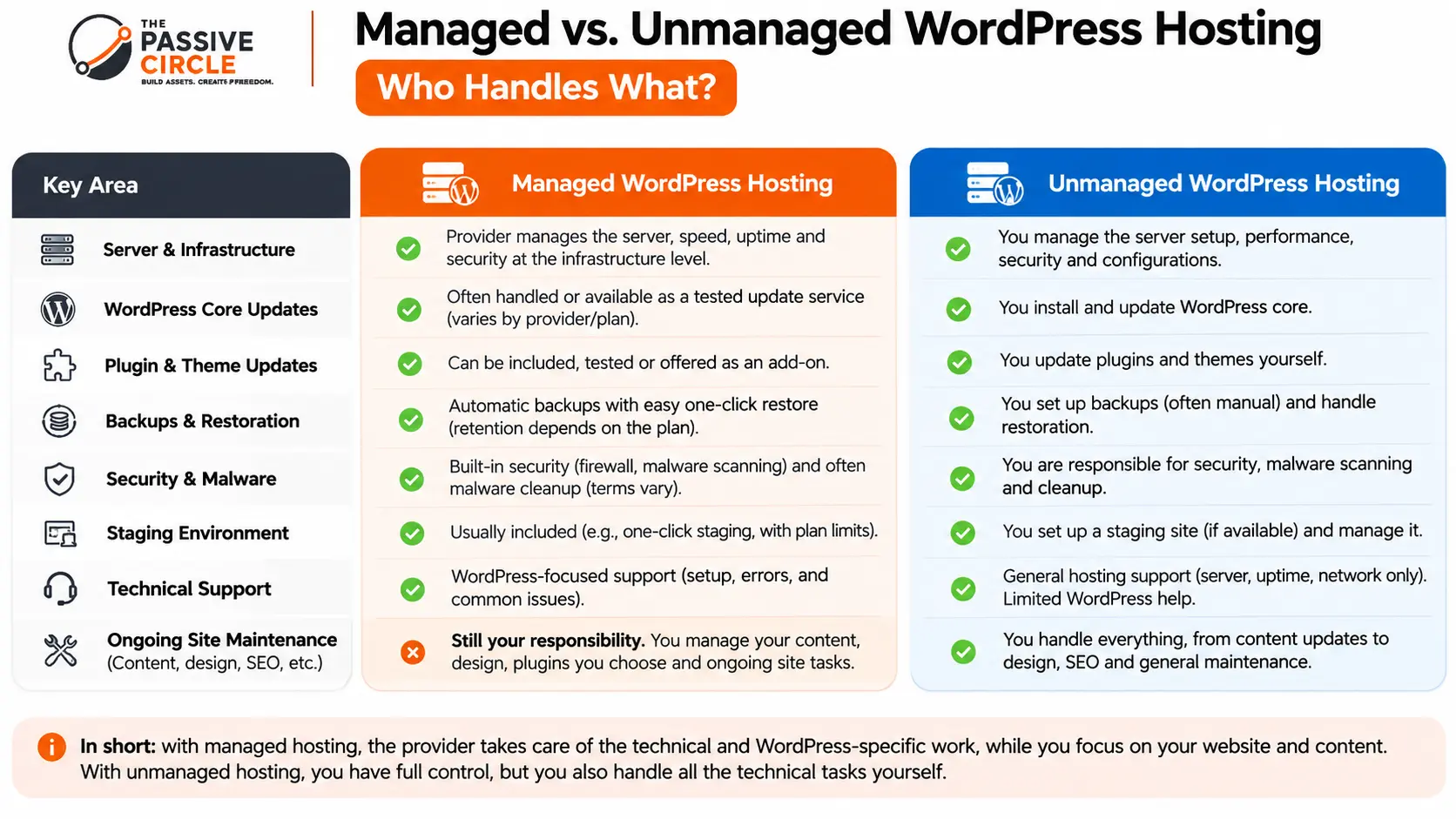
Managed vs. Unmanaged WordPress Hosting
| Area | Managed WordPress hosting | Unmanaged hosting |
|---|---|---|
| Server management | Provider handles it | You or your developer handle it |
| WordPress updates | Often partly automatic, depth varies | You install and test them |
| Backups | Usually included, schedule varies | You set them up or pay for a service |
| Security | Server protection included, owner duties remain | Mostly your job |
| Support | Platform-focused help, scope varies | Server help, sometimes none for software |
| Technical knowledge | Lower | Higher |
| Customer control | Often limited | High |
| Cost | Usually higher | Usually lower |
The real difference depends on the provider and plan. Unmanaged hosting does not always mean zero support. Many hosts still help with server problems.
If you are also comparing shared plans, read what shared hosting is. Many budget “managed” plans are shared plans with WordPress tools added.
What Do Managed WordPress Hosting Providers Actually Offer?
This is not a ranking. The four plans below sit at very different levels, so they are not equal products. The table compares the entry plan of each provider, using documentation reviewed on 21 November 2026.
Budget Hosting With Managed Features vs. Premium Managed Platforms
Hostinger and SiteGround sell shared hosting plans with WordPress tools added. WP Engine and Kinsta sell platforms built around WordPress, with higher entry prices and tighter limits on visits. Neither type is better in general. The question is how much depth you need.
A budget plan can be a good fit for a small blog. A premium platform adds things like free staging on the entry plan, longer restore history and add-ons for tested updates. Compare the actual service, not the word “managed”.
| Feature | Hostinger (Single) | SiteGround (StartUp) | WP Engine (Startup) | Kinsta (Single 20GB) |
|---|---|---|---|---|
| Websites | 1 | 1 | 1 | 1 |
| Updates | Automatic update tools listed on pricing page | WordPress auto-updates advertised | Managed WordPress, PHP and MySQL updates listed | Core, plugins and themes are the owner’s job. Automatic Updates add-on costs $3 per environment per month |
| Tested updates and rollback | Not clearly specified in the reviewed documentation | Not clearly specified in the reviewed documentation | Smart Plugin Manager add-on, included on higher plans | Included in the Automatic Updates add-on |
| Backup frequency | Weekly. Daily on higher plans or as an add-on | Daily | Daily and on demand | Daily. Hourly and 6-hour are paid add-ons |
| Retention | Weekly backups 6 weeks, daily backups 7 days | Up to 30 daily copies | 30 days. Older access through support | 14 days |
| On-demand backups | Needs Business or higher plan | 5 free manual slots on GrowBig and higher. StartUp needs the paid Premium Backup service | Yes | Manual backups, up to 5 at a time |
| Staging | Not listed on Single | Not on StartUp | Staging and development environments listed, number not verified | Free one-click staging listed |
| Security | Malware Scanner scans and cleans files only, not the database. Paid Site Cleanup service listed at $95 for WordPress | Enhanced security and firewall advertised, cleanup not clearly specified | Threat defense listed, contact support for malware | Cloudflare firewall and DDoS protection, free cleanup policy with conditions |
| Support | 24/7 support, details vary by plan | 24/7 reported by independent reviews | 24/7 chat and tickets, no phone on Startup. Plugin conflicts out of scope | 24/7 chat in dashboard. Plugin code fixes out of scope |
Plan names change. SiteGround details come from its official promotional, tutorial and help pages, which could not always be matched to the current checkout. If a feature is not confirmed for an entry plan, the table says so. Check each plan before buying.
| Provider | Starting price | Renewal price | Billing note |
|---|---|---|---|
| Hostinger Single | £1.49 per month on the UK pricing page | £7.99 per month | 48-month prepaid term, seasonal offer, GBP |
| SiteGround StartUp | Check current pricing and renewal terms on SiteGround’s official pricing page. | Check current pricing and renewal terms on SiteGround’s official pricing page. | Not verified against current official checkout documentation |
| WP Engine Startup | Standard monthly price not confirmed from an official page I could read. The plans page shows a “starting at” figure with a footnote | Not clearly specified in the reviewed pages | Annual billing and first-year offers can lower the displayed price. Treat an offer as an offer, not the standard price |
| Kinsta Single 20GB | $35 per month, USD | No intro rate stated | Annual billing is cheaper, first month free listed. Promotions and billing terms can change |
Prices and promotional offers were checked on 21 November 2026. They may change by country, billing term, and checkout location. Do not compare pounds with dollars, or a 48-month prepaid price with a monthly price. Compare the renewal price over the full term, and confirm exact current prices on each provider’s page.
Want to see current plans? Provider plans change often. This link opens Hostinger’s own plan page.
Reading from Bangladesh? Local payment options and local support can matter more than a global plan. I have used ExonHost hosting myself. It is a standard hosting provider, not one of the managed WordPress platforms compared above. See ExonHost plans.
What Managed WordPress Hosting Does Not Include
This list protects you from wrong expectations. Managed hosting usually does not include:
- Writing or editing your content.
- SEO work or guaranteed ranking improvements. WP Engine and Kinsta both list SEO as outside support.
- Website redesign or changes to how your site looks.
- Unlimited development help or custom code fixes.
- A fix for every plugin conflict.
- Guaranteed uptime or complete security.
Some providers publish uptime commitments, but a commitment is not perfect uptime. Read the terms. Also remember that you still need to know what a WordPress website owner needs to control, even on a managed plan.
Is Managed WordPress Hosting Worth the Extra Cost?
The honest answer is: sometimes. Measure it against what you would otherwise pay in time and risk.
- Time saved: If updates and backups cost you hours every month, managed hosting saves real time.
- Recovery: One-click restores and longer history reduce the damage from a bad update.
- Specialist support: Useful when you cannot solve a platform problem yourself.
- Testing: Staging matters when changes are frequent.
- Business importance: The more income depends on the site, the stronger the case.
Ordinary shared hosting is enough for many new bloggers. A small blog with a few posts a month, a backup plugin and a careful owner may not need a premium platform yet. If you are still choosing, see how to choose web hosting.
Use this short path to decide:
- Does your site earn money or collect leads? If no, start with a good shared plan and keep your own backups.
- Would a broken update cost you real income? If yes, look for tested updates, daily backups and staging.
- Do you want help with platform problems? If yes, compare support scope in writing.
- Do you run many sites or client sites? If yes, compare agency or multi-site plans.
Who Should Choose Managed WordPress Hosting?
- Beginners: Not always. A careful beginner with a small site can start on shared hosting.
- Personal bloggers: A good shared plan is usually enough at first.
- Affiliate marketers: Consider managed hosting once the site earns steady income and downtime would cost you.
- Small business websites: Often a good fit, because recovery and support matter.
- Growing websites: Useful when traffic and plugin count rise.
- Agencies and multi-site owners: Look at plans built for many sites.
If you outgrow even managed plans, compare them with a VPS. A VPS gives more control, but you take on more technical work.
Final Verdict
Managed WordPress hosting is not one service. It is a bundle of smaller services, and the bundle changes by provider and plan.
So go back to the question: what are you actually paying someone else to do? If the answer is server care, backups and some WordPress safety, many plans can do that. If the answer is tested updates, longer backup history and specialist help, expect to pay more. If the answer is “everything”, no hosting plan does that.
My advice is simple. Write down the three jobs you want to hand over. Then check each plan page for those exact jobs. Compare renewal prices, not only first-year offers.
Still choosing a host? Our hosting guide explains how to compare plans step by step. It is an independent guide, not a provider page.
Frequently Asked Questions
What does managed WordPress hosting actually include?
Most plans include server care, backups and some security tools. WordPress updates, staging and tested updates depend on the provider and plan. Content, SEO and design are not included.
Is managed WordPress hosting worth it?
It is worth it when time, recovery speed and support matter more than the lowest price. A small hobby blog may not need it. A site that earns money often does.
Do I still need to update WordPress on managed hosting?
It depends. Some hosts handle core updates. Kinsta says updating core, plugins and themes is the owner’s responsibility, with a paid add-on for plugins and themes. Always check your plan.
Does managed WordPress hosting include backups?
Usually, yes. How often they run, how long they are kept and whether you can create your own differ by provider and plan. Test a restore and keep your own copy.
Can managed hosting fix plugin problems?
Support can often help you get back online, for example by disabling the plugin that caused an error. Fixing third-party plugin code is usually outside the scope.
What is the difference between managed and unmanaged WordPress hosting?
With managed hosting, the provider handles more of the server and WordPress work. With unmanaged hosting, you handle most of it, and you get more control.
Official Sources Used
Reviewed on 21 November 2026. Plans and documents change, so use these pages to confirm current details.
- Kinsta: scope of support for managed WordPress hosting, backups, Automatic Updates add-on, malware removal, plans.
- WP Engine: backup and restore, scope of support, Smart Plugin Manager, plans.
- Hostinger: UK pricing, daily backups, backup retention, Malware Scanner and Site Cleanup.
- SiteGround: managed WordPress hosting, staging tool, backup service.
- WordPress.org: plugin and theme auto-updates.