Imagine you have a WordPress website. You have a WordPress login. You have a hosting account. You bought a domain a while ago.
Then a developer asks for access. A friend mentions DNS. Someone asks where your backups are.
Suddenly you notice something. A website is not one thing. It is a set of accounts, services, files and systems that work together, and you may not know who controls each part.
So here is the real question: what does a normal WordPress website owner actually need to control?
The short answer is this. You don’t need to become a WordPress technician. You need to understand what you own, what you control, what you can access, and what someone else is managing for you.
This article walks through that idea step by step. It uses The Passive Circle as a simple real example.
A WordPress website owner should personally control the domain, hosting account, WordPress Administrator account and important connected services, while knowing how to reach DNS, files, database and backups when necessary.
A WordPress Website Is More Than WordPress
Your WordPress login is not the same thing as owning your entire website. It only gives you control of one layer.
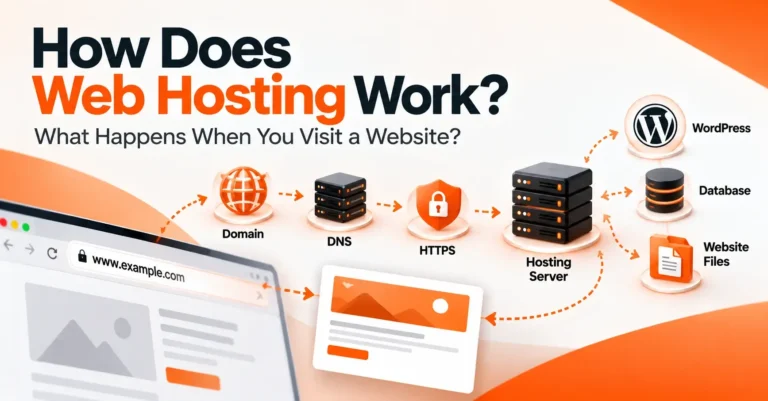
A WordPress website usually has these connected parts:
- Domain: your website name, such as example.com. You rent it through a company called a registrar.
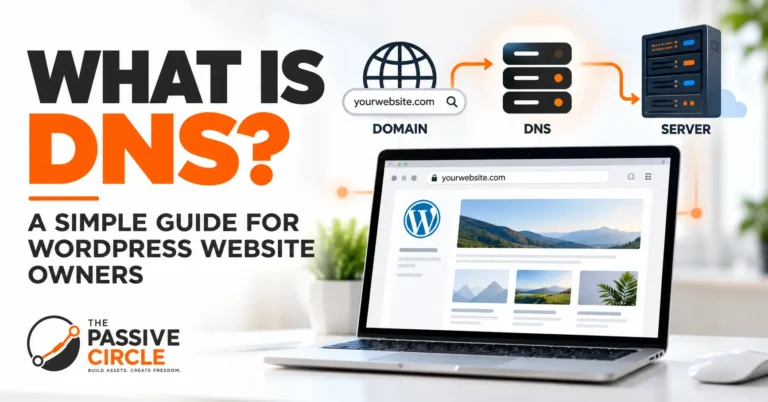
- DNS: a system that helps your browser find where a domain should go.
- Hosting: the company and server where your website lives.
- WordPress: the software that runs your pages, posts, themes and plugins.
- Website files: the actual files on the server, such as themes, plugins and uploaded images.
- Database: the place where WordPress stores your content and settings.
- Backups: saved copies you can use to bring the site back.
- Connected services: tools such as Google Search Console, which sit beside the site instead of inside it.
If you want a deeper look at the hosting layer, our guides on what web hosting is and how web hosting works explain it from the beginning.
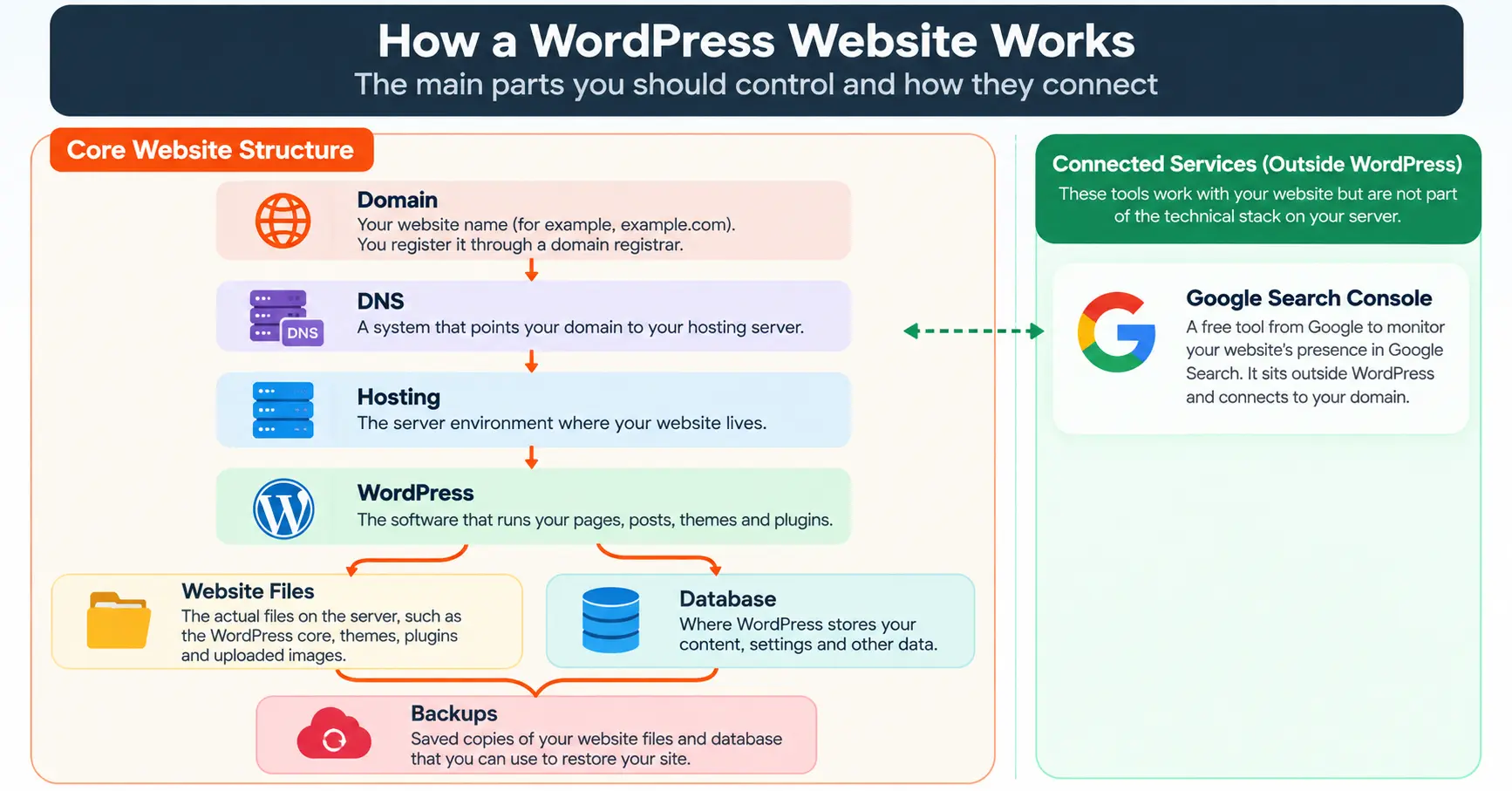
Here is why the layers matter. You can be an Administrator inside WordPress and still have no control over your domain. You can own the domain and have no idea where your backups are. Each layer can belong to a different person or company, and that is fine, as long as you know which is which.
What Should You Personally Own?
Some parts of your website should be under your own control. If you lose them, you can lose the website itself.
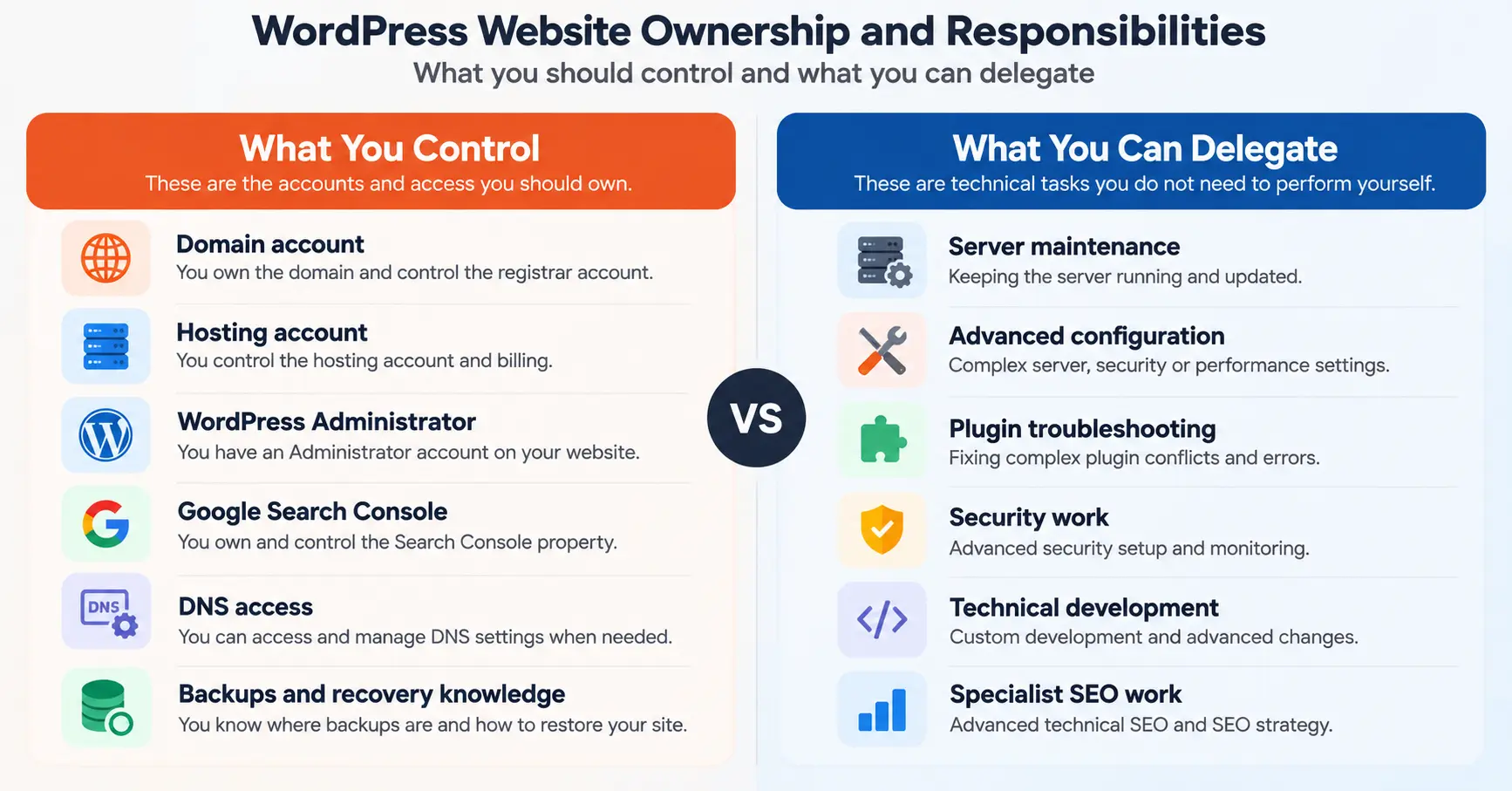
Think of website control in three levels
OWN
The accounts that determine who controls your website.
- Domain
- Hosting
- WordPress Admin
- Search Console
ACCESS
Technical areas you may need to reach.
- DNS
- Files
- Database
- Backups
DELEGATE
Technical work you do not need to perform yourself.
- Server maintenance
- Advanced configuration
- Technical development
- Specialist work
What should stay under your control?
These are the accounts that should remain under your control, even when other people help manage the site.
Your domain
Your domain is your website’s name. When you register it, you do it through a registrar. Your registrar account is where you manage the domain, but the important thing is that the domain registration and registrant information are under your control.
Make sure you control that account. That means the account uses your email address, you can reset the password yourself, and you know when the domain renews. Registrars usually offer a transfer lock and an authorization code for moving a domain to another registrar. You should know that these exist. ICANN, the organization that coordinates the domain system, explains the basics of registration and transfers for people who register domains.
The domain and hosting do not have to be with the same company. For The Passive Circle, the domain is registered through Namecheap, while the website is hosted with Hostinger. This is a normal setup. It is not a Namecheap tutorial. The lesson is simple: the owner should control the domain account.
If a developer registered your domain in their own name, you have a problem to fix. Ask them to move it to an account that you control.
Your hosting account
The hosting provider runs the server environment where your site lives. But you should normally control the hosting account itself.
Why does this matter?
- Billing goes to you, so the site does not go offline because someone else stopped paying.
- You can contact support directly.
- You can see or ask about backups.
- You can move to another provider when you need to.
- You can recover the account if something goes wrong.
You do not need to manage the server. You only need to be the person the hosting company recognizes as the account holder.
Your WordPress Administrator account
In WordPress, an Administrator is the most powerful normal role on a single site. An Administrator can manage users, install plugins and themes, change settings and edit content. WordPress.org documents each role and its capabilities in its official roles and capabilities guide.
You should have your own Administrator account. It should be separate from any account a developer or agency uses. If your only Administrator account belongs to someone else, you do not fully control your site.
This does not mean developers should never have Administrator access. Sometimes they need it. The better rule is: give people the level of access they actually need for their work.
Your Google Search Console property
Google Search Console shows how your site appears in Google Search. It also sits outside WordPress, so it is easy to forget.
Google’s documentation describes different permission levels, including Owner, Full user and Restricted user. Owners have the most control, including the ability to manage other users. Full users can see most data and take many actions. Restricted users can mainly view data.
A person who helps with SEO does not automatically need to be the Owner. In many cases a lower permission level is enough. You should stay the Owner of your own property.
What Should You Know How to Access?
Some parts of your website you may rarely touch. You do not need to use them every day. But you should know where they are and how you would reach them.
Four technical areas you should know how to reach
DNS
DNS helps connect a domain name with the place where your website or another service, such as email, is served. If your domain is the address, DNS is like the instruction that says where that address leads.
You do not need to learn DNS records. You should know three things:
- where your DNS is managed
- who can change it
- what happens to it when your hosting changes
Many people assume DNS is always managed where the domain was bought. That is not always true. The Passive Circle shows this: the domain is registered at Namecheap, but DNS is managed through Hostinger. Registration and DNS are two separate jobs, even when one company does both.
Website files and FTP or SFTP
The WordPress Dashboard lets you manage WordPress. FTP and SFTP give you another way to reach your website’s files on the server. SFTP is generally the safer choice because it encrypts the connection, and many hosts also provide a file manager in their control panel.
Most owners do not need file access every day. It can help when:
- a broken plugin locks you out of the dashboard
- you are troubleshooting a problem
- you are moving the site to another host
- you need to recover a file
You do not need to learn commands. You only need to know whether file access is available and who can set it up. The Passive Circle owner does not regularly use FTP or SFTP, and that is a perfectly normal situation.
Your database
The database is where WordPress stores your posts, pages, settings, comments and other structured information. Your theme and plugin files are separate. The database stores much of your site’s content and settings, while your files contain the WordPress software, themes, plugins and uploaded media.
You will probably never edit it by hand. But it is useful to know that it exists, where access is available, who can reach it, and that it is included in your backups. A backup without the database is not a full backup of a WordPress site.
Your backups
Here is a practical question: if your website disappeared tonight, could you bring it back?
To answer, you need to know:
- Are backups happening at all?
- Where are they stored?
- How recent is the latest one?
- How long are backups kept?
- Who controls them?
- How would a restore work?
For The Passive Circle, Hostinger handles automatic daily backups. That is true for this site. It does not mean every Hostinger plan or every hosting company works the same way. Always check your own plan.
Also, having backups is not the same as having tested a restore. A backup you have never tried to use is still a promise, not a proof.
The broader lesson: an owner should understand the recovery path, even when the hosting provider handles the backup process.
What You Do NOT Need to Manage Yourself
If this list feels long, relax. A normal WordPress owner does not need to personally manage these systems:
You don’t need to operate this yourself
You can understand these systems without personally operating them.
Many people run good websites without ever touching these. Some of them are handled by the hosting provider. Some can be handed to a specialist.
Here is the line to remember: you don’t need to operate every system. You need to know who operates it.
What Does Your Hosting Provider Usually Handle?
Hosting providers differ a lot. Some technical work may be handled by your host, while other work may belong to you or a specialist. The summary and table below show common patterns, not rules. Your plan may be different.
Who usually handles each layer?
- Domain
- WordPress
- Content
- Access control
- Search Console
- Server infrastructure
- Hardware
- Hosting-level services
- Some backups
- Some maintenance
- Advanced development
- Complex troubleshooting
- Advanced security
- Specialist SEO
A visual summary only. Responsibilities vary by provider and hosting plan.
| Area | Usually handled by | What the owner should know |
|---|---|---|
| Server hardware | Hosting provider | You never touch it, but its reliability affects your site. |
| Server infrastructure | Hosting provider | Ask the host what is included in your plan. |
| Basic server maintenance | Often the hosting provider | What the provider handles depends on the hosting plan and provider. |
| Hosting-level security | Often the hosting provider | It does not replace good passwords and careful access. |
| Automatic backups | Depends on the provider and plan | Know where they are, how recent they are, and how to restore. |
| WordPress | Usually the owner | Updates, plugins and themes are often your job, unless someone is hired. |
| Content | Owner or your writers | Nobody else can decide what your site says. |
| Domain | Owner, through a registrar | Keep control of the registrar account and renewals. |
| DNS | Depends on your setup | Know where it is managed and who can change it. |
What Access Should You Give Other People?
Think about the people who may help you, and what each one actually needs:
- A developer may need Administrator access to build or fix things. You can often remove or reduce it when the work ends.
- A writer usually needs only to create content. A lower WordPress role, such as Author or Contributor, often covers that.
- An SEO specialist may need to see Search Console data. A Full or Restricted user is often enough, not Owner.
- A designer may need access to a theme or a page builder, but not to your hosting account.
- Hosting support may need temporary access to help fix a problem. Close it when the work is done.
Access should follow the job
This is not a fixed table. Every project is different. The habit matters more than the exact roles: ask what the person needs to do, give that access, and review it later. WordPress and Google both publish their official role and permission lists, so check them before you choose.
What If Your Developer Disappears Tomorrow?
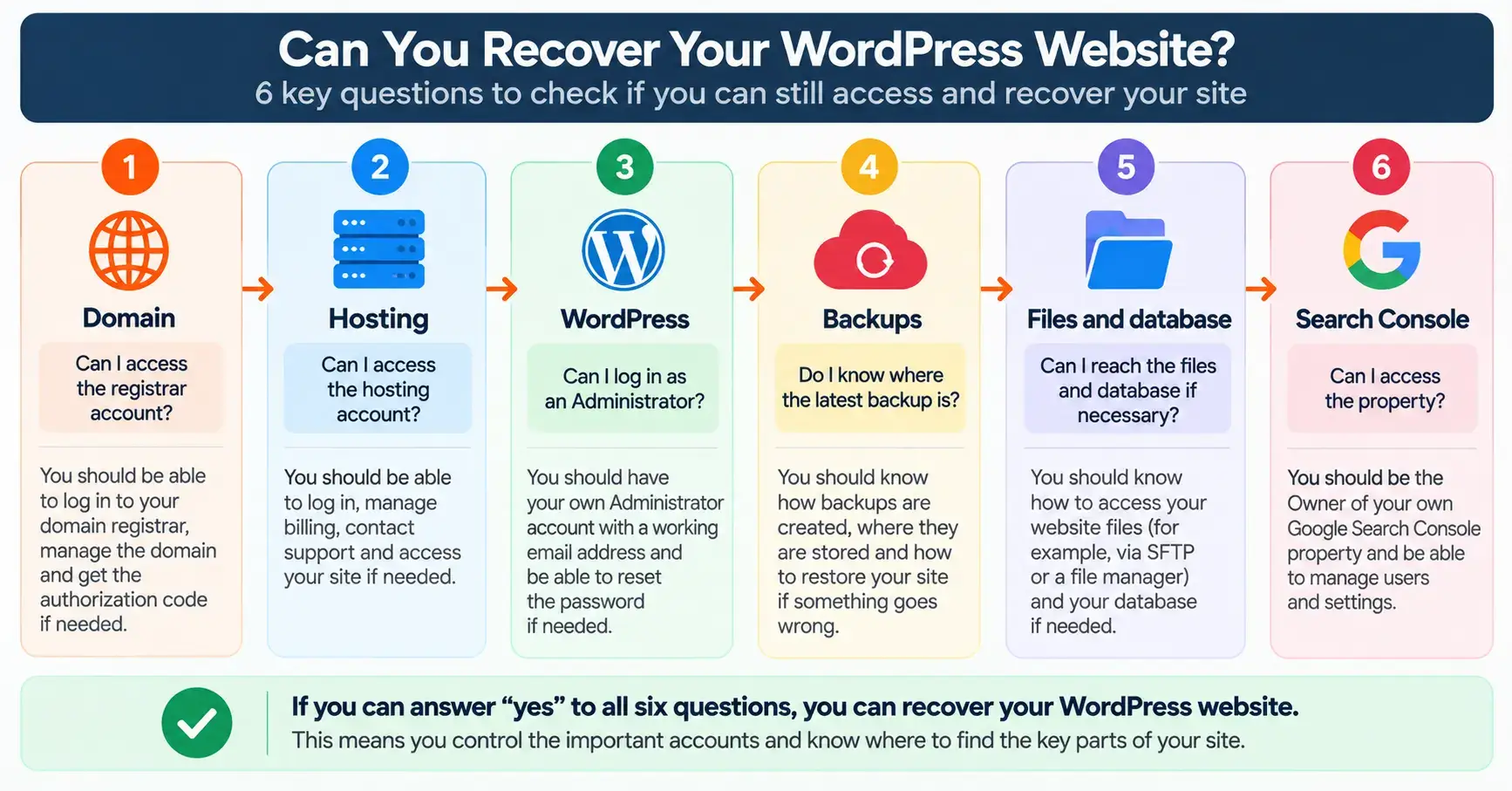
This is a simple test of healthy ownership. Ask yourself whether you could still handle each item below.
Could you still run the website tomorrow?
- Domain access
- Hosting access
- WordPress Administrator access
- Backup access
- Search Console access
- Website file access
- Ability to move the site
If you cannot answer one, you have found a gap.
A gap is useful, not scary. Most gaps are fixed by asking for access or by moving an account into your own name.
A developer can help you operate a website without becoming the person who owns your website. Good developers usually understand this and are happy to document what they built.
A Real Example: The Passive Circle
Here is the current setup for The Passive Circle. It shows the ownership model without exposing any private details.
Current setup of The Passive Circle
- Domain
- Hosting
- WordPress
- Search Console
- Database access
- DNS
- Hosting infrastructure
- Automatic daily backups
- Cloudflare (not currently used)
- FTP/SFTP
This is only one example. There are many valid ways to build a WordPress website. The provider names do not matter. What matters is that the owner knows where the important controls are.
If you are still choosing a host, our guide on how much web hosting costs is a good next step.
The Simple WordPress Ownership Checklist
Try to answer each question without searching.
- Where is my domain registered?
- Who controls the domain account?
- Who controls my hosting account?
- Can I log into WordPress as an Administrator?
- Who controls my Google Search Console?
- Where is my DNS managed?
- Where are my backups?
- Can I reach my website files if I need to?
- Do I know how a restore would work, and where database access is available?
- When was the latest backup?
- Who has access to my website right now?
- Could I recover the website if my developer stopped working tomorrow?
If you cannot answer one, write it down and find out this week. You do not need to fix everything in one day.
The Simple Rule to Remember
Own the important accounts. Know where the important controls are. Give other people only the access they need.
You do not need to become a server administrator. You do not need to use FTP every week. You do not need to edit your database every month.
You do need to know how your website could be accessed, managed and recovered. That is what it means to be a WordPress website owner who is in control.
Frequently Asked Questions
Do I need to know coding to manage a WordPress website?
No. Most daily work, such as writing posts, adding pages and installing plugins, does not need code. You do need to understand who controls your accounts and where your backups are.
Should I own my domain and hosting accounts?
Yes, in almost every case. The accounts should use your email address and your billing details. A developer can work inside them without owning them.
Do I need FTP or SFTP access for WordPress?
Not for everyday work. It can help when your dashboard is broken, when you are troubleshooting or when you move to a new host. Many hosts also offer a file manager as an alternative. It is useful to know whether file access is available.
Should my developer have WordPress Administrator access?
Sometimes, yes, while they build or fix things. But give only the level of access the task needs, keep your own separate Administrator account, and review access when the project ends.
Where should WordPress backups be kept?
Ideally in more than one place, and not only on the same server as your website. Know where your host stores backups and how to restore them. Some owners also keep an extra copy elsewhere.
What happens if my developer stops working with me?
If you own your domain, hosting, WordPress Administrator account, Search Console and backups, you can keep running the site or hire someone new. If you do not, you may need to recover those accounts first. That is why it is better to check ownership before there is a problem.