Want to Make a Landing Page That Looks Great and Brings Results?
If you’ve been thinking about building a landing page but feel overwhelmed by tech stuff, you’re not alone. I’ve been there too.
Many tools out there are expensive, confusing, or made for pros. But the good news? You don’t need any coding or design skills to get started.
With Systeme.io, you can create a beautiful, high-converting landing page in just a few steps. It’s simple, beginner-friendly, and free to use. Whether you’re trying to grow your email list, promote a free ebook, or sell a product, Systeme.io gives you everything you need in one place.
In this step-by-step guide, I’ll show you how to create a landing page in systeme io from scratch. You’ll learn how to:
- Set up your free account
- Choose the right template
- Customize it for your brand or offer
- Publish it and start collecting leads or sales
No complicated tools. No extra software. Just a few clicks and you’re live.
If you want a full overview of Systeme.io features, read this guide first.
If you’re ready to learn how to create a landing page in systeme io without the headache, you’re in the right place.
Let’s get started.
Table of Contents
Why You Need a Landing Page That Converts
A landing page is one of the most powerful tools in online marketing. Whether you’re growing an email list, promoting a product, or building a personal brand, a strong landing page can make a big difference.
Before we dive into creating a landing page in systeme io, let’s understand why it matters.
What is a Landing Page?
A landing page is a single web page with one specific goal. It’s not like a home page or a blog. Instead, it focuses on one action you want the visitor to take.
That action could be:
- Subscribing to your email list
- Downloading a free ebook
- Signing up for a webinar
- Buying a product
- Booking a free call
Visitors “land” on this page after clicking a link. That link could come from:
- A Facebook or Instagram ad
- A YouTube video
- An email
- A blog post
- A social media bio
Why Landing Pages Matter
If you want to grow your business online, you need a way to turn visitors into leads or customers. A good landing page helps you do that.
This is also how you earn from affiliate marketing. You build trust first, then recommend the tool.

Let’s say you offer a free guide. When someone visits your landing page, they enter their email to get the guide. That email goes into your list. Later, you can follow up with helpful tips, offers, or product launches.
This is how many online businesses grow, by turning traffic into leads and leads into buyers.
Without a landing page, most visitors will scroll, get distracted, and leave. But with a focused landing page, you guide them to take action right away.
Google also recommends making pages mobile-friendly and fast. Google’s mobile-friendly advice
What Makes a Landing Page Convert
Not all landing pages work the same. Some get results. Some don’t. The difference often comes down to how well the page is built.
A converting landing page is:
- Clear – The message is easy to understand
- Focused – There’s only one goal or action
- Valuable – It offers something the visitor wants
- Trustworthy – It looks clean and professional
To boost conversions, every landing page should include:
- A strong headline that grabs attention
- Short, benefit-driven text
- A call-to-action (CTA) that tells the visitor exactly what to do
- Optional trust signals like testimonials or logos
When your landing page includes these elements, people are more likely to take action. That means more leads, more sales, and better results.
What Makes Systeme.io Perfect for Landing Pages
If you’re new to online marketing or just want an easy way to create high-converting pages, Systeme.io is a great place to start. It’s designed for people who want results without the stress of learning tech or buying lots of tools.
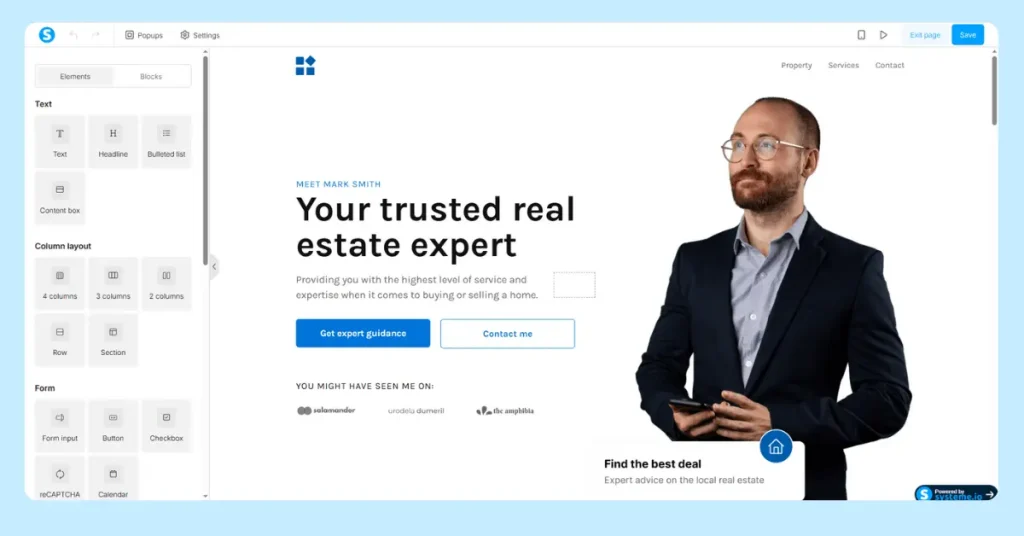
Here’s why Systeme.io is the best tool to create your landing pages—especially if you’re a beginner.
All-in-One Tool for Online Business
With Systeme.io, you don’t need to buy or connect different tools. Everything you need is already built-in. You can:
- Build landing pages and full sales funnels
- Collect emails and set up email sequences
- Sell products and digital offers
- Automate your follow-ups
This saves you time, effort, and money. Instead of learning five tools, you only learn one.
Free Plan with Powerful Features
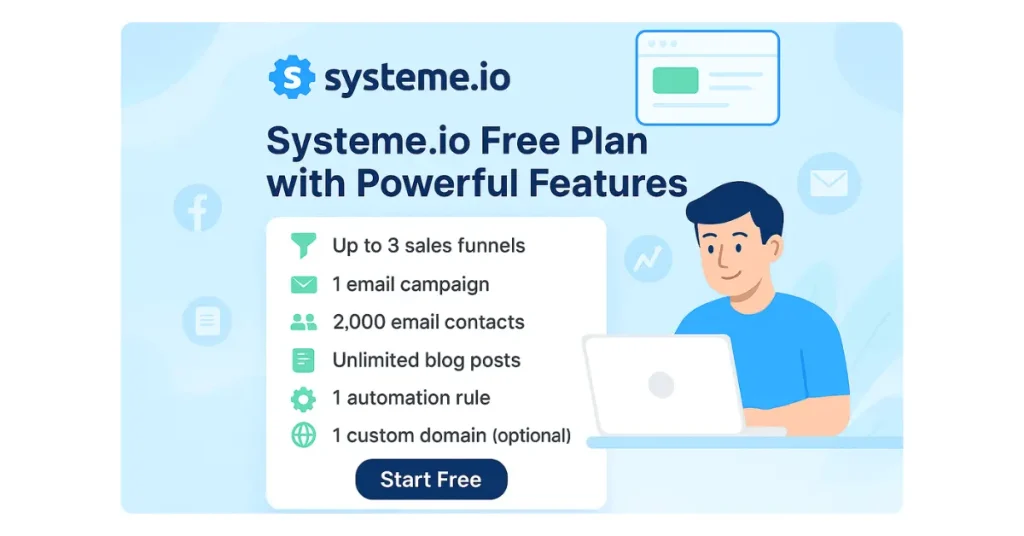
Many landing page builders make you pay before you can even try them. Systeme.io offers a generous free plan that includes:
- Up to 3 sales funnels
- 1 email campaign
- 2,000 email contacts
- Unlimited blog posts
- 1 automation rule
- 1 custom domain (optional)
You can build and publish your first landing page without paying anything. This is perfect if you’re testing your idea or just starting out.
No Coding or Design Skills Needed
One of the best things about Systeme.io is how simple it is to use.
You don’t need to know HTML, CSS, or any tech skills. You just use the drag-and-drop page builder. That means you can:
- Add or move blocks with one click
- Change text directly on the screen
- Upload images and videos easily
- Add forms, buttons, and countdown timers without code
The builder shows you exactly what your page will look like, so you can edit with confidence.
These landing page best practices are worth following too.
Mobile-Friendly by Default
Today, most people use their phones to browse online. If your landing page doesn’t look good on mobile, you could lose leads.
The good news? Systeme.io pages are mobile-friendly automatically.
You don’t need to adjust layouts for smaller screens. The system does it for you. All you need to do is focus on your message.
You can even preview your page on mobile view before publishing it.
Here’s why Systeme.io is the perfect tool for creating landing pages:

- You only need one platform
- You can start for free
- It’s easy for beginners
- Pages are ready for mobile
- No code or design skills needed
If you’re looking for a beginner-friendly, no-cost way to create a landing page that works, Systeme.io gives you everything you need in one simple tool.
How to create a landing page in Systeme io (Step-by-Step)
Now that you know why landing pages matter and why Systeme.io is perfect for beginners, it’s time to learn how to create a landing page in systeme io.
In this section, I’ll walk you through how to create a landing page in systeme io step by step. You’ll go from zero to published in just a few clicks.
No stress. No code. Just follow these steps.
Step 1: Sign Up for a Free Systeme.io Account

First, go to Systeme.io.
Click on the “Get Started for Free” button.
Now enter your email address and a password. That’s it.
You’ll be taken straight to your dashboard, no credit card required.

Step 2: Go to Funnels and Click “Create”

At the top menu, you’ll see Sites. In dropdown you can see Sales Funnels.
Click it, then hit the Create button on the right.
Funnels are where all your landing pages live in Systeme.io.
Each funnel can include multiple pages like a signup form, thank you page, or sales page.
Step 3: Choose the Build an Audience Funnel Option
After you click “Create,” you’ll see several funnel types.
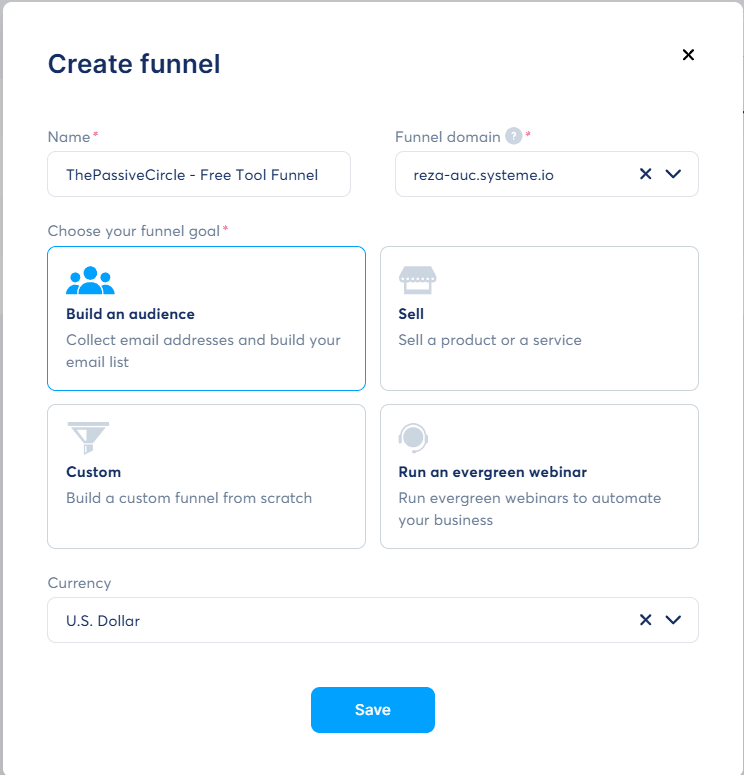
Choose “Build an Audience.” This is ideal for collecting emails.
It’s the best option if you’re offering a lead magnet, free guide, or newsletter.
Next, give your funnel a name. Something simple like “Pre Made Affiliate WordPress Template for Free” is perfect.
Click “Create” to move forward.
Step 4: Pick a Landing Page Template You Like
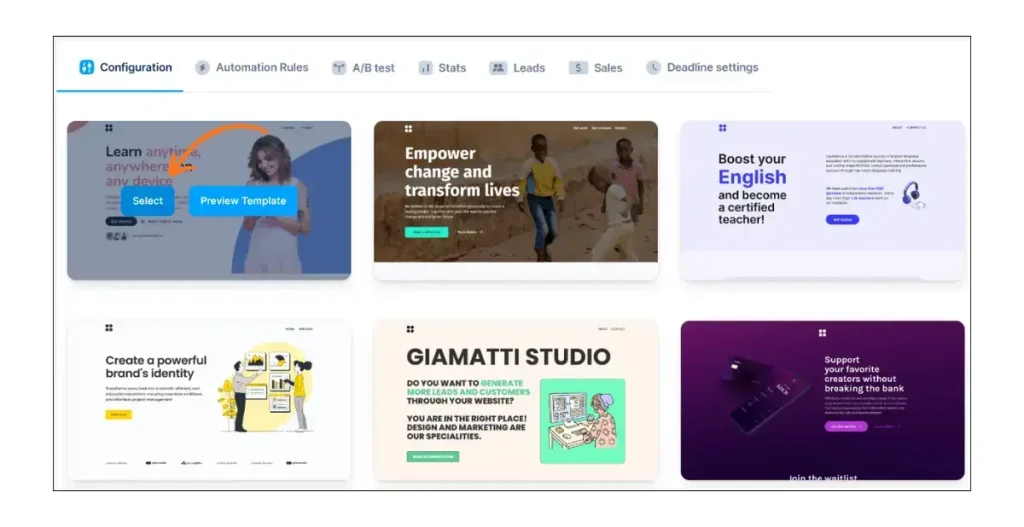
Now you’ll see a list of ready-made templates. These are designed to help you get started fast.
Scroll through and choose one that fits your style.
Don’t worry too much about the design now, you can change colors, fonts, and images later.
Once you find one you like, click “Select.”
Step 5: Customize the Page Using Drag-and-Drop Editor
Click on “Edit Page” to open the builder.
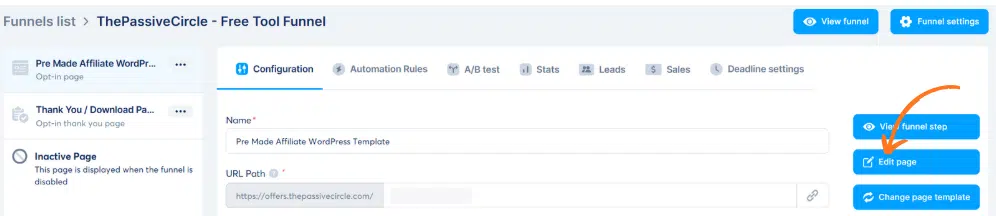
This is where you’ll design your landing page. The editor is drag-and-drop, which means you just click, move, and type, no code needed.
You’ll see blocks on the left. These include:
- Text
- Images
- Buttons
- Forms
- Videos
Click on any block to change the text or style.
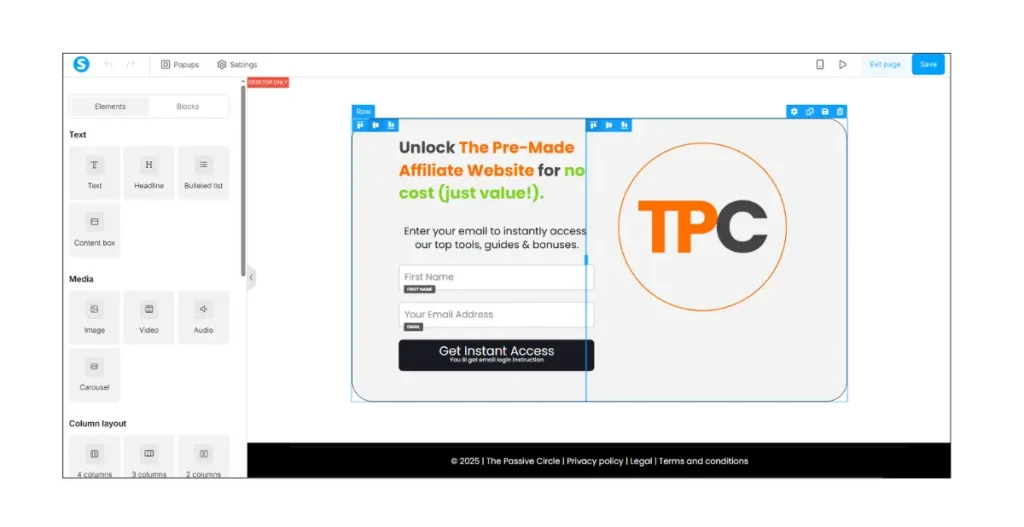
Tips for Easy Editing:
- Change the headline to clearly say what you’re offering
- Use bullet points to show benefits
- Keep the text short and focused
- Upload your logo or product image for branding
- Use colors that are easy to read
You can preview your page at any time by clicking “Preview” at the top.
Step 6: Add Your Call-to-Action and Email Form
Every landing page needs a strong call-to-action (CTA).
This tells your visitors what to do next.
Here are a few good CTA examples:
- “Get My Free Ebook”
- “Download the Checklist”
- “Join the Newsletter”
- “Sign Up Now”

Click on the CTA button in your template and edit the text.
Make it short, clear, and action-focused.
To collect emails, drag the Email Form element onto your page.
Then, connect it to your email list inside Systeme.io.
This means every email collected will go into your contact list automatically.
You can follow up with emails, offers, or tips later.
Check out the landing page I built in this post and grab your ready-to-use Affiliate WordPress Template to kickstart your own site today.
Step 7: Set Up a Thank You Page (Optional)

After someone signs up, it’s good to send them to a thank you page.
This makes the experience feel complete.
On this page, you can:
- Thank them for signing up
- Tell them to check their email
- Give the next steps
- Share a bonus video or download link
To create one, go back to your funnel.
Click “Add Step” and choose “Thank You Page” from the template list.
Edit it just like your landing page.
Step 8: Save and Publish Your Page
Once your page looks good, click “Save Changes” in the top-right corner.
Then click “Exit” to go back to the funnel overview.
Next, click the small link icon beside your landing page. This is your unique page URL.
Copy it and use it in:
- Social media bios
- Emails
- Ads
- Blog posts
- YouTube descriptions
Step 9: Test Your Landing Page Before Sharing It
Before you send people to your page, test it.
Open the link in a new browser tab.
Check how it looks on desktop and on mobile.
Make sure:
- The form works
- The CTA button works
- The design looks clean
- The email goes into your list
Once everything looks and works right, you’re ready to go live.
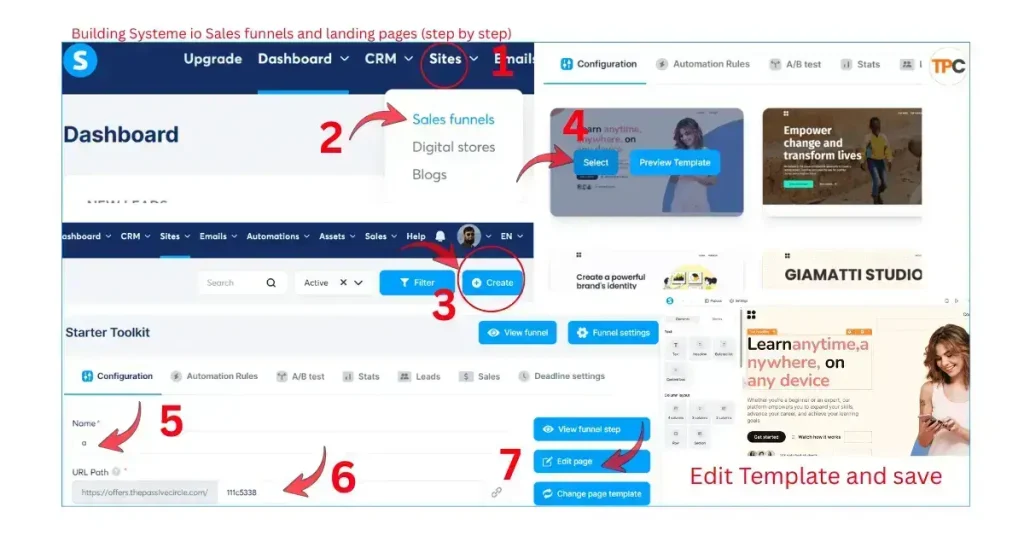
The whole process in a single image:
You’ve Just Built Your First Landing Page
That’s it! You now know how to create a landing page in Systeme io without using any code or advanced tools.
Let’s quickly recap what you’ve done:
- Signed up for a free account
- Created a new funnel
- Picked a template
- Customized your page
- Added a CTA and form
- Published and tested your page
Now your landing page is live and ready to collect leads or drive sales.
5 Simple Tips to Make Your Systeme.io Landing Page Convert Better
You’ve built your landing page. That’s a huge step.
Now it’s time to make sure it works better and turns more visitors into leads or customers. A few small changes can make a big difference.
Here are five easy and proven tips to boost your page conversions using Systeme.io.
1. Use Clear Headlines
Your headline is the first thing people see. It should tell them what they get in just a few words.
Don’t make it clever or confusing. Keep it clear, direct, and focused on the benefit.
Example Headlines:
- “Download Your Free Guide to Start Affiliate Marketing”
- “Join the 3-Day Email Challenge for Beginners”
- “Get a Free Ebook on Growing Your Email List”
Tips:
- Use simple words
- Focus on what the visitor will gain
- Avoid long sentences or vague language
2. Focus on One Goal
A good landing page does one thing well.
Don’t try to collect emails, sell products, and get webinar signups on the same page.
Pick one goal:
- Get an email signup
- Sell a single product
- Book a free call
If your goal is to grow your email list, the whole page should support that. Remove anything that distracts from your main call-to-action.
Why this works:
When your page is focused, your message is stronger. Visitors know exactly what to do.
3. Keep the Design Simple
Less is more when it comes to landing page design.
If your page has too many colors, fonts, or animations, people get distracted or overwhelmed.
Design tips:
- Use 1 or 2 main colors
- Pick one simple font for headings and body text
- Use clean layouts with lots of white space
- Keep sections short and easy to scan
Simple pages are easier to read. That means more people stay on the page and take action.
4. Add Social Proof
People trust what others trust.
That’s why social proof is powerful.
You can add:
- Testimonials from happy users
- Ratings or reviews
- Logos of brands you’ve worked with
- Number of downloads or subscribers
Example:
“Over 3,000 people have downloaded this free guide!”
Even one or two real testimonials can help your landing page feel more credible.
If you’re just starting out, ask a friend or early user for feedback you can share.
5. Use Strong Call-to-Action Buttons
Your call-to-action (CTA) button is what gets the click.
So make it strong, visible, and action-focused.
Avoid buttons that say “Submit” or “Click Here.” Those are boring and easy to ignore.
Use phrases like:
- “Get Started”
- “Join Free”
- “Send Me the Guide”
- “Claim My Copy”
- “Start the Free Course”
Also, use a bold button color that stands out from the rest of the page.
Tip: Test different button text or colors to see what works best.
Quick Recap
Here’s a quick summary of what you can do to improve your landing page right now:
- Write a clear and benefit-focused headline
- Stick to one main goal for each page
- Keep your design clean and distraction-free
- Add trust with testimonials or social proof
- Use strong CTA buttons with clear action words
These tips don’t take much time, but they can greatly improve your results.
Even if you’ve already published your landing page in Systeme.io, it’s never too late to make a few tweaks. Small improvements lead to better conversions over time.
Systeme.io Landing Page Examples for Inspiration
Now that you know how to create a landing page in systeme io and improve its results, you might be wondering:
What kind of landing page should I create?
The good news is that Systeme.io comes with ready-to-use templates for almost every goal. Whether you want to grow your email list, promote a product, or invite people to an event, there’s a layout for it.
Here are a few simple and powerful landing page types you can create with Systeme.io.
1. Lead Magnet Page
This is one of the most popular and effective landing pages.
A lead magnet is something you give away for free in exchange for an email address. It could be a:
- Checklist
- Guide
- Toolkit
- Quick tutorial
- PDF download
Visitors sign up to get it, and you collect their emails to build your list.
2. Free Ebook Page
Have you written a small ebook or guide?
You can use a landing page to promote it and collect leads at the same time.
Just add:
- A photo of your ebook cover
- A headline showing the benefit
- A short description
- An email form or download button
This works great for authors, bloggers, and content creators.
3. Webinar Signup Page
Running an online webinar? You’ll need a place where people can register.
A webinar landing page can include:
- The event date and time
- The topic or title
- A short description of what they’ll learn
- A signup button or countdown timer
This helps you get more signups and send reminders through email.
4. Free Course Page
If you offer a short course or video series, a free course landing page is the best way to promote it.
What to include:
- A headline that shares the course benefit
- A short intro or video preview
- A signup form or CTA button
- A list of what’s included
Free course pages are great for coaches, educators, or anyone building trust before selling a full program.
5. Thank You or Confirmation Page
While not a landing page in the traditional sense, thank you pages still matter.
Once someone signs up, redirect them to a confirmation page that:
- Says thank you
- Confirms their signup
- Gives them the next steps
This helps improve the user experience and builds trust.
Start With a Template and Make It Yours
The best part? You don’t have to build these from scratch.
Systeme.io gives you pre-designed templates for all these landing pages. You can:
- Choose one based on your goal
- Replace the text and images
- Publish it in minutes — all without coding
These templates are tested, mobile-friendly, and built to convert.
So whether you’re offering a lead magnet, ebook, course, or webinar, Systeme.io has everything you need to launch fast.
Final Thoughts on How to Create a Landing Page in Systeme io
Creating a landing page can feel scary if you’re just starting out. But with Systeme.io, it doesn’t have to be hard.
You don’t need tech skills. You don’t need a big budget.
All you need is a simple idea and a few clicks.
With Systeme.io, you can:
- Build your landing page
- Launch it in minutes
- Start collecting leads or sales today
The platform does all the heavy lifting for you. It gives you the tools, templates, and builder, all in one place and free to start.
Just remember these tips:
- Keep your page simple and clean
- Focus on one clear offer
- Use a strong call-to-action (CTA)
- Test your page before sharing it
Whether you’re offering a free ebook, running a webinar, or just starting your first email list, Systeme.io makes it easy to grow.
So now that you know how to create a landing page in systeme io, it’s time to put it into action.
Ready to Build Your First Landing Page?
It’s time to take action and put what you learned about how to create a landing page in systeme io into practice.
You now know how to create a landing page in Systeme io step by step, with no tech stress.
Don’t wait. The tools are ready, and so are you.
Head over to Systeme.io and sign up for free.
No credit card. No complicated setup. Just a few clicks.
Use the drag-and-drop builder to create your first landing page today.
Then share your page with your audience, followers, or email list.
Your next subscriber, lead, or customer might be just one click away.
Click here to build your first high-converting landing page in minutes. You’ve got this.
No need to pay for tools like Mailchimp or ConvertKit. Systeme.io does it all from one place.
Here is the comparison you may find helpful: Systeme.io vs Mailchimp: Which One Is Better for Beginners?
FAQs
If you’re just starting out, it’s normal to have questions. Below are quick answers to some of the most common ones beginners ask about using Systeme.io landing pages.
Q1: Is Systeme.io really free?
Yes. The free plan gives you access to landing pages, funnels, email marketing, automation, and more.
You can use these tools to build and launch your first funnel without paying.
When you’re ready to grow, you can upgrade to unlock more features.
Q2: Can I use my own domain with Systeme.io?
Yes, you can. But this option is only available on paid plans.
If you’re on the free plan, Systeme.io will give you a free subdomain (like yourname.systeme.io), which works just fine when you’re getting started.
Q3: Can I add videos or images to my landing pages?
Absolutely. The drag-and-drop builder lets you easily add:
Images
Videos (YouTube, Vimeo, or uploads)
GIFs
Icons and banners
This helps you build engaging, high-converting Systeme.io landing pages without using code.
Q4: Can I connect Systeme.io with other tools I use?
Yes. Systeme.io integrates with:
Payment tools like PayPal and Stripe
Email platforms
Webhooks and Zapier for automation
These options help you connect Systeme.io with your business tools easily.
Q5: What if I need help while building my landing page?
No worries. Systeme.io has:
Step-by-step tutorials inside your dashboard
A knowledge base
A friendly support team
Tons of free YouTube videos created by the community
You’re never alone when using Systeme.io.
Still have questions? Drop them in the comments or contact support inside your dashboard.