This post may contain affiliate links. If you purchase through these links, I may earn a small commission at no extra cost to you. Read our full Affiliate Disclosure
Starting your first website should feel exciting, not overwhelming. But the moment you search for web hosting, you’re hit with dozens of options, endless promises, and confusing jargon.
I know that feeling because I’ve been there too. Standing at the crossroads, unsure which host won’t waste my money or break my site. The good news? You don’t need the ‘perfect’ host. You just need the right one for your first step. And that’s exactly what this guide will help you find.
Table of Contents
Finding the Right Web Hosting Services as a Beginner
If you’re reading this, that means you’re probably thinking about starting your first website. Right? Maybe a blog, a side hustle, or a simple page of your ideas.
And then you hit the first roadblock: Choosing the right hosting.
You Google “best web hosting” and suddenly… boom! Dozens of companies! Hundreds of plans! All are promising speed, uptime, and support. Bluehost says it’s number 1. Hostinger says it’s the cheapest. SiteGround talks about performance. HostGator waves deals in your face.
It feels like you’re standing in a supermarket with too many choices. I’ve been there too.
When I started blogging, I had no technical skills at all. I simply wanted to build something online. My budget was very limited back then. That’s why I went with ExonHost, a small but affordable hosting provider. The yearly cost was low enough for me to get started without stress.
It wasn’t fancy or the best hosting. But you know what? It worked. It gave me the confidence for my first blog live.
That experience taught me something important:
- You don’t need the perfect hosting to start.
- What you need is the right hosting for your current stage.
And that’s what this guide is about. If you’re looking for the best hosting for beginners, this guide will save you weeks of trial and error.
Here are seven popular beginner-friendly hosts:
- Bluehost
- Hostinger
- SiteGround
- HostGator
- A2 Hosting
- DreamHost
- ExonHost
We’ll look at what each one does best, who it’s perfect for, and where it falls short. No jargon. No endless comparison tables. Just clear advice you can actually use.
So, whether you’re:
- A student trying out blogging for the first time
- A 9–5 employee testing a side hustle
- Or someone who just wants a small website without headaches
By the end, you’ll know which hosting to choose. You’ll be ready to launch the website you’ve dreamed about.
Well, let’s dive in.
What is Web Hosting?
Think of your website like a house.
- The domain name (like thepassivecircle.com) is your address.
- The hosting is the land where you build the house.
- And your website files (images, text, pages) are the actual house sitting on that land.
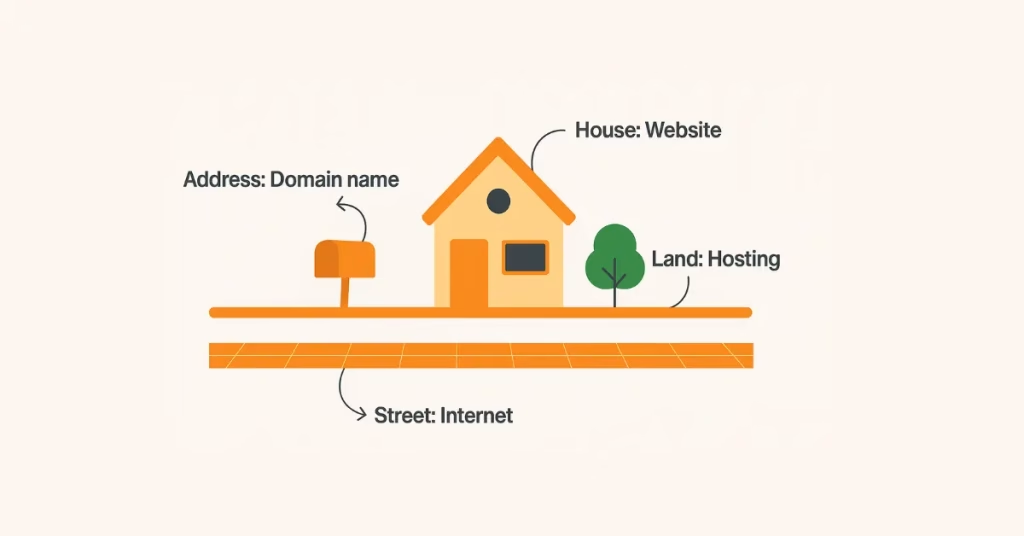
Without land, you can’t build a house. Without hosting, your website has nowhere to live online.
Web hosting is a service that keeps your website’s files. It lets anyone on the internet access those files.
When a person types your website name, their browser connects to the server of your hosting provider. It retrieves your website files and displays the site on their screen.
Once you have these two (domain + hosting), you can start building your website (house).
That’s it. No complicated tech talk.
How to Choose Web Hosting as a Beginner (What Actually Matters)
A lot of hosting companies like to use fancy terms such as uptime guarantees, SSD storage, free SSL, CDN, bandwidth, cPanel, and 1-click installs.
Sounds fancy, right? But as a beginner, you don’t really care about 90% of that. What you care about is this:
- Is it affordable? You don’t want to spend $20–30/month when you haven’t even started. Most beginner-friendly hosts cost between $2–5/month if you pay yearly.
- Is it easy to use? You don’t want to fight with complicated dashboards. You want a clean control panel where you can install WordPress in one click and manage your site without headaches.
- Is it reliable? A good host should keep your site online (uptime) and reasonably fast. You don’t need Supercomputer Speed. But you also don’t want visitors waiting forever for your page to load.
- Does it have support when you get stuck? This is a big one. As a beginner, you’ll have questions. The best hosts have 24/7 chat support so you can get unstuck quickly.
- Does it include the basics for free? Things like:
- Free SSL (the little lock in your browser)
- Free domain for the first year (saves $10–15)
- Free email (like admin@thepassivecircle.com)
Some hosts include all of these. Some charge extra.
That’s really it.
Forget about the noise. Focus on affordability, ease, reliability, support, and freebies.
If a hosting company ticks these boxes, it’s beginner-friendly.
Now that we’ve cleared the fog, let’s dive into the actual hosts and see which one fits you best.
The 7 Best Web Hosting Services
Let’s be honest. There’s no single “perfect” hosting. The best one depends on your goals, budget, and what kind of website you want to build.
I’ve picked 7 globally popular web hosts (plus ExonHost, which I personally use). Each has its strengths and weaknesses.
Here’s the breakdown:
1. Bluehost – Best for Beginners
Bluehost is like training wheels for blogging. Super beginner-friendly with 1-click WordPress installs. It is often recommended as the best WordPress hosting option for beginners.
Best For: Absolute beginners who want a smooth setup for their first blog.
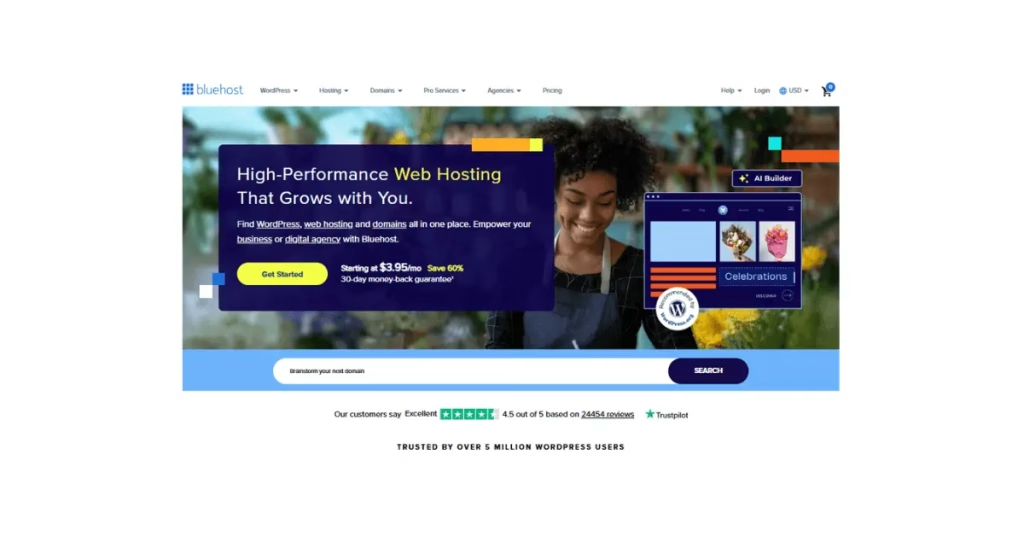
Pros:
- Officially recommended by WordPress.org.
- Free domain for the first year.
- Very simple dashboard.
- 24/7 live chat and phone support.
Cons:
- Renewal prices can be higher.
- Best suited for smaller sites, not high-traffic blogs.
When I first started, I didn’t pick Bluehost because I didn’t have a dollar card or PayPal. If I could start over with international payment access, I would choose Bluehost first. They’re great for beginners. WordPress recommends them. Plus, their support is reassuring for those without tech skills.
If you just want something simple and don’t want to overthink, Bluehost is the safe choice.
2. Hostinger – Best Cheap Hosting
Hostinger gives you crazy-low prices but still solid performance. One of the cheapest web hosting plans for beginners.
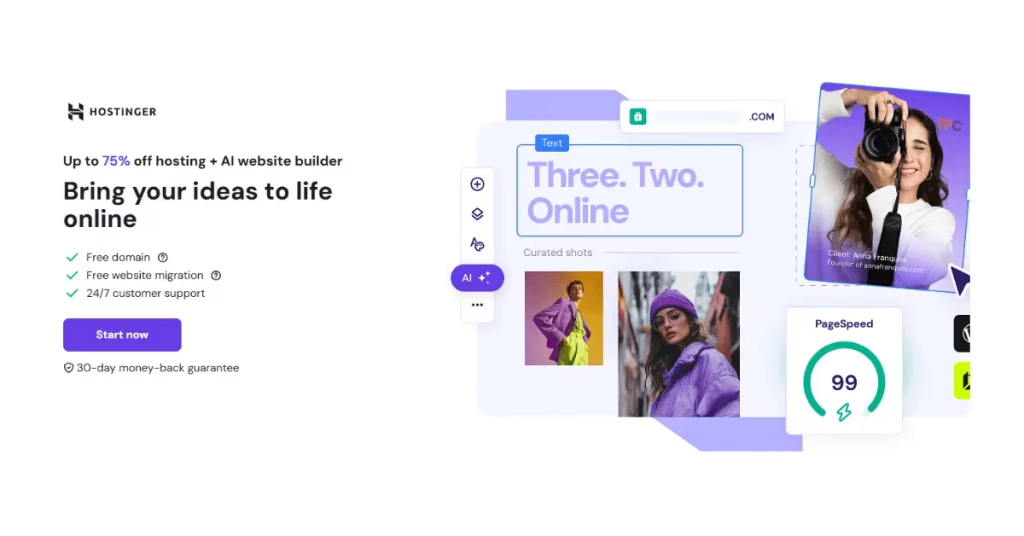
Best For: Beginners on a tight budget.
Pros:
- Super cheap plans (as low as $2.99/month, After Discount $2.49/month in 1 year plan).
- Free domain even on the cheapest plan.
- Easy-to-use custom dashboard (hPanel).
- Fast loading with LiteSpeed servers.
- Free SSL & email included.
Cons:
- Customer support can sometimes be slow.

Back then, price was my biggest problem. That’s why I went with ExonHost (local option). But if I had access to Hostinger, I’d have saved even more and gotten better global speed. Many beginners today start with Hostinger because it’s cheap but still reliable. My mistake was thinking only “local payment” mattered. I know reach and speed matter more.
Pick Hostinger if you’re testing the waters and don’t want to spend too much upfront.
3. SiteGround – Best for Reliability
SiteGround offers great support and reliable servers. It costs a bit more, but it’s worth it. Strong on uptime and speed, which matters if you’re targeting visitors worldwide.
Best For: Beginners who want peace of mind and fast customer support.
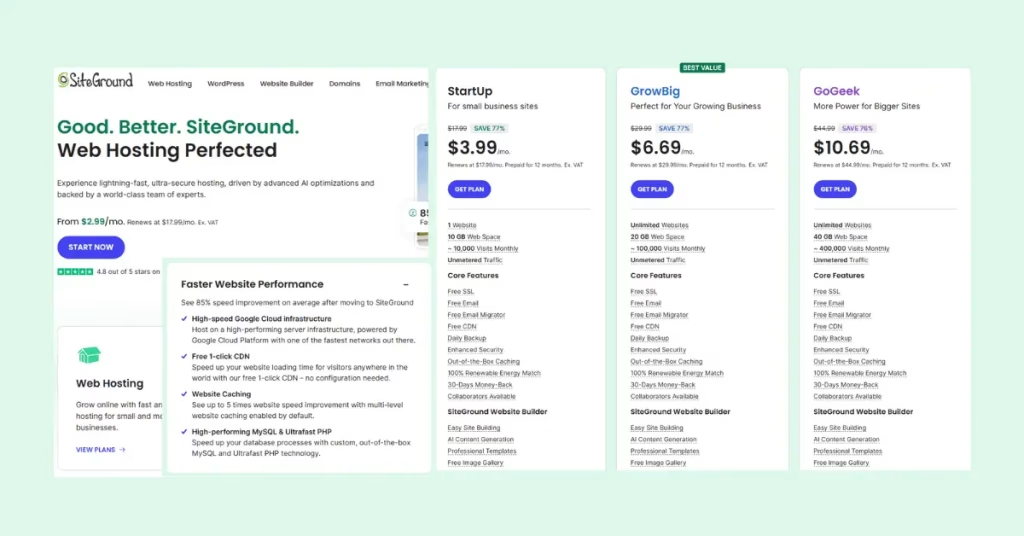
Pros:
- Excellent 24/7 support (fast replies).
- Free daily backups.
- Great for WordPress hosting.
- Super fast server response.
Cons:
- More expensive than Bluehost/Hostinger.
- Limited storage on lower plans.
I didn’t choose SiteGround when starting out because it felt expensive compared to local hosting. Later, I learned why people recommend it. Speed, stability, and especially for e-commerce or small businesses. If your goal is just hobby blogging, cheaper is fine. But for serious growth (like an online shop), SiteGround saves you from migration headaches later.
If you’re nervous about tech and want someone “on call” to fix problems, SiteGround is your friend.
4. HostGator – Best for Flexibility
HostGator is affordable, reliable, and has been around forever. A good fit if you’re weighing shared vs VPS hosting options later.
Best For: Beginners who want to experiment with different site types.
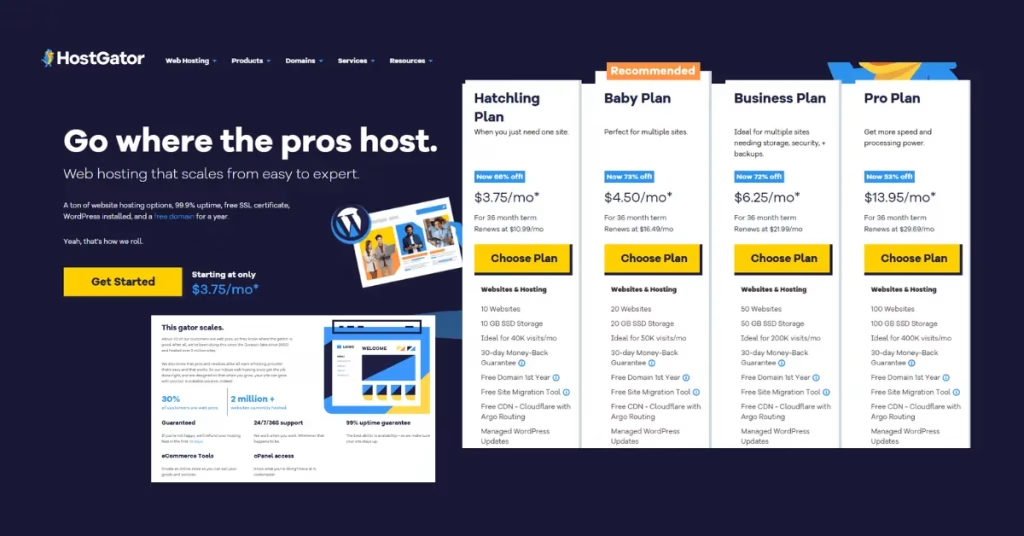
Pros:
- Unmetered bandwidth.
- Free website builder.
- Decent pricing.
- 45-day money-back guarantee.
Cons:
- The dashboard feels a little old-school.
- Performance is good but not top-tier.
HostGator would have been a more “global” choice. Beginners often jump into shared hosting because it’s cheap, and that’s fine. But I wish someone had told me to look at renewal prices carefully before committing.
If you want something flexible that works for blogs, portfolios, and small business sites, go with HostGator.
5. A2 Hosting – Best for Speed
A2 Hosting is all about speed. If you care about fast-loading pages, this is a great pick.
Best For: Beginners who want speed-focused hosting.
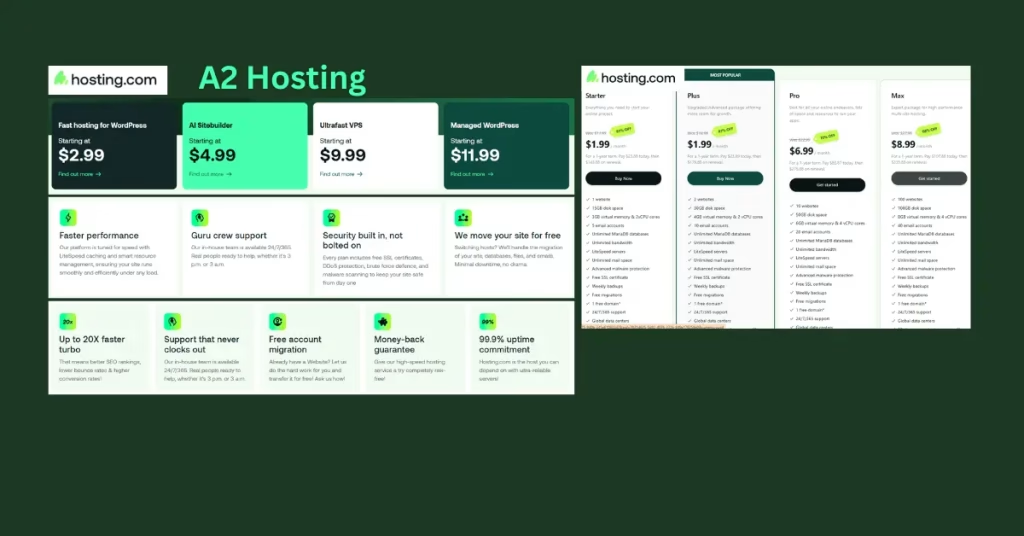
Pros:
- Turbo servers (up to 20x faster load times).
- Free site migration.
- Anytime, money-back guarantee.
- Good developer features if you grow later.
Cons:
- Renewal prices jump higher.
- “Turbo” speed only on higher-tier plans.
In my beginner stage, VPS hosting was something I didn’t even understand. I thought, “hosting is hosting.” Later, I learned the difference between shared, VPS, and cloud. A2 Hosting is where many upgrade after they outgrow beginner plans. My mistake? I didn’t think about growth at all. If I could advise my beginner self: start small, but choose a host that gives you easy room to upgrade—A2 does that well.
If speed and SEO rankings matter to you from day one, A2 Hosting is worth it.
6. ExonHost – Best Local Alternative (My Pick)
ExonHost is a rising hosting company that’s affordable and beginner-friendly. For me, it was the easiest and most reliable web hosting I could get locally.
Best For: Beginners who want a simple, affordable option (especially in Asia).
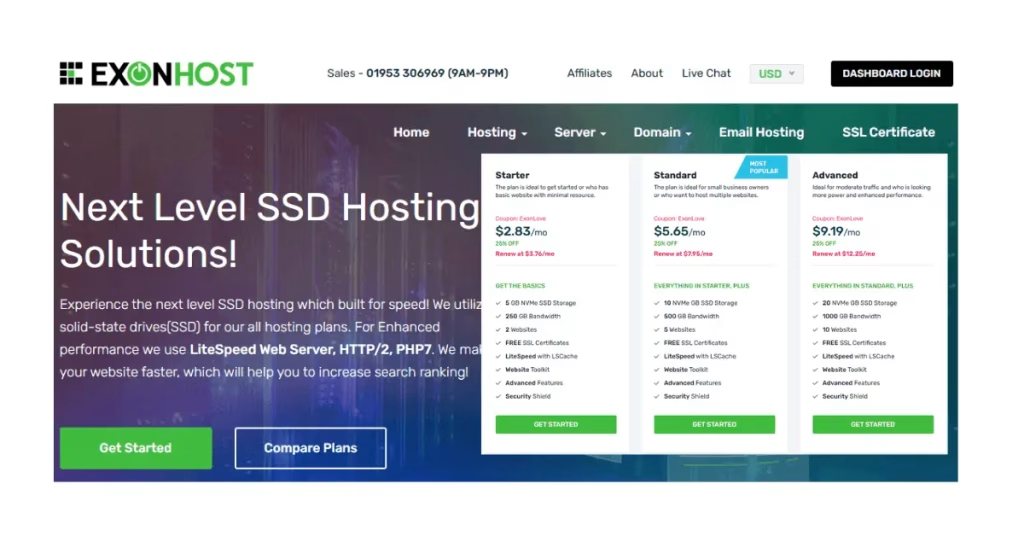
Pros:
- Very affordable starter plans.
- Great customer support (quick responses).
- Free SSL and cPanel.
- Servers in Asia = faster speeds for local visitors.
Cons:
- Not as globally recognized as Bluehost/Hostinger.
- Fewer data center options.
This was my real first hosting. I had no dollar card, no PayPal. ExonHost solved that with bKash payment. It cost me $30.45/year, and honestly, their support saved me multiple times—even at 11 PM. For a beginner in Bangladesh, it was the perfect start. But I quickly learned: local hosting isn’t the best if your target audience is the USA, UK, or Europe. My mistake was thinking “cheap + local” was enough. That’s why in this blog, I share the international options I wish I had known about earlier.
If you’re in Bangladesh and want something affordable with bKash payment, ExonHost is still a great place to start.
7. DreamHost – Best for WordPress
DreamHost is another WordPress-recommended host with simple pricing.
Best For: Beginners who love WordPress and want unlimited storage.
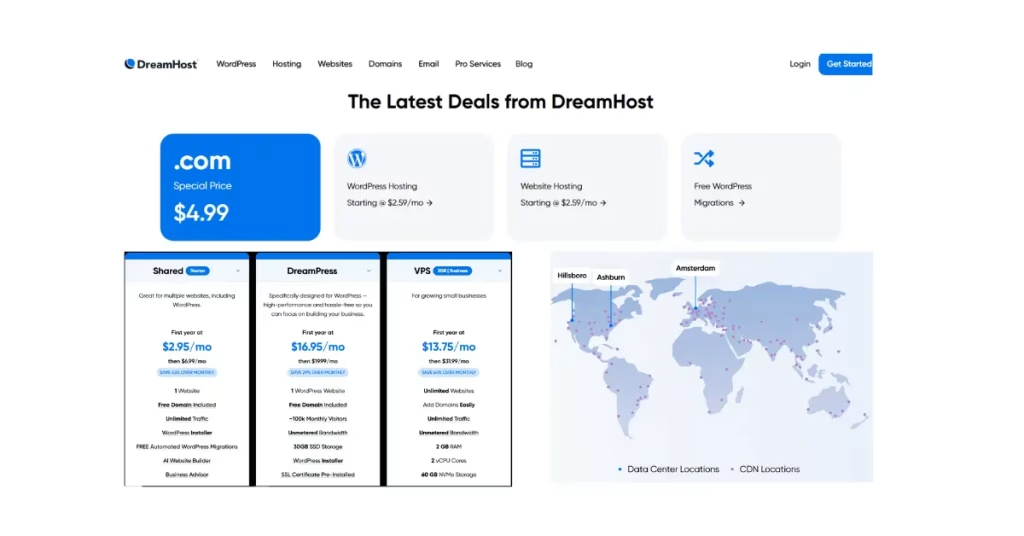
Pros:
- Free domain + SSL.
- 97-day money-back guarantee (longest in the industry).
- Unlimited storage & bandwidth.
- Transparent pricing (no sneaky upsells).
Cons:
- No phone support (chat/email only).
- The dashboard feels different from cPanel.
DreamHost looked solid when I was researching. I like their focus on small businesses and WordPress. As a beginner, I ignored WordPress’s own recommendations. Now, I see why it matters. If you plan to run a content site or small business, DreamHost is one of the safest beginner picks.
If you want simple, WordPress-focused hosting without surprises, DreamHost is your pick.
8. Namecheap – Best Domain Provider (with Hosting Option)
If you’ve been around the internet for a while, you’ve probably heard of Namecheap. They’re one of the biggest domain name registrars out there, and that’s where they truly shine. But they also offer web hosting services at pretty affordable rates. Many beginners love it because of its hosting with free domain bundle.
Why people choose Namecheap:
- Very cheap shared hosting plans.
- Free domain privacy with domain purchases.
- Easy to manage domains + hosting under one account.
- Decent uptime for smaller websites.
Pros:
- Great value for domain names.
- Hosting starts at a very cheap price.
- Free SSL for the first year.
- Beginner-friendly dashboard.
Cons:
- Hosting performance isn’t as strong as Hostinger, Bluehost, or SiteGround.
- Renewal prices can be higher.
- Customer support is okay, but not as fast as the top-tier hosts.
Best For: Beginners who want to buy both domain + hosting in one place and don’t care much about blazing speed.
When I first started, I didn’t even think about separating domain and hosting. Namecheap felt tempting because I could get everything in one spot. I later saw that it’s usually better to buy a domain at Namecheap or another budget-friendly place. Then, host your site with a performance-focused company like Hostinger, SiteGround, or Bluehost. I use ExonHost for my hosting due to easy bKash payments in Bangladesh. For domains, I would only trust Namecheap. If your target visitors are from the US or Europe, I wouldn’t rely on their hosting long-term.
Comparison Table: Best Hosting for Beginners in 2026 (Quick Scan)
| Hosting Provider | Starting Price (Monthly) | Best For | Standout Feature | Pros | Cons |
| Bluehost | $3.95 | WordPress beginners | 1-click WordPress install + free domain | Official WordPress.org recommendation, beginner-friendly dashboard, 24/7 support | Renewal rates jump, upsells during checkout |
| Hostinger | $2.99 | Budget-conscious beginners | Fast LiteSpeed servers + free email | Cheapest plans, strong uptime, free domain & SSL | Basic plan has limited resources |
| SiteGround | $3.99 | Reliability + support | Google Cloud infrastructure + top-rated support | Excellent speed, daily backups, beginner-friendly tools | Pricier renewals, storage limits |
| HostGator | $2.75 | All-round beginners | Unlimited storage + unmetered bandwidth | Easy cPanel, flexible hosting types, 24/7 support | Interface feels outdated, upsells can be annoying |
| A2 Hosting | $2.99 | Speed-focused beginners | Turbo servers (up to 20x faster) | Great speed, free site migration, strong developer options | Renewal cost high, no free domain on basic plan |
| ExonHost | $3.99 | Beginners in Asia (Bangladesh/India) | Affordable local support + LiteSpeed servers | Easy local payment methods, fast support, SSD storage | Smaller global reputation, fewer data centers |
| DreamHost | $2.95 | Simplicity + WordPress | Transparent pricing + free WHOIS privacy | Official WordPress.org recommendation, long money-back guarantee, free domain | Support slower via live chat (no phone), advanced features limited |
Prices are approximate “starting offers”, renewal rates are usually higher. Always check the provider’s site for the latest deal.
Best Hosting Categories for Beginners
Not all beginners have the same goals. Some just want to start a personal blog. Others plan to open a small business, run an online store, or even manage multiple websites.
Here’s my take on the best hosting picks by category (after testing, research, and real-world beginner feedback).
Best Overall Hosting for Beginners → Bluehost
If you’re a complete beginner and want zero stress, Bluehost is the safest pick.
- Official WordPress.org recommended host.
- Free domain, SSL, and 1-click WordPress install.
- Simple dashboard + 24/7 support.
Why it’s best overall: You can go from idea to live website in under an hour.
Best Cheap Hosting → Hostinger
Tight budget? Hostinger gives you crazy value for money.
- Plans start under $2.99/ month.
- Free domain + free email.
- LiteSpeed servers for speed.
Why it’s best cheap: You won’t find a better balance of price + performance.
Best for WordPress → Bluehost / DreamHost
Both are officially recommended by WordPress.org.
- Bluehost = beginner-friendly setup + easy WordPress tools.
- DreamHost = simple pricing + free WHOIS privacy.
Why it’s best for WordPress: If your only goal is a WordPress blog or site, these two are the most beginner-trusted options.
Best for eCommerce → SiteGround
Running an online store? You need speed + security.
- Google Cloud-powered hosting.
- Excellent uptime and reliability.
- Daily backups + top-rated support.
Why it’s best for eCommerce: Your store stays fast, secure, and always online.
Best for Agencies → SiteGround
If you’re building websites for clients or small agencies:
- White-label features.
- Powerful collaboration tools.
- Strong reputation for uptime.
Why it’s best for agencies: You look professional, clients stay happy.
Best for Small Business → DreamHost
Small businesses need simple + reliable hosting.
- Straightforward pricing (no hidden tricks).
- Free domain and SSL.
- Free WHOIS privacy (saves yearly cost).
Why it’s best for small business: Transparent + affordable, without tech headaches.
Best Shared Hosting → HostGator
Want unlimited websites, storage, and bandwidth at a low cost?
- Classic cPanel interface (easy for beginners).
- Reliable uptime.
- 24/7 support available.
Why it’s best shared: Beginners get lots of room to grow without big costs.
Best VPS Hosting → A2 Hosting
Need more power later? A2 Hosting’s VPS plans deliver.
- Turbo servers (up to 20x faster).
- Free site migration.
- Flexible options for growth.
Why it’s best VPS: Beginners who want future scaling can start small and upgrade easily.
Best Cloud Hosting → Hostinger (Cloud Plan)
If you’re curious about cloud hosting:
- Affordable cloud options.
- Faster performance than regular shared hosting.
- Great for traffic spikes.
Why it’s best cloud: You get a modern hosting experience without spending a fortune.
Best Hosting Alternative (Personal Pick) → ExonHost
Here’s my personal note. I started my own journey with ExonHost. Why? Because it was cheap ($30/year -after discount), reliable, and they had local support I could trust.
- Local payment options (helpful in Asia).
- LiteSpeed servers.
- Beginner-friendly team.
Why it’s best alternative: If you’re like me (a complete beginner starting from scratch), ExonHost is a hidden gem worth trying.
Quick takeaway:
- Go with Bluehost if you just want an easy start.
- Choose Hostinger if budget matters most.
- Pick SiteGround if you care about speed and support.
- Try ExonHost if you want a simple alternative (and to support a growing host).
Beginner’s Step-by-Step Setup Guide
Okay, you’ve picked your host. Now what? This is the part where most beginners get stuck. Don’t worry — I’ll walk you through it.
1. Choose Your Hosting
Pick one from the list above.
- Bluehost if you want easiest setup.
- Hostinger if you’re on a budget.
- ExonHost if you’re in Asia and want simple local support.
Once you sign up, you’ll get a hosting dashboard (your control panel).
2. Register Your Domain
Most hosts give you a free domain for the first year. Example: thepassivecircle.com
Tips:
- Keep it short.
- Easy to spell.
- Avoid numbers/dashes if possible.
3. Install WordPress
Good news: almost every host has 1-click WordPress install. You literally click once, wait 2 minutes, and WordPress is live.
WordPress is the engine that powers your website.
You can follow my easy step by step guide: How To Set Up a WordPress Website for Beginners (No Coding)
4. Choose a Theme (My Pick: Blocksy)
Your theme is the design of your site. For beginners, I recommend Blocksy. Why?
- Free + super customizable.
- Lightweight (fast loading).
- Works well with Gutenberg (the built-in WordPress editor).
You can install it directly from your WordPress dashboard under Appearance → Themes → Add New.
You can find details guidelines here: Blocksy Theme Review: The Best WordPress Theme for Affiliate Bloggers
5. Write Your First Post
Go to Posts → Add New. Give it a title like “Hello, World!” or your first blog idea. Write something simple, don’t worry about perfection.
The key is to publish fast. You’ll improve as you go.
6. Hit Publish
Click Publish in the top right. Boom. Your website is now live on the internet.
Beginner tip: Don’t get lost tweaking design for weeks. Launch first → learn later.
Domain vs Hosting (Simple Explanation for Beginners)
Many beginners get confused between a domain and hosting.
Here’s the easy way to remember it:
- Domain → Your website’s address (like thepassivecircle.com).
- Hosting → The place where your website’s files, images, and content live.
Think of it like this:
- The domain is your street address.
- The hosting is your actual house.
You can buy a domain and hosting from the same company or from different providers.
Can I transfer domain and hosting separately?
Yes!
- You can keep your domain with one company (like ExonHost) and move hosting to another (like Bluehost or Hostinger).
- You just need to update your domain’s nameservers to point to the new hosting.
Example:
I bought my domain + hosting from ExonHost. Later, if I want to move hosting to Bluehost, I only pay ExonHost for the domain renewal and Bluehost for the hosting.
Common Hosting Mistakes to Avoid
I wish someone had warned me about these when I bought hosting for the first time. I wasted money, got frustrated, and even had a site go offline. Don’t repeat my mistakes.
Here are the biggest hosting mistakes beginners make — and how you can avoid them:
1. Choosing Only on Price
I get it. $1.99/month looks tempting. But cheap hosting often comes with:
Slow websites.
Limited support.
Huge renewal fees after the first year.
My tip: Look at the value (speed, support, uptime), not just the price tag.
2. Ignoring Support Quality
When you’re new, you’ll break stuff. Trust me. If your host doesn’t have 24/7 live chat or fast ticket support, you’ll feel stuck.
Always test support before buying. Ask them a beginner question and see how they respond.
3. Not Checking Renewal Cost
This one hurts the most. A host may advertise $2.99/month, but after the first year, it jumps to $9.99+. Many beginners don’t notice until it’s too late.
Always check the renewal price before buying.
4. Not Knowing the Difference Between Shared, VPS, and Cloud Hosting
Shared hosting = cheapest, but you share resources with others (best for beginners).
VPS hosting = private resources, faster, more control (good for growing sites).
Cloud hosting = scalable and modern, great for handling spikes in traffic.
Most beginners should start with shared hosting. Upgrade later when your site grows.
5. Buying Hosting Without a Plan
Many beginners buy hosting but never use it. They spend money, lose motivation, and quit.
My advice: Write down what you’ll do in the first 30 days (example: install WordPress, publish 3 posts, learn SEO basics).
If you avoid these 5 mistakes, you’ll save money, time, and a lot of frustration.
WordPress Template
I’ve got a ready‑made Affiliate WordPress Template for you — no setup hassle, no time wasted. And the best part? It’s 100% free!
Here’s what’s inside:
Blocksy theme with Gutenberg editor
Essential plugins already set up
A sample blog to get you started
Step‑by‑step PDF guide to walk you through everything
Grab it here! And save your time!
Conclusion
Starting your first website can feel overwhelming. I know — I was there. I wasted weeks comparing hosts, reading reviews, and second-guessing. Here’s the truth: don’t overthink it. Pick a reliable web hosting provider that matches your needs.
Pick one host that fits your needs and just start:
- Best cheap option → Hostinger
- Best for beginners → Bluehost
- Best for WordPress → DreamHost
- Best for eCommerce → SiteGround
- Best alternative → ExonHost (my personal pick when I started)
Once you have hosting, the rest (WordPress, themes, writing posts) becomes easy. The biggest mistake is waiting too long.
FAQs
1. Which hosting is best for beginners?
If you’re just starting, go with Bluehost or Hostinger. They’re beginner-friendly, cheap, and have a one-click WordPress install.
2. Do I need to buy a domain separately?
Not always. Many hosts (Bluehost, Hostinger, DreamHost) give a free domain for 1 year. After that, you’ll renew it yearly.
3. Can I switch hosts later?
Yes! You’re not locked in forever. Most hosts even offer free migration if you move later.
4. What is shared hosting vs VPS hosting?
Shared hosting = cheap, multiple sites on one server (good for beginners).
VPS hosting = more private resources, faster, better for growing sites.
5. Is free hosting worth it?
Honestly? No. Free hosting comes with ads, limits, and downtime. If you’re serious, invest at least $2–$5/month.
6. Which hosting is best for WordPress?
Bluehost and DreamHost are officially recommended by WordPress.org. Both are great choices.
7. Can I host multiple websites on one plan?
Yes, but only on certain plans. Look for “Unlimited websites” in the features. (HostGator, DreamHost, and SiteGround allow this).
8. What is uptime, and why does it matter?
Uptime means how often your site is online. Good hosts offer 99.9% uptime. Anything less = avoid.
9. Do I need technical knowledge to manage hosting?
Nope. Most beginner hosts have one-click installs, dashboards, and support. You don’t need coding skills.
10. How much does hosting cost per year?
Expect to pay $30–$70 for the first year (if you grab discounts). Renewal is usually $80–$120 per year.
11. Which hosting is best for e-commerce?
Go with SiteGround (best WooCommerce support) or Bluehost’s WooCommerce plan.
12. Is monthly billing available?
Some hosts allow monthly, but it’s usually more expensive. Annual plans are cheaper.
13. Can I upgrade later (shared → VPS → cloud)?
Yes. Almost every host allows you to scale up when your traffic grows.
14. Which hosting is best for small businesses?
DreamHost or SiteGround — reliable, secure, and good support for business sites.
15. How do I pick the right hosting for me?
Tight budget? → Hostinger.
Beginner on WordPress? → Bluehost/DreamHost.
eCommerce? → SiteGround.
Agencies? → SiteGround.
Personal alternative? → ExonHost.
16. Is Namecheap hosting good?
Namecheap is excellent for buying domains, and their hosting is cheap for beginners. But if you want fast performance and strong support, they’re not the best choice. Many people, including me, use Namecheap just for domains. Then, they connect it to another host like Hostinger, SiteGround, or Bluehost. That way, you get the best of both worlds: affordable domains + reliable hosting.
17. Hostinger vs Namecheap – which is better?
Both are beginner-friendly, but they serve different needs:
Pricing: Namecheap is a bit cheaper for domains and hosting. However, Hostinger offers better hosting performance.
Speed & Uptime: Hostinger is faster and more stable worldwide. Namecheap hosting is okay, but not as optimized for global traffic.
Support: Hostinger has 24/7 live chat that’s more responsive. Namecheap support is good for domains, but slower for hosting issues.
Best Use Case:
Go with Namecheap → if you mainly want cheap domains and maybe test a small website. Choose Hostinger if you want to start a blog or affiliate site. It offers great speed and support.
My take: Register your domain with Namecheap. Then, choose a strong hosting provider like Hostinger, SiteGround, or Bluehost. That’s the combo many bloggers (including me) end up using.
18. How to Choose a Web Hosting Provider?
Choosing the right hosting provider can feel overwhelming at first, but it gets simple if you focus on a few key things:
Know your goal.
Starting a personal blog? Shared hosting is fine.
Planning to grow fast or run a store? Go for VPS or cloud hosting.
Check where your visitors are.
If your audience is in the US/UK, choose a hosting with servers close to them. Speed matters for both SEO and user experience.
Look at beginner-friendly features.
One-click WordPress install.
Free SSL certificate.
Simple control panel (like cPanel or custom dashboards).
Support is gold.
You’ll have questions, especially as a beginner. Pick a host with 24/7 chat support that actually helps (not just copy-paste replies).
Beware of renewal pricing.
Many hosts offer cheap first-year deals but double or triple prices later. Always check renewal rates before buying.
Don’t chase “free” hosting.
Free hosts usually have ads, slow servers, and limits that make your site look unprofessional. It’s better to invest even $2–3/month in a real host.
I started with ExonHost because it allowed me to pay locally via bKash in Bangladesh, which solved my biggest headache at that time. Later, I learned that the “right host” depends less on what’s cheapest and more on what matches your website’s goals. That’s why I recommend choosing a provider based on your needs, not just the price tag.
Grab Your Free Affiliate WordPress Template!
I’ve got a ready‑to‑use Affiliate WordPress Template for you — totally free!
- ✅ Blocksy theme with Gutenberg editor
- ✅ Essential plugins already installed
- ✅ Sample blog included
- ✅ Step‑by‑step PDF setup guide