This post may contain affiliate links. If you purchase through these links, I may earn a small commission at no extra cost to you. Read our full Affiliate Disclosure
Setting up a WordPress website for beginners is challenging. It feels overwhelming sometimes. Yes, I know the feelings! Chasing a dream is not easy. Need dedication, hard work, and consistency to succeed.
It may be a bit scary to start building your own website at first. What no one tells you, learning to build a WordPress site is not as difficult as you may think!
Earlier, when I decided to build a WordPress website for affiliate marketing, I was stuck on a question. Is WordPress the right platform for my Website? Which should I choose, WordPress.com or WordPress.org?
That sort of question held me back for those days. I research on the internet, watch YouTube videos, and talk to my colleague at the office (yes, I’m still in a 9-to-5 job! It will take time, you know!). I accumulate all the scattered information and decide. I spent a lot of time and effort to do so.
I wish I had a complete guide. Where could I get all the information in one place? This is the reason I’m writing this blog to help beginners like you. To get all the information in one place.
Why is WordPress.org better for you instead of WordPress.com? How to start an affiliate website with WordPress without coding? How to Set Up a WordPress Website step by step? How to choose your niche? Set up domain and hosting, essential plugins, themes, and much more! Let’s start the journey!
OK.. Well, hold on a second! Let’s clear a thing first, some of your friends may advise you to hire a Website Developer to do the job instead of building it yourself.
Ignore them! Believe me, if you choose the hard way, you can develop a solid foundation for your online career.
In my experience, I can say, learning all the processes one by one can boost your confidence. And take you one step closer to success.
Let’s begin.
Table of Contents
What Is Affiliate Marketing & How It Works on WordPress?
Affiliate marketing is the way to earn money by recommending products or services.
Well, you don’t have to create a product, handle customer service, or worry about shipping. You share a special link, known as an affiliate link. When someone clicks it and buys something, you earn a commission.
Think of it like this:
You’re the middleman who connects people to helpful tools, apps, or products—and you get paid for it. Simple as that.
It’s kind of like being a digital referral agent.

Let’s explain each step:
- Visitor: Someone visits your blog, watches your YouTube video, or follows you on social media.
- Clicks Your Affiliate Link: You recommend a product (e.g., a tool, plugin, or software) and share your unique affiliate link.
- Makes a Purchase: If the visitor buys through your link (or signs up, depending on the offer), it gets tracked.
- You Earn a Commission: You get paid! This can be one-time or recurring (monthly income).
That’s it. There is no need to create your product or deal with customers. You help people discover great tools and get rewarded when they act.
Want to learn more about affiliate marketing? Go through my previous Blog, Transform Your Life with Affiliate Success in 2026
Now, the question is which one is better for a beginner with no tech skills WordPress.com or WordPress.org?
If you are searching Google or watching YouTube videos, you can get tons of advice that will blow your mind! Some of them are talking in favour of WordPress.org, and some are for WordPress.com! You will get confused! Everyone has a different opinion! Let me share a screenshot from Reddit.
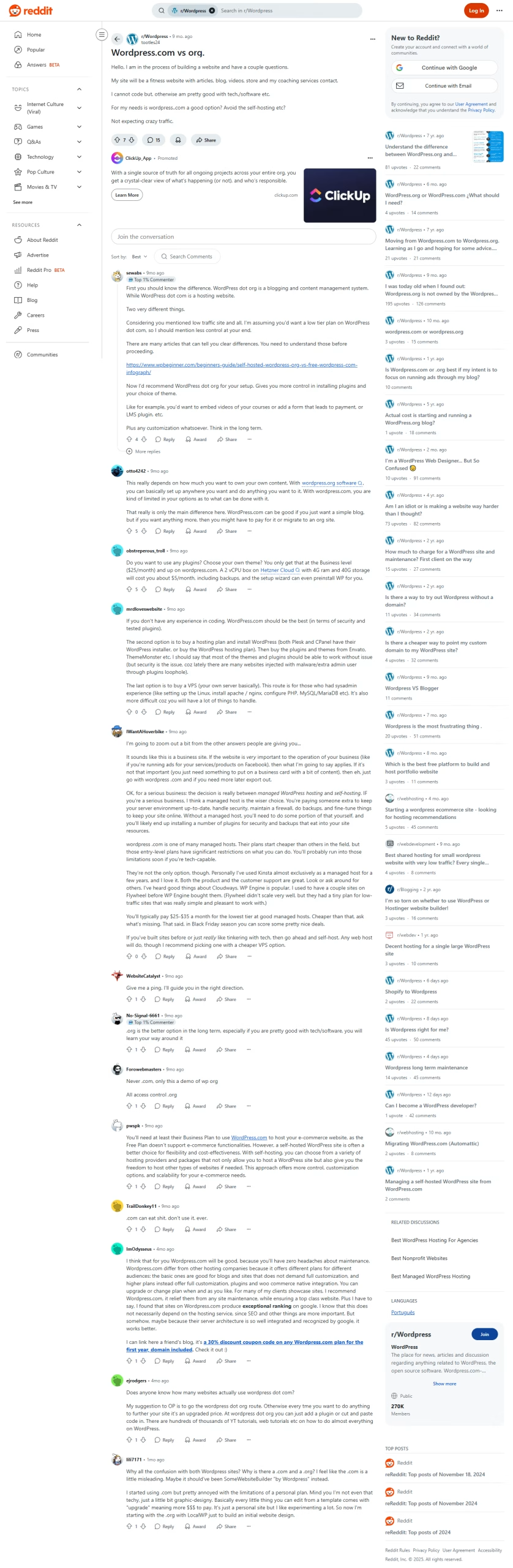
If you go through the comments, you can understand what I’m talking about!
WordPress.com vs WordPress.org
The choice between WordPress.com and WordPress.org comes down to control vs. simplicity.
- WordPress.com is like renting an apartment. Hosting, security, and maintenance are taken care of for you. But customization is limited unless you pay for premium plans.
- WordPress.org is like owning a house. You have full control and freedom to customize everything. But you’re also responsible for hosting, security, and updates.
If your goal is to create a professional affiliate site, monetize, and grow traffic, WordPress.org is usually the better long‑term choice (even for beginners) because:
- You can use any plugin or theme
- Full freedom for SEO, monetization, and customization
- Hosting is cheap and beginner-friendly with services like Bluehost, Hostinger, or SiteGround (ExonHost for Bangladesh)
But if you want a simple personal blog without worrying about technical setup, WordPress.com is easier to start with.
Follow the steps below, or click any link from the index to jump directly to the topic you’re most interested in.
Step 1: Choose Your Niche & Affiliate Programs
What is a Niche in Affiliate Marketing?
Most beginners (me included, once) rush into design… and end up with a pretty site that does nothing.
My goal with The Passive Circle is to help beginners build an affiliate website that earns.
That’s why everything here is designed to be clean, easy to follow, and focused on results.
Once you’re clear on your goal, every choice you make, hosting, tools, even blog topics, becomes 10× easier.
Niche selection helps you build authority and trust with the audience. You can speak directly to your targeted audience. They believe you because you address their needs directly.
You can get a clear idea from the table below-
| Website Type | Main Goal | Key Features |
|---|---|---|
| Business Website | Generate Leads | Contact forms, email signup, testimonials |
| Online Store | Make Sales | Product pages, shopping cart, payment system |
| Affiliate Website | Promote Products | Product reviews, comparison tables, tracking links |
| Membership Site | Restrict Content | Member login, subscription plans, protected pages |
| Education / Course Site | Teach Skills | Course pages, member access, progress tracking |
| Portfolio Website | Showcase Work | Image galleries, project pages, contact info |
| Blog | Share Content | Clean layout, categories, search function |
Here’s a simple guide: How to Find a Profitable Niche for Affiliate Marketing Beginners (Low Competition Guide). You’ll find it to be quite helpful.
Read my guide. Follow each step. You will discover a profitable niche. Low competition. High demand. And affiliate programs that offer lifetime or recurring payouts.
Popular Affiliate Networks for Beginners
These networks are suitable for beginners, reliable, and filled with products you can promote.
- Amazon Associates – Huge range of products, easy approval, and great for beginners.
- ShareASale – Thousands of merchants across different niches.
- CJ Affiliate (Commission Junction) – Big brands, long track record.
- Impact – Many SaaS and software brands have recurring commissions.
- ClickBank – Digital products with high commission rates.
- PartnerStack – Focused on software and recurring revenue programs.
- Awin – International merchants and flexible niches.
Mini Case Studies of Successful Affiliates
Adam Enfroy
- Started blogging in 2019.
- Focused on software (hosting, marketing tools) via networks like Impact and PartnerStack.
- Now earns six figures monthly from affiliate programs.
Authority Hacker
- Built authority sites in niches like health and marketing.
- Uses multiple networks (CJ, ShareASale, direct programs).
- Known for deep reviews, SEO‑optimized content, and email funnels.

WireCutter (Acquired by The New York Times)
- Focused on product reviews (tech, home, outdoor).
- Uses Amazon Associates and other retail programs.
- Built trust through rigorous testing and honest recommendations.

These examples prove you don’t need to be a big brand to start. With the right niche, consistent content, and the right affiliate networks, you can grow like they did—one blog post at a time.
Step 2: Set Up Domain & Hosting (No Tech Required)
When you’re starting, the last thing you need is tech headaches. You can choose from Domain & Hosting from Bluehost, Hostinger, or SiteGround.
- One-click WordPress install – no manual downloads, click and go.
- Free domain name for the first year, plus a free SSL certificate, secure your site right away.
- 24/7 live support so you can ask questions anytime, without feeling lost.
AI builders like Bluehost’s WonderSuite
Bluehost includes WonderSuite at no extra cost. This is an AI-assisted builder that helps you go live fast, even if you’re not technical. It simplifies everything:
- Automates setup with pre-installed WordPress and helpful templates (WonderTheme, WonderBlocks)
- Offers guided AI onboarding (WonderStart, WonderHelp) that builds your site in minutes by asking a few simple questions
- Let’s you drag-and-drop layout details and use starter content without coding.
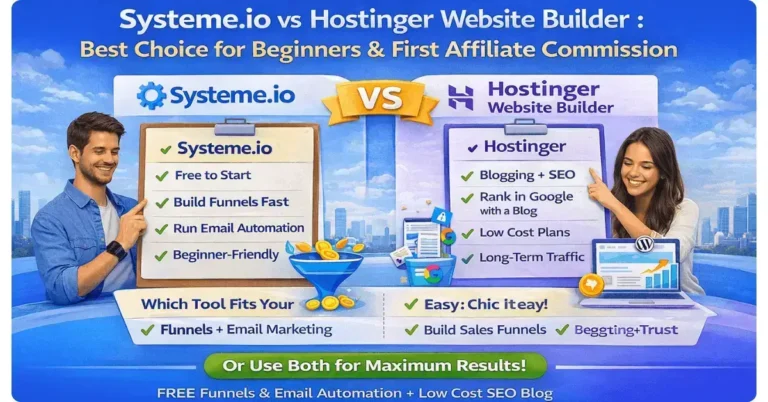
| Hosting Provider | Beginner Perks | Domain & SSL | AI Builder | Support |
|---|---|---|---|---|
| Bluehost | One‑click WordPress, WonderSuite AI setup | Free 1‑year domain & SSL | WonderSuite AI builder included | 24/7 live chat & phone |
| Hostinger | Budget plans, hPanel, one‑click installs | Free domain & SSL on most plans | No AI builder (simple hPanel tools) | 24/7 live chat |
| SiteGround | Managed WordPress, fast servers, staging | No free domain, SSL included | No native AI builder (uses WP tools) | 24/7 chat & ticket support |
Why this matters for you:
- Bluehost is the easiest pick for beginners. Free domain, SSL, one-click WordPress, and an AI-guided site builder are all built in.
- Hostinger offers the best value for tight budgets. Clean hPanel, fast setup, great price. Bluehost
- SiteGround offers stellar performance, developer tools like staging, and strong speed, but it costs more.
If you’re starting, Bluehost’s AI onboarding and one-click setup make the process painless. No coding, no confusion, launch.
Step 3: Install WordPress & Set Up Core Pages
You have a website goal, find a profitable niche, select and buy a domain name, and a hosting plan.
Now it’s time to install WordPress and set up the core page.
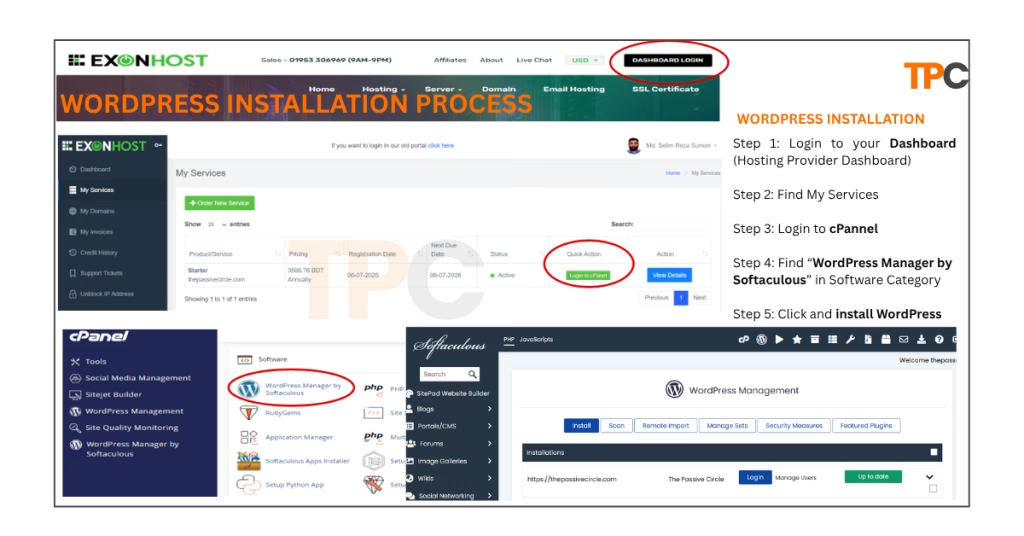
Bluehost, Hostinger, and SiteGround are the most popular web hosting providers right now. They allow you to install WordPress with one click. No coding. No file uploads. Click “Install WordPress” from your hosting dashboard, and you’re done.
ExonHost is the best website providers in banglasedh with 24/7 support. I’m currently using their service. I’m personally using their hosting, and just last night at 11 PM, I had a chat with their support team, they were quick, friendly, and extremely helpful.
If you’re in Bangladesh and looking for a dependable local hosting provider, I highly recommend ExonHost.
Here is a pro tip for you: Stick with the default Gutenberg editor. It’s light, easy for beginners, and works great with Blocksy, Kadence, or Astra themes. I’m currently using the Gutenberg editor with Blocksy themes.
Once installed, choose a basic, fast theme:
- Astra or Blocksy (perfect for affiliate blogs)
- Kadence (great for customization)
- Use your host’s starter theme (Bluehost WonderTheme is solid for beginners).
I’ve got a ready‑made Affiliate WordPress Template for you no setup hassle, no time wasted. And the best part? It’s 100% free!
Here’s what’s inside:
Blocksy theme with Gutenberg editor
Essential plugins already set up
A sample blog to get you started
Step‑by‑step PDF guide to walk you through everything
No cost. Just pure value.
Grab it here! And save your time!
Grab Your Free Affiliate WordPress Template!
I’ve got a ready‑to‑use Affiliate WordPress Template for you — totally free!
- ✅ Blocksy theme with Gutenberg editor
- ✅ Essential plugins already installed
- ✅ Sample blog included
- ✅ Step‑by‑step PDF setup guide
Must-Have Core Pages (Trust + SEO)
Before publishing your first blog post, set up these essential pages:
- About Page
- Tell visitors who you are and why your blog exists.
- Share your journey—beginners trust authenticity over perfection.
- Privacy Policy
- Required by law if you collect data (contact forms, email opt-ins, analytics).
- Also, it improves your credibility with visitors and Google.
- Affiliate Disclosure
- Be transparent that you may earn commissions from affiliate links.
- Example: Some of the links on this site are affiliate links. This means I may earn a commission at no extra cost to you.
- Terms of Service
- Defend your legal rights and outline how users can use your site.
- Simple templates are available, or you can generate one from free online tools.
These pages aren’t legal formalities. They build trust with your audience and show credibility to search engines. Both are key to long-term affiliate success.
Your WordPress is set up, and your trust pages are ready. Now, your blog can accept content and affiliate links.
Step 4: Install Essential Affiliate Plugins (No Coding)
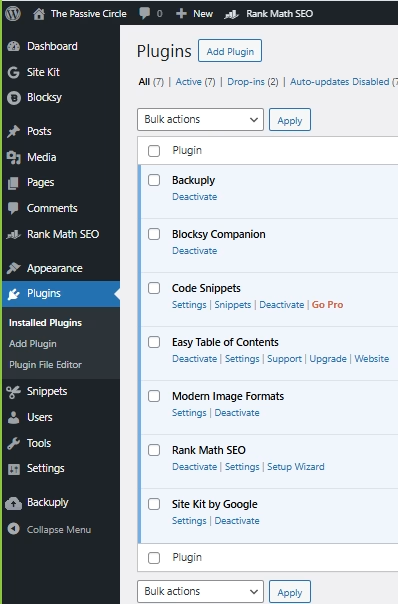
You don’t need to be a tech expert to run a powerful affiliate site. Some easy-to-use plugins can track, manage SEO, and analyze data for you. You won’t need to write any code.
Here’s what I recommend:
- ThirstyAffiliates or Pretty Links – Cloak long, messy affiliate links into clean, branded URLs. They make links look professional and track clicks through a simple process.
- BetterLinks or Lasso – These tools offer advanced link management with smart features. They’re great if you want more control or detailed tracking.
- Rank Math (or Yoast SEO) – Helps optimize your posts for Google. Rank Math is rapidly establishing itself as the go-to SEO plugin in 2026.
- MonsterInsights – Links your site to Google Analytics with a few clicks. You can see where your visitors come from and which pages get the most clicks.
Pro affiliate marketers use these plugins to build trust and boost conversions. Clean links seem safer. SEO plugins boost traffic. Analytics reveal which content earns money, so you can focus on what works.
You should use Simple Plugins to Start. Then Update.
Step 5: Create Keyword-Focused Content That Converts
Once your site is ready, it’s time to create content that brings traffic. And makes sales. The secret? Write for keywords people search for, especially ones with buyer intent.
Best Content Formats for Affiliate Success
- Product Reviews – Share honest pros, cons, and your verdict.
- Best-Of Lists – e.g., “Best Email Marketing Tools for Beginners (2026).”
- How-To Guides – Solve a problem and recommend tools based on your expertise.
- Product Comparisons – Side-by-side comparisons help readers choose.
- Deals & Discounts Posts – Round up promotions, coupons, or seasonal sales.
Choosing the Right Keywords
Look for low-competition and high buyer intent keywords.
Tools you can use:
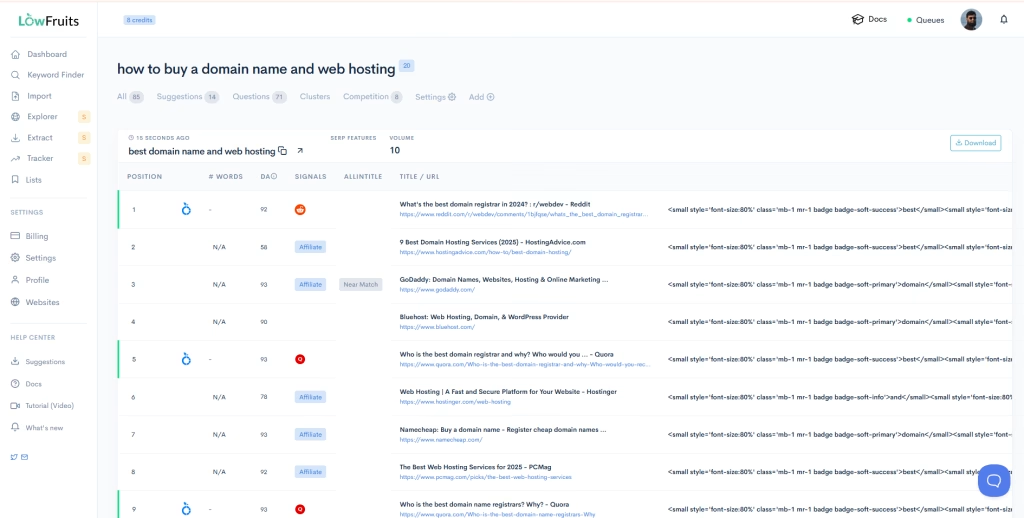
- LowFruits.io and KWFinder help me find easy keywords. These are often ignored by big players.
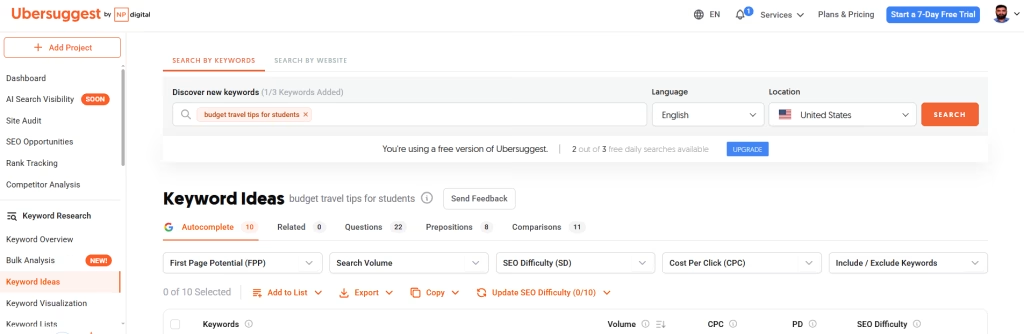
- Ubersuggest (Keyword Volume & Difficulty): This SEO tool, created by Neil Patel, is easy to use. You can start with a free version and later go for the paid version.
- You can use it to check.
- Keyword search volume
- SEO difficulty and competition
- Content ideas
- Backlinks
- Competitors’ domain authority
- Google Trends (Find Rising Niches): This free tool shows you trending topics. Use it to explore your trending keywords. Whether your keyword is growing or fading. With this tool, you can compare two or more keyword ideas. You can find out if the niche is seasonal or evergreen. Also, you can discover trending topics.
Layout Tips That Boost Conversions
- Use clear, scannable headings (H2 and H3).
- Add bullet points for key takeaways.
- Include comparison tables (features, prices, pros, and cons).
- Share your personal experience to build trust.
Content that solves a problem and uses the right keywords ranks faster. It converts better, too. This is because you provide people with what they want.
Step 6: Add Affiliate Links with Care and Provide Disclosure
Affiliate links work best when they feel natural inside your content. Don’t just throw them everywhere, place them where readers are ready to take action.
Smart Link Placement Ideas:
- Inside the flow of your blog post (where it feels relevant).
- Callout boxes highlight recommended tools.
- Resource sections (e.g., “Tools I Use for My Blog”)
- Comparison tables (features, pros, pricing)
Always add an affiliate disclosure.
Include a simple statement like this:

“This post contains affiliate links. I may earn a commission if you click and purchase, at no extra cost to you.”
This keeps you FTC-compliant and builds trust with readers.
Step 7: Drive Traffic with SEO and Email Lists
Your affiliate links can’t work without traffic. Begin with SEO basics and gradually expand your audience.
SEO Essentials for Beginners
- On-page SEO – Optimize title tags, meta descriptions, headings, and internal links.
- Off-page SEO – Build backlinks through guest posts, niche forums, and outreach.
- Technical SEO – Make sure your site runs fast, works well on mobile, and is error-free.
Build Your Email List from Day One
Don’t wait until later—start capturing emails immediately.
- Use lead magnets (free PDF, checklist, toolkit).
- Add pop-ups or sign-up forms on key pages.
- Send value-packed emails with helpful tips and occasional affiliate offers.
Affiliate traffic grows over time through evergreen content and consistent email outreach. More content and subscribers mean greater long-term earnings potential.
Track Performance & Optimize
Once your site is running, the real growth comes from tracking what works and improving it.
Track Key Metrics
- Use MonsterInsights or GA4 plugin to monitor:
- Clicks on affiliate links
- CTR (Click‑Through Rate) of buttons and callouts
- Bounce rate & session duration to spot weak pages
Test & Improve
- A/B test different headlines to see which grabs more clicks
- Move or style affiliate callouts to boost conversions
- Test different product placements inside the content
Monthly Content Audit
- Update stale blog posts with fresh info
- Replace or refresh affiliate links (check for expired deals)
- Refine CTAs to keep them clear, attractive, and action‑driven
Small monthly tweaks can lead to big conversion jumps over time. Track, test, and improve — it’s the affiliate marketer’s growth loop.
Common Mistakes & How to Avoid Them
Even beginners can avoid costly mistakes if they know what to watch out for.
Spamming Affiliate Links
Don’t drop affiliate links everywhere.
Instead, weave them naturally into helpful content, product comparisons, or personal recommendations.
Skipping Disclosure & Legal Pages
Lack of transparency can hurt your credibility (and even break affiliate program rules).
Instead, always include Affiliate Disclosure, Privacy Policy, Terms, and Disclaimer.
Choosing a Weak or Overly Broad Niche
Picking a huge, competitive niche makes it hard to rank.
Instead, start with a focused, low‑competition niche to grow faster.
Writing Only for SEO
SEO is important, but readers come first.
Instead, write to solve real problems. SEO will follow naturally when content is valuable.
Frequently Asked Questions About Making a Website (FAQs)
2. Get domain & hosting
3. Install WordPress
4. Pick theme & plugins
5. Create core pages
6. Publish content
7. Promote & optimize