This post may contain affiliate links. If you purchase through these links, I may earn a small commission at no extra cost to you. Read our full Affiliate Disclosure
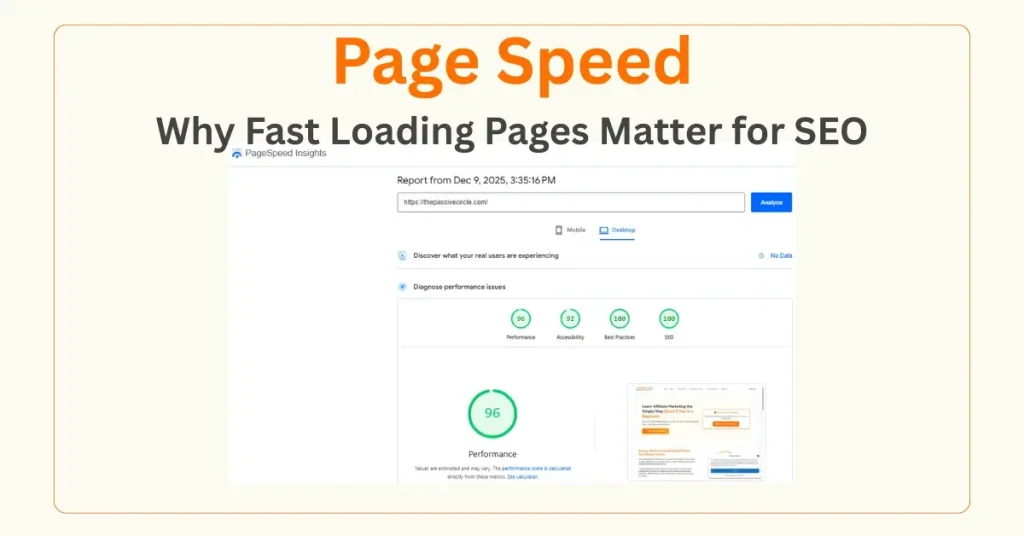
Page speed is one of the most straightforward but most powerful SEO factors. When your pages load fast, people stay longer, read more, and interact with your content. When your site loads slowly, most visitors leave before the page even appears. Google notices this behavior and adjusts your rankings accordingly.
Page Speed and SEO both terms are strongly inter-related.
As a beginner in blogging or affiliate marketing, improving your page speed is one of the easiest ways to get quick SEO wins. You don’t need technical skills to make your site faster. A few simple changes can make a big difference in traffic, user experience, and even affiliate conversions.
In this guide, we’ll walk through what page speed really means, why it matters, and the exact steps you can take to speed up your site. This is your complete beginner-friendly explanation of why page speed affects SEO and what you can do to improve it today.
Table of Contents
What Page Speed Really Means
Page speed is how fast your page loads from the moment a user clicks your link. It includes how quickly text appears, how soon images display, and how smooth the page feels when scrolling.
A fast site loads within 2–3 seconds.
A slow site takes 5–10 seconds or more.
Most beginners assume users will wait, but this is not true. People expect websites to load instantly. If your site is slow, visitors leave before they even read your content, and Google sees this as a sign of a poor experience.
Page speed is not just a technical topic. It’s a direct part of how users feel when they visit your blog.
Why Page Speed and SEO Matters
Google uses a mobile-first approach today, and page speed is a key part of that system. When your pages load fast, visitors stay longer and interact with the content. The longer they wait, the better your SEO improves over time.
Here’s how page speed affects your SEO:
- Faster pages reduce bounce rate
- Visitors stay longer on the page
- More users click your internal links
- Mobile users get a smoother experience
- Google trusts fast sites more
- Fast sites convert better
If your site is slow, people leave. When they go quickly, Google sees that as a negative signal. But if your site is fast, visitors stay and explore more. These actions tell Google your content is worth ranking.
A Simple Story: How Speed Improved My Own Blog
When I started my first beginner blog, I didn’t think about page speed at all. I used a heavy theme, uploaded large images, and installed too many plugins. My posts were good, but readers left fast.
When I tested my site on PageSpeed Insights, the mobile score was terrible.
After I switched to a fast theme, reduced the number of heavy plugins, and compressed my images, everything changed.
My page speed went up.
My bounce rate dropped.
My rankings improved.
This experience taught me something clear:
Speed is not optional. It’s a core part of SEO.
What Good and Bad Page Speed Looks Like
Before (Slow Page Experience)
- Page loads in 6+ seconds
- Images take a long time to appear
- The layout jumps around while loading
- Buttons load late
- Visitors leave within seconds
After (Fast Page Experience)
- Loads in under 2–3 seconds
- Images are compressed
- Layout is stable
- Smooth scrolling
- Visitors stay longer
A fast site feels smooth. And smooth sites keep visitors reading.
Main Causes of a Slow Website
If your site feels slow, it usually comes from a few common issues:
- Large image files
- Heavy themes
- Too many plugins
- Weak hosting
- Unoptimized scripts
- No caching
- Too many homepage elements
- Big pop-ups or sliders
The good news is that most of these problems are easy to fix.
Key Steps to Improve Page Speed
1. Choose Fast Hosting
Your hosting provider has a greater impact on your speed than anything else. If your hosting is slow, no amount of optimization can fully fix it.
Beginner-friendly fast hosting options include:
A good hosting plan can instantly improve your load time.
2. Use a Lightweight Theme
Heavy themes in too many scripts slow down your site.
Choose a theme built for speed, such as:
- Blocksy Theme
- GeneratePress
These themes load fast and look clean on mobile.
3. Compress Your Images
Large, uncompressed images are one of the biggest reasons new blogs load slowly.
You can fix this by using:
Aim to keep image files under 200 KB when possible.
4. Remove Unnecessary Plugins
Plugins add extra code.
Too many plugins make your site heavy and slow.
Keep only the plugins you need. Remove the rest.
Good plugins for beginners include:
- Rank Math Pro (SEO)
- PrettyLinks (affiliate link management)
- Fluent Forms (lightweight forms)
- Easy Table of Contents
Avoid plugins that add animations, sliders, or large scripts.
5. Enable Caching
Caching creates a ready version of your page so it loads faster.
Most hosting providers include caching features. If yours doesn’t, you can use caching plugins.
This simple step can cut load time by 30–50 per cent.
6. Clean Up Your Homepage
Your homepage should be simple and light.
Avoid:
- Image-heavy sliders
- Multiple animations
- Large background videos
- Too many widgets
A clean homepage improves speed everywhere.
7. Reduce External Scripts
Too many tracking tools, chat widgets, and pop-ups slow down your site.
Use only what you really need.
If you use Systeme.io for email lists or funnels, keep pop-ups light and straightforward.
Tools to Measure and Improve Page Speed
Google PageSpeed Insights
Shows you your speed score and simple ways to fix issues.
GTmetrix
Gives more detail on what’s slowing your site.
Google Search Console
Tracks speed issues across your whole site.
Ubersuggest
Helps you monitor bounce rate and user behaviour.
These tools are easy to use, even for beginners.
Small Tutorials for Beginners
How to Test Page Speed
- Go to PageSpeed Insights
- Enter your URL
- Check both Mobile and Desktop scores
- Scroll down and find the section called “Opportunities.”
- Fix the suggestions one by one
- Test again after improvements
How to Compress Images
- Upload your image to Canva
- Export as WebP or compressed JPG
- Run it through Imagify or TinyPNG
- Upload the smaller file to WordPress
Small images lead to significant speed improvements.
How to Clean Up Plugins
- Go to Plugins in WordPress
- Check which ones you haven’t used in months
- Deactivate unnecessary ones
- Delete them
- Test your site speed again
A lighter site loads faster and ranks better.
Page Speed Mistakes to Avoid
- Using a heavy theme
- Uploading large images
- Overloading your homepage
- Using too many pop-ups
- Keeping unused plugins
- Using slow hosting
- Ignoring mobile speed
- Adding video backgrounds
Avoiding these mistakes can instantly improve your speed.
SEO Angle: Why Google Rewards Fast Sites
Google’s goal is to help users find answers fast.
A slow page stops that goal.
A fast page supports it.
Fast pages help Google by:
- Keeping users happy
- Reducing bounce rate
- Increasing time on site
- Improving user flow
- Supporting mobile-first indexing
A fast site tells Google your content is worth recommending.
For beginners, improving speed is one of the easiest SEO wins you can get.
Quick Page Speed Checklist Before Publishing
- Did I compress my images?
- Is my theme lightweight?
- Is my hosting fast?
- Did I remove heavy plugins?
- Is caching enabled?
- Does the site load fast on mobile?
- Is my homepage clean?
- Are my pop-ups small and simple?
- Did I test the URL in PageSpeed Insights?
Checking these items helps keep your site fast.
Next Step (CTA)
Now that you understand page speed, the following guide will help you increase user activity on your pages:
👉 Read: Engagement Metrics for Beginners
This will show you how to turn your visitors into active readers, further improving your SEO.