This post may contain affiliate links. If you purchase through these links, I may earn a small commission at no extra cost to you. Read our full Affiliate Disclosure
Choosing the best WordPress theme can be hard, especially for new affiliate bloggers. One wrong pick, and your site could be slow, hard to customize, or plain ugly. In this Blocksy Theme Review 2025, I’ll show you why Blocksy might be the game changer you’ve been looking for.
It’s efficient, optimized for search engines, and simple for beginners. It’s great for creating a professional affiliate site without coding hassles.
When I started my affiliate blog The Passive Circle, I believed that picking a theme would be simple. Wow… I was wrong.
I spent weeks switching between different WordPress themes. Some looked beautiful, but it took forever to load. Others loaded fast, but they made me feel like I needed a degree in coding just to edit the header.
It was exhausting and frustrating. It was exhausting. At one point, I even thought maybe I wasn’t techy enough for blogging.
Then, almost by accident, I found the Blocksy theme. (Learnt from a YouTube tutorial)
Then, almost by accident, I discovered Blocksy Theme through a YouTube tutorial. The moment I installed it, everything changed:
- My site loaded more quickly.
- The design looked clean and professional.
- And for the first time, I wasn’t afraid to open the settings menu.
In this review, I’m going to share exactly why I think Blocksy is perfect for affiliate bloggers. Especially if you’re just starting. We’ll look at speed, SEO, design, and how beginner-friendly it is. So you can decide if it’s right for you.
Table of Contents
What is Blocksy?
Blocksy is a free WordPress theme. It focuses on speed, flexibility, and modern features.
It works great with Gutenberg, the default WordPress editor. You can design your pages easily, without needing extra page builders.
There’s a Pro version with advanced features. I used the free version, and it worked well for my affiliate blog. It helped me create a professional look.
What I love is that it’s lightweight, mobile-friendly, and designed for SEO. I wanted Google traffic and an easy reading experience.
Why Blocksy Theme Is Great for Affiliate Bloggers (My Experience)
Here’s what I’ve personally noticed after using Blocksy:
Fast Loading Speeds
When someone visits your blog, speed is the first thing they notice (even if they don’t say it).
Blocksy is lightweight, so pages load super fast without you touching a single line of code.
In my case, after switching to Blocksy, my Google PageSpeed score jumped from 67 to 97.

That’s free SEO power without extra plugins.
A faster site is important. It keeps visitors on your page longer. Also, Google is more likely to rank you higher.
Beginner-Friendly Customization
I’m not a coder, and I don’t want to become one.
Blocksy lets me change colors, fonts, and layouts with just a few clicks.
For example, I matched my brand colors in under five minutes—no YouTube tutorial needed.
SEO-Ready
Blocksy’s clean code and mobile responsiveness gave me an SEO edge right from the start.
I still need to write good content, but at least my theme isn’t holding me back.
Gutenberg-Friendly
I write all my posts in Gutenberg.
With Blocksy, it feels smooth. There are no strange formatting issues or broken layouts.
Features I Love in Blocksy Theme
- Starter Sites: These are pre-built designs you can import instantly. I used one as a base for my blog, then tweaked it to match my style.
- Global Styling: Change your brand colors and fonts site-wide in seconds. I love this for keeping everything consistent.
- Custom Header/Footer Builder: Once I added a Get My Free Toolkit button to the header, and I didn’t change any code.
- Widget Areas – Perfect for placing affiliate banners or newsletter forms in my sidebar. As you can see a banner of Systeme.io in my right sidebar. It is one of my favorite Email Marketing tools.
- Mobile Optimization—My blog looks good on my phone, which is where most of my readers browse.

Pros and Cons
Pros:
- Lightweight and very fast
- Beginner-friendly settings
- Works well with Gutenberg
- Excellent free version
Cons:
- Some advanced features are locked in Pro
- Slight learning curve if you’ve never customized a theme before
Blocksy vs Astra and GeneratePress
I’ve also tried Astra and GeneratePress; they’re good themes too.
But Blocksy feels more modern. Especially in how it handles customization.
With Astra or GeneratePress, I had to install extra plugins to get certain design options.
With Blocksy, I got more flexibility out of the box.
Here’s a comparison of Blocksy vs. Astra vs. GeneratePress
| Feature | Blocksy | Astra | GeneratePress |
|---|---|---|---|
| Speed & Performance | Lightweight and highly optimized; scores excellent on PageSpeed without extra tweaks. | Very fast; one of the earliest lightweight themes on WordPress. | Ultra-lightweight and minimal; excellent speed even without caching. |
| Design Options (Out of the Box) | Rich customization via Customizer, advanced header/footer builder, multiple layouts, and modern effects without extra plugins. | Good customization, but many advanced features need Astra Pro or extra plugins. | Basic design options are in the free version; most advanced styling needs GP Premium. |
| Header/Footer Builder | Drag-and-drop builder with live preview in the free version. | Header/footer customization in the free version is limited; the full builder is in Pro. | Header/footer customization is mostly in the Pro version; basic in the free. |
| Starter Templates | Modern, fully responsive templates built with Gutenberg or Elementor. | Huge template library; mostly Elementor and Gutenberg ready. | Decent but smaller library; optimized for speed over variety. |
| WooCommerce Features | Advanced shop layouts, AJAX add-to-cart, and product quick view are included for free. | WooCommerce options are good, but some need the Pro add-on. | Basic WooCommerce integration; advanced features in Pro. |
| Ease of Use | Intuitive interface; everything is organized in the Customizer. | User-friendly; relies on add-ons for more features. | Very simple and clean; fewer settings in the free version. |
| Extra Plugins Needed | Few to none for common customizations. | Often requires multiple add-ons for design tweaks. | Often requires a premium plugin for more control. |
| Pricing (Pro) | Affordable lifetime plan; generous free version. | Annual and lifetime options; advanced features locked in Pro. | Annual and lifetime plans; most customizations are behind GP Premium. |
How to Install and Set Up Blocksy
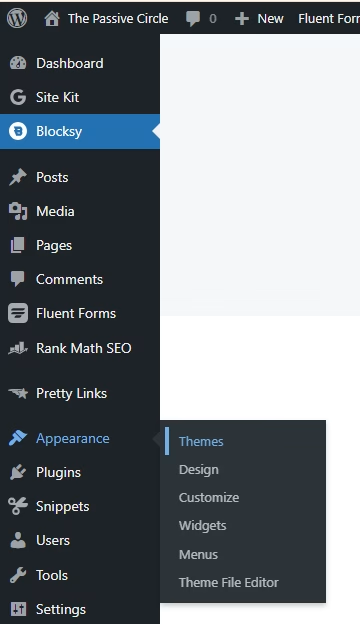
- In your WordPress dashboard, go to Appearance → Themes → Add New.
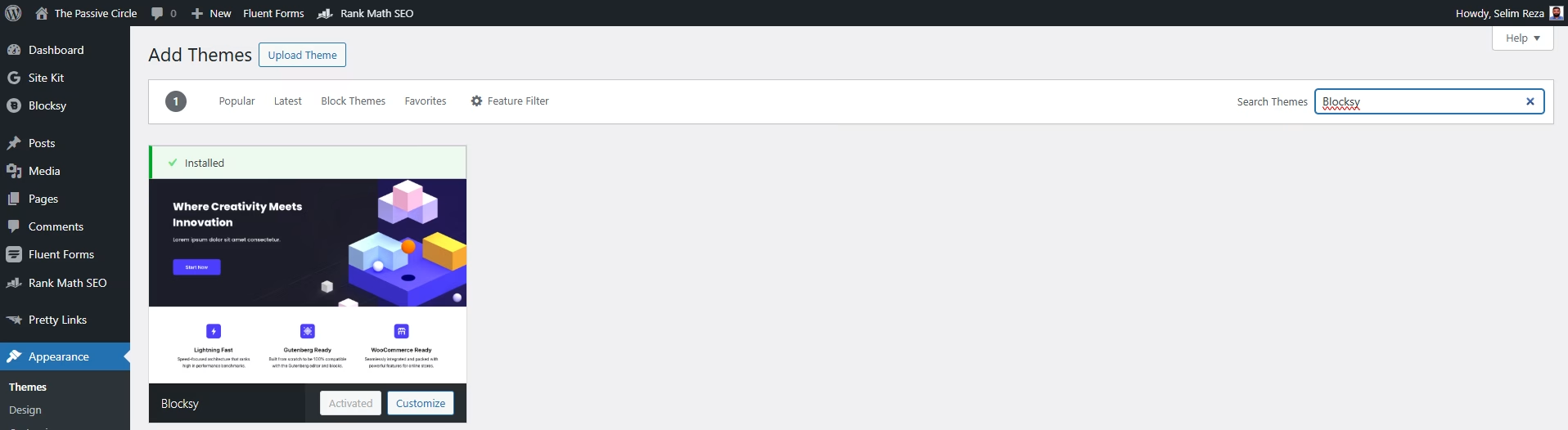
2. Search for “Blocksy” and click Install, then Activate.
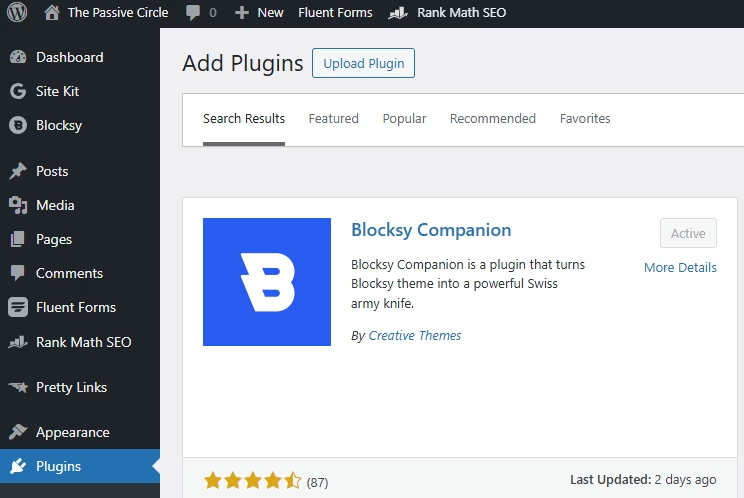
3. Install the Blocksy Companion plugin for extra features and starter sites.
4. Import a starter site that matches your niche and start customizing.
If you use the Easy Table of Contents plugin, Blocksy works perfectly with it. I’ve written a full tutorial 10 Simple Steps to Master Easy Table of Contents in Blocksy.
Pricing
- Free—enough for most beginners to create a great-looking blog.
- Pro – Starts at $69/year. Unlocks advanced header/footer features, more design options, and WooCommerce extras.
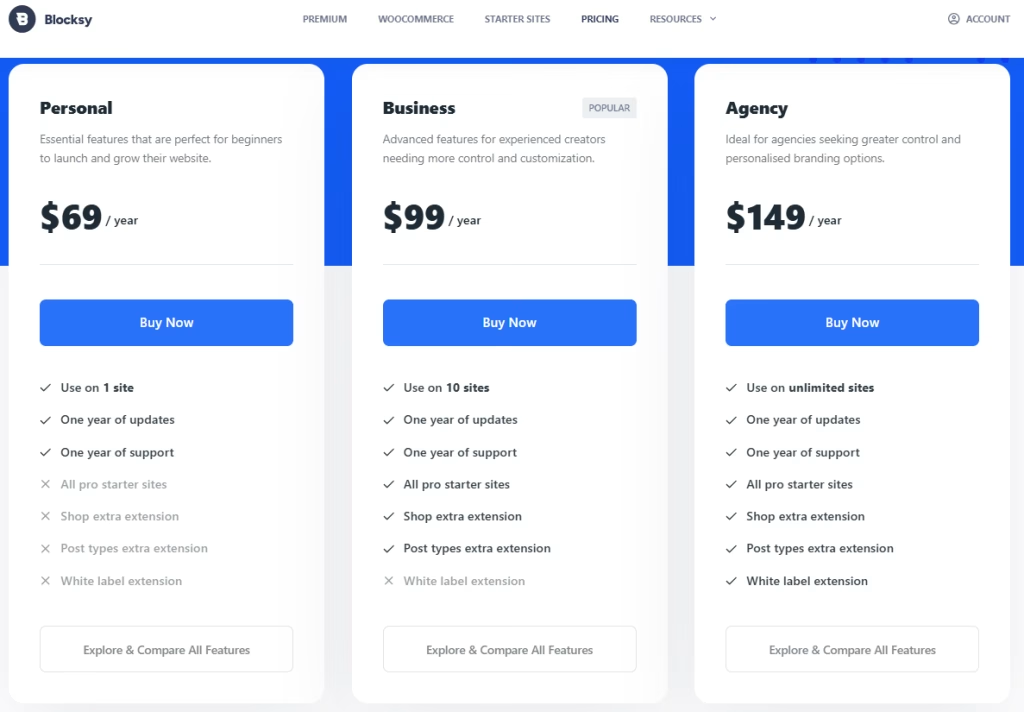
I started free and only considered Pro after I was sure I would stick with blogging.
Conclusion
Blocksy was the first theme that made me feel confident as a blogger.
It’s fast, flexible, and doesn’t make beginners feel like they’re “over their heads.”
Try Blocksy if you need a theme that loads fast, looks sharp, and is user-friendly. You won’t need to hire a developer!
Try Blocksy Free | Upgrade to Pro
FAQs of Blocksy Theme Review
Is Blocksy a WordPress theme?
Yes. Blocksy is a modern, lightweight WordPress theme designed for speed, flexibility, and compatibility with Gutenberg, Elementor, and other page builders. It’s free to use, with a Pro upgrade available for advanced features.
Is Blocksy better than Astra?
It depends on your needs. Astra is very popular and has a huge user base, but Blocksy offers more design customization out-of-the-box, especially in the free version. If you want a fresher design and more control without extra plugins, Blocksy is often the better pick.
Which is better for beginners, Blocksy or Astra?
For beginners, Blocksy feels easier to customize without touching code. Astra is great too, but you may need extra plugins to achieve the same look and functionality that Blocksy offers right away.
What are the requirements for using the Blocksy theme?
You only need a WordPress installation (self-hosted or WordPress.com Business plan) and PHP 7.4 or higher. Good hosting will help Blocksy run at its fastest.
Is Blocksy theme free to use?
Yes. The free version is powerful enough for most beginner websites and includes fast performance, mobile-friendly layouts, and multiple starter sites.
Does Blocksy have a Pro version?
Yes. Blocksy Pro adds premium features like advanced header/footer builders, conditional sidebars, custom WooCommerce options, and sticky or floating elements.
What is included in Blocksy Pro?
Blocksy Pro includes:
Advanced menu options
Multiple header designs
WooCommerce customization tools
Custom sidebars
Hooks and filters for developers
White label branding for agencies
Is there a free download for Blocksy Pro?
There is no legal free download for Blocksy Pro. You should always download themes from official sources to ensure security and updates.
What are Blocksy starter sites and how do I use them?
Yes. Blocksy works seamlessly with Elementor, making it easy to design custom pages. Many of its starter sites are also Elementor-ready.
Is Blocksy compatible with Gutenberg?
Absolutely. Blocksy is fully optimized for the Gutenberg editor, which means you can build beautiful layouts without needing a separate page builder.
Can I use a child theme with Blocksy?
Yes, and it’s recommended if you plan to make custom code changes. A child theme ensures your modifications aren’t lost during updates.
What is the Blocksy child theme and why should I use it?
The child theme is a copy of the main theme’s structure where you can add your own custom CSS or PHP. This keeps your changes safe during theme updates.
How do I download and install the Blocksy theme?
Go to your WordPress dashboard → Appearance → Themes → Add New → Search for “Blocksy” → Install → Activate. You can also download it from the WordPress theme repository.
Can I customize Blocksy without coding?
Yes. Blocksy’s customizer allows you to change colors, fonts, layouts, and more with just a few clicks — no coding needed.
Does Blocksy theme support WooCommerce?
Yes. Blocksy integrates deeply with WooCommerce and offers product page customization, cart styling, and checkout layout control.
How fast is the Blocksy theme compared to other themes?
Blocksy is one of the fastest WordPress themes available. It’s lightweight, optimized for performance, and scores highly on Google PageSpeed Insights without heavy optimization.
Is Blocksy theme good for SEO?
Yes. It’s coded for SEO best practices, is mobile responsive, and loads quickly — all factors that can help your site rank better.
What kind of websites can I build with Blocksy?
Almost anything: affiliate blogs, business sites, portfolios, e-commerce stores, educational sites, and news/magazine layouts.
Can I migrate my existing site to Blocksy?
Yes. Just activate Blocksy, adjust your design in the customizer, and update any styling to match your branding. You won’t lose your content.
Does Blocksy offer built-in demo sites?
Yes. These starter sites are designed for different niches and can be imported in one click to get your site up fast.
What are the best free features of Blocksy?
Some of the standout free features include a header/footer builder, advanced color controls, global typography settings, and multiple blog layouts.
Is there a lifetime deal for Blocksy Pro?
Yes. Blocksy offers a lifetime plan that includes all Pro features and updates without yearly renewal fees.
Can I use Blocksy for affiliate blogs?
Definitely. Its fast load times, SEO readiness, and easy customization make it ideal for affiliate marketers who want a professional look without a developer.
How do I import a Blocksy theme demo?
Install and activate the Blocksy Companion plugin → Go to Appearance → Starter Sites → Choose your template → Click “Import.”
Is Kadence theme better than Blocksy?
Kadence is a great theme too, but Blocksy often offers more free customization options. The best choice depends on your design preferences and required features.
What makes Blocksy different from Kadence?
Blocksy’s interface feels more modern and offers more styling controls in the free version. Kadence focuses more on simplicity and speed.
How do I update the Blocksy theme?
Go to Dashboard → Updates or Appearance → Themes, and click “Update” when a new version is available.
What kind of support does Blocksy offer?
Blocksy offers free community support via forums and priority support for Pro users. Their documentation and video tutorials are also excellent.
Is Blocksy worth it for new bloggers in 2025?
Yes. It’s beginner-friendly, fast, SEO-optimized, and offers features that usually require paid plugins. For a new blogger, it’s one of the smartest theme choices available.
I share everything I learn about affiliate marketing as I go. Feel free to check out my other blogs.
- How to Do Keyword Research for Free (Find Easy Keywords for Beginners)

- Link Juice in SEO: A Simple & Easy Guide for Beginners
- How Bloggers Make Money With Affiliate Marketing Funnels (Simple Guide)
- Systeme.io Pricing Explained for Beginners (Free vs Paid Plans)
- Best Email Marketing Tools for Beginners With No Website
Suggested Blog Posts
- The Ultimate Affiliate Marketing Guide for Beginners 2025 [Proven + Powerful Strategies]
- Systeme.io Ultimate Guide 2025: Login, Pricing, Features, Reviews, and How to Get Started
- ExonHost Review 2025: Best Hosting for Fast & Reliable Websites in Bangladesh
- 10 Simple Steps to Master Easy Table of Contents in Blocksy
- Blocksy Theme Review 2025: The Best WordPress Theme for Affiliate Bloggers
- How to Use Ubersuggest for SEO and Skyrocket Blog Traffic Fast (Honest Review + Free Trial)
- Avoid These 10 Affiliate Marketing Mistakes Beginners Always Make