This post may contain affiliate links. If you purchase through these links, I may earn a small commission at no extra cost to you. Read our full Affiliate Disclosure
Before starting a website, one of the first things beginners usually think about is the cost of hosting. Since hosting is a recurring expense, understanding the pricing structure helps you plan better from the beginning.
This is why many new bloggers and small business owners try to understand Hostinger pricing before choosing their hosting plan.
Hostinger is an international web hosting company that mainly focuses on beginners and small website owners. Their platform is designed in a way that even someone with no technical experience can set up a website without feeling overwhelmed.
Most of their plans include some useful built-in features such as:
- Free SSL certificate
- Free domain name for the first year
- Weekly or daily backups
- Website builder
- 24/7 customer support
Because of these beginner-friendly features, Hostinger has become a popular choice among users from countries like the United States, United Kingdom, Canada, Australia, and many European regions.
Another important point for beginners is risk. If something goes wrong after purchase, you should have an option to cancel.
Hostinger offers a 30-day money-back guarantee, which allows new users to test the service without making a long-term commitment.

However, one area where many beginners get confused is the number of available plans. Hostinger offers multiple pricing tiers, and each plan comes with different limits on storage, websites, backups, and performance.
Choosing the wrong plan in the beginning may either limit your website growth or make you spend more than necessary.
So in the next, we will look at Hostinger’s main hosting plans and understand what each one offers.
In the following section, we will break down Hostinger Premium, Business, and Cloud Startup plans to help you choose the most suitable option for your website.
Table of Contents
Hostinger Hosting Plans Overview
Hostinger currently offers three main shared hosting plans for beginners and small website owners.
These are:
- Premium Plan
- Business Plan
- Cloud Startup Plan
Each of these plans comes with a different pricing structure, storage capacity, backup system, and performance level.
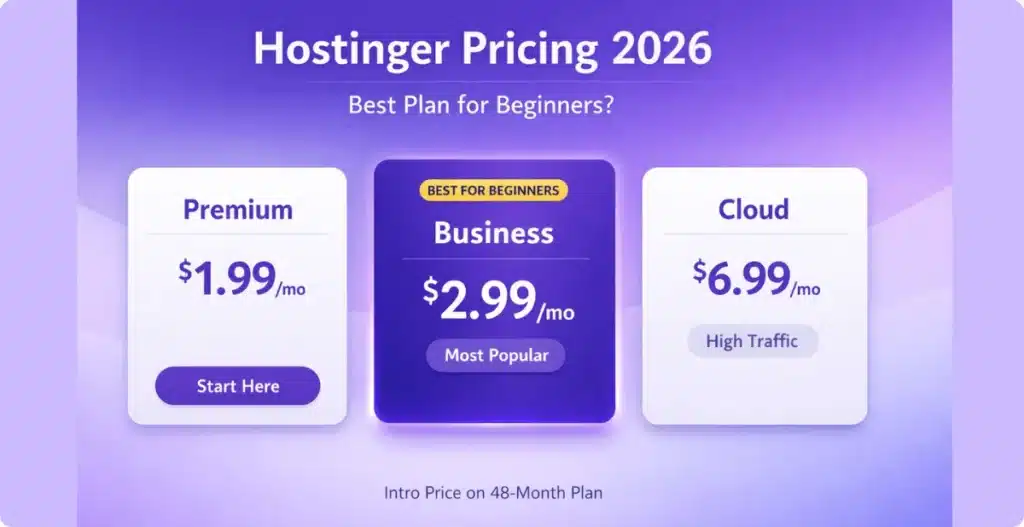
As of 2026, Hostinger’s introductory pricing starts from around $1.99 per month, but this price is available only when you choose a long-term billing cycle (usually 48 months).
Here is a quick breakdown of the starting prices:
| Plan | Starting Price | 48-Month Total Cost |
|---|---|---|
| Premium | $1.99/month | $95.52 |
| Business | $2.99/month | $143.52 |
| Cloud Startup | $6.99/month | $335.52 |
These promotional prices are commonly available in countries like the United States, United Kingdom, Canada, Australia, and most European regions, although the final billing amount may vary slightly depending on local currency.
Now let’s understand what each plan actually offers.
Hostinger Premium vs Business plan
The Premium Plan, which starts from $1.99 per month, is designed for beginners who are planning to run a personal blog or a small affiliate website. It allows hosting up to 3 websites, includes 20 GB SSD storage, and provides 2 free email accounts per site.
The Business Plan starts from around $2.99 per month on a 48-month contract. This plan supports up to 50 websites, offers 50 GB NVMe storage, and includes daily backups along with a free CDN, which can improve lightning-fast page loading speeds for international visitors.
For users who expect higher traffic or want to run multiple business websites, Hostinger also offers the Cloud Startup Plan, starting from approximately $6.99 per month. This plan allows up to 100 websites, includes 100 GB NVMe storage, and comes with additional performance features like a dedicated IP address and increased server resources.
| Plan | Premium | Business ⭐ | Cloud Startup |
|---|---|---|---|
| Starting Price (48-Month) | $1.99/mo | $2.99/mo | $6.99/mo |
| Renewal Price | $10.99/mo | $16.99/mo | $25.99/mo |
| Storage | 20 GB SSD | 200 GB NVMe | 200 GB NVMe |
| Websites | 100 | 100 | 300 |
| Free Domain | Yes | Yes | Yes |
| Daily Backups | No | Yes | Yes |
| Dedicated IP | No | No | Yes |
| Performance | Standard | 5x Faster | 10x Faster |
| Choose Premium | Choose Business | Choose Cloud |
*Introductory pricing on 48-month billing cycle. Renewal rates may vary.
All three plans include some common features such as:
- Free SSL certificate
- Free domain name (first year)
- WordPress installation
- Website builder
- 24/7 customer support
The main difference between these plans is not just the price, but also how much performance and scalability you get as your website grows over time.
Most beginners usually start with the Premium plan because of its lower upfront cost. In the next section, we will look at whether this plan is actually enough for a new blog or affiliate website.
Hostinger Premium Plan (Best for Beginners)
The Premium plan is one of the most affordable WordPress hosting plans available in 2026, specifically designed for those who want a lower upfront cost while still getting professional features.
If you are looking for affordable WordPress hosting plans, Hostinger’s Premium tier is a top contender. Starting your first blog, affiliate website, or portfolio site, the Hostinger Premium Plan is usually the most suitable option.
This plan currently starts from around $1.99 per month when you choose the 48-month billing cycle. That means you will need to pay approximately $95.52 upfront for four years of hosting. Choosing the 4-year cycle ensures a lower upfront cost compared to paying for a premium host month-to-month.
Compared to paying monthly hosting fees elsewhere, this significantly reduces your initial long-term hostinger subscription prices.
The Premium plan allows you to host up to 3 websites, which is more than enough for most beginners who are planning to launch a single blog or maybe a niche affiliate site.
You also get:
- 20 GB SSD storage
- 2 email accounts per website (free for 1 year)
- Free domain name (first year)
- Free SSL certificate
- Weekly backups
- WordPress auto-installer
- Website builder included
These features are usually enough for a beginner-level website that does not expect heavy traffic in the early stages.
One important thing to understand here is renewal pricing.
After your initial 48-month term ends, the Premium plan typically renews at around $10.99 per month. So it is better to consider the long-term value instead of just the introductory offer.
For beginners who want to test affiliate marketing or blogging without spending too much money upfront, this plan provides a balanced starting point.
If your website grows later, you can always upgrade to the Business or Cloud plan without migrating your site.
If you are launching your first blog or affiliate site, the Premium plan is usually enough to get started without overspending.
Check Latest Premium Plan Pricing
Hostinger Business Plan (Best for Growing Websites)
If you are planning to run more than one website or expect your traffic to grow over time, the Hostinger Business Plan can be a more suitable option than the Premium plan.
This plan currently starts from around $2.99 per month when you choose the 48-month billing cycle. The total upfront cost for four years comes to approximately $143.52.
Compared to the Premium plan, this gives you significantly more resources to handle website performance and growth.
The Business plan allows you to host up to 50 websites and includes:
- 50 GB NVMe storage
- 5 email accounts per website (free for 1 year)
- Daily backups
- Free CDN integration
- Free domain name (first year)
- Free SSL certificate
- WordPress staging tool
One of the biggest advantages of this plan is the inclusion of daily backups, which is not available in the Premium plan.
This becomes important when you are running an affiliate website, blog, or small business site where regular content updates are made. If anything goes wrong during updates, your website can be restored easily.
Another performance-related feature included in this plan is the Content Delivery Network (CDN), which helps your website load faster for visitors from countries like the United States, United Kingdom, Canada, Australia, and other European regions.
For example, I am currently using the Hostinger Business plan for this website (thepassivecircle.com), mainly because it offers:
- Better storage capacity
- Daily automated backups
- Improved loading speed for global visitors
- Seamless handling of traffic spikes
This makes it a practical option if you are planning to grow your website beyond a single blog in the future.
After the promotional period ends, the Business plan usually renews at around $16.99 per month.
So while the upfront cost is slightly higher than the Premium plan, the added performance and backup support may be useful for growing websites.
If you are planning to build multiple websites or grow your affiliate blog over time, the Business plan offers better long-term performance.
View Business Plan Details
Hostinger Cloud Startup Plan (Best for High Traffic Websites)
If you are planning to run a business website, an eCommerce store, or expect higher traffic from the beginning, the Hostinger Cloud Startup Plan can offer more performance compared to shared hosting plans.
This plan starts from around $6.99 per month when you select the 48-month billing cycle. The total upfront cost comes to approximately $335.52 for four years.
Although the price is higher than the Premium and Business plans, this plan is designed for users who need more stability and server resources.
With the Cloud Startup plan, you can host up to 100 websites and get:
- 100 GB NVMe storage
- 10 email accounts per website (free for 1 year)
- Daily backups
- Free CDN
- Dedicated IP address
- Priority 24/7 support
- Higher server resources (RAM & PHP workers)
One important difference between this plan and the previous ones is the dedicated IP address, which can improve security and email deliverability for business websites.
This plan also includes additional performance resources such as increased RAM and more PHP workers. These help your website handle sudden traffic spikes without slowing down.
For beginners, this plan may not be necessary in the early stages. However, if you are running an online store or expecting international traffic from countries like the US, UK, Canada, or Europe, the added performance can be useful.
After the initial promotional period ends, the Cloud Startup plan usually renews at around $25.99 per month.
So it is generally recommended for growing business websites rather than beginner-level blogs.
If your website expects higher traffic or you are planning to run an online store, the Cloud Startup plan may offer better stability and performance.
Explore Cloud Startup Plan
Choosing the Right Hostinger Plan
After looking at the pricing and features of each Hostinger hosting plan, the next step is to decide which one is suitable for your website.
This usually depends on how many websites you want to run and how much traffic you expect in the beginning.
If you are planning to launch your first blog or affiliate website, the Premium Plan is generally enough. It allows you to host up to 3 websites and provides the basic resources needed to get started without spending too much upfront.
However, if you are planning to:
- Build multiple websites
- Grow your affiliate blog over time
- Target international traffic
- Update content frequently
Then the Business Plan can offer better long-term flexibility.
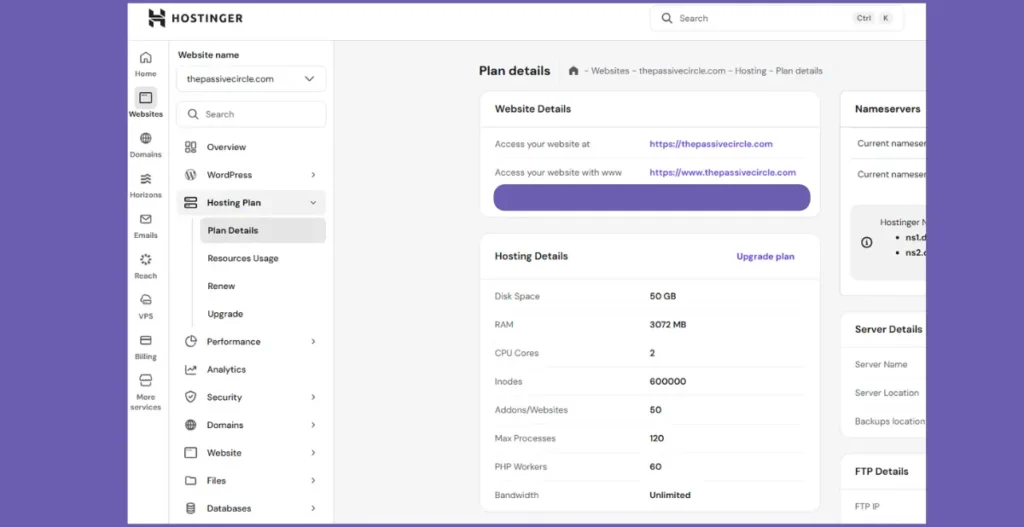
For example, since I am currently running this website (thepassivecircle.com) on the Business plan, I chose it mainly for daily backups and improved loading performance for visitors coming from the US, UK, and Canada.
If your website grows in the future, you can upgrade your hosting plan from Premium to Business or Cloud without migrating your site manually.
This means you can start small and scale your hosting resources as your website traffic increases.
If you are planning to run an online store or expect higher traffic from the beginning, then the Cloud Startup Plan may offer more stability due to its dedicated server resources.
Otherwise, beginners usually do not need this plan in the early stage.
If you are still unsure how Hostinger compares with other hosting providers, you can check our detailed guide on:
👉 Hostinger vs ExonHost: Which Hosting Is Better for Beginners?
This can help you understand how Hostinger performs in terms of speed, pricing, and beginner support.
For beginners who want to start a blog or affiliate website, the Premium plan is usually the most cost-effective starting point. You can upgrade later as your website grows.
Hostinger Pricing 2026 – Tips & Discounts
When looking at Hostinger pricing, it is important to understand how their promotional offers actually work.
Most of the affordable WordPress hosting plans monthly prices, such as $1.99/month for Premium or $2.99/month for Business, are available only when you select a long-term billing cycle like 24 or 48 months.
For example:
- Premium Plan: $1.99/month → $95.52 for 48 months
- Business Plan: $2.99/month → $143.52 for 48 months
- Cloud Startup: $6.99/month → $335.52 for 48 months
[Prices may vary slightly based on regional taxes or limited-time seasonal setup fees.]
If you choose a shorter billing cycle, the monthly cost may increase significantly.
Renewal
Another important thing beginners often miss is the renewal pricing.
After your initial hosting period ends:
- Premium usually renews at around $10.99/month
- Business renews at around $16.99/month
- Cloud Startup renews at around $25.99/month
So it is better to consider the long-term value before purchasing based only on the introductory price.
Discounts
Hostinger also runs seasonal promotions during events like:
- Black Friday
- Cyber Monday
- Holiday sales
- Back-to-school campaigns
During these periods, discounts can go up to 75% to 85% on long-term plans.
You may also find additional coupon codes from affiliate partners, which can reduce the upfront payment slightly. You can often find an extra 7% to 10% off by using coupon codes (like PREMIUM7 or similar partner codes) at checkout.
For users from countries like the United States, United Kingdom, Canada, Australia, and Europe, the final price may be displayed in local currencies such as USD, GBP, CAD, or EUR.
However, the overall pricing structure usually remains similar across regions.
Another advantage is that Hostinger includes features like:
- Free SSL certificate
- Free domain name (first year, After that, you will pay standard registration fees (usually $9.99–$15.99/year))
- Daily backups (Business plan and above)
There are no extra charges for these essential features, which makes their pricing easier to manage for beginners.
Tips
- Lock in the Lowest Rate: “Always choose the 48-month plan to protect yourself against inflation and annual price hikes.”
- Skip the Add-ons: “During checkout, Hostinger might suggest paid SEO tools or priority support. Beginners can usually skip these to keep the lower upfront cost even lower.”
- Free Migration: “Don’t pay for migration services! Hostinger offers stress-free site migration for free, which saves you roughly $50–$100 compared to hiring a developer.”
Hostinger Pricing 2026 – Tips & Discounts
Introductory Hostinger pricing is available only on long-term billing cycles such as 24 or 48 months.
Renewal Pricing After First Term:
- Premium: ~$10.99/month
- Business: ~$16.99/month
- Cloud Startup: ~$25.99/month
Discounts up to 75% – 85% are often available during:
- Black Friday
- Cyber Monday
- Holiday Sales
- Back-to-School Campaigns
All Hostinger plans include essential features like free SSL certificate, free domain (first year), and daily backups (Business plan and above).
Always check both the introductory and renewal pricing before selecting a hosting plan. This helps you avoid unexpected costs in the future.
Other Hosting Options to Consider
While Hostinger is widely used because of its beginner-friendly pricing, some users may also consider other hosting providers depending on their website requirements.
Some commonly known hosting platforms include:
- Bluehost
- GoDaddy
- IONOS
For example, Bluehost offers shared hosting plans starting from around $1.99 per month on long-term billing cycles. It also includes a free domain name for the first year and basic SSL support.
GoDaddy’s Economy plan usually starts from approximately $5.99 per month for the first year. However, renewal pricing may increase depending on the selected contract duration.
IONOS is another budget hosting provider that sometimes offers introductory pricing as low as $1.00 per month for the first year. This may be useful for users who are launching a single personal website.
Each of these hosting providers offers different pricing models, support systems, and performance levels.
However, for beginners who are looking for an affordable hosting solution with built-in features like free domain, SSL certificate, backups, and an easy setup process, Hostinger is often considered a practical starting option.
If pricing and beginner-friendly setup are your main concerns, Hostinger usually provides a balanced starting point for new bloggers and affiliate marketers.
Why Hostinger Stands Out
For beginners, choosing a hosting provider is not only about pricing. Ease of use, performance, and built-in features also play an important role when launching a new website.
One of the main reasons many new bloggers and affiliate marketers choose Hostinger is its custom control panel, known as hPanel.
Unlike traditional cPanel dashboards, hPanel is designed in a simplified way so that users can install WordPress, manage domains, or create email accounts without technical knowledge.
Hostinger also uses NVMe SSD storage in its Business and Cloud plans, which can help improve website loading speed for visitors coming from different countries such as the United States, United Kingdom, Canada, Australia, and Europe.
Another advantage is that most essential features are already included within the hosting plan itself, such as:
- Free SSL certificate
- Free domain name (first year)
- Automated backups
- Website builder
- WordPress auto-installation
- Bulletproof website security
- Worry-free automated backups
- Guaranteed 99.9% uptime
- One-click restoration
So beginners usually do not need to purchase additional tools separately.
Hostinger also provides 24/7 live chat support, which can be helpful when setting up your website for the first time.
In addition, the 30-day money-back guarantee allows users to test the hosting service and request a refund if it does not meet their requirements.
These beginner-focused features make Hostinger a practical option for users who want to start a blog, affiliate website, or small business site without managing complex technical settings.
Hostinger’s beginner-friendly dashboard and built-in features make it easier to launch a website without prior technical experience.
Hostinger Pros & Cons (2026)
✔ Hostinger Pros (2026)
- Affordable Hostinger pricing from $1.99/month
- Beginner-friendly WordPress hosting plans
- Upgrade your Hostinger plan anytime
- Global data centers for international visitors
- 30-day money-back guarantee included
✖ Hostinger Cons
- Higher renewal Hostinger hosting costs
- Premium plan lacks daily backups
- Free CDN not included in entry-level plan
- No phone-based customer support
- Long-term billing needed for lowest price
Frequently Asked Questions
How much does Hostinger cost per month in 2026?
Hostinger’s shared hosting plans start from around $1.99 per month for the Premium plan when you choose a 48-month billing cycle. The Business plan starts from approximately $2.99 per month, while the Cloud Startup plan begins from around $6.99 per month.
Is Hostinger really $1.99 per month?
Yes, the Premium plan can cost around $1.99 per month if you select the 48-month billing cycle during checkout. However, this is an introductory promotional price and requires upfront payment for the selected hosting term.
What is the renewal price of Hostinger hosting?
After the initial promotional period ends, the Premium plan usually renews at around $10.99 per month. The Business plan may renew at approximately $16.99 per month, while the Cloud Startup plan can renew at around $25.99 per month.
Which Hostinger plan is best for beginners?
For beginners who want to start a blog or affiliate website, the Premium plan is usually enough in the early stage. It allows hosting up to 3 websites and includes basic features such as free SSL, domain name, and weekly backups.
Is Hostinger suitable for affiliate marketing websites?
Yes, Hostinger is suitable for affiliate websites due to its low introductory pricing and built-in features like SSL certificates, WordPress installation, and automated backups. Many beginners use the Premium or Business plan to start affiliate blogs.
Can I upgrade my Hostinger plan later?
Yes, you can upgrade your hosting plan from Premium to Business or Cloud Startup at any time without migrating your website manually. This allows your hosting resources to grow along with your website traffic.
Conclusion
Understanding Hostinger pricing can help you choose a hosting plan that fits your website needs without overspending in the beginning.
When looking at the overall Hostinger hosting costs, the 48-month cycle offers the best value.
For beginners who are planning to start a blog, affiliate website, or small business site, the Premium Plan usually provides enough resources to get started at a lower upfront cost.
If you expect your website to grow over time or plan to manage multiple websites, the Business Plan can offer better performance along with daily backups and improved loading speed for global visitors.
For websites that require higher stability, such as online stores or business platforms with expected traffic, the Cloud Startup Plan may provide additional server resources and support.
You can also upgrade your hosting plan later as your website traffic increases, without migrating your website manually.
If you are still comparing hosting providers, you may check our detailed guide on:
Hostinger vs ExonHost: Which Hosting Is Better for Beginners?
This can help you understand how Hostinger performs in terms of pricing, speed, and beginner support.t] review for readers comparing hosts.
If you are planning to launch your first blog or affiliate website, you can start with a Hostinger plan that matches your current needs.
Check Latest Hostinger Pricing