This post may contain affiliate links. If you purchase through these links, I may earn a small commission at no extra cost to you. Read our full Affiliate Disclosure
Many new bloggers upload images without thinking about alt text. It feels small, so they skip it. But this tiny line helps Google understand your image. It also allows readers who cannot see the picture. If the image fails to load, the alt text shows what should be there.
In this guide, you will learn what alt text is and why it matters for SEO. You will also learn how to write it.
Table of Contents
What is Alt Text For Images
Image alt text is a brief description of what an image shows. Google reads it to understand the context. Screen readers read it for people who cannot see the picture. Your visitors see it when the image does not load.
Think of a friend asking you what is in the picture on your screen. Whatever you say in one clear line is your alt text. That is the simplest way to think about it.
Why Alt Text Matters
Alt text tells Google what your image is about. Google cannot see pictures, so this line helps the search engine understand your topic. It can also help your images rank in Google Images, which brings more traffic.
Alt text also makes your blog more accessible. People with screen readers depend on it to understand what is on the page. Users with slow internet can still understand the image when it fails to load.
Each line adds extra clarity to your content. Google likes pages that explain things well.
Simple Examples of Image Alt Text
Here are a few examples that match your niche.
- Alt text: SEO checklist for beginners
- Alt text: Google Search Console dashboard for a new blog
- Alt text: Man working on an affiliate blog at home
- Alt text: Affiliate marketing roadmap graphic for beginners
Short lines work best. They help both Google and your readers.
Good and Bad Alt Text
Bad alt text is unclear or full of random keywords. Good alt text tells the reader what the image shows.
- Bad: affiliate marketing guide
- Good: Step-by-step guide for new affiliate marketers
- Bad: hosting, beginner hosting, Hostinger
- Good: Hostinger control panel for a new blog setup
- Bad: money chart
- Good: Income report chart for my first affiliate sale
Good alt text feels natural. It sounds like how you describe a picture to a friend.
7 Simple Image Alt Text Tips for Beginners
Tip 1. Describe what you see
Write a clear line that explains the image. Keep it natural and straightforward.
Tip 2. Keep it short
One short sentence is enough. Five to twelve words is a good range.
Tip 3. Use keywords only when they fit
Add a keyword only if it matches the image. Never force it.
Tip 4. Avoid keyword lists
Do not write a line full of unrelated keywords. Google does not like this.
Tip 5. Add alt text to helpful images
Tutorial images, screenshots, charts, and step-by-step graphics should always have alt text.
Tip 6. Leave decorative images empty
Shapes, icons, or design images do not need alt text. Keep them empty.
Tip 7. Use real screenshots when possible
Real tool screenshots support trust. They also help Google understand your experience.
How Long Should Alt Text Be
Keep it short and straightforward. One short sentence is enough. Aim for five to twelve words. Do not write long lines or keyword lists.
Alt text: Simple keyword research example for beginners
This length is perfect.
Should You Use Keywords in Alt Text
You can use a keyword when it fits the image. Never force the keyword. Google does not like keyword stuffing, and it does not help your ranking.
Natural use
Alt text: On-page SEO checklist for beginners
Forced use
Alt text: SEO checklist, SEO beginners, SEO tips
Natural use is always better.
Where You Should Add Alt Text
Add alt text to images that help the reader learn something. These include:
- Product dashboards
- Tool screenshots
- Hosting control panels
- Keyword research tools
- Step-by-step graphics
- Diagram images
- Tutorial images
These images guide your readers, so they should always have alt text.
When You Should Leave Alt Text Empty
If an image is only decoration, you can leave the alt text empty. This includes shapes, dividers, and background designs. These do not need any description.
Real Life Examples for Affiliate Blogging
Since your niche is affiliate marketing for beginners, these examples will help you.
- Alt text: Hostinger dashboard for a new WordPress setup
- Alt text: Systeme.io funnel builder for beginners
- Alt text: Simple blog layout for affiliate marketers
- Alt text: Income report chart from my first affiliate sale
- Alt text: Budget-friendly blogging setup for beginners in the USA
This style also builds trust. It shows fundamental tools that you use, not stock images.
How to Write Alt Text in WordPress
Writing alt text is very easy. Upload your image and look at it for a moment. Think about what it shows. Then write one clear line in the alt text box. Add a keyword only if it fits the image. Leave decorative images empty.
This habit takes only a few seconds but helps your SEO in the long run.
Quick Checklist Before You Publish
Ask yourself these questions.
- Did I add alt text to all useful images?
- Does the alt text describe what the image shows?
- Are the lines short and clear?
- Did I avoid keyword stuffing?
- Did I leave decorative images empty?
If the answer is yes, then your alt text is in good shape.
Frequently Asked Questions
What is alt text for images?
Image alt text is a short line that explains what an image shows. Google reads this text to understand your image. Screen readers also use it to help people who cannot see the image.
Why is image alt text important
Alt text helps Google understand the topic of your page. It also helps readers when an image does not load. This makes your blog more helpful and more accessible.
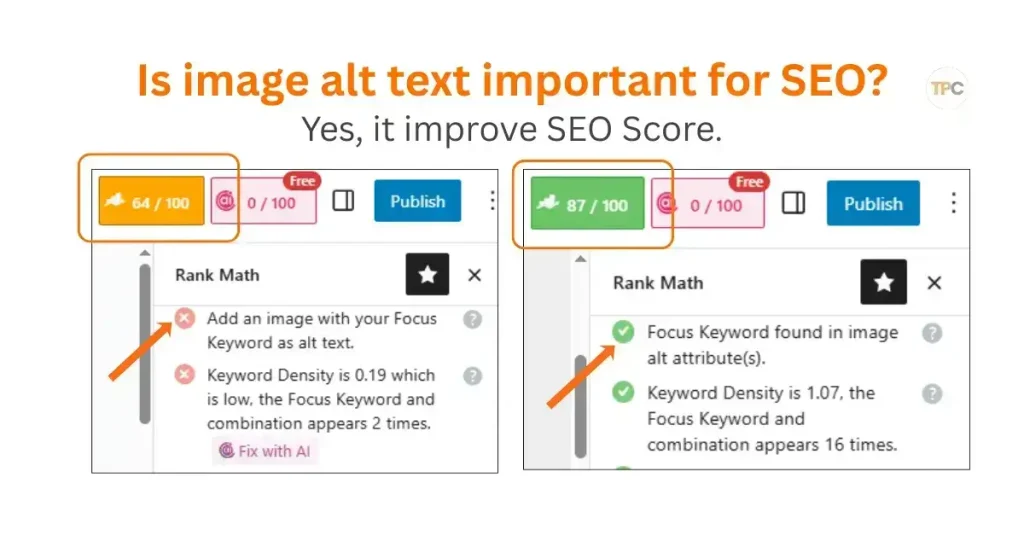
Is image alt text important for SEO?
Yes. Alt text gives Google clear context about your images. This can improve your page ranking and help your images appear in Google Images. It is one of the easiest SEO steps beginners can do.
How to write alt text for images?
Look at the image and describe what you see. Keep it short. Use simple words. Add a keyword only when it matches the image. Do not fill it with random keywords.
How to view alt text?
You can view alt text in WordPress by clicking the image inside the editor. The alt text box appears on the right. On a live page, you can right-click the image, select Inspect, and look for the alt attribute inside the image code.
What is an image alt text example?
Alt text: Keyword research example for beginner bloggers
Alt text: Hostinger dashboard for a new WordPress setup
Alt text: Income report chart for my first affiliate sale
These examples show clear descriptions that match the image.
How to get the alt text for an image?
You can find the alt text inside the alt attribute of the image. In WordPress, select the image and check the alt text box. In the image code, look for alt and read the words inside the quotes.
Can ChatGPT write alt text for images?
Yes. ChatGPT can write simple alt text if you describe the image or upload it. It can give you short and clear options that fit your blog style.
What are some tools for an image alt text generator?
There are simple tools that help you create alt text. Some popular ones are:
AltText.ai
ImageAltText.io
Canva AI
ChatGPT
These tools can suggest lines, but you should always check them to make sure they match your image.
How to add alt text to images in WordPress?
Adding alt text in WordPress is simple.
Upload your image.
Click the image inside your editor.
Look at the right sidebar.
Find the alt text box.
Write one short line that explains the image.
Save your post or update it.
WordPress will place your text inside the alt attribute automatically.
Final Note for You
Alt text is a small part of on-page SEO, but it gives real long-term benefits. Make it a habit to write one short line for every image you use. Your blog will grow stronger over time.
If you want to learn more, you can also read the guides on the alt attribute and image optimization. These posts complete your SEO images foundation.
You have now learned the full image SEO path.
These three work together to help your blog grow.