This post may contain affiliate links. If you purchase through these links, I may earn a small commission at no extra cost to you. Read our full Affiliate Disclosure
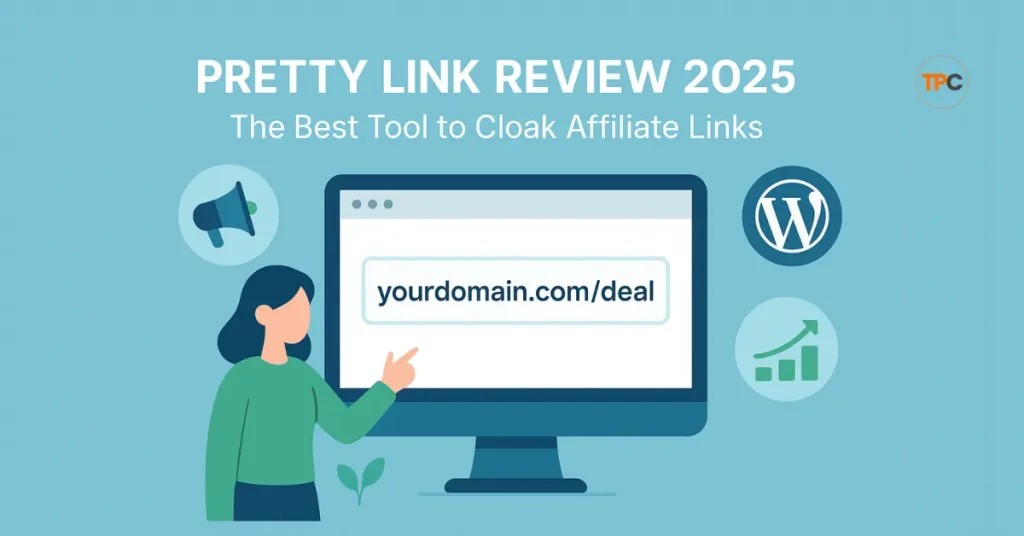
When I first started affiliate marketing, my links looked long and messy. They did not look safe, and many people avoided clicking them. That is when I learned about link cloaking. Cloaking helps you turn ugly links into short, clean ones that look more trusted. It also enables you to track clicks and protect your commissions.
I began my journey while working a regular 9-to-5 job. I wanted more freedom and time for myself. Affiliate marketing gave me that chance. In my early days, I struggled to manage my links and track what worked. Then I found Pretty Links, a simple WordPress plugin that made everything easier.
In this blog, I will show you how I use Pretty Links step by step. You will see why it is my favorite tool for beginners and how it can help you grow your affiliate business, too.
Table of Contents
What is Pretty Links?
Pretty Link is a simple WordPress plugin that helps you manage, shorten, and cloak your affiliate links. Instead of showing long, messy URLs, it lets you create short, clean links that look safe and professional.
For example, you can turn a link like https://example.com/product?ref=12345 into https://yourdomain.com/product.
With Pretty Link, you can also track how many people click your links, where the clicks come from, and which links perform best. This is very helpful for affiliate marketers who want to learn what works and what doesn’t.
It is built only for WordPress users, which makes setup and use very easy. You can install it from your WordPress dashboard and start using it in minutes.
Pretty Link comes in two versions: a Free version that covers basic link cloaking and tracking, and a Pro version that adds advanced tools such as keyword auto-linking, link expiration, and split testing.
Whether you are just starting or growing your affiliate business, Pretty Link gives you all you need to manage and protect your links in one place.
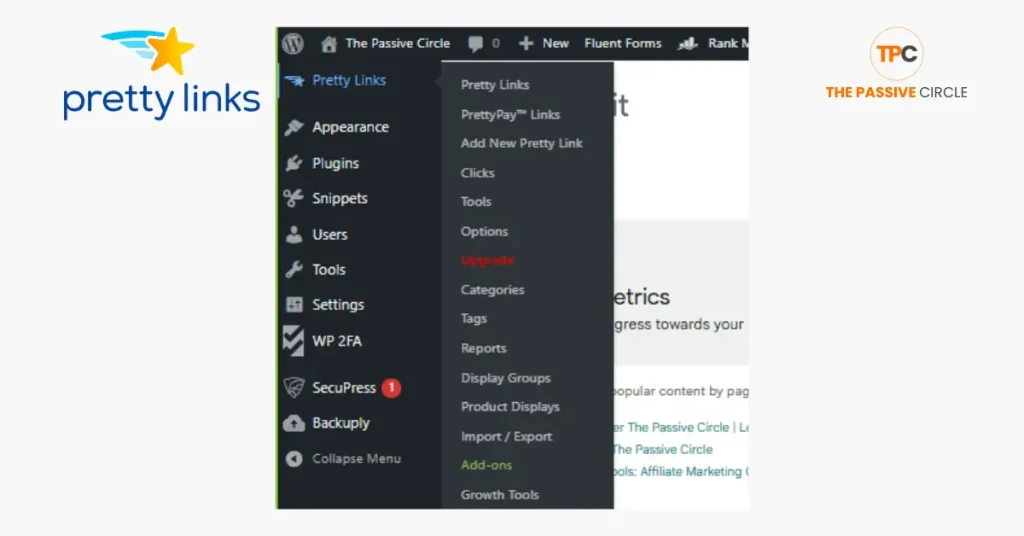
Why Cloak Affiliate Links?
If you are new to affiliate marketing, you may wonder why link cloaking matters. Cloaking your links is not about hiding anything bad. It is about making your links look clean, safe, and easy to click.
Most affiliate links are long, full of numbers and random letters. They look confusing and, at times, even suspicious. When you cloak them, you turn those long URLs into short, branded links that fit your website name. This helps you build trust with your audience and makes your links look more professional.
Cloaked links also improve your click-through rate. People are more likely to click on a simple link that looks friendly and matches your brand. It gives a better user experience and helps you earn more commissions.
Some affiliate programs also require you to use cloaked links to comply with their policies. Cloaking helps you manage your links safely while staying compliant.
Another big reason is tracking. Cloaked links let you see which links get the most clicks, where those clicks come from, and which pages perform best. This helps you understand what works and where to focus your effort. With one tool, you can track, manage, and improve your entire affiliate link strategy.
5 Powerful Reasons Why Pretty Link Is the Best Tool for Beginners
1. Simple Setup and Easy to Use
Pretty Link is one of the easiest tools for beginners to start with. You do not need to know any coding or have tech skills. If you can use WordPress, you can use Pretty Link. The plugin has a clean and simple dashboard that guides you through every step.
Once you install and activate the plugin, you can create your first cloaked Link in just a few minutes. Here is how:
- Go to your WordPress dashboard.
- Click on Pretty Links in the left menu.
- Select Add New Link.
- Paste your long affiliate link into the Target URL box.
- Create a short, neat custom slug (e.g., /best-tool).
- Add a title or notes if you like.
- Click Update or Publish.
That’s it. You now have a clean and branded Link ready to share anywhere.
This easy setup makes Pretty Link perfect for new affiliates who want to get started quickly without getting lost in complicated settings.
2. Professional and Branded Links
First impressions matter online. When someone sees a long and strange affiliate link full of numbers and symbols, it often looks spammy or unsafe. Pretty Link fixes that by turning your messy links into short, branded URLs that match your own domain name.
For example:
Before: https://example.com/product?ref=affiliate12345&utm_source=email After: https://yourdomain.com/product
The second Link looks cleaner and feels more trustworthy. It shows your brand name, which helps people know the Link is safe to click. This small change can make a big difference in how many people visit your links.

Branded links also work better when you share them on social media, YouTube, or inside emails. Long links often break or look unprofessional in messages. Cloaked links stay short and neat, making them easier to remember, share, and track.
When your audience trusts your links, they are more likely to click and buy. That trust helps you build a stronger brand and grow your income over time.
3. Built-in Tracking and Analytics
Pretty Link does more than just shorten your links. It also tracks how your links perform. Every time someone clicks your cloaked Link, the plugin records valid data right inside your WordPress dashboard.
You can see:
- Total clicks – how many times people clicked your Link.
- Unique clicks – how many different visitors clicked.
- Referring sources – where the clicks came from, such as Facebook, email, or your website.
- Date and time – when the clicks happened most often.
This tracking is powerful for beginners because it shows what works and what doesn’t. You can find out which links get the most clicks and which ones are being ignored. That helps you make more intelligent choices in your marketing.
For example, if a link in your email gets more clicks than one on social media, you know where to focus more effort. You can also test different wording or placements and see which version performs better.
With Pretty Link’s built-in analytics, you do not need any extra tracking tools. You just need to improve your conversions, which is right there in one place.
4. Time-Saving Link Management
Managing many affiliate links can be stressful, but Pretty Link makes it simple. The dashboard is clean and easy to follow. You can see all your links in one place, check their stats, and edit them anytime. This saves you hours you would normally spend searching for old links or fixing broken ones.
Each Link can be grouped and organized by category, campaign, or product type. This helps you stay tidy and makes it easy to find a link fast. You can also choose different redirection types such as 301 (permanent), 302 (temporary), or 307 (temporary redirect). These options help you control how search engines and browsers handle your links.
In the Pro version, there is a powerful feature called keyword auto-linking. It lets you set a keyword, and Pretty Link will automatically turn that word into a cloaked link across your posts or pages. For example, if you set “best SEO tool” as a keyword, every time that phrase appears on your site, it links to your affiliate offer.
This saves time, keeps your content consistent, and ensures you never miss an earning opportunity. With Pretty Link, link management becomes fast, simple, and stress-free even as your business grows.
5. Scalable as You Grow
Pretty Link is not just for beginners. It is a tool that grows with your affiliate business as it expands. The free version is perfect for starting, but the Pro version adds many advanced features that help you scale faster.
With keyword auto-linking, you can turn specific words into affiliate links across your website automatically. This saves time and helps you earn from more pages without doing extra work. The link expiration feature lets you set a date for a link to stop working, which is excellent for limited-time offers or promotions. You can also use split testing to compare two different links and see which one gets more clicks.
As your traffic and income grow, these features become very useful. They help you manage hundreds of links, improve conversions, and make smarter decisions using real data.
Upgrading to Pretty Link Pro is worth it once you start getting steady traffic or if you are promoting several affiliate products. The plugin’s extra tools help you stay organized and keep your site running smoothly.
Pretty Link grows with your goals. Whether you are a beginner or an experienced marketer, it supports you at every stage of your journey.
Step-by-Step: How I Cloak Affiliate Links with Pretty Link
Cloaking affiliate links with Pretty Link is quick and straightforward. Even if you are new to WordPress, you can do it in a few minutes. Here is how I do it step by step.
Step 1: Install and Activate Pretty Link
Go to your WordPress dashboard. Click on Plugins → Add New. In the search bar, type Pretty Link. When it appears, click Install Now, then Activate.
After activation, you will see a new Pretty Links option in your WordPress sidebar. The plugin is now ready to use.
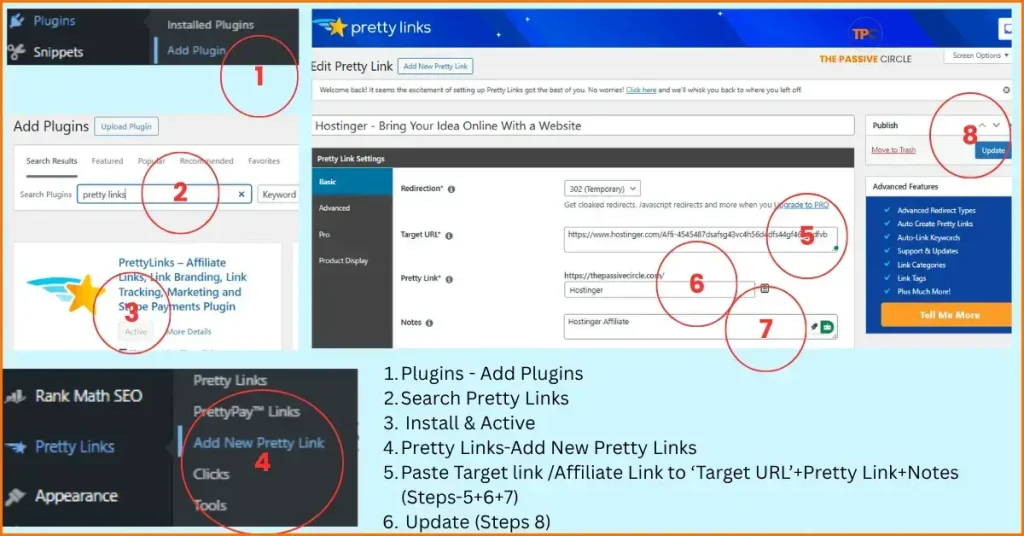
Step 2: Create a New Pretty Link
Click on Pretty Links → Add New Link.
- Paste your long affiliate link into the Target URL box.
- Type a short, branded link in the Pretty Link field (for example, /best-offer).
- You can also add a title or a small note to help you remember what the Link is for.
- When done, click Update or Publish.
- Your clean and cloaked Link is now ready to share anywhere.
Step 3: Choose Redirect Type (301 or 302)
Before saving your Link, you can choose a redirect type.
- 301 redirect means permanent. Use it when the Link will not change.
- 302 redirect means temporary. Use it for limited offers or short campaigns.
Pretty Link also supports 307 redirects, but most beginners only need 301 or 302. Pick the one that fits your goal and save your Link.
Step 4: Track and Optimize
Once your Link is live, go to your Pretty Link dashboard and check the stats. You can see how many people clicked, where they came from, and which links perform best.
If one Link performs better than others, study why. The placement or the text around it may work better. Use that idea in your next campaign.
Over time, this simple tracking and testing will help you find what brings the most clicks and income. With Pretty Link, you can improve your results step by step without any extra tools.
Pretty Link Free vs Pro — Which One Should You Choose?
Pretty Link offers both a free and a pro version, and you choose the one that best meets your needs and goals. Let’s look at what each version gives you and when it makes sense to upgrade.
Pretty Link Free Version
The free version is perfect for beginners just starting in affiliate marketing. It gives you everything you need to create and manage basic cloaked links. You can:
- Cloak and shorten lengthy URLs.
- Use your own domain for branded links.
- Track clicks and unique visitors.
- Choose between 301, 302, and 307 redirects.
- Organize links inside your WordPress dashboard.
These features are enough to get started. You can manage your links, keep them neat, and track simple stats without paying anything. For someone on a budget, it’s a great way to learn how link cloaking works.
Pretty Link Pro Version
The Pro version is made for people who want more control and automation. It adds:
- Keyword auto-linking (turn words into links automatically).
- Link expiration (set time limits for promotions).
- Split testing (see which Link gets more clicks).
- Advanced reports and tracking.
- Conversion reports and tags.
- Priority support from the Pretty Link team.
These tools save time and help you scale your affiliate business faster. They are helpful when you start managing many links or run bigger campaigns.
When to Upgrade
If you are new and have only a few links, start with the free version. It will teach you how to use the plugin and get results without spending money.
Once you begin earning or notice that you are spending more time managing links manually, upgrade to the Pro version. The extra tools will save you hours and help you gain more.
Pretty Link Pro is worth it as your affiliate business grows. Until then, the free version has everything you need to get started and build your confidence.
Pretty Link Pros and Cons
Every tool has its strengths and weaknesses. Pretty Link is no different. Here’s a simple look at what it does well and where it could improve.
Pros
Easy to use:
Pretty Link is beginner-friendly. You can set up and start cloaking links in minutes, even if you’ve never used a WordPress plugin before.
Clean interface:
The dashboard is simple and well-organized. You can see all your links, stats, and reports in one clear view.
Accurate tracking:
The plugin provides reliable click data so you can see how your links perform and make better marketing decisions.
Great support:
The Pretty Link team provides quick help, especially for Pro users. There’s also plenty of documentation and tutorials online.
One-time setup:
Once a link is created, you don’t need to touch it again unless you want to edit or track it. It keeps working in the background.
Cons
Limited free version:
The free plan is enough for beginners but lacks features such as keyword auto-linking, split testing, and advanced reporting.
WordPress-only:
Pretty Link works only on WordPress sites. If you use another platform, you’ll need a different tool.
May slow down the site if overused:
Adding too many redirects or heavy tracking can slow your website slightly, especially on cheap hosting. Using high-quality hosting and good site maintenance helps avoid this.
| Pros | Cons |
|---|---|
| Easy to use, even for beginners | Free version has limited features |
| Clean and simple dashboard interface | Works only with WordPress sites |
| Accurate tracking and clear analytics | Too many redirects can slow down your site |
| Great customer support and tutorials | Advanced tools only in the Pro version |
| One-time setup, links keep working automatically | Needs good hosting for best performance |
Overall, Pretty Link offers more pros than cons, especially for beginners. Its ease of use and robust tracking make it one of the best tools for affiliate marketers who want to get started quickly and grow with confidence.
Pretty Link Alternatives
While Pretty Link is a great tool, it is not the only option for cloaking and managing affiliate links. If you are exploring different choices, here are a few popular alternatives worth knowing about.
1. ThirstyAffiliates
ThirstyAffiliates is another well-known WordPress plugin for link cloaking. It offers many of the same features as Pretty Link, such as clean link shortening, tracking, and link categories. It also lets you add affiliate links directly while writing posts, which saves time. However, its free version offers fewer options, and some users find the setup a bit slower than Pretty Link.
2. Replug
Replug is a cloud-based tool, not limited to WordPress. It lets you shorten links, track clicks, and even add retargeting pixels for advanced marketing. This makes it powerful for bigger campaigns and social ads. The downside is that it’s more complex and costs more, which might not be ideal for beginners just getting started.
3. Lasso
Lasso focuses on creating affiliate displays and link management. It’s perfect for bloggers who want to make product boxes or comparison tables with links. It also connects with Amazon and other affiliate programs. However, it’s a premium-only tool, so there’s no free version to try first.
Comparison of Pretty Links vs ThirstyAffiliates vs Replug vs Lasso (at a Glance)
| Features | Pretty Link | ThirstyAffiliates | Replug | Lasso |
|---|---|---|---|---|
| Platform | WordPress | WordPress | Cloud-based | WordPress |
| Free Version | Yes | Yes | Limited Free | No |
| Starting Price (Pro) | $99.60/year | $99.60/year | $9/month | $16/month (or $190/year) |
| Best For | Beginners who want easy link cloaking | Bloggers managing many affiliate links | Marketers running paid ads or campaigns | Advanced users who want stylish product boxes |
| Main Features | Link cloaking, branded URLs, tracking, keyword auto-linking (Pro) | Link management, auto-linking, Amazon API import | Branded short links, retargeting, campaign tracking | Product boxes, Amazon sync, broken link alerts |
| Setup Process | Install plugin → Activate → Add New Link | Install plugin → Set categories → Add links | Sign up → Connect domain → Create link | Install plugin → Connect affiliate programs → Add displays |
| Ease of Use | ⭐⭐⭐⭐⭐ | ⭐⭐⭐⭐ | ⭐⭐⭐ | ⭐⭐⭐⭐ |
| Tracking Options | Clicks, sources, unique visits | Click tracking and link reports | Advanced tracking and analytics dashboard | Conversion tracking and link monitoring |
| Support | Email and documentation | Ticket support and docs | Chat and email support | Priority email support |
| Best Overall Choice | Best for beginners | Great for bloggers | Good for paid marketers | Great for visual marketers |
Why Pretty Link Wins for Beginners
Pretty Link is the perfect starting tool for anyone new to affiliate marketing. It combines simplicity, speed, and powerful features in one easy-to-use plugin. You do not need to be a tech expert to use it. Installation takes only a few clicks, and once it’s active, you can begin cloaking and sharing your links right away.
What makes Pretty Link special is how beginner-friendly it feels. The dashboard is clear and straightforward, so you can see your links, clicks, and reports without feeling lost. You can learn how tracking works step by step, which helps you understand your audience and which types of content bring results.
Another big win is that Pretty Link is free to start. You get the core tools to shorten and track links for free. When your site and income grow, upgrading to the Pro version is easy. It adds more features like keyword auto-linking and link testing, but the process stays simple.
For anyone just starting affiliate marketing, or someone who dreams of leaving the 9-to-5 job behind, Pretty Link is the right fit. It saves time, builds trust with your readers, and helps you earn more with less effort.
Is Pretty Link Worth It in 2025?
Yes, Pretty Link is still one of the best affiliate link tools in 2025, especially for beginners. It gives you everything you need to manage, cloak, and track your links without stress. Let’s quickly recap the five main reasons it stands out:
- Simple setup – You can install and start using it in minutes.
- Branded, professional links help build trust and make your links look clean.
- Built-in tracking – You can see what’s working and what’s not right inside your dashboard.
- Time-saving management – Keep all your links organized and easy to update.
- Scales with you – Start free and upgrade later when your business grows.
At the beginning of my affiliate marketing journey, I felt overwhelmed by all the tools and tasks. Pretty Link made it simple to track and manage my links. It helped me understand my clicks, improve my campaigns, and slowly grow my income. Over time, that growth gave me the confidence to move away from my 9–5 job and work for myself.
If you are new to affiliate marketing, start with the free version of Pretty Link. Test it, learn how it works, and see how it helps you manage your links better. Once you start earning, upgrade to Pro for more features and control. Pretty Link is a small tool that can make a big difference in your journey toward financial freedom.
Pretty Links FAQs
1. What is Pretty Links?
Pretty Links is a WordPress plugin that shortens, cloaks, and tracks URLs using your own domain name.
2. How do you create a Pretty Link?
Install the plugin, go to Pretty Links → Add New Link, paste your long URL, choose a short slug, and save it.
3. What is the difference between Bitly and Pretty Links?
Bitly uses its own domain and works online only. Pretty Links runs on your site, gives you complete control, and uses your own domain.
4. Pretty Links vs ThirstyAffiliates: which is better?
Pretty Links is simpler for beginners. ThirstyAffiliates adds additional tools, such as an Amazon API import, for advanced users.
5. Pretty Links free alternative
You can try ThirstyAffiliates Free as an alternative to Pretty Links, Simple 301 Redirects, or Bitly for straightforward link shortening.
6. Is Pretty Links free?
Yes. The free version includes link cloaking and basic tracking. There’s also a Pro plan with more tools.
7. Pretty Links affiliate
Pretty Links has its own affiliate program. You can promote it and earn a commission on sales.
8. Pretty Links Pro free download
Always download from the official site. Avoid pirated copies; they can harm your site.
9. Pretty Links pricing
Pro plans usually start around $99.60 per year, depending on your chosen package.
10. How to sign up in Pretty Links?
No sign-up is needed for the free plugin. Install it directly in WordPress. Paid users sign up on the official website.
11. Pretty Links login
Free users don’t log in — it works inside WordPress. Pro users can log in to the Pretty Links website to manage licenses.
12. Pretty Links for affiliate marketing
Yes. It’s built for affiliate marketers who want clean, trackable, and safe links.
13. Where can I paste my affiliate links for free?
Use your blog, YouTube description, social media, or emails. Always include an affiliate disclosure.
14. How to create affiliate links for free?
Join any affiliate program, get your unique Link, and cloak it using Pretty Links Free.
15. What does the Pretty Links Free vs Pro version offer?
The free plan gives basic tracking. Pro adds keyword auto-linking, link expiration, split testing, and more.
16. Is the Pretty Links free affiliate program available?
Yes. You can earn money promoting Pretty Links through its affiliate program.
17. What additional features does the Pro version of Pretty Link offer compared to the Free version?
The Pro version includes auto-linking, link categories, expiration dates, conversion tracking, and split testing, which are not available in the free version.
18. How does Pretty Link ensure the security and privacy of my affiliate links?
Pretty Links stores data inside your WordPress database. It uses redirects that keep the absolute URL private and help protect your commissions from theft or tampering.
19. Can I use Pretty Link for non-affiliate links as well?
Yes. You can cloak and track any URL — blog posts, external resources, or social media links.
20. Does link cloaking hurt SEO?
No, not when used correctly. Always add nofollow and sponsored tags for affiliate links.
21. Is link cloaking allowed by affiliate programs?
Most allow it, but some, like Amazon, have rules. Always check your affiliate program policy.
22. Can Pretty Links track where clicks come from?
Yes. It tracks clicks, referrers, and unique visits in your dashboard.
23. Which redirect type should I use?
Use 301 for permanent links and 302 for temporary offers.
24. Will Pretty Links slow down my site?
Not usually. Too many redirects can slow down performance, so use a reliable hosting provider.
25. Can I add nofollow and sponsored to links?
Yes. You can mark each Link as nofollow, sponsored, or both.
26. Can I use Pretty Links on multiple sites?
Yes, depending on your license type. The free version can be used on any WordPress site you own.
27. Does Pretty Links work with WooCommerce and page builders?
Yes. It works with WooCommerce, Elementor, Gutenberg, and Divi.
28. Can I import links in bulk?
Yes, the Pro version allows you to import from CSV or migrate links from other plugins.
29. Can Pretty Links find broken links?
It doesn’t automatically scan your site, but you can detect inactive links through click tracking.
30. Can I use my own custom domain?
Yes. All links are branded with your domain name, helping your brand look more professional.
31. How do I track conversions, not just clicks?
Pretty Links tracks clicks. To track sales, connect it with your Google Analytics.
32. Best practices for beginners
Keep slugs short, group links by category, use nofollow, and check stats weekly.
33. What are the common mistakes to avoid?
Don’t hide affiliate intent, don’t use pirated plugins, and avoid cloaking when your affiliate program forbids it.
34. What specific features are included in the Pro version of Pretty Links?
The Pro version adds many advanced tools beyond the free version. Some of the key features include:
Keyword & URL replacements: Automatically replace specified keywords or URLs in your posts with your Pretty Links.
Advanced redirect types: In addition to 301/302/307, Pro offers cloaked redirects, JavaScript redirects, Meta-Refresh, Tracking Pixel redirects, and Geo-targeted redirects.
Automation: Auto-create links for posts/pages, auto-link keywords, rotate redirects, and set link expiration dates.
Product Displays: Create visually appealing product boxes or displays for affiliate links.
Detailed reporting: Click tracking, export click databases, conversion reports, link categories & tags.
In short, the Pro version is for users who need automation, more control over redirects, conversion tracking, and large-scale link management.
35. How does Pretty Links compare to other link-cloaking tools available?
Comparing Pretty Links to alternatives shows both strengths and trade-offs:
Strengths of Pretty Links:
It runs inside WordPress, using your own domain, which helps branding and trust.
It offers robust cloaking, tracking, and branded links at a reasonable price.
It’s a good fit for affiliate marketers who already use WordPress and want simple control.
36. Where alternatives excel / Pretty Links limitations?
Some tools, like Replug, offer cross-platform support (not just WordPress), advanced analytics dashboards, retargeting pixels, and deeper integrations.
Some tools provide more native scheduling, broken link checking, and maybe more external platform integrations. (e.g., in the comparison with ThirstyAffiliates, that plugin had features like link scheduling and auto health checks of links.
Because Pretty Links lives in WordPress, it’s less suited for marketers who need a standalone, multi-platform link manager or who run heavy campaigns outside WordPress.
Bottom line: If you are a WordPress user focused on affiliate marketing and want simplicity + control, Pretty Links is a top pick. If you need advanced features across many platforms or heavy retargeting and campaign tracking, consider alternatives.
37. Can Pretty Links work with platforms other than WordPress?
Pretty Links is built for WordPress. It is a WordPress plugin, and its features require a WordPress site to run.
That means:
You cannot natively install Pretty Links on platforms like Shopify, Wix, or non-WordPress websites and have full plugin functionality.
You can still use links created in WordPress (if you have a WordPress site) and share them on other platforms (emails, social media, etc.).
If you don’t have a WordPress site, you may need a cloud-based tool or an alternative plugin that supports other CMS or platforms.
38. How does Pretty Link handle link expiration, and what benefits does it provide for affiliate marketers?
Pretty Link Pro lets you set start and end dates for each Link. After expiration, the Link can redirect to another URL or show a custom message. This helps affiliate marketers remove outdated promotions automatically and avoid losing traffic to expired offers.
39. Are there any limitations or potential issues with using Pretty Link?
Pretty Link works only on WordPress, so you can’t use it on other website builders. Heavy tracking can slow down a site if not optimized. Also, some affiliate programs (like Amazon) may limit or ban cloaked links, so always review each program’s terms.
Suggested Posts
- Rank Math Pro vs Competitors: Is It Better Than Yoast, Ahrefs, and SEMrush in 2025?
- Systeme.io Ultimate Guide 2025: Login, Pricing, Features, Reviews, and How to Get Started
- ExonHost Review 2025: Best Hosting for Fast & Reliable Websites in Bangladesh
- How to Use Ubersuggest for SEO in 2025 — Skyrocket Blog Traffic Fast (Honest Review + Free Trial)
I share everything I learn about affiliate marketing as I go. Here are my most recent posts you might find helpful.
Recent Posts
- How to Do Keyword Research for Free (Find Easy Keywords for Beginners)

- Link Juice in SEO: A Simple & Easy Guide for Beginners
- How Bloggers Make Money With Affiliate Marketing Funnels (Simple Guide)

- Systeme.io Pricing Explained for Beginners (Free vs Paid Plans)
- Best Email Marketing Tools for Beginners With No Website