This post may contain affiliate links. If you purchase through these links, I may earn a small commission at no extra cost to you. Read our full Affiliate Disclosure

Have you ever wondered why some articles don’t get as many clicks as they deserve, even after you work hard on them?
The term schema markup WordPress might sound tricky at first. Many beginners imagine complicated code and lots of things that could go wrong.
I used to feel the same way. But after trying the schema on my own WordPress site, I found out it’s actually simple. Schema markup just means giving Google extra details so it can understand your content more clearly. If you use WordPress, the whole process is easy for beginners.
Table of Contents
What is Schema Markup
Schema markup is a small piece of code that works in the background of your content. Your readers won’t notice it, but search engines will.
It helps Google figure out what kind of page you’ve made.
For example, it tells Google if your page is:
- A review
- An article
- A FAQ section
- A product explanation
- A step-by-step guide
Think of it like adding labels to a package before you send it.
“Fragile”, “This side up”, “Handle with care”.
These labels tell the delivery company what’s inside the box. Schema markup does the same for Google.
Why Schema Matters
Schema markup gives Google clearer information about your page. When Google understands your content faster, your page can appear in better search results.
Many people notice a 15% boost in click-through rates after adding schema markup.
Schema can also unlock special search features called rich results, such as star ratings, FAQ dropdowns, breadcrumbs, prices, how-to steps, and video details. These extras help your link stand out. Even if you’re not ranked first, your result can look more useful and attract more clicks.
These features make your link more noticeable. Even if you’re not in the top spot, your result can look more helpful and get more clicks.
Schema doesn’t promise rich results, but it gives you a chance to get them.
Schema Markup WordPress Setup (Easiest Way)
If you’re worried about dealing with code, you don’t need to be. You won’t have to write or edit any code yourself.
WordPress plugins take care of schema for you automatically.
The two most common options are:
- Rank Math
- Yoast SEO
Once installed, these plugins:
- Add Article schema to your blog posts
- Add Webpage schema to your pages let you switch schema types for reviews, FAQs, products, or how-to posts
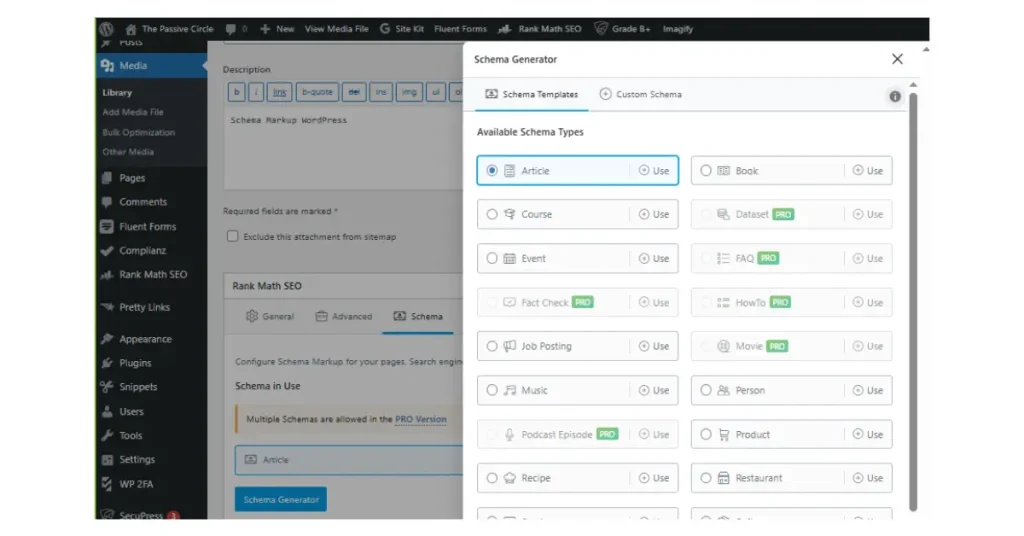
I’m using Rank Math plugin to take care of schema. And it is super easy to use.
Just choose the schema type that matches your content. That’s all there is to it.
This is the easiest way to use schema markup in WordPress without touching any code.
The Schema Types You’ll Use the Most
If you’re an affiliate marketer or a new blogger, you don’t need to use every schema type.
Start with these:
- Article Schema
Use on your regular blog posts. - Review Schema
Great for posts like ExonHost review, Systeme.io review, or any tool review for beginners. - Product Schema
Useful when your post is about a single main product. - FAQ Schema
Use when you add real questions and answers at the end of a post. - How-To Schema
Perfect for step-by-step posts like “How to Start Affiliate Marketing”. - Video Schema
Use it if you embed your own YouTube tutorial.
Most beginners start with the Article, Review, and FAQ schema. That’s enough to see real results.
Schema Markup Generators (If You Want Manual Control)
If you want to create a schema without using plugins, there are simple tools you can try:
- Schema markup generator by TechnicalSEO
- Schema markup testing tool by Google
You fill out a form.
The tool generates the schema code.
You paste it into your header using a script plugin.
For most beginners, using plugins is still the easiest choice.
How to Add Schema Markup in WordPress
Here’s a simple routine I follow: Write, Pick, Test. Start by writing your blog post.
- Scroll to the schema settings in your SEO plugin.
- Click the schema type that matches your content.
- Add details like a rating if it’s a review post.
- Update the post.
- Test your schema with a rich results tool. It only takes a minute or two for each post.
How to Check Your Schema
Testing your schema is important. It shows whether Google can read it properly and helps make sure your markup works. You can use tools like:
- Google Rich Results Test
- Schema.org validator
- A schema markup tester tool
Paste your URL, and the tool will show any errors or let you know if everything is set up correctly. If you see a green checkmark from Google’s Rich Results Test, your schema is working and ready to help your search results.
Benefits of Schema Markup
Here are the results you may notice:
- Higher click-through rate
- Clearer search results
- Better visibility for the right keywords
- Stronger E-E-A-T signals
- More trust from readers
Schema can’t take the place of good content, but it helps support it.
Schema Markup Mistakes Beginners Should Avoid
Here are a few common mistakes to avoid:
- Don’t add schema for things not visible on your page
- Don’t fake ratings. Many sites see drastic declines when caught; imagine waking up to find your snippets gone overnight.
- Don’t create fake FAQ sections
- Don’t layer multiple schema types unnecessarily
Schema works best when it matches the actual content on your page.
Simple Checklist for Every Post
Before you publish:
- Does the schema type match the content?
- Did you test your schema?
- Does the page actually include the elements you marked up?
- Would this help a beginner understand the post better?
If you answered yes to these, you’re ready to publish.
Final Thoughts
Schema markup helps Google understand your WordPress site better. It also makes your content stand out in search results, which is helpful if your niche is crowded.
For example, a beginner blogger added schema to their site and saw more clicks within a few weeks. This shows that schema can bring real results.
Start simple.
- Use your SEO plugin.
- Choose the right schema type.
- Test your work.
- Update when needed.
Small changes like these can make your SEO journey smoother and more successful.
If you’re interested in learning more about SEO, check out my Complete SEO Guide for a better understanding.
- How to Do Keyword Research for Free (Find Easy Keywords for Beginners)

- Link Juice in SEO: A Simple & Easy Guide for Beginners
- How Bloggers Make Money With Affiliate Marketing Funnels (Simple Guide)

- Systeme.io Pricing Explained for Beginners (Free vs Paid Plans)

- Best Email Marketing Tools for Beginners With No Website

Suggested Blog Posts
- The Ultimate Affiliate Marketing Guide for Beginners 2025 [Proven + Powerful Strategies]
- Systeme.io Ultimate Guide 2025: Login, Pricing, Features, Reviews, and How to Get Started
- ExonHost Review 2025: Best Hosting for Fast & Reliable Websites in Bangladesh
- 10 Simple Steps to Master Easy Table of Contents in Blocksy
- Blocksy Theme Review 2025: The Best WordPress Theme for Affiliate Bloggers
- How to Use Ubersuggest for SEO and Skyrocket Blog Traffic Fast (Honest Review + Free Trial)
- Avoid These 10 Affiliate Marketing Mistakes Beginners Always Make