This post may contain affiliate links. If you purchase through these links, I may earn a small commission at no extra cost to you. Read our full Affiliate Disclosure

Have you ever written a blog post that no one reads? You hit publish, wait a few days, and still no traffic, no clicks, not even a comment. It’s frustrating, right?
I felt the same when I first started my blogging journey.
I thought posting regularly was enough to attract readers. Later, I realized something simple yet powerful: traffic doesn’t come from writing more. It comes from writing what people actually search for.
That’s where keyword research comes in.
When I first discovered this concept, it changed everything. I learned how to find what real people type into Google before they click any link. Then, I started writing for those exact searches.
Thanks to Ubersuggest reviews and recommendations. One long-tail keyword was enough to bring my first 100 visitors, all from a single blog post. It felt like magic, but it was simply understanding what readers were already looking for.
If you’re a beginner, maybe living anywhere from the USA to the EU or even Germany, and trying to grow your blog, this guide is for you.
You’ll learn step-by-step how to use Ubersuggest, with insights from trusted Ubersuggest reviews. A beginner-friendly keyword research tool for bloggers, to find easy-to-rank keywords and start getting steady traffic.
When I began blogging, I saw that SEO tools like Semrush and Ahrefs were quite expensive. But here’s the good news: Ubersuggest is much cheaper and perfect for beginners.
It has strong features like keyword research, site audits, and rank tracking. It’s user-friendly and affordable. Ubersuggest helps new bloggers increase traffic and grow their blogs affordably.
It’s a simple tool, so you can focus on what matters: creating great content and attracting readers. You don’t need SEO experience, fancy tools, or a big budget: just curiosity, consistency, and a bit of patience.
By the end of this guide, you’ll know exactly how to find the right keywords for your niche, use them in your posts naturally, and start seeing traffic even if you’ve just created your first blog.
This is 100% beginner-friendly, no prior SEO knowledge required.
Table of Contents
Keyword Research & Search Intent with Ubersuggest
Let’s start simple.
What is a Keyword
A keyword (or key phrase) is the exact set of words that people type into Google when they want answers. When someone searches for “best coffee for cold brew” or “how to start a blog in Germany,” they show what matters to them.
When I first started blogging, I didn’t know this. I thought keywords were just random words I repeated inside my post. Later, I learned that a keyword connects your content to your reader’s question. Without it, your post might look good, but Google won’t know who it’s for.
Why Keywords Matter
Think of your blog like a shop hidden in a busy city. Keywords are the street signs that tell visitors how to find you. Cool! Right?
When you pick the right keywords, search engines know what your page is about. Then, they show it to the right audience. That’s how organic traffic begins, not from luck but from matching what people search with what you write.
What is search intent and why it is important for SEO
Understanding search intent means knowing why someone searches for a keyword. Once you understand this, your traffic can grow faster. You’ll create content that answers the right questions.
The Three Types of Search Intent
| Intent Type | What It Means | Example Keyword | When to Use It |
|---|---|---|---|
| Informational | The user wants to learn something. | how to use Ubersuggest, keyword research for beginners | Use this for guides, tutorials, and blogs. |
| Commercial Investigation | The user is comparing options or tools. | Ubersuggest vs Ahrefs, best keyword research tool for bloggers | Great for affiliate posts and reviews. |
| Transactional | The user wants to buy or subscribe. | buy Ubersuggest lifetime plan, Ubersuggest pricing plans | Ideal for conversion-oriented CTAs. |
As a new blogger, focus on Informational and Commercial Investigation keywords. These attract readers who are learning or exploring. They love detailed how-to guides like this one.
How to Choose Ubersuggest Keywords That Actually Work in 2025
Have you noticed how some blogs appear at the top of Google while others are buried on page ten? The secret is in the keywords you choose.
The right keywords can improve your ranking, bring in the right visitors, and keep your blog traffic steady. Instead of guessing, start searching for the keywords that will help your blog succeed today.
If you open Ubersuggest, you’ll see two essential numbers beside each keyword:
- Search Volume (SV): How many people search for it monthly?
- SEO Difficulty (SD): How hard it is to rank for that keyword.
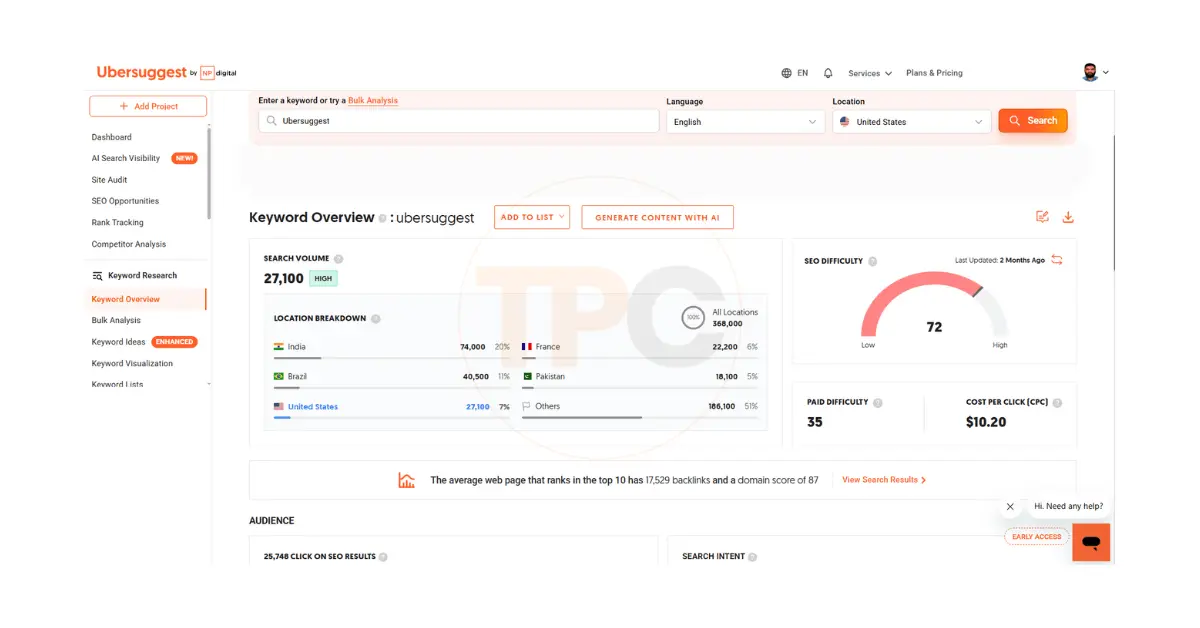
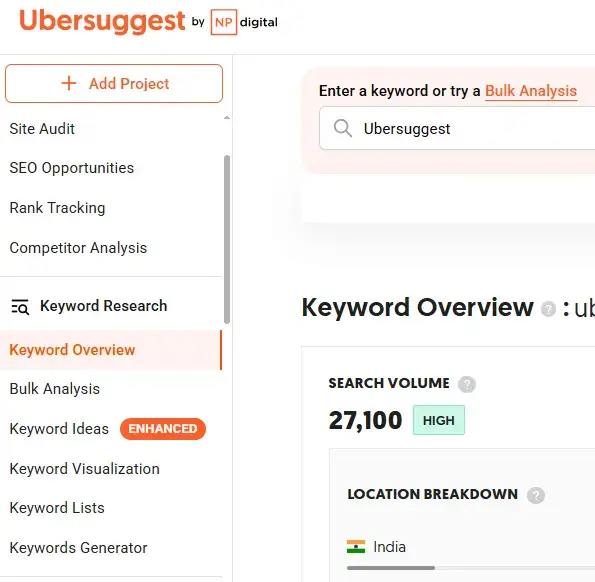
If you search ‘Ubersuggest’ in Keyword Overview Section you may see its SEO Difficulty (SD) 72, Search Volume (SV) 27,100 and even Location wise search volume (it changes accordingly).
Although the search volume is high this is not a good keyword for a beginner. Because It’s SEO difficulty is high. Instead of this keyword another long tail keyword like-
ubersuggest keyword planner
ubersuggest competitor analysis
ubersuggest backlinks
ubersuggest free keyword tool- may be a good choice. You have to dive deep through Ubersuggest Keywords idea features.
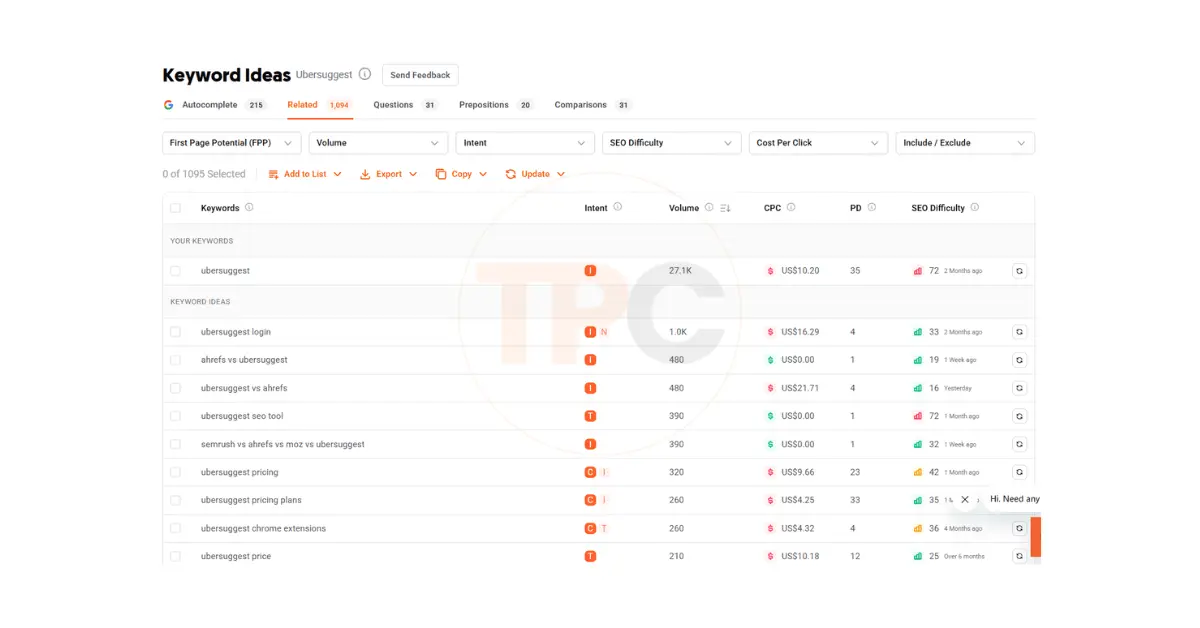
You don’t need high volume or zero competition; you need a balance. Aim for keywords with medium volume (100–1,000) and low difficulty (below 50) when starting.
Here’s a quick look at what’s good and what’s not (This is a dummy data, just for understanding the concept):
| Keyword Example | Country | Search Volume | Difficulty | Verdict | Why |
|---|---|---|---|---|---|
| keyword research | USA | 60 K | 80 | Too Broad | High competition; large brands dominate. |
| how to do keyword research for beginners | USA | 2 K | 42 | Good | Easier to rank; matches intent. |
| Ubersuggest Germany | Germany | 390 | 40 | Good | Localized; less competition. |
| best SEO tool in Europe 2025 | EU region | 70 | 33 | Niche Win | Great mix of low SD + clear intent. |
| SEO software comparison | Global | 30 K | 75 | Too Competitive | Big companies own this space. |
| free keyword planner for small blogs | USA | 260 | 39 | Strong | Long-tail, realistic for beginners. |
Choose a keyword like how to do keyword research for beginners instead of just keyword research. This way, you target a smaller audience. However, you connect with the right people, those who will click, stay, and learn.
Here’s what helped me: When I started considering volume and difficulty together, I saw that traffic doesn’t come from popular words. It comes from words that are easier to rank for.
Start with simple, question-style keywords that have clear intent. Let Ubersuggest show you which ones are realistic to rank for. Once you’ve picked one, write for the reader behind that keyword, not for Google.
Next, let’s open Ubersuggest together and see how to set it up for your country and niche. Click here to start your Ubersuggest free trial. It’s the easiest way to follow along with the next step.
How to Use Ubersuggest for Beginners in 2025
Before we get deep into keyword research, let’s first walk through how to set up Ubersuggest properly. Spending a few minutes to set it up correctly can save you hours later. It is especially true if your audience is from the USA, the EU, or Germany.
I still remember the first time I opened Ubersuggest. The interface looked simple, but I had no idea where to click first.
According to several Ubersuggest reviews, beginners find it easier than other SEO tools.
If you’ve ever had that moment of thinking, ‘Okay, what do I do now?’ don’t worry, this section will guide you through it.
Step 1: Sign Up and Log In
- Go to Ubersuggest.com.
- You can start with the Free Plan, using just your Google account and no credit card is required.
- Once inside, you’ll land on your ubersuggest dashboard.
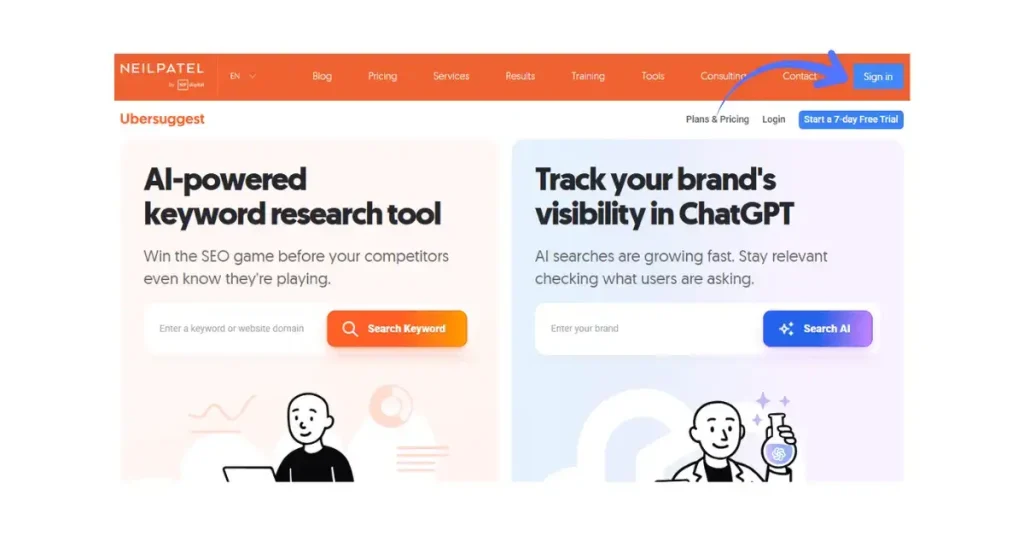
If you’re new, I suggest exploring with the free version first. You’ll get a few daily searches, usually 3. This search is enough to practice and learn the workflow.
Tip: If required upgrade to the paid plan for more research. It gives you unlimited searches, competitor tracking, and access to historical data.
Step 2: Choosing Your Location (US, EU, or Germany)
Many beginners skip this, but your location setting changes everything. Ubersuggest gets keyword data from your chosen country. So, “blog ideas” in the US may have a different search volume in Germany.
Here’s how to set it up:
- On the main dashboard, look for the flag icon in the top right corner.

- Click it to open a drop-down list of countries.

- Choose the United States, Germany, or European Union (English) — depending on your audience.
- You can also select a language for more precise suggestions.
If you’re writing English blogs for international readers, stick to the United States. If you write for local audiences, choose Germany (German) or the EU (English).
Step 3: Dashboard Overview
The Ubersuggest dashboard has six main tools. Here’s a quick tour so you don’t feel lost when you log in:
| Module | What It Does | How You’ll Use It |
|---|---|---|
| Keyword Overview | Shows volume, SEO difficulty, CPC, and trend for one keyword. | Perfect for checking keyword potential before writing. |
| Keyword Ideas | Expands your seed keyword into hundreds of related phrases. | Great for finding long-tail keywords using the Ubersuggest Keyword Planner. |
| Content Ideas | Displays popular blog titles and pages for your keyword. | Helps you see what kind of content ranks well. |
| Competitor Analysis | Lets you explore what keywords other websites rank for. | Ideal for stealing topic ideas ethically. |
| Site Audit | Scans your blog for technical SEO errors. | Keeps your site healthy and Google-friendly. |
| Rank Tracking | Tracks keyword positions over time. | Helps you monitor what’s improving or dropping. |
When I first used the dashboard, I didn’t touch half these tools because they seemed advanced. Once I used Keyword Overview and Keyword Ideas, it all clicked. The Ubersuggest SEO tool offers all-in-one keyword tracking and planning features.
Step 4: Free vs Paid — What You See
Here’s what to expect when using the free vs paid version:
| Feature | Free Plan | Paid Plan (Trial or Pro) |
|---|---|---|
| Keyword searches per day | 3 | Unlimited |
| Keyword suggestions | Limited | Full access |
| Competitor data | Partial | Complete |
| Site audit | Basic | Deep scan |
| Rank tracking | Not available | Included |
| Export results (CSV) | Not available | Yes |
| Location targeting | Basic | All countries |
If you’re just starting out, use the Free Plan to learn the basics and explore real Ubersuggest reviews from users. When you’re ready to analyze competitors or track results, upgrade to the trial or paid plan.
Ready to unlock the full keyword data and location filters? Start your Ubersuggest free trial now. It’s perfect for beginners.
Step 5: Configure Your Settings (Cheat Sheet)
Here’s a quick checklist to ensure your Ubersuggest account fits your audience and goals:
| Setting | Recommended Option | Why It Matters |
|---|---|---|
| Language | English (or German for local blogs) | Matches your blog content language. |
| Country | United States, Germany, or EU | Influences keyword data accuracy. |
| Daily Email Report | On | Get keyword ideas in your inbox. |
| Tracked Keywords | 5–10 starting keywords | Helps monitor early blog growth. |
| Competitors | 2–3 similar blogs | Lets you compare keyword gaps. |
Once these are set, you’re ready to begin your first keyword search.
Takeaway: Don’t rush through the setup. Choosing the right country, language, and competitors helps Ubersuggest match your readers’ interests.
Let’s begin finding seed keywords. These are the core of any keyword strategy.
Ubersuggest vs Ahrefs 2025: Which SEO Tool is Best for You?
For keyword research and SEO, two popular tools are Ubersuggest and Ahrefs. Both are strong options, but they serve different users. This is clear in their pricing and features. So, which one should you choose?
Let’s break it down so you can decide which tool works best for your blog.
Pros of Ubersuggest
- Ubersuggest is significantly more budget-friendly than Ahrefs, making it suitable for beginners. If you’re new to blogging, Ubersuggest has everything you need. It’s easy to use and won’t cost much.
- User-Friendly Interface: The tool is easy to navigate, even for beginners. Access key metrics like search volume, SEO difficulty, and CPC quickly. You can find everything on one dashboard.
- Free Plan Available: Ubersuggest has a free version. It allows limited daily searches. This is great for anyone just starting with SEO.
- **Keyword Tracking:** Ubersuggest offers an easy-to-use interface for tracking keywords. This helps you monitor your rankings over time.
- Local SEO Focus: Ubersuggest lets you select a country for keyword data. This makes it ideal for localized SEO, especially if you target regions like the USA, EU, or Germany.
Cons of Ubersuggest
- Limited Data for High-Traffic Sites: Ubersuggest is fantastic for smaller sites. However, it may fall short for high-traffic websites. Its data and tools can feel limited next to Ahrefs, especially for complex SEO needs.
- Limited Advanced Features: Ubersuggest doesn’t offer some advanced tools found in Ahrefs. It misses in-depth competitor analysis, backlink analysis, and content gap analysis.
- **Lower Search Limits on Free Plan:** The free version of Ubersuggest allows users to do a few searches daily. This may not be enough for those needing in-depth keyword research.
Pros of Ahrefs
- Ahrefs offers detailed and accurate data. It excels in backlink analysis, competitor research, and advanced keyword insights.
- Ahrefs is a trusted tool for SEO pros and big companies. Its features are rich, and its accuracy is high. It offers detailed reports on backlinks, domain authority, and key SEO metrics.
- Backlink Analysis: If you need a robust backlink analysis tool, Ahrefs is the best choice. It has a huge backlink index. This gives you clear insights into your site’s backlinks and those of your competitors.
- Content Explorer: Ahrefs has a tool called Content Explorer. It helps you find popular and shared content in your niche. This can inspire your own content strategy.
Cons of Ahrefs
- Ahrefs costs much more than Ubersuggest. The cost may be prohibitive for beginners or small bloggers who are just starting out.
- Complex Interface: Ahrefs can be overwhelming for new users. Its many features and complex layout can make it hard to navigate. If you’re beginning your SEO journey, you may need time to understand how to use it effectively.
- No Free Plan: Unlike Ubersuggest, Ahrefs doesn’t offer a free plan. Even its entry-level plan can feel pricey for those on a budget.
Ubersuggest vs Ahrefs: Pricing Comparison
Here’s a quick comparison of their pricing:
| Feature | Ubersuggest | Ahrefs |
|---|---|---|
| Free Plan | Available (limited searches) | Not Available |
| Basic Plan | $12/month (with limited features) | $99/month |
| Pro Plan | $20/month (unlimited data access) | $179/month |
| Enterprise Plan | $40/month (more features) | $399/month |
| Trial Period | 7-day free trial | No free trial |
| Keyword Tracking | Limited tracking | Unlimited tracking |
| Backlink Analysis | Basic analysis (limited) | In-depth backlink analysis |
| Competitor Analysis | Basic competitor insights | Advanced competitor analysis |
Ubersuggest vs Ahrefs – Which Should You Choose?
- Choose Ubersuggest if you’re a beginner, a blogger on a budget, or someone just getting started with SEO. It’s easy to use, affordable, and offers all the basic features you need for keyword research and tracking.
- Choose Ahrefs for advanced SEO tools. It’s great for larger websites and provides detailed competitor analysis and backlink tracking. Ahrefs is pricier, but it offers detailed data. This data can help you grow your SEO efforts.
Both tools have strengths. The best choice depends on your SEO goals, budget, and expertise level.
Why I Chose Ubersuggest (Quick Comparison)
Here’s a quick comparison to show why I personally use Ubersuggest instead of Ahrefs.
| Feature | Ubersuggest | Ahrefs |
|---|---|---|
| Price | $12–$20/month | $99+/month |
| Beginner Friendly | Yes | Steep learning curve |
| Free Trial | Available | No free plan |
| Local SEO Focus (US, EU, Germany) | Strong regional data | Limited in some regions |
| Ease of Setup | Simple dashboard | Complex interface |
What I did? I choose ubersuggest. You can too.
Step 1: Ubersuggest Keyword Planner — Seed Keywords & Brainstorming (2025 Update)
Every piece of keyword research begins with a few broad seed ideas that the core topics your blog covers. Think of them as the roots that grow into hundreds of related keywords.
For a travel blog, try these seed keywords: budget travel, tips for Germany, and solo trips. If you’re in tech, start with AI tools, productivity apps, or affiliate marketing software.
When I first started, I often picked random words I liked, not the ones people actually searched for. And Result: nice articles, zero visitors. After I chose seed keywords with intent and checked them in Ubersuggest, my traffic grew.

1. Where to Find Your Seed Keywords
Start with topics you already understand. Your goal is to gather 5 to 10 broad ideas that represent your niche.
Here are some easy ways to build that list:
- Your own experience: What do you write or talk about most?
- Competitor blogs: Use Ubersuggest to enter a competitor’s domain. Then, check Keywords by Traffic and note the common topics.
- Google Autocomplete: Type one of your topics into Google and note the suggestions.
- Forums and Groups: Check out Reddit, Quora, or Facebook groups in your niche. Look for common questions people ask.
Example: If you run a cooking blog, easy dinner recipes, meal prep, and healthy pasta ideas are strong seeds.
2. Plug Them Into Ubersuggest → Keyword Overview
- Go to Keyword Overview inside the Ubersuggest Keyword Planner.
- Type one of your seed words, e.g., “easy dinner recipes.”
- Choose your country — the United States or Germany.
- Click Search.
With the Ubersuggest Keyword Planner, bloggers can discover easy-to-rank long-tail keywords.
You’ll see four critical metrics inside the Ubersuggest Keyword Planner:
| Metric | What It Means |
|---|---|
| Search Volume | How many people search for this keyword per month. |
| SEO Difficulty (SD) | How hard it is to rank organically. Lower = easier. |
| Paid Difficulty (PD) | How competitive paid ads are. |
| CPC (Cost Per Click) | Average ad bid. Higher = more commercial value. |
Focus mainly on Search Volume and SEO Difficulty. For new blogs, the sweet spot is volume between 100 – 1 000 and SD below 50.
3. Before / After: Bad vs Good Seed Keyword
| Example | Country | Volume | SD | Verdict | Why |
|---|---|---|---|---|---|
| keyword research | US | 60 K | 80 | Too broad | Huge competition; hard to rank. |
| how to do keyword research for beginners | US | 2 K | 42 | Good | Long-tail, lower competition, clear intent. |
| Ubersuggest Germany | DE | 390 | 40 | Good | Localized keyword; less crowded SERP. |
| SEO tools | DE | 18 K | 77 | Too competitive | Generic term; big brands own it. |
You can see the difference right away. Focus on phrases that beginners would actually use, not big numbers.
4. Filtering & Sorting Inside Ubersuggest
After you run your keyword, click the Keyword Ideas tab.
At the top right, use the filters:
- SEO Difficulty → Max 50
- Volume → Min 100
- Include keywords → words like “how,” “best,” “tips.”
- Exclude → brand names or unrelated phrases.
This filter quickly removes keywords that won’t work. It gives you ideas you can rank for.
5. Don’t Miss These Tabs
Most beginners stay on the “Suggestions” tab and miss three powerful sections:
| Tab | Why It’s Useful | Example Result |
|---|---|---|
| Related | Gives synonyms and variations. | From “keyword research,” you get “keyword strategy,” “SEO keyword tips.” |
| Questions | Shows what people ask. | How to find low-competition keywords? |
| Prepositions | Adds context phrases like for beginners, in Germany, without tools. | “keyword research for beginners,” “keyword research in Germany.” |
These tabs help you write content that matches real user intent. Many of my top posts came from the Questions tab. Those queries make great blog titles.
If you’re ever unsure which keyword to pick, check the Questions section. When you see “how,” “why,” or “what,” you’ve found real search interest.
6. Example Workflow
- Start with a topic idea: affiliate marketing.
- Enter it in Ubersuggest → Keyword Overview.
- Filter for SD < 50 and Volume > 100.
- Open the Questions tab.
- Pick how to start affiliate marketing with no money.
- That’s your long-tail keyword ready for an article.
7. Quick Seed Keyword Checklist
- 5 – 10 topics you know.
- Each checked for Search Volume & SD.
- At least 2 from the Questions tab.
- Include 1 localized term (for Germany or EU).
Takeaway:
Seed keywords are the starting point of every successful blog post. Choose wisely, filter for real metrics, and check those “hidden” tabs that many overlook.
Next, we’ll expand your seed ideas into a full keyword list and validate which ones deserve a blog post.
Start your Ubersuggest free trial and keep your dashboard open for the next step.
Step 2: Expand & Validate Keyword Ideas in Ubersuggest (2025 Strategy)
Once you’ve found a few good seed keywords, it’s time to dig deeper. This step changes your general ideas into specific, rankable keywords. These keywords attract steady visitors, not just random clicks.
Think of this as keyword mining: you start with rough stones and polish them until you find the gems.
1. Use the Keyword Ideas Tool
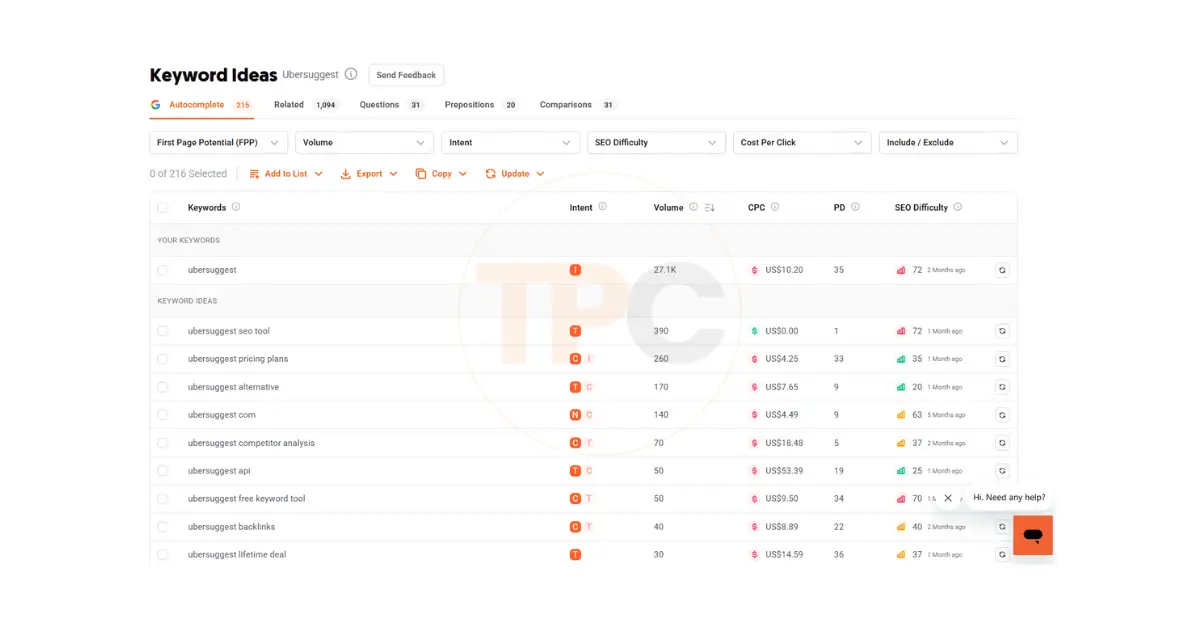
Head to the Keyword Ideas tab in Ubersuggest. You’ll notice several categories: Suggestions, Related, Questions, Prepositions, and Comparisons.
Here’s how to use each:
| Tab | Purpose | What You Get |
|---|---|---|
| Suggestions | Expands your seed keyword with simple variations. | “how to do keyword research,” “keyword research process.” |
| Related | Finds synonyms and close topics. | “SEO keyword list,” “keyword optimization.” |
| Questions | Reveals search phrases shaped as questions. | “how to find keywords with low competition?” |
| Prepositions | Adds context terms like “for,” “in,” “without.” | “keyword research for bloggers,” “keyword research in Germany.” |
| Comparisons | Finds “vs” style keywords for reviews. | “Ubersuggest vs Ahrefs,” “Ubersuggest vs SEMrush.” |
When I first started, I used only “Suggestions.” Once I discovered the “Questions” tab, my blog traffic nearly doubled. Why? Because those queries were exactly what my readers were typing into Google.
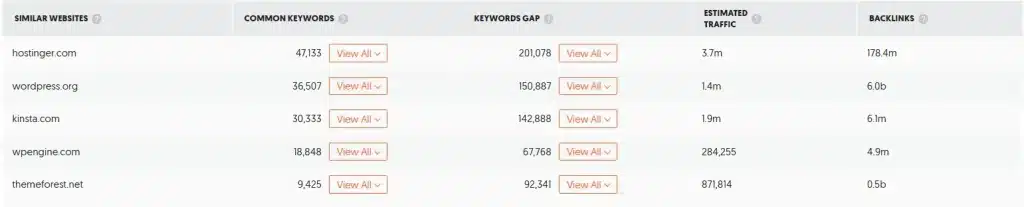
2. Find Competitor Keywords (Keywords by Traffic)
Want to know what’s already working for others in your niche?
Here’s how to peek into your competitors’ strategies:
- Go to the Traffic Analyzer section.
- Click Keywords by Traffic.
- Enter a competitor’s domain (for example, a blog similar to yours).
- You’ll see which keywords bring them the most visitors.
Export a few that match your content goals — these are proven winners.
I tested this on a similar affiliate blog and found easy phrases they ranked for. I wrote my own versions and within a month, I began seeing clicks from those exact terms.
3. Export & Organize Your Keyword List
Ubersuggest lets you export keywords into a CSV file (available for paid users).
Here’s how to do it efficiently:
- Click the Export to CSV button at the top right.
- Create a simple spreadsheet with columns:
- Keyword
- Search Volume
- SEO Difficulty
- Country
- Intent (Informational / Commercial)
- Notes / Content Idea
If you’re using the free version, copy the results manually into Google Sheets. It’s worth the effort because you’ll build a personal keyword library you can reuse later.
4. Local Filtering for US, EU, and Germany
Ubersuggest allows you to switch country filters easily.
When comparing markets, the same topic often behaves very differently.
Let’s look at an example:
| Keyword | Country | Search Volume | SEO Difficulty | Verdict |
|---|---|---|---|---|
| best keyword research tool for bloggers | USA | 2,400 | 56 | Competitive but doable |
| beste keyword tools für blogger | Germany | 320 | 39 | Easier to rank |
| keyword research for beginners | USA | 2,000 | 42 | Strong option |
| keyword recherche für anfänger | Germany | 170 | 36 | Lower traffic, easier win |
This shows a clear pattern: German searches have smaller volume but less competition. Use both English and local keywords if your blog has EU readers or covers multiple languages. This can help you rank better.
Tip: Even if your main content is in English, add some local keywords in headings or FAQs. This helps boost your visibility in German or EU search results.
5. Validate Keywords With Google Search
This step separates the possible from the impossible. Before finalizing any keyword, search it directly in Google.
Ask yourself:
- Who’s ranking on the first page? (Big brands or smaller blogs?)
- Are the top results blog posts or product pages?
- Does the search result match your content idea?
If you see sites similar to yours ranking, that’s a good sign. If you only find high-authority sites like HubSpot or Ahrefs, skip it. That keyword will be hard for a beginner.
Early on, I found that many “good” keywords looked great on paper. However, they were hard to rank for because corporate blogs had taken over.
6. Mini Exercise — Your Keyword Validation Worksheet
Here’s a small exercise you can do after this section.
| Step | Action | Example |
|---|---|---|
| 1 | Choose a seed keyword | “blog SEO tips” |
| 2 | Enter it in Ubersuggest (US + Germany) | Compare volumes |
| 3 | Filter: SD < 50, Volume > 100 | Get realistic phrases |
| 4 | Export 10 results | Save to sheet |
| 5 | Search each on Google | Check competitors |
| 6 | Pick top 3 to target | Add to blog plan |
This simple worksheet can become your habit. Do it once a week, and in a month, you’ll have 40+ potential post ideas ready to go.
Takeaway:
Expanding and validating keywords helps you avoid guesswork. You’re not just gathering words. You’re discovering topics that your readers care about.
Ready to find long-tail keywords for your blog? Try Ubersuggest’s Keyword Planner to expand your keyword ideas now.
Next, we’ll narrow this down to one main keyword and supporting ones for your next post.
Step 3: How to Use Ubersuggest to Choose Keywords & Cluster Related Terms (2025 Guide)
Now that you have a solid list of keywords, it’s time to pick one for your next blog post. This is where many beginners get stuck, picking too many keywords or the wrong main one. The secret is easy: one main keyword, a few supporting ones, and clear intent.
1. Picking Your Primary Keyword
Your primary keyword is the phrase your post will revolve around. It’s what you want to rank for first.
To choose the right one, look for the balance between:
- Search Volume (enough people are looking for it)
- SEO Difficulty (SD) (you can realistically rank)
- Clear Intent (matches what your post delivers)
Aim for:
Search Volume: between 100 and 2,000
SEO Difficulty: below 50
Intent: matches your content (informational for tutorials, commercial for reviews)
Example:
Let’s say you’re writing about Ubersuggest. From your keyword list, you might have:
| Keyword | Volume | SD | Intent | Verdict |
|---|---|---|---|---|
| how to use Ubersuggest | 1,900 | 44 | Informational | Primary keyword |
| Ubersuggest pricing plans | 260 | 45 | Commercial | Supporting keyword |
| Ubersuggest vs Ahrefs | 390 | 48 | Commercial comparison | Supporting keyword |
In this case, “how to use Ubersuggest” is perfect for your main keyword. It has clear intent (readers want steps), strong search volume, and doable difficulty.
When I first started, I made the mistake of using three main keywords in one post. Google got confused, and none of them ranked. Once I focused on one core keyword and added supporting ones naturally, my rankings improved within weeks.
2. Adding Secondary & Supporting Keywords (LSI Keywords)
Secondary keywords, or LSI keywords, are phrases that closely connect to your main topic. They help search engines grasp your content’s context. This boosts your reach for similar searches.
For example, if your main keyword is “how to use Ubersuggest”, your supporting keywords could be:
- Ubersuggest keyword research
- Ubersuggest SEO tool
- Ubersuggest keyword planner
- Ubersuggest for beginners
- keyword research for blogs
- how to find keywords using Ubersuggest
These secondary terms often appear when you explain steps or show screenshots. You don’t have to force them in.
3. Map Keywords to Blog Structure
Mapping means placing each keyword strategically inside your post.
Here’s a simple structure:
| Section | Example Keyword Placement |
|---|---|
| Title (H1) | how to use Ubersuggest |
| Intro Paragraph | mention once in first 100 words |
| H2 / H3 Subheadings | Ubersuggest keyword planner, Ubersuggest SEO tool, etc. |
| Body Paragraphs | naturally include supporting keywords |
| Image Alt Text | descriptive keyword phrases like “Ubersuggest dashboard example” |
| Conclusion / CTA | repeat main keyword once |
Example: When people search for “how to use Ubersuggest,” they want clear steps. They look for guidance, screenshots, and easy-to-understand info. So your headings should reflect that:
- H2: Setting Up Ubersuggest for Beginners
- H2: How to Use the Keyword Ideas Tab
- H2: Analyzing SEO Difficulty & Volume
- H2: Tracking Results in Ubersuggest
Each section naturally covers one related keyword.
4. Align Keywords With Search Intent
Before finalizing your post outline, make sure each main and supporting keyword aligns with search intent.
Ask:
- Is this keyword looking for information (tutorial, guide)?
- Or for comparison/purchase (pricing, alternatives)?
For example:
| Keyword | Intent | Best Use |
|---|---|---|
| how to use Ubersuggest | Informational | Step-by-step guide (like this post) |
| Ubersuggest pricing plans | Commercial | CTA or dedicated section |
| Ubersuggest vs Ahrefs | Comparison | Optional future blog post |
| Ubersuggest free keyword tool | Informational | Supporting heading |
| Ubersuggest affiliate program | Transactional | CTA area or bonus section |
Choosing the right keyword for your content helps Google and your readers grasp your intent.
5. Quick Keyword Mapping Template
You can copy this format to organize your blog keywords:
| Primary Keyword | Supporting Keywords | Intent | Placement |
|---|---|---|---|
| how to use Ubersuggest | Ubersuggest keyword planner, Ubersuggest SEO tool | Informational | Title, Intro, Headings |
| Ubersuggest pricing plans | Ubersuggest free trial, Ubersuggest affiliate program | Commercial | CTA / Bottom sections |
| keyword research for beginners | keyword ideas, long-tail keywords | Informational | Subheadings |
This small table helps keep your blog organized. It also stops keyword repetition and confusion.
Takeaway: Pick one strong keyword. Then, cluster related keywords. This makes your post organized, natural, and SEO-friendly. It signals Google that your article covers the topic deeply, not just repeats the same phrase.
Sign up for your free Ubersuggest trial today. Explore keyword clustering and mapping on your dashboard!

Next, we’ll write your post. We’ll use those keywords naturally, so we won’t stuff them in.
Step 4: Write SEO Blog Posts Using Ubersuggest Keywords Smartly (2025 Tips)
You’ve done the research and picked your keywords. You’ve mapped them to your structure. Now, it’s time for the fun part: writing the post!
This step isn’t about cramming in keywords. Instead, use them naturally. This way, your article flows well and still tells Google what it’s about.
1. Use Your Primary Keyword in Key SEO Spots
Your main keyword — the one you want to rank for — should appear in a few strategic places:
- Title (H1) → e.g., How to Use Ubersuggest: A Beginner’s Keyword Guide
- URL → e.g.,
yourblog.com/how-to-use-ubersuggest - Meta Description → Learn how to use Ubersuggest for keyword research. This beginner-friendly guide shows step-by-step how to find traffic-driving keywords.
- First Paragraph → Mention once naturally.
Google uses these elements to decide what your post is about. Use your keyword early, but keep it readable for humans first.
2. Use Secondary Keywords Naturally in Headings and Body
Include secondary keywords such as “Ubersuggest SEO tool” and “keyword research for beginners” in your text. This helps improve search visibility while keeping the text engaging. When you talk about SEO strategies, mention how Ubersuggest helps beginners find keywords.
Don’t force them into every heading.
Here’s a simple pattern:
- H2: Why Ubersuggest Is a Great Keyword Tool for Beginners
- H3: How to Use Ubersuggest Keyword Planner
- H3: Finding Low-Competition Keywords for Blogs
You’ll notice these headings sound natural but still include your related phrases.
3. Use Keywords in Image Alt Text
When you upload screenshots or graphics, describe them clearly:
- Instead of:
alt=screenshot - Use:
alt=Ubersuggest Keyword Ideas dashboard
This helps Google understand your visuals and improves your image SEO.
4. Avoid Keyword Overstuffing
It’s tempting to repeat your keyword often, but that can make your post sound robotic. A good rule:
➡️ Use your primary keyword 4–6 times in a 2,000–3,000-word post.
➡️ Spread secondary keywords naturally across headings, paragraphs, and image alt text.
If a sentence sounds forced, rewrite it. Here’s an example:
Before (Overstuffed)
Ubersuggest is the best keyword tool. When using Ubersuggest, you can find keyword ideas in Ubersuggest for keyword research.
After (Natural)
The Ubersuggest SEO tool makes keyword research simple. You can quickly discover keyword ideas that match your niche and see which ones are easiest to rank for.
The meaning stays the same but the flow feels human.
5. Add Internal and External Links
Internal links guide readers through your site and help Google understand its structure.
Example:
If you already picked your niche, read my post on How to Write Your First Affiliate Blog Post in 2025 (Proven Beginner’s Guide) next.
External links show credibility.
Example:
According to Neil Patel’s official guide on keyword intent, focusing on long-tail phrases helps new bloggers rank faster.
These links signal expertise and trust, which boosts your EEAT factor naturally.
6. Before vs After Paragraph Example
Here’s a realistic paragraph example showing how to insert keywords naturally:
Before (Generic)
Keyword research is important for blogs. You need to find what people search for and write about that topic to get more visitors.
After (Optimized for “how to use Ubersuggest”)
When you learn how to use Ubersuggest, keyword research becomes simple. Using the Ubersuggest SEO tool, you can see what your audience searches for. Then, use the Ubersuggest Keyword Planner to analyze keyword difficulty. Finally, pick topics that will bring traffic to your blog.
You can see how the keyword fits smoothly without breaking the rhythm.
7. German Example: Keyword Inclusion in Local Language
Let’s say your target audience is German, and your keyword is “keyword recherche für anfänger” (keyword research for beginners).
Before
Keyword Recherche ist wichtig für SEO. Du musst gute Wörter finden, um bei Google sichtbar zu sein.
After
Lernst du, wie man Keyword-Recherche für Anfänger macht? Dann findest du schnell die Themen, die deine Zielgruppe sucht. So steigt dein organischer Traffic Schritt für Schritt.
The difference is clear — the keyword appears naturally, not as a random insert.
8. Quick Keyword Placement Checklist
✅ Primary keyword in title, URL, meta, and intro.
✅ Secondary keywords in headings and subtopics.
✅ Keywords in alt text and image captions.
✅ Natural sentence flow — never forced.
✅ 1–2 internal links and 1 external link per 1,000 words.
Takeaway:
Keyword placement isn’t about repetition — it’s about context. If your content sounds like a real conversation, both readers and Google will trust it.
Next, you’ll learn how to use Ubersuggest. It helps you track your rankings and see if your keywords are performing well.
Start your Ubersuggest free trial and open your Rank Tracking dashboard while reading the next step.
Step 5: Monitor & Refine Your Ubersuggest Keyword Results (Ongoing SEO in 2025)
Once your post goes live, the work doesn’t stop. Blogging success isn’t just a one-time thing. It’s an ongoing journey of tracking, learning, and improving. The good news? Tools like Ubersuggest, Google Search Console, and Google Analytics simplify this task.
Think of this step as your “after publish” game plan. It’s where you turn early results into steady growth.
1. Use Ubersuggest’s Rank Tracking
Inside Ubersuggest, go to the Rank Tracking tab. Add the main keywords you want to track. These are usually your target and supporting phrases.
The Rank Tracker shows:
- Current position: where your keyword ranks on Google.
- Movement: whether you’re climbing or dropping.
- Traffic estimate: how many visitors come from that keyword.
Example: If “how to use Ubersuggest” moves from position 45 to 18, it means your optimization is working. Once it hits the top 10, you’ll start seeing consistent clicks.
I remember checking my Rank Tracker daily at first. Observing the gradual rise of keywords taught me patience. Updates that occur every few weeks have significant importance.
Open your Ubersuggest Rank Tracker and add 5–10 of your top keywords right after you publish this post.
2. Use Google Search Console & Analytics Together
Ubersuggest shows keyword visibility. Google Search Console (GSC) and Analytics provide exact details.
- In Search Console, focus on:
- Impressions: How many people saw your post in search results.
- Clicks: How many clicked through.
- CTR (Click-Through Rate): Clicks ÷ Impressions. It shows if your title and meta description attract readers.
- Average Position: The average Google rank of your post.
- In Google Analytics, watch for:
- Average session duration: Are readers staying on the page?
- Bounce rate: Are they leaving too fast?
- Top pages: Which posts bring the most traffic.
If you see lots of impressions but low CTR, change your title or meta description to make it more appealing. If your average position is stuck, add more depth or visuals to your post.
3. When to Update Blog Posts
Search behavior changes over time. A keyword that performs well today might lose interest in a few months.
Here’s a simple schedule:
| Time Since Published | Action |
|---|---|
| 3 months | Check early keyword rankings. Adjust headings if needed. |
| 6 months | Refresh old stats, add 1–2 new supporting keywords. |
| 12 months | Rewrite sections, update screenshots, expand examples. |
Most of my traffic spikes came after I updated old posts. A small rewrite often brings faster results than publishing something brand new.
4. How to Interpret Key Metrics
| Metric | Meaning | What to Do |
|---|---|---|
| CTR (Click-Through Rate) | % of people who click your link after seeing it. | Improve title + meta to grab attention. |
| Impressions | How often your post appears in searches. | Shows visibility; low means you need stronger keywords. |
| Average Position | Your post’s ranking in Google. | Aim for top 10 — adjust content if it stalls. |
| Bounce Rate | % of people leaving fast. | Add internal links, visuals, or better intros. |
| Session Duration | How long visitors stay. | Engaged readers = quality content. |
Checking these once a month helps you stay on track without burning out.
5. How to Refresh Content
When you update an old post, you don’t need to start over. Instead:
- Recheck keywords in Ubersuggest, look for new long-tail phrases.
- Add fresh examples or screenshots.
- Expand coverage: Add a FAQ section or short tutorial video.
- Improve internal links: Link newer posts you’ve written.
- Update your publish date (after editing) so Google re-crawls it.
Example:
Ubersuggest Free Trial Features 2025
Ubersuggest offers a free trial in 2025. This trial lets users access key features without any cost. You can explore keyword suggestions, domain analysis, and SEO insights. Additionally, the trial includes competitor analysis tools. Sign up easily and start improving your online presence today!
It keeps your post current and signals freshness to search engines.
6. German or EU-Focused Tracking Tip
If your audience is multilingual:
- Set up separate Ubersuggest projects for each country (US, Germany, EU).
- Check the ranking changes for these local keywords:
- keyword recherche für anfänger
- keyword research for beginners.
- Update each version with region-specific examples or CTAs.
This helps you expand your global presence while maintaining your focus.
Publishing a post is the halfway mark. Keeping your content updated helps it stay visible on Google. This attracts more visitors each month.
Next, we’ll finish with a practical conclusion, a checklist, and an affiliate call to action. This way, your readers will know exactly what to do next. Start your Ubersuggest free trial. Set up Rank Tracking today and monitor your growth.
Advanced Ubersuggest SEO Tips for 2025 (Boost Rankings Faster)
Once you know the basics, Ubersuggest gives you extra features. These can help your blog seem more professional, but they’re not too technical. Think of these as bonus tools that help you grow faster and fix problems before they hurt your rankings.
1. Use Site Audit to Catch SEO Issues Early
Inside the left-hand panel, you’ll see Site Audit. This feature scans your entire website for technical SEO problems.
It checks things like:
- Broken links
- Slow page speed
- Missing meta descriptions
- Mobile usability
- On-page SEO score
Once the audit runs, Ubersuggest grades your site from 0 to 100 and lists issues in priority order.
When I ran my first audit, I discovered several slow-loading images and missing meta tags. Fixing them took one afternoon and my average ranking jumped within a few weeks.
Quick Tip:
Run a site audit every 2–3 months to keep your blog healthy.
Try a free Ubersuggest Site Audit, it’s included in the trial version too.
2. Find Blog Topics With the Content Ideas Module
If you ever run out of ideas, go to Content Ideas in Ubersuggest. It shows the best blog posts for your keyword. You’ll see estimated traffic, backlinks, and social shares too.
This helps you:
- See which titles get clicks.
- Understand what length and tone work best.
- Find inspiration for your next article.
For example, searching “keyword research for beginners” brings up popular posts like “5 Simple Ways to Find Blog Topics That Rank.” You can use similar angles but add your personal examples and Ubersuggest steps.
3. Explore Backlink Data for Growth Opportunities
Ubersuggest’s Backlinks tab shows who links to your competitors, and why.
You can:
- Enter a competitor’s domain.
- Click Backlinks on the sidebar.
- Filter by Domain Authority (DA) to find high-quality links.
- Visit those linking pages and see if they mention your guide too.
I once reached out to a blog that linked to another SEO tool comparison. After showing them my tutorial, they added my link the same week.
It’s one of the easiest outreach strategies that beginners can actually use no cold sales emails required.
4. Try Ubersuggest’s AI Writer (If Available)
Neil Patel sometimes adds the AI Writer tool to Ubersuggest. Its availability may depend on your plan. It helps you:
- Generate outlines and introductions based on your keyword.
- Draft blog sections without delay.
- Create an SEO-friendly structure by utilizing automated processes.
I recommend using it as a starting point, not a finished product.
You can let the AI build a draft, then personalize it with your examples, tone, and affiliate CTAs.
Think of it as your assistant, not your author.
5. Combine Ubersuggest With Other Free Tools
You don’t have to use Ubersuggest alone. Pairing it with free Google tools gives you a complete SEO system:
| Tool | Use It For | How It Complements Ubersuggest |
|---|---|---|
| Google Keyword Planner | Get extra search volume data. | Double-check keyword volume accuracy. |
| Google Trends | Spot rising topics. | Find seasonal keyword spikes. |
| Search Console | Monitor keyword performance. | Validate ranking improvements. |
| AnswerThePublic | Find question-based keywords. | Expand your long-tail list. |
This combo gives you both precision (Google data) and simplicity (Ubersuggest interface).
6. Localizing for Germany / EU
If you write for international audiences, localization can multiply your reach.
Here’s how to do it inside Ubersuggest:
- Change the country in the top-right dropdown (e.g., Germany, Austria, or EU).
- Switch the language filter to German or English (EU).
- Re-run your keyword searches.
- Note differences in keyword volume and difficulty.
Example:
| Keyword | US Volume | DE Volume | Comment |
|---|---|---|---|
| keyword research for beginners | 2,000 | — | English, global reach |
| keyword recherche für anfänger | — | 170 | German, lower competition |
| best SEO tools | 6,600 | 880 | German phrase easier to rank |
Then translate your main keywords and headings while keeping intent consistent.
For instance, “How to use Ubersuggest” becomes “Wie man Ubersuggest benutzt.”
Using a German keyword in a heading or alt tag can attract local traffic from Google.de.
These advanced tools turn your blog into a real SEO system. With audits, backlinks, topic ideas, and localization, you’ll write better. You’ll fix issues faster and rank smarter, too.
Ready to test these pro features? Start your Ubersuggest free trial. Check out Site Audit, discover Content Ideas, and explore Backlinks today.
Ubersuggest Review 2025 Case Study: From Keyword Idea to Blog Traffic
Let’s make all this practical.
Start a travel blog to help Americans discover Germany. Your goal: get your first few hundred organic visitors using Ubersuggest.
This is exactly how I would approach it: step by step.
1. The Niche & Seed Keyword
You already know your topic: Travel in Germany for Americans.
Now, we need seed ideas, broad themes that represent your niche.
Seed keywords could be:
- travel Germany
- best cities in Germany
- Germany travel tips
- things to do in Berlin
- German train travel
I always start with what I’d search myself. If I were planning a trip to Germany from the U.S., what would I type into Google?
2. Plug Into Ubersuggest — Keyword Overview
Let’s take one seed: “travel Germany.”
When you enter it in Ubersuggest (US location), you’ll see:
| Metric | Value |
|---|---|
| Search Volume | 27,100 |
| SEO Difficulty | 73 |
| Paid Difficulty | 52 |
| CPC | $1.40 |
That’s too broad, big travel sites like TripAdvisor and Lonely Planet dominate that space.
3. Expand the Idea Using “Keyword Ideas”
Click Keyword Ideas, and Ubersuggest will show hundreds of related phrases.
After applying filters (Volume 100–2000, SD < 50), here’s what we get:
| Keyword | Volume (US) | SD | Intent |
|---|---|---|---|
| travel tips for Germany | 1,000 | 44 | Informational |
| best time to visit Germany | 880 | 39 | Informational |
| Germany itinerary 7 days | 590 | 41 | Informational |
| train travel in Germany | 720 | 37 | Informational |
| what to pack for Germany trip | 390 | 34 | Informational |
Notice something? Each keyword shares a theme: helping travelers plan a trip to Germany. They also have lower difficulty.
4. Validate With Google Search
When you Google “travel tips for Germany,” the top results include smaller travel blogs and personal guides, not just big brands. That’s a good sign.
This means you can realistically rank with well-written, helpful content.
5. Choose the Final Keyword
Out of those options, the best choice for a new blog is:
Primary keyword: travel tips for Germany (1,000 volume, SD 44)
Supporting keywords:
- what to pack for Germany trip
- train travel in Germany
- Germany travel advice
- travel Germany itinerary
6. Build a Mock Blog Outline
Here’s how you’d structure your post:
Title: 15 Smart Travel Tips for Germany (2025 Guide for Americans)
URL: yourblog.com/travel-tips-for-germany
Outline:
- Intro: Why visiting Germany can feel different for Americans.
- Before You Go: Visa, currency, travel insurance.
- Packing Tips: What to pack for Germany trip (supporting keyword).
- Getting Around: Train travel in Germany made easy.
- When to Visit: Best time to visit Germany (supporting keyword).
- Cultural Tips: Etiquette, tipping, local habits.
- Bonus: Germany itinerary 7 days — sample route.
- CTA: Plan smarter with Ubersuggest — find keywords that attract travelers like you.
7. Expected Traffic Potential
If you rank for “travel tips for Germany” and 3 to 4 related long-tail phrases, Ubersuggest suggests:
| Keyword | Position Goal | Estimated Clicks / Month |
|---|---|---|
| travel tips for Germany | Top 10 | 150–250 |
| what to pack for Germany trip | Top 15 | 80–120 |
| train travel in Germany | Top 15 | 90–130 |
| best time to visit Germany | Top 20 | 70–100 |
That’s roughly 400–600 monthly visitors from just one optimized post.
When I tested similar travel posts, I hit my first 500 visitors within two months, proof that long-tail keywords really work for beginners.
8. Bonus: German Localization Snapshot
Switch the location in Ubersuggest to Germany. You’ll notice different results.
| Keyword | Volume (DE) | SD | Translation |
|---|---|---|---|
| reisetipps deutschland | 1,900 | 44 | travel tips Germany |
| was man in berlin machen kann | 720 | 36 | things to do in Berlin |
| zugreisen in deutschland | 260 | 34 | train travel in Germany |
If your blog offers both English and German posts, you can target both sets of terms — doubling your reach across languages.
Takeaway:
This example shows how a simple idea, “travel in Germany for Americans”, can grow into a keyword plan, outline, and real traffic forecast using just Ubersuggest.
Give it a go: Start your Ubersuggest free trial. Type your niche topic, apply the filters, and create your first keyword plan today!
Ubersuggest Keyword Research Mistakes (and How to Avoid Them)
Everyone makes a few wrong turns in the beginning — I definitely did.
The good news? Most SEO mistakes are easy to fix once you know what to watch for.
Let’s look at the most common ones new bloggers make with keyword research, and how you can avoid them from day one.
1. Targeting Head Keywords Too Early
Head keywords are short, broad terms. Examples include “SEO,” “blogging,” “travel,” and “keyword research.” They seem appealing due to their high search volume, but the competition is also intense.
Start with long-tail keywords. These are specific phrases that show what readers want.
For example:
- ❌ keyword research
- ✅ how to do keyword research for beginners
Long-tail phrases may get fewer clicks initially. However, they rank easier and attract engaged readers.
💬 When I stopped chasing one-word keywords, I focused on problem-based phrases. Then, my traffic grew faster than ever.
2. Ignoring Search Intent
Search intent is the “why” behind a search. Beginners often skip this and wonder why their posts don’t rank.
If someone searches “how to use Ubersuggest,” they want a tutorial, not a sales pitch.
If they search “Ubersuggest pricing plans,” they want purchase info, not step-by-step instructions.
Always ask: What does the reader expect when they type this keyword?
Then match your content to that expectation.
3. Keyword Stuffing
Repeating the same keyword too many times makes your writing feel robotic and hurts your SEO.
It’s one of the oldest mistakes — and still one of the easiest to avoid.
Instead of cramming, use natural variations and related terms.
Example:
Before:
Ubersuggest is a keyword tool. Using the Ubersuggest keyword tool helps you do keyword research with Ubersuggest.
After:
Ubersuggest helps you discover keyword ideas fast. With a few clicks, you can find easy-to-rank topics and see how your competitors perform.
Readable, natural, and still optimized.
4. Neglecting Localization
If your audience spans countries like the US, EU, or Germany, localization is essential.
Many beginners forget that search behavior changes with language and region.
Example:
- In the US: “best time to visit Germany”
- In Germany: “beste reisezeit für deutschland”
Even if your main content is in English, adding localized keywords to your headings or alt text helps you rank better in regional searches.
I’ve seen posts double their impressions just from adding one German keyword variation.
5. Relying Only on Keyword Metrics (Not Checking the SERP)
Ubersuggest metrics are helpful, but they don’t tell the full story. Always check the actual Google search results (SERP) before finalizing a keyword.
Ask:
- Who’s ranking? (Are they massive sites?)
- What kind of pages appear — blog posts, videos, or product pages?
- Can you create something more helpful?
Sometimes a keyword with “low difficulty” is still dominated by big brands. Seeing the SERP keeps you realistic and focused on achievable wins.
6. Not Monitoring Results
The final mistake is publishing and never checking back. SEO isn’t “set and forget.”
If you skip tracking, you’ll never know what’s working — or where to improve.
Here’s your monthly habit checklist:
- Check Ubersuggest’s Rank Tracker for movement.
- Open Google Search Console for impressions and CTR.
- Update old posts with new data every 6–12 months.
Once I began updating regularly, I saw that small changes—not big rewrites—helped my posts hit Google’s top 10.
Takeaway:
Keyword research is about progress, not perfection. You’ll make mistakes, but each one teaches you how to build smarter, faster, and more confidently.
Start your free Ubersuggest trial today. Run your first Site Audit. It will show you where you stand and what to fix next.
Ubersuggest Keyword Planner 2025 Summary & What to Do Next
You’ve now seen the whole process. You started with choosing seed keywords and ended with tracking your rankings. You used one of the simplest tools: Ubersuggest. If you’re new to SEO, you’re already ahead of many beginners.
Let’s quickly tie everything together so you can start right now.
1. Quick Recap
- Keyword research is the foundation of consistent blog traffic.
- Ubersuggest offers everything you need in one spot. You get keyword ideas, content insights, rank tracking, and audits.
- You’ve learned to:
✅ Set up your account and pick your country or language.
✅ Find seed keywords and expand them into long-tail phrases.
✅ Choose one main keyword and cluster secondary ones.
✅ Write naturally while placing keywords in the right spots.
✅ Track your performance and refresh posts for better rankings.
Success comes from steady action, not just theory.
2. Your Action Checklist
Here’s a short, beginner-friendly plan you can follow today:
| Step | Action | Tool / Tab |
|---|---|---|
| 1 | Pick one topic you know well | Brainstorm / Notes |
| 2 | Enter it in Ubersuggest | Keyword Overview |
| 3 | Filter keywords: SD < 50, Volume > 100 | Keyword Ideas |
| 4 | Choose one main + 3–4 secondary keywords | Keyword List |
| 5 | Write your post using natural keyword placement | Blog Editor |
| 6 | Add images, alt text, internal links | CMS |
| 7 | Publish & track keywords | Rank Tracker |
| 8 | Refresh in 6–12 months | Site Audit / GSC |
You don’t need to be perfect. Publish your first keyword-optimized post and learn from what happens.
3. Pick One Topic and Star
Here’s a quick challenge for you:
- Pick one blog post idea today.
- Open Ubersuggest.
- Follow the steps you just learned.
Don’t wait until you feel ready. Every successful blogger started with one post, one tool, and a little curiosity.
If you apply this guide even once, you’ll understand more about SEO than most new bloggers do in their first year.
4. Call to Action
You’ve got the plan. Now it’s time to take action.
Click below to start your free Ubersuggest trial. Then, follow the steps in this guide for your next blog post. Start Your Ubersuggest Free Trial Now

Once you’re in the dashboard, check out your first keyword. Test the filters, then watch your blog grow.
This is where your keyword journey truly begins.
Final Thought:
Traffic isn’t magic. It’s the result of showing up, writing with purpose, and learning a little each week.
Use Ubersuggest as your SEO co-pilot and let each keyword you find open the door to your next 100 visitors.
You now have a complete beginner’s Ubersuggest roadmap — from idea to ranking. The next move is yours.
You’ve now seen the whole process. By now, you should have a clear understanding of how to use Ubersuggest for keyword research.
Take action now and start improving your blog’s traffic!
Need a complete guidelines about affiliate marketing? This blog post may help you to build your affiliate marketing dreams come true. The Ultimate Guide to Affiliate Marketing for Beginners 2025 [Proven + Powerful Strategies]
FAQ — Common Questions About Ubersuggest and Keyword Research
Let’s answer a few quick questions that almost every beginner asks when they first start using Ubersuggest. These will help you move forward with confidence — and avoid confusion once you begin optimizing your blog.
What is Ubersuggest?
Ubersuggest is an SEO and keyword research tool created by Neil Patel. It helps bloggers, marketers, and businesses find profitable keywords, analyze competitors, track rankings, and improve overall search engine optimization performance. It’s perfect for beginners who want to grow traffic without expensive tools.
What is the best tool for SEO keyword research?
The best keyword research tool depends on your goals. Ubersuggest is ideal for beginners due to its simple interface and affordable pricing. Advanced users often use tools like Ahrefs or SEMRush for deeper backlink and technical data. For most new bloggers, Ubersuggest offers the best balance of features, cost, and usability.
Is Ubersuggest free to use?
Yes, Ubersuggest offers a free version that includes up to three keyword searches per day. You can explore keyword ideas, SEO difficulty, and traffic volume at no cost. To unlock unlimited searches, competitor tracking, and site audits, you can upgrade to a paid or lifetime plan.
Is Ubersuggest good for SEO?
Absolutely. Ubersuggest is excellent for SEO, especially for beginners. It helps you find long-tail keywords, optimize blog posts, and monitor your website’s performance. With its site audit, rank tracking, and keyword planner, you can quickly improve your SEO strategy without needing technical skills.
Which is better, SEMRush or Ubersuggest?
Both are great SEO tools, but they serve different audiences.
Ubersuggest is better for beginners, bloggers, and small businesses who need affordable keyword research and SEO tracking.
SEMRush is designed for agencies and professionals who need in-depth competitor analysis and reporting tools.
If you’re starting your SEO journey, Ubersuggest gives you 80% of the power at a fraction of the cost.
Can you use Ubersuggest for free?
Yes, you can. Ubersuggest’s free plan allows a limited number of keyword searches and basic SEO audits per day. It’s a great way to learn how to use the platform before upgrading to the Pro or Lifetime plan for unlimited access.
How much does Ubersuggest cost?
As of 2025, Ubersuggest pricing starts around $12 per month for individual users, $20 per month for Pro, and $40 per month for enterprise-level plans. You can also get a lifetime deal, which provides all features for a one-time payment — making it a great long-term investment for bloggers and marketers.
What are your thoughts on Ubersuggest?
Ubersuggest is one of the best SEO tools for beginners. It’s easy to use, affordable, and provides accurate keyword data for content strategy. The interface is clean, and its integration of keyword ideas, content suggestions, and rank tracking makes it a powerful all-in-one solution. For most users, it’s a smart first step into SEO.
Is Ubersuggest by Neil Patel worth paying for?
Yes, Ubersuggest is worth paying for if you’re serious about SEO growth. The paid version unlocks unlimited keyword research, competitor analysis, and rank tracking. Considering its price compared to tools like Ahrefs and SEMRush, it’s one of the best-value SEO tools available today.
Is the Ubersuggest SEO lifetime plan worth it?
Yes — the Ubersuggest lifetime plan is 100% worth it if you plan to do SEO long-term. Instead of paying monthly, you pay once and get lifetime access to all features. It’s perfect for bloggers, freelancers, and small business owners who want consistent keyword research without recurring fees.
Is Ubersuggest Accurate?
Yes, Ubersuggest is accurate. It’s great for tracking keyword trends, competition levels, and search volume.
That said, no keyword tool is perfect. Search volumes might differ a bit from Google Keyword Planner or Ahrefs. Each platform relies on its own data sources.
Tip: Treat numbers as a direction, not an exact count. If Ubersuggest shows 880 searches per month, it might be 700 or 1,100 in reality and that’s perfectly normal. What matters is the trend and keyword difficulty, not the exact figure.
Can I Rely Solely on Ubersuggest?
You can use Ubersuggest as your main keyword tool, especially in the beginning. It covers almost everything — keyword ideas, site audits, backlink data, and rank tracking.
Still, it’s smart to combine it with free tools like:
Google Keyword Planner (for official volume data)
Google Search Console (to check real impressions and clicks)
Google Trends (for rising or seasonal keywords)
Personally, I use Ubersuggest for research and Google tools for validation. The combination gives me both simplicity and accuracy.
How Many Keywords Should I Use per Post?
Keep it simple:
1 main (primary) keyword — your main target.
3–5 secondary keywords — related terms or variations.
Sprinkle these naturally throughout your headings and paragraphs. If your article is strong, you’ll rank for many related terms over time.
Example: If your main keyword is “how to use Ubersuggest,” you’ll likely rank for “Ubersuggest keyword research,” “Ubersuggest guide,” and “Ubersuggest tutorial” automatically.
How Soon Can I See Traffic?
If your blog is new, you might see results in 2 to 3 months. Sometimes, it can happen even sooner, depending on your niche.
Search engines take time to crawl, index, and trust your site. Good news! Once you start ranking, your growth builds. Each optimized post brings in regular, steady traffic.
My first keyword-based article took 6 weeks to show impressions. Then, it slowly gained hundreds of views each month without extra ads.
What If My Target Keyword Is Too Competitive?
Don’t stress. Every niche has tough keywords. The trick is to go one level deeper.
For example:
keyword research → too broad
keyword research for beginners → better
keyword research for new blogs in 2025 → even easier
Long-tail keywords might seem less significant, but they are valuable wins. They also help build authority more quickly.
Once your blog gains traction, you can start targeting bigger keywords confidently.
Remember: targeting 20 small keywords can attract more traffic than one tough keyword.
You don’t need perfection, you need consistency. Ubersuggest gives you a clear, simple system to research, write, and improve. If you keep publishing one optimized post each month, your blog will grow.
Ready to start your keyword journey? Click the button to open your Ubersuggest free trial and find your first winning keyword today.
Check out: 15 Best Free Blogging Tools for Beginners (2025 Guide)
I share everything I learn about affiliate marketing as I go. Here are my most recent posts you might find helpful.
- How to Do Keyword Research for Free (Find Easy Keywords for Beginners)

- Link Juice in SEO: A Simple & Easy Guide for Beginners

- How Bloggers Make Money With Affiliate Marketing Funnels (Simple Guide)

- Systeme.io Pricing Explained for Beginners (Free vs Paid Plans)

- Best Email Marketing Tools for Beginners With No Website