Choosing the wrong WordPress theme is a real problem. It can slow your site down, break your layout, and waste hours of your time. I made that mistake when I first started. After testing several themes, I switched to Blocksy. I have not looked back since.
In this Blocksy theme review, I will share exactly what I tested, what I love, and what every beginner should know before making a decision.
⭐ My Quick Verdict
Blocksy is the best free WordPress theme for beginner affiliate bloggers. It is fast, clean, and works perfectly with Gutenberg. I personally use it on The Passive Circle. You do not need to buy the Pro version to get started.
| Best for | Bloggers, affiliate marketers, beginners |
| Free version | Yes, fully functional, unlimited sites |
| Pro price | From $69/year |
| Page speed | Excellent. One of the fastest themes available |
| My rating | ⭐⭐⭐⭐⭐ (5/5) |
Pros:
- Extremely fast. Scores well on Core Web Vitals and PageSpeed
- Beautiful design right out of the box. No design skills needed
- 100% free with a strong optional Pro upgrade
- Perfect Gutenberg compatibility with zero layout conflicts
Cons:
- WooCommerce features require the Pro version
- Smaller community compared to Astra
What Is Blocksy? A Quick Definition
Blocksy is a free, lightweight WordPress theme built for speed and flexibility. It works seamlessly with Gutenberg, Elementor, and all major page builders. Over 300,000 websites use this WordPress theme worldwide.
It is designed to be fast-loading, beginner-accessible, and fully customizable without coding. You can set up a clean, professional-looking blog in under an hour using the built-in WordPress Customizer.
Blocksy is developed by CreativeThemes. The team releases regular updates and has a strong track record of improving performance and adding new features.
Blocksy Theme Pricing: Free vs Pro
One of the best things about this WordPress theme is the generous free version. It gives you everything a beginner needs to launch a fast, professional blog. The Pro version is optional and only worth considering after you have real traffic.
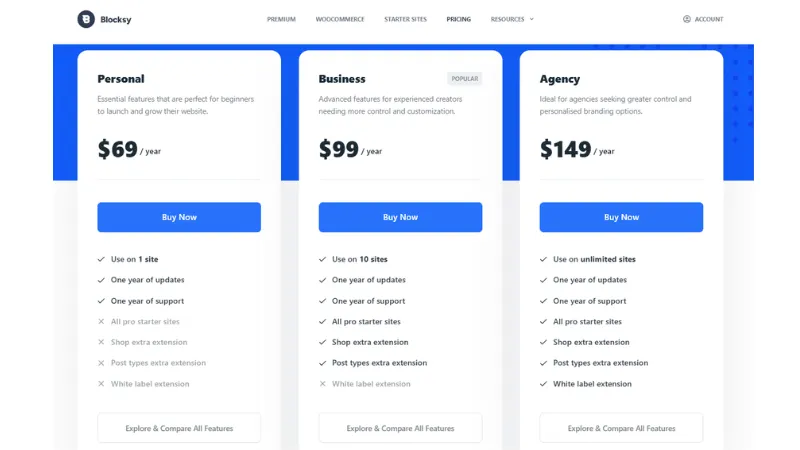
Blocksy Pricing at a Glance
| Plan | Price | Sites | Key Features |
|---|---|---|---|
| Free ✅ | $0 | Unlimited | Full theme, Gutenberg support, 60+ starter sites |
| Personal | $69/year | 1 | Core Pro extensions, sticky header, mega menu, custom fonts |
| Business | $99/year | 10 | All extensions including Shop Extra, Post Types Extra, priority support |
| Agency | $149/year | Unlimited | All sites, white label, agency features |
My recommendation: Start with the free version. Upgrade to Personal ($69/year) only if you need the sticky header, mega menu, or custom fonts on one site. Most beginner bloggers never need to upgrade at all.
Check current Blocksy pricing →
Blocksy Theme Features I Personally Tested
I have been using Blocksy on The Passive Circle since I launched the site. These are not features I read about elsewhere. These are things I tested myself and rely on every day.
Is Blocksy Theme Actually Fast?
Yes. Blocksy is one of the lightest WordPress themes available. After switching to Blocksy, my site scored significantly better on Google PageSpeed Insights. The theme loads minimal CSS and JavaScript by default.
I compared Blocksy theme speed against Astra and GeneratePress. Blocksy matched or beat both in load time tests. For SEO, Blocksy theme speed is one of its strongest advantages. Google rewards fast-loading pages with better rankings.
How Easy Is Blocksy Theme Customization?
Very easy. All Blocksy theme customization happens inside the native WordPress Customizer. You can change your colors, fonts, layout, header style, and footer without writing a single line of code.
I set up my full header, sidebar, and homepage layout in about 45 minutes on my first try. No developer. No tutorials. Just the built-in Blocksy theme options.
Does Blocksy Work Well with Gutenberg?
Blocksy is one of the best Gutenberg-compatible themes available. Every block looks clean and consistent with the Blocksy theme design. There are no spacing issues or layout conflicts that affect some older themes.
I write every post in Gutenberg. Blocksy handles blocks smoothly and the output always looks polished. This is a key reason I recommend Blocksy for affiliate bloggers building content-heavy sites.
What Are Blocksy Starter Sites?
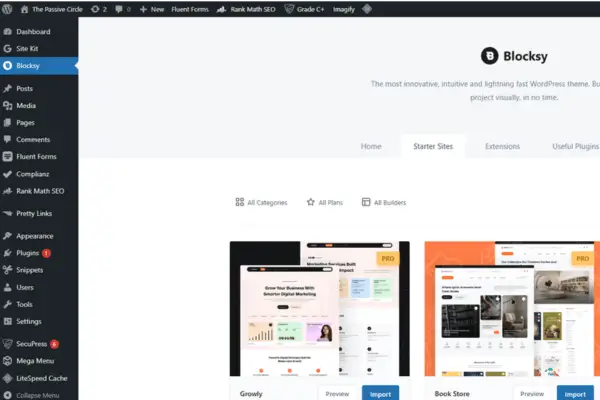
Blocksy starter sites are over 60 free professionally designed templates you can import in one click. They cover blogs, portfolios, business sites, and online stores. You access them through the free Blocksy Companion plugin.
I imported the Blog starter site when I first set up The Passive Circle. I customized the colors and fonts to match my brand in about 30 minutes. It saved me hours of design work.
Is Blocksy Pro Worth Upgrading To?
It depends on where you are in your blogging journey. The free Blocksy theme is genuinely excellent for most bloggers and affiliate marketers. I personally upgraded to Blocksy Pro for the sticky header and mega menu features.
If you run an online store, want WooCommerce product filtering, or need advanced layout hooks, Blocksy Pro is worth the investment. But do not buy it on day one. Start free and upgrade only when you hit a real limitation.
How to Install and Set Up Blocksy: Step by Step
Setting up Blocksy theme takes less than 5 minutes. You do not need any technical skills. Follow these five steps and your WordPress site will be ready to customize.
Step 1: Install the Blocksy Theme
Go to your WordPress dashboard. Click Appearance > Themes > Add New. Search for “Blocksy” in the search box. Click Install, then click Activate.
Step 2: Install the Blocksy Companion Plugin
After activation, Blocksy will prompt you to install the Blocksy Companion plugin. Install and activate it. This free plugin unlocks the starter sites, extensions, and extra Blocksy theme customization options.
Step 3: Import a Blocksy Starter Site
Go to Appearance > Blocksy > Starter Sites in your dashboard. Browse the free templates and pick one that fits your blog style. Click Install and let it import in about 60 seconds.
I used the Blog starter site for The Passive Circle. It gave me a professional foundation I could build on immediately.
Step 4: Customize Your Blocksy Theme Design
Go to Appearance > Customize. Here you can change your colors, fonts, header layout, footer, and sidebar. Everything shows as a live preview so you see changes instantly.
Focus on three things first: your site logo, your brand color, and your navigation menu. Get these right and your site will already look professional.
Step 5: Set Up Your Homepage Layout
Go to Settings > Reading. Choose between showing your latest posts or a static homepage. For affiliate blogs, I always recommend a static homepage. It gives you full control over what new visitors see first.
Who Should Use Blocksy Theme?
This WordPress theme for beginners works well for most new bloggers. But it is especially powerful for affiliate marketers who need a fast, good-looking site without a big upfront budget.
Blocksy is the right choice if you are:
- A beginner blogger building your first WordPress site
- An affiliate marketer who needs a fast, clean WordPress theme
- Someone who wants full Gutenberg or Elementor compatibility
- A blogger who wants a professional design without hiring a developer
You may want to consider other options if you:
- Need a fully built-in drag-and-drop visual editor inside the theme itself
- Want a massive community with thousands of third-party child themes
Blocksy vs Astra vs GeneratePress: Which Is Best?
These are the three most popular lightweight WordPress themes right now. I have tested all three. Here is how they compare for bloggers and affiliate marketers.
| Feature | Blocksy | Astra | GeneratePress |
|---|---|---|---|
| Free version quality | ✅ Excellent | ✅ Good | ✅ Good |
| Gutenberg support | ✅ Built-in | ✅ Good | ✅ Good |
| Page speed | ⚡ Very fast | ⚡ Fast | ⚡ Fast |
| Design flexibility | ✅ High | ✅ High | ⚠️ Medium |
| Starter templates | 60+ | 200+ | 30+ |
| Pro price per year | $69 | $47 | $59 |
| Best for beginners | ⭐ Yes | Decent | Decent |
Astra has more starter templates and a bigger community. GeneratePress is extremely lightweight. But Blocksy theme gives you better design quality in the free version, stronger Gutenberg support, and a faster-looking site without extra plugins.
For a deeper comparison, read my post: Blocksy vs Astra: Which Theme Is Better for Beginners?
Is Blocksy Theme Worth It? My Honest Answer
✅ Use Blocksy if you…
- Are starting a blog or affiliate site
- Want a fast, free WordPress theme
- Use Gutenberg as your editor
- Want a professional design without a designer
⏸ Wait on Pro if you…
- Have fewer than 10 published posts
- Have not started getting traffic yet
- Do not need WooCommerce or mega menus
- Are still deciding your blog niche
I have used Blocksy theme on The Passive Circle since the very beginning. It has never held me back. The design looks professional without any design skills on my end. I upgraded to Blocksy Pro after 6 months. It was worth it for the sticky header and mega menu alone.
If you are a beginner, the free Blocksy theme is one of the best zero-cost decisions you can make for your WordPress site.

🚀 Ready to Start with Blocksy?
It is free. It is fast. And it works out of the box. You can set up your WordPress site in under an hour. Even complete beginners can do this.
Still setting up your site? Read my guide on how to set up a WordPress website for beginners before you install Blocksy. It will save you a lot of confusion in the early stages.
Once your site is live, you will need good hosting to keep it fast. Check my guide on the best hosting for beginners to see what I personally use and recommend.
I also use systeme.io alongside Blocksy for email funnels and landing pages. It is free to start and connects perfectly with WordPress. And if you want to add a floating table of contents to your Blocksy site, read my guide on how to add a floating TOC in Blocksy theme. It takes about 10 minutes.
Frequently Asked Questions About Blocksy Theme
Is Blocksy theme really free?
Yes. Blocksy has a fully functional free version available on WordPress.org. You can use the free Blocksy theme on unlimited websites with no time limit. The Pro version adds advanced features like WooCommerce support, sticky headers, and mega menus. These are optional extras.
Is Blocksy theme good for SEO?
Yes. Blocksy theme is built with clean, lightweight code that directly helps with page speed. Page speed is a confirmed Google ranking factor. It also includes proper schema markup and works perfectly with SEO plugins like RankMath. A fast, well-coded WordPress theme is one of the easiest SEO wins you can get as a beginner.
Does Blocksy theme work with Elementor?
Yes. Blocksy is fully compatible with Elementor, Gutenberg, Beaver Builder, and most major page builders. You can use your preferred builder without any layout conflicts or styling issues.
How does Blocksy compare to Astra?
Both are excellent lightweight WordPress themes. Blocksy theme offers better out-of-the-box design quality and stronger Gutenberg support. Astra has a larger template library and a bigger community. For affiliate bloggers focused on speed and clean design, Blocksy is my top recommendation.
Should I get Blocksy Pro or start with the free version?
Start with the free Blocksy theme. It is more than enough to launch your blog and start ranking on Google. Upgrade to Pro only when you specifically need WooCommerce integration, sticky headers, or advanced mega menus. These features become valuable once you have consistent traffic coming in.
Can I use Blocksy for affiliate marketing?
Absolutely. Blocksy theme works great for affiliate marketing blogs. It loads fast, integrates with all major affiliate link plugins, and produces a clean, trustworthy design. I personally run my affiliate blog, The Passive Circle, on Blocksy theme.
Once you have Blocksy set up, the next step is publishing your first post. Read my guide on how to write your first affiliate blog post. It walks you through the exact structure I use on every post.
This Blocksy theme review covers everything a beginner needs to make a confident decision. It is fast, free to start, beginner-friendly, and backed by a team that keeps improving it. If you are building a WordPress blog for affiliate marketing or passive income, Blocksy theme is the safest and smartest choice you can make in 2026.