
When I started building The Passive Circle, I thought AI tools would do most of the heavy lifting. They would write the articles, pick the keywords, build the strategy, and maybe even make the coffee. That is not what happened. What actually happened taught me something more useful: where AI genuinely helps, and where it will quietly let you fail if you trust it too much.
This is not a list of 20 tools I found on a comparison site. This is the actual AI workflow for affiliate bloggers that I use every week to plan, write, and publish content on this site. Seven of the best free AI tools for bloggers. Real usage. Honest results.
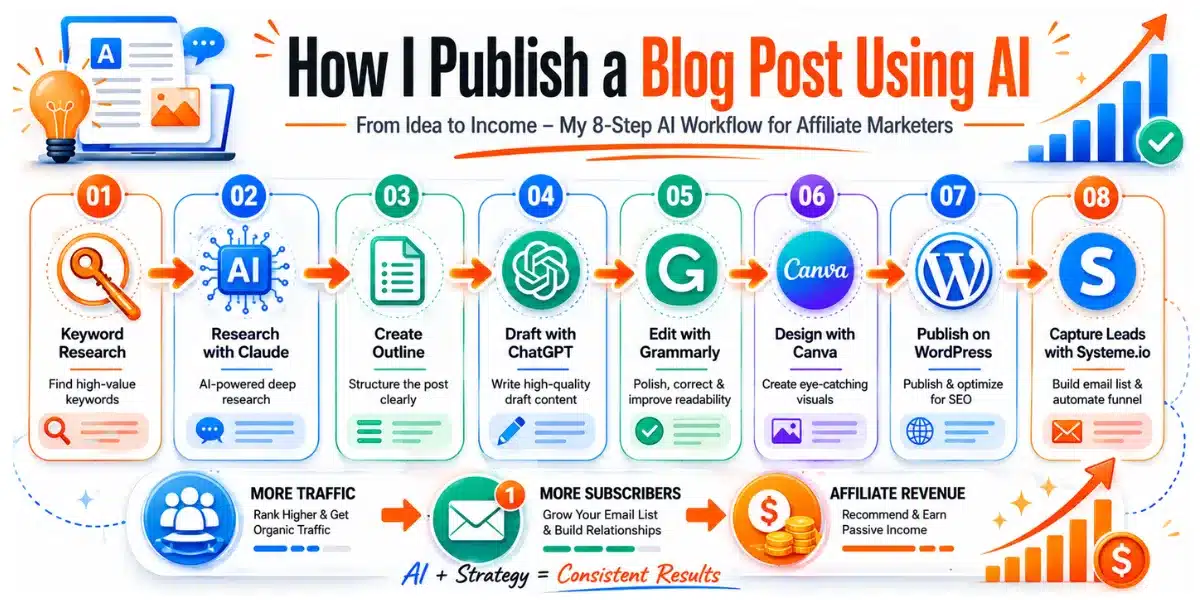
- Claude is the best AI for planning, auditing, and strategic thinking
- ChatGPT is still the fastest drafting tool I use
- 7 tools do more than 15 tools ever did. Fewer tools, better results
- The biggest mistake is trusting AI to replace your personal voice
My Actual AI Workflow for Affiliate Bloggers in 2026 (7 Tools, Not 15)
I spent months testing more tools than I want to admit. Most of them added noise, not results. Every tool that did not make my blogging workflow faster or my content better got cut. What is left is below.
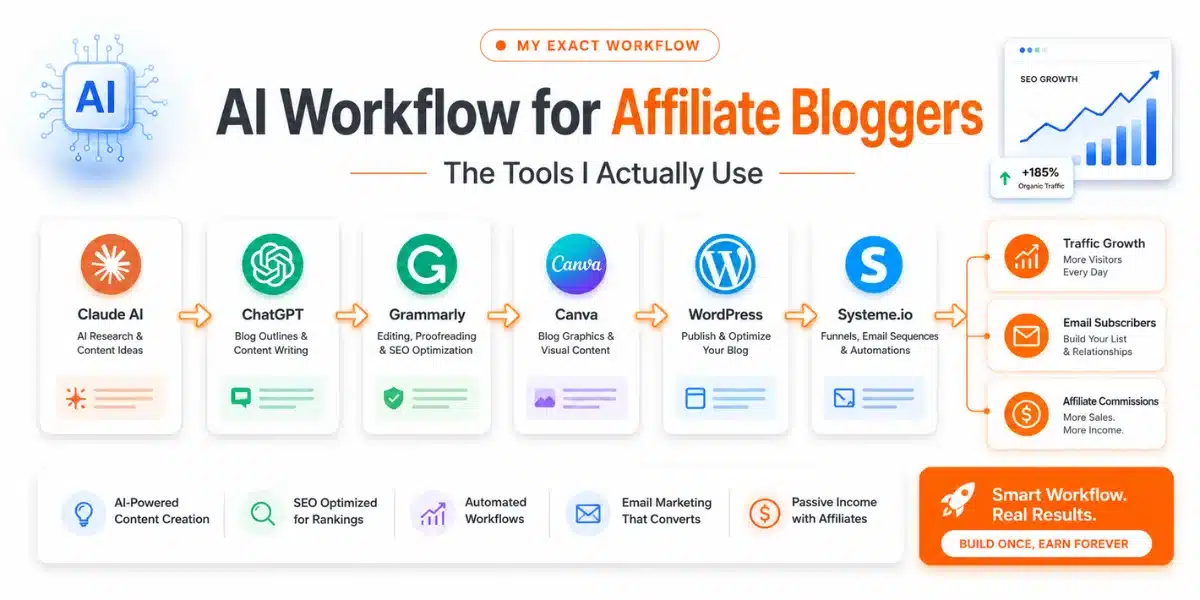
| Task | Tool | What I Use It For | Cost |
|---|---|---|---|
| Strategy & Research | Claude AI | Content planning, audits, topic validation, SEO thinking | Free / Pro $20/mo |
| First Drafts | ChatGPT | Blog post drafts, outline expansion, rewriting sections | Free tier available |
| Editing | Grammarly | Grammar, readability, tone checks | Free tier available |
| Keyword Research | Ubersuggest | Keyword difficulty, search volume, competitor gaps | Free tier available |
| Blog Graphics | Canva | Hero banners, Pinterest pins, featured images | Free tier available |
| Email & Funnels | Systeme.io | Email list, opt-in pages, automation | Free plan for up to 2,000 contacts |
| Website Hosting | Hostinger | Fast, reliable hosting with beginner-friendly setup | From $2.99/mo |
Notice what is not on the list. No Jasper. No Scalenut. No Simplified. No Pictory. I tried all of them. They did not earn their place in a one-person workflow where time is the real currency.
The affiliate marketing tools above connect to each other in a simple chain. Claude helps me decide what to write. ChatGPT handles AI content creation for the first draft. Grammarly cleans it. Ubersuggest confirms the keyword is worth the effort. Canva builds the visuals. Systeme.io captures the reader’s email. Hostinger keeps everything running without crashing at 2am.
That chain is the workflow. The next sections explain each tool and how they fit together in practice. If you want to go deeper on the keyword research part, my guide on how to do keyword research for free covers the full process step by step.
Claude AI for Blogging: My Honest Review
I did not plan to switch. I was using ChatGPT and I was reasonably happy with it. What pushed me toward Claude AI for blogging was a specific frustration: my ChatGPT drafts were readable, but they had no point of view. Every article sounded like a confident summary of everything everyone else had already said. Nothing was wrong. Nothing was particularly right either.
I needed a tool that would help me think, not just produce. Claude solved that problem.
What Claude Actually Does Better
Let me be specific, because “better” is useless without context.
Content planning. I uploaded my published content list to Claude and asked it to identify gaps in my strategy. It found that I had dozens of SEO tutorial posts but nothing that connected them directly to affiliate income outcomes. That gap became three new articles and one major update to an existing post.
Topic validation before I waste time. I used to write first and check search interest second. That is backwards. Now I describe a post idea to Claude, including the topic, the angle, my audience, and my domain authority, and ask whether the approach is strong enough to rank and convert. Claude pushes back when the idea is weak or undifferentiated. This saves me from spending five hours on a post that has no realistic path to traffic.
Content audits. This is where Claude has saved me the most time. I paste in an existing article, tell Claude what it was originally trying to do, and ask what is missing, what is repetitive, and what a first-time blogger would find confusing. The article you are reading right now started as exactly that kind of conversation. Claude found five sections that were generic, two that were redundant, and the gap that became the new workflow section.
SEO strategy thinking. Ubersuggest tells me which keywords exist. Claude helps me decide which ones to actually target given my current domain authority, my existing posts, and my monetization goals. It connects data to decisions. That is a different skill than keyword research, and it is one that most tools do not try to solve. For example, Claude helped me see why targeting a keyword like “NitroPack review” made more sense than chasing “best WordPress speed plugin” at my current traffic level. You can read that reasoning in action in my NitroPack review.
Affiliate marketing planning. I have had long conversations with Claude about commission structures, which tools to prioritize at different traffic levels, and where my income concentration risk sits. It gave me the honest observation that I had built a heavy Systeme.io content cluster without realizing how exposed that made me if the program changed terms. I was not looking for that feedback. It offered it anyway.
Business brainstorming. When I am stuck on direction, I explain my current situation and ask what I am missing. Claude asks questions back. That back-and-forth is closer to thinking out loud with a smart colleague than talking to a text generator. It does not just confirm what I already think.
Website and content structure. My article HTML design system, the sticky TOC, the visual blocks, the progress bar, the pricing tables: all of these were built through Claude conversations. I described the problem. Claude built a solution. I tested it. We iterated. This saved me weeks of research and trial and error in WordPress.
- Strategic thinking, not just text generation
- Pushes back when your idea is weak
- Content auditing and gap analysis
- Connecting SEO data to publishing decisions
- Building HTML, code, and design systems
- Long context: holds a whole article in one conversation
- Writing tone feels more natural and human
- Free plan limits are more restrictive than ChatGPT
- Slower than ChatGPT for quick first drafts
- Does not browse the web on free tier
- No image generation
- Knowledge cutoff means it may not know newest tool pricing
Claude vs ChatGPT: Real-World Blogging Comparison
This is not a technical specs comparison. I am not a developer. This is what I noticed after using both tools to build the same blog over the same period.
| Blogging Use Case | Claude | ChatGPT | Winner |
|---|---|---|---|
| Writing a first draft quickly | Good, but slower | Fast, flexible | ChatGPT |
| Content strategy and planning | Strong, connects ideas | Surface-level | Claude |
| Auditing an existing article | Detailed, honest | Often too agreeable | Claude |
| Pushing back on weak ideas | Yes, often does this | Rarely | Claude |
| Building HTML / code blocks | Excellent | Good | Claude |
| Beginner-friendly tone | Natural, warm | Can sound corporate | Claude |
| Free plan generosity | More restricted | More generous | ChatGPT |
| Brainstorming topic angles | Strong | Strong | Tie |
| Long article context retention | Excellent | Good | Claude |
| Affiliate marketing strategy | Strong | Generic | Claude |
The short version: use Claude to decide what to write and how to structure it. Use ChatGPT to write the first draft quickly. Edit both in your own voice before publishing. Neither tool alone produces something worth reading without your input.
ChatGPT: The Tool That Started Everything
I need to tell you honestly how ChatGPT became part of my life. Not the marketing version where everything clicked immediately and I started earning passive income in 90 days. The real version.
When I first opened ChatGPT, I did not use it for keyword research or article outlines. I used it like a therapist. I shared my struggles with it. My fear that I had started too late. My worry that I was not technical enough to build a blog that anyone would trust. My doubt that anyone in Bangladesh who was not already successful had any business teaching people about affiliate marketing.
ChatGPT engaged with all of it. It was patient, thoughtful, and available at 1am when the self-doubt was loudest. It helped me see that the “learning alongside my audience” angle was a strength, not a weakness. That readers connect more with honest struggle than polished expertise. That my non-technical background made me better at explaining things to other non-technical people, not worse.
That was ChatGPT’s first real contribution to The Passive Circle. Not a blog post. A mindset shift.
Then I made the classic mistake. I got lazy. I started copying ChatGPT drafts directly into WordPress without editing them. The results were obvious and embarrassing: corporate phrasing, generic structure, no personality, no real opinion. Google did not love it. More importantly, I did not love it. It did not sound like me.
The lesson I eventually learned is one I now consider the most important thing I know about AI tools: AI gives you a first draft, not a final article. The editing, the personal examples, the honest admissions, the specific details from your own experience: those are yours. Those are what make the content worth reading and worth ranking.
Today I still use ChatGPT for drafts. I still have conversations with it when I am stuck. But I never publish a sentence it wrote without reading it and asking: does this sound like something I would actually say to a friend? If not, I rewrite it. That question has improved every article on this site.
What ChatGPT Does Well for Beginner Bloggers
- First drafts from an outline: paste your structure, get a starting point in minutes
- Brainstorming angles: ask for 10 different ways to frame an article topic
- Rewriting confusing sections: paste a paragraph and ask for a simpler version
- Writing meta descriptions and headlines: fast, useful, easy to tweak
- FAQ generation: give it your topic and ask for 10 questions readers actually ask
How to Use AI to Write Blog Posts: My Step-by-Step Process
Six months ago this process took me eight hours per article. Now it takes between three and five, depending on length. Learning how to use AI writing tools as a system rather than as individual apps is the reason it got faster. Tools without a system are just more tabs to switch between.
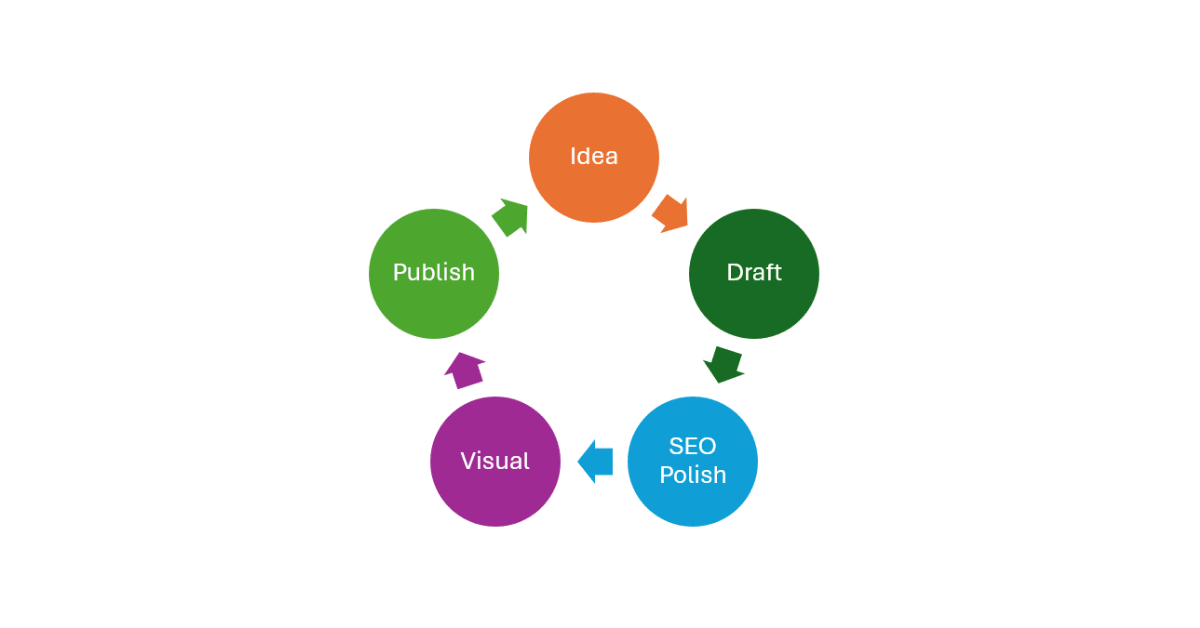
I do not chase random ideas. Every post sits in a planned content roadmap I built with Claude. I pick the next post that fills a traffic gap, targets a useful keyword, or supports an existing article. Starting with a plan means I never waste five hours on a post that has no clear purpose.
I check search volume and keyword difficulty before writing a single word. If a keyword is too competitive for my current domain authority, I find a longer-tail version. This one habit has saved me from publishing articles that would never rank no matter how good they were. I use Ubersuggest as my starting point: my full guide on how to use Ubersuggest for SEO covers the exact process I follow. I also use LowFruits for low-competition keywords that bigger blogs overlook, and SE Ranking when I need a fuller picture of a competitor’s traffic.
I tell Claude the topic, the target keyword, my audience, and what I already have on the site. I ask what the article needs to cover to be more useful than what is already ranking. Claude usually identifies two or three angles that top results are missing. Those gaps become my differentiation. I also ask Claude to audit any existing posts I plan to link to, so the internal linking actually makes sense.
Claude builds the outline based on the research conversation. I review it, remove anything repetitive or too generic, and add sections I know from personal experience that no AI would think to include. The outline is a contract. Every H2 has a job to do for the reader before I start writing.
I paste the outline into ChatGPT with specific instructions: warm tone, short sentences, no em dashes, no corporate language, beginner-friendly. The draft is never published as-is. It is a starting point, not a finished article. I treat it the way I would treat notes from an interview: useful raw material that still needs to become real writing.
This is the step most beginners skip, and it shows. I read every paragraph and rewrite anything that does not sound like something I would say in a conversation. I add personal examples, specific numbers from my own experience, honest mistakes, and moments where I was confused before things clicked. An AI cannot tell you that I spent three weeks unable to figure out DNS records before my first site went live. That is mine. That is what makes the content worth reading instead of skipping.
Grammarly handles the mechanical errors I miss: grammar, passive voice, sentences that ran too long. I accept grammar suggestions and mostly ignore style suggestions. Grammarly does not know my voice. I do. The goal is a clean, readable article that still sounds like me, not a Grammarly-optimized article that sounds like everyone else.
I make four images per article at specific dimensions: hero banner at 1200x600px, pricing or tool screenshot at 800x450px, feature image at 600x400px, and CTA banner at 1200x400px. Canva templates keep this process to about 20 minutes. I export as .webp for page speed. All images get descriptive alt text before publishing.
I paste the HTML into a Custom HTML block, set the URL slug, write the meta description in RankMath, add the focus keyword, and set the excerpt manually. The excerpt matters because WordPress will otherwise pull from the HTML block and show technical code in your blog listing pages. I learned that the hard way. If you are still setting up your hosting, my Hostinger review for beginners covers what the setup process actually looks like from day one.
Every article that generates genuine interest has a path to my email list. Systeme.io handles the opt-in page, the email sequence, and the automation: all on the free plan, which covers up to 2,000 contacts. Building the list from day one is advice I wish I had taken more seriously earlier. Traffic that does not convert to an email subscriber is traffic you may never see again.
What AI Cannot Do For You (Read This Before You Start)
Most AI tools articles skip this part. That is a problem. If you go into AI tools with the wrong expectations, you will waste months producing content that sounds fine but earns nothing and ranks nowhere.
Here is what I learned the hard way.
AI Cannot Give You Real Experience
I spent three weeks confused about DNS records before my first domain pointed correctly to my hosting. That story is in my Hostinger setup article. It is the sentence that most readers tell me resonated with them. No AI knew I had that experience. No AI could have written it. And without it, the article is just another step-by-step guide that looks like every other step-by-step guide.
AI can describe what DNS records are. It cannot describe what it felt like to get them wrong three times in a row and then finally see your site load. That feeling is what builds trust with a reader who is in the same situation right now.
AI Cannot Build Your Reputation
Google and readers both notice the difference between a site with a real person behind it and a content machine. EEAT (Experience, Expertise, Authoritativeness, Trustworthiness) is not something you can generate. It is something you accumulate over time by being honest, specific, and consistent.
An AI can help you write faster. It cannot help you build a reputation for being the blogger who tells the truth even when it is not what the affiliate wants you to say.
AI Cannot Pick Your Niche, Your Angle, or Your Voice
These are decisions only you can make, and they are the decisions that determine whether your blog has a chance of standing out. A niche chosen by ChatGPT based on competition scores is a niche with no connection to your actual experience. An angle that AI suggests because it is popular is an angle that 200 other bloggers are already using. A voice that sounds like a polished AI output is a voice nobody remembers.
Your strongest content asset is what only you know. AI is at its most useful when it helps you organize and express that knowledge, not when it replaces it.
AI Cannot Handle Your Affiliate Relationships
Commission terms change. Programs get discontinued. Payout methods matter if you are outside the US. These details require real research on real program pages, not AI-generated summaries that may reflect last year’s rates or a program that has since been restructured.
Every pricing detail in my articles gets verified on the official tool page before publishing. AI is useful for structuring that information once I have verified it. It is not a reliable source for the information itself.
AI Cannot Maintain Your Consistency
The blogs that grow are the ones that publish regularly. AI can make each post faster to produce, but it cannot show up on a Tuesday night when you are tired and would rather not. That part is still yours. It always will be.
Other AI Tools Worth Exploring
These are tools I have tested or that have a legitimate audience for specific use cases. They did not make my core workflow, but depending on your situation, one or two might be useful to explore.
Specifically built for finding keywords that bigger sites ignore. Useful if you have a new blog with low domain authority and need to find realistic ranking opportunities. I wrote a full breakdown of how I use it in my LowFruits review.
Good for social media captions, email subject lines, and CTA text. Better than ChatGPT for short punchy marketing phrases. The free plan is enough to get started.
Neil Patel’s SEO tool. The free tier gives you keyword ideas, search volume, and basic competitor analysis. Enough for a beginner to build an initial keyword list without paying $100 per month for premium tools. My guide on how to use Ubersuggest for SEO walks through the exact steps. When you are ready to upgrade, compare it against SE Ranking before deciding.
Useful for checking how well a draft is optimized compared to ranking pages. The free version covers basics. I use Ubersuggest instead, but Scalenut is worth trying if you want more specific on-page SEO scoring.
Shows keyword ideas from Google, YouTube, Amazon, and Wikipedia in one view. No signup required. Useful for finding long-tail ideas and understanding what people search across different platforms, not just Google.
Built specifically for marketing copy rather than general writing. The free plan includes a monthly word limit that covers beginner needs. Particularly useful for product descriptions, landing page copy, and affiliate review drafts.
Good for paraphrasing sections that sound too much like an AI wrote them. The free version handles basic rewrites. Useful when you want to restructure a sentence without losing the meaning.
Highlights complex sentences, passive voice, and adverbs. The online version is free. I use it occasionally when an article feels harder to read than it should. Targeting a Grade 6 to 7 reading level is easier with a tool that shows you where you went wrong.
Google’s AI assistant. Useful if you are already deep in the Google ecosystem. I have not used it enough to rank it against Claude or ChatGPT for blogging tasks, but it is free and worth testing if you want another option.
If you are based in Bangladesh and want local server speed, Bengali support, and payment methods that actually work, ExonHost is the option I recommend. I started The Passive Circle with it and ran it for 6 months before switching to Hostinger. I wrote up everything in my ExonHost review. It is not in my core global stack now, but for local blogs it removes a lot of the friction that comes with international hosting payments.
The Real Limitations of Free AI Tools
Free tiers exist to show you the tool and convert you to a paid plan. That is the business model. Knowing where the walls are helps you plan around them instead of hitting them mid-project.
| Limitation | What It Means in Practice | How to Work Around It |
|---|---|---|
| Word / credit limits | ChatGPT free tier resets monthly. Writesonic free gives limited words. You may hit the ceiling mid-article. | Draft in sessions. Use free credits for outlines and headlines. Use the paid draft for the full article if needed. |
| No live web access | AI tools without browsing cannot confirm current pricing, check competitor pages, or verify new tool features. | Always verify pricing on the tool’s official website before publishing. Never trust AI for current pricing data. |
| Generic output without editing | Raw AI drafts sound like every other AI article. Google can detect patterns. Readers lose interest. | Treat every AI draft as a rough first pass. Rewrite in your voice. Add personal details AI cannot know. |
| Fewer features on free plans | Grammarly free misses tone suggestions. Ubersuggest free limits daily searches. Scalenut free gives basic SEO data only. | Start free, identify the one tool where the upgrade would meaningfully change your output, upgrade that one first. |
| Fact errors | AI tools sometimes state incorrect facts confidently. Statistics, pricing, and feature details are high-risk areas. | Verify any specific claim before publishing. Link to original sources where possible. |
Is Building an AI Workflow Worth It for a Beginner Blogger?
The AI tools for affiliate marketing in 2026 are genuinely useful. But the workflow matters more than the tools themselves. Here is who this system is actually built for.
- Are willing to edit every AI draft before publishing
- Have a content plan, not just random post ideas
- Plan to publish consistently over at least 6 months
- Want to write faster without losing your personal voice
- Are a beginner blogger looking for free tools that actually work
- Plan to publish raw AI content without editing
- Are looking for an automated income system that runs itself
- Do not have a specific niche or audience in mind
- Want instant results. This is a 12 to 18 month game
- Are not willing to add your own experience to every article

Ready to build your AI-powered blog workflow?
Start with the tools that have the most generous free plans. Systeme.io gives you a free email funnel and up to 2,000 contacts without paying a cent, which means you can start capturing readers from your very first post.
Start free with Systeme.io →Frequently Asked Questions
They solve different problems. Claude is better for content strategy, auditing existing articles, and thinking through affiliate marketing plans. ChatGPT is faster for writing first drafts. I use both in the same workflow: Claude to plan and structure, ChatGPT to draft quickly. Neither replaces editing in your own voice.
Yes, with one condition: you have to edit the AI output and add genuine personal experience. Raw AI content ranks poorly because it is generic and indistinguishable from thousands of similar articles. Articles that combine AI efficiency with real first-person insight have a much stronger chance. The tools help you produce content faster. The editing is what makes it rankable.
ChatGPT free tier is the most useful single tool for getting started because it handles both brainstorming and drafting. If you add one more, add Grammarly for editing. If you add a third, add Ubersuggest for keyword research before writing. Those three tools cover the core workflow without any cost.
Systeme.io handles what happens after someone reads your article. It captures their email address through an opt-in form, sends them a welcome sequence, and keeps them connected to your blog. The free plan covers up to 2,000 contacts and includes funnels, email automation, and landing pages. For a new blogger, it removes the cost barrier to building an email list from day one.
Three is enough to start. One for writing (ChatGPT), one for editing (Grammarly), and one for keyword research (Ubersuggest). Everything else: graphics, funnels, hosting, comes after you have published your first five articles and have a clearer sense of where you need help. Start with fewer tools than you think you need. Add one at a time when a specific gap appears.
The limits exist but are workable for beginners. ChatGPT’s free tier resets monthly and covers several long articles. Grammarly’s free version handles all basic editing. Ubersuggest gives a limited number of daily searches, which is enough for planning one or two posts per week. Once your blog starts earning, upgrading one or two tools makes sense. Until then, the free tiers are genuinely sufficient.
No. AI tools help you attract readers through search traffic. An email list helps you keep them. These are different problems. A reader who finds your article, reads it, and leaves may never come back. A reader who joins your email list can be reached directly whenever you publish something new or recommend a tool. Building the list from the first post is advice I wish I had followed earlier.
Realistically, 6 to 12 months before organic search traffic becomes consistent. AI tools make the content production faster, but Google’s timeline for indexing, evaluating, and ranking new content does not change because you used AI. The advantage of an AI workflow is that you can publish more quality content in that 6 to 12 month window, which increases the number of articles competing for rankings. Consistency is more important than any individual tool.
If you found this useful, the most helpful next step depends on where you are right now. If you have not started your blog yet, the WordPress setup guide for beginners covers the technical side without assuming you know anything. If you are on the hosting decision, my honest Hostinger review will save you an hour of research. If you have a blog but need better keyword targeting, the guide on how to do keyword research for free is the right next read. And if you have a blog but are still figuring out the affiliate side, the beginner affiliate marketing guide covers the full process in seven steps. Start with the next step. Not all of them at once.