How to Build a Website for Beginners (The Simple Path I Recommend)
When I started building my first website in June 2025, I felt completely lost.
Hosting, domain names, WordPress, themes, plugins. Every tutorial explained things differently. Some helped, but many made things even more confusing.
If you feel overwhelmed right now, you’re not alone. I went through the same confusion while building The Passive Circle.
The good news is simple.
You don’t need to understand everything at once. You only need to follow a clear beginner path.
If you’re completely new to this idea, I explained the full journey in How Affiliate Marketing Became My Path to Freedom where I share how blogging and affiliate marketing can eventually turn a website into an online income source.
⚡ Quick Summary: How to Build a Website
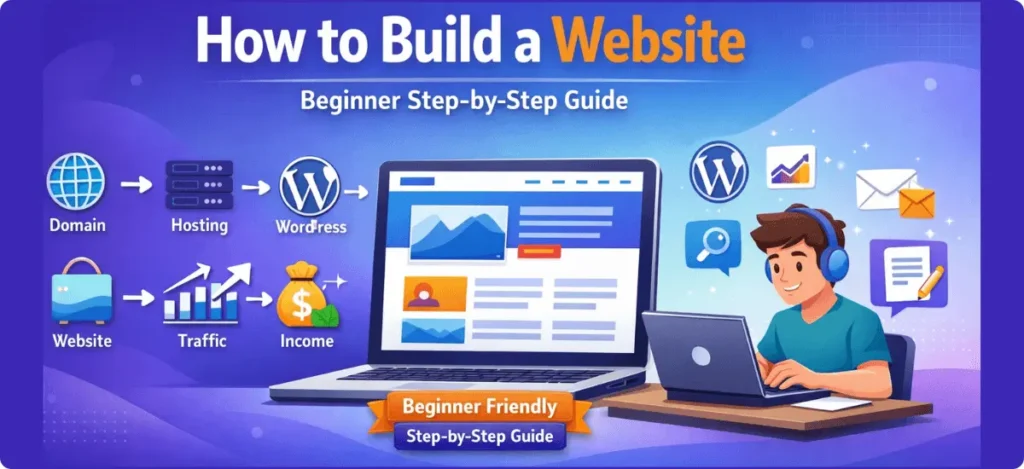
If you’re short on time, here is the beginner-friendly path to launch your website.
- ✅ Buy hosting and a domain (Hostinger or ExonHost)
- ✅ Install WordPress using one-click setup
- ✅ Choose a theme to design your website
- ✅ Publish helpful blog content
- ✅ Grow traffic using SEO
Your website can be live within a few hours. After that, you simply improve it step by step.
The Safe Beginner Path to Build Website
Most beginner bloggers launch their first website using a simple setup like this. You don’t need complicated tools or technical knowledge. You only need the right starting path.
This simple process is used by millions of bloggers and affiliate marketers.
- You don’t need coding knowledge.
- You don’t need expensive tools.
- You only need the right setup and the willingness to learn step by step.
Choosing Hosting: Hostinger vs ExonHost
If you’re starting your first website, these two hosting providers are beginner-friendly and easy to set up.
Tools That Make Website Building Easier
Once your website is live, a few tools can help you grow faster.
- WordPress – The platform that powers your website
- Email Marketing – Build an email list using systeme.io
- Keyword Research – Find traffic opportunities using tools like SE Ranking or LowFruits
If everything still feels confusing right now, that’s completely normal. Once you start building your website step by step, things quickly begin to make sense.
I also wrote a simple tutorial on How to Do Keyword Research for Free (Find Easy Keywords for Beginners) which explains how to find low-competition topics.
One beginner-friendly SEO tool I often use is explained in my guide How to Use Ubersuggest for SEO and Skyrocket Blog Traffic Fast.
What the Website Building Process Looks Like
If you’re new to websites, the process may look complicated at first. But in reality, the journey follows a very simple path.
Think of building a website like building a small online system. Each step naturally leads to the next one.
The first three steps are technical setup. After that, the real journey begins.
Your website can usually be live within a few hours. From there, you simply improve it step by step as you learn more about blogging, SEO, and online marketing.
If you want to understand the basics first, you can read my Affiliate Marketing Guide for Beginners: 7 Simple & Proven Steps where I explain how beginners start earning online step by step.
Table of Contents
Why I Started Building a Website
In June 2025, I started learning how to build my first website.
At that time, I was working a regular job and living away from my family. Like many people, my daily routine felt simple but exhausting. I would wake up early, go to work, return home tired, and repeat the same cycle again the next day.
Days passed like this again and again.
After some time, I started asking myself a serious question.
“Is this the only way to live?”
This question pushed me to explore building a website and learning how online businesses actually work.
Many people reach this stage in life. You work hard every day, but your time does not really belong to you. You follow the schedule decided by your employer, and your personal life slowly becomes limited by that routine.
For example, simple things start to feel difficult:
- Traveling when you want
- Spending enough time with your family
- Choosing how you want to use your time
For me, it started to feel like a rat race.
Not because work itself is bad, but because life started to feel restricted. I realized that if I wanted more freedom in the future, I needed to start building something of my own.
Discovering Online Business
Around that time, I discovered something interesting while browsing online.
Many people were building websites and using them to earn income. Some were sharing knowledge, others were reviewing products, and many were running online businesses.
- Blogging
- Affiliate marketing
- Digital businesses
At first, it sounded unrealistic.
But the more I researched, the more I realized something important.
Almost every online business starts with a website.
A website gives you a place where you can publish your ideas, share knowledge, recommend useful tools, and connect with people who are looking for the same information.
In simple words, a website becomes your home on the internet.
And once I understood that, I decided to learn how to build one.
The Beginning Was Confusing
However, starting the journey was not easy.
At that time, I knew almost nothing about websites. Terms like hosting, domains, WordPress, themes, and plugins sounded technical and confusing.
In the beginning, I struggled with questions like:
- What exactly is web hosting?
- How do you choose a domain name?
- Should I use WordPress.com or WordPress.org?
- What are themes and plugins used for?
Every tutorial explained things differently. Some helped, but much of the information felt scattered across different blogs and videos.
Sometimes I spent hours researching just one simple question.
Learning by Doing
Even though the process felt confusing, I decided to continue learning step by step.
I told myself something simple:
If other beginners can learn this, I can learn it too.
So I kept experimenting.
My first website setup was far from perfect. I made mistakes, broke things, and spent many late nights trying to fix problems I did not fully understand.
But every mistake taught me something new.
Slowly, the confusion started turning into confidence. The technical terms became easier to understand, and the website began to take shape.
That journey eventually led to the creation of The Passive Circle.
And today, I share that same learning journey here to help beginners who are starting from exactly where I once was.
The Biggest Beginner Confusions I Faced
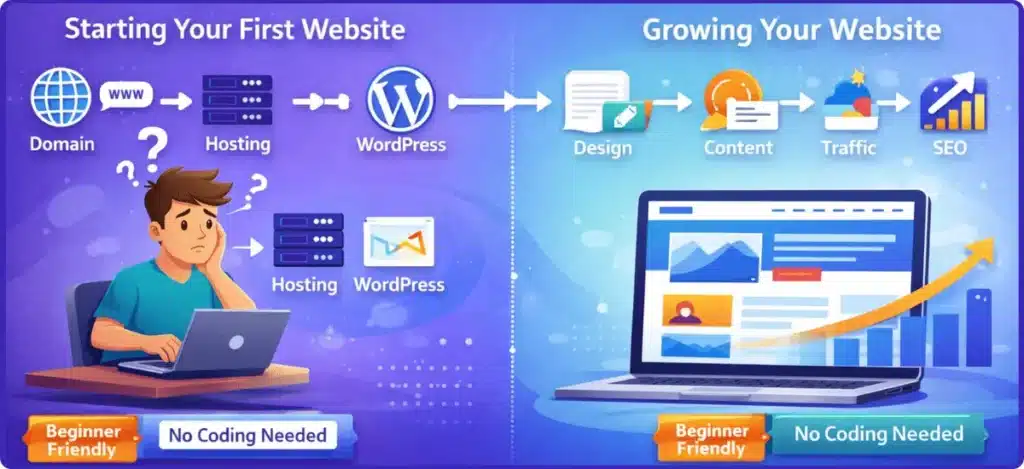
Common Questions I Had at the Beginning
- What exactly is a domain name?
- What does web hosting actually do?
- Should I use WordPress.com or WordPress.org?
- What is BDIX hosting?
- Which hosting plan should beginners choose?
These questions slowed me down a lot when I started building my first website.
When I decided to build my first website, I thought the hardest part would be writing blog posts. But very quickly I discovered something unexpected. The real confusion actually begins before the website even goes live.
Most tutorials show the final result. They show how to install WordPress or publish a post. But they rarely talk about the messy stage at the beginning when a beginner is trying to understand dozens of unfamiliar terms.
That was exactly the situation I faced.
At that time, simple questions kept slowing me down. Things like hosting, domains, WordPress, and themes sounded technical, even though they are actually simple once you understand them.
Choosing the Right Domain Name
The first challenge I faced was choosing a domain name.
A domain name is simply the address people type into their browser to visit your website. For example, my website uses the domain:
thepassivecircle.com
Choosing that name was not as easy as I expected. I kept asking myself several questions before making a decision.
Questions I Asked Before Choosing My Domain
- Should the domain include keywords?
- Should the name be short or descriptive?
- Is the .com version available?
- Will the name still make sense in the future?
Eventually I realized something important: a domain name doesn’t need to be perfect. It just needs to be memorable and flexible.
Eventually, I realized something important. A good domain name does not need to be perfect. It simply needs to be easy to remember, easy to spell, and flexible enough to grow with your website.
WordPress.com vs WordPress.org
Another confusion that slowed me down was understanding the difference between WordPress.com and WordPress.org.
Many tutorials say “build your website with WordPress,” but beginners often don’t realize that there are actually two different platforms with very different purposes.
Here is the simple difference:
| Platform | What It Means |
|---|---|
| WordPress.com | A hosted platform with limited customization |
| WordPress.org | A self-hosted website with full control |
For blogging and affiliate marketing, most beginners choose WordPress.org because it allows you to fully control your website.
With WordPress.org you can install themes, use plugins, monetize your content, and grow your website without platform restrictions. Once I understood this difference, many things suddenly became much clearer.
Local Hosting vs Global Hosting
Another topic that confused me at the beginning was choosing the right hosting provider.
While researching hosting, I kept seeing terms like global hosting, local hosting, and BDIX hosting. At first, these sounded very technical and difficult to understand.
Hosting Terms That Confused Me
- Global Hosting – Hosting providers serving websites worldwide
- Local Hosting – Hosting companies focused on a specific country
- BDIX Hosting – Faster connection for users inside Bangladesh
Understanding these differences helped me choose the right hosting provider for my website.
After spending some time researching, I realized that the basic idea is actually quite simple.
Global hosting providers such as Hostinger are usually better if your audience comes from different countries. Local hosting providers such as ExonHost can be helpful if you prefer local support, local payment methods, and faster connections inside Bangladesh.
Because of this, many beginners compare both options before making a decision.
If you’re still confused about hosting, I created a full beginner comparison in Hostinger vs ExonHost: Which Hosting is Better for Beginners? where I break down the pros and cons of both options.
Choosing the Right Hosting Plan
Once I finally chose a hosting provider, another question appeared.
Which hosting plan should I choose?
Most hosting companies show several options, such as single website hosting, premium hosting, and business hosting. When you see these options for the first time, it can feel confusing.
You might start wondering whether a basic plan is enough or whether you should choose something more powerful.
In reality, most beginner blogs start with a basic hosting plan. As your website grows and traffic increases, you can always upgrade your hosting later.
I also shared a complete beginner breakdown of hosting options in 7 Best Web Hosting Services for Beginners (Step-by-Step Guide) if you want to compare different providers before choosing one.
Payment and Setup Confusion
Another small challenge beginners often face is the payment and setup process.
If you are buying hosting for the first time, you may worry about things like whether your card will work, whether the payment is secure, or what happens after the purchase is completed.
I had exactly the same questions when I bought hosting for my first website.
But once the payment was done, the setup process turned out to be much simpler than I expected. Most hosting providers guide you through the process step by step, and many of them now offer one-click WordPress installation.
What I Learned From These Confusions
Looking back, all these questions felt overwhelming at the beginning. But they also helped me understand how websites actually work.
Once you move past these early decisions, building a website becomes much easier. Instead of worrying about technical details, you can start focusing on the things that really matter.
For example:
- creating helpful content
- learning SEO
- growing your audience
In other words, the confusing stage usually happens only at the beginning. Once your website is live, the rest of the journey becomes much more enjoyable.
Search engine optimization (SEO) helps your website appear in Google search results when people look for topics related to your content. Google explains the basics in its SEO Starter Guide.
The 4-Step Process to Build a Website
When I first started researching how to build a website, the process looked complicated. Every tutorial seemed to introduce new tools, new terms, and new steps.
But after going through the setup myself, I realized something important.
Building a website is actually much simpler than it appears.
Most beginner websites follow the same basic structure.
Domain + Hosting
       ↓
Install WordPress
       ↓
Customize Your Website
       ↓
Publish Content
Once you understand these four steps, the whole process becomes much easier to follow.
Before building your website, it’s also important to choose the right niche. I explain this step in How to Find a Profitable Niche for Affiliate Marketing Beginners.
Step 1: Choose a Domain Name and Web Hosting
The first step in building a website is choosing a domain name and a hosting provider.
Your domain name is the address people type into their browser to visit your website. For example, my website uses the domain name thepassivecircle.com.
Web hosting is the service that stores your website files and makes your site accessible on the internet. Without hosting, your website cannot exist online.
When I started my website, I spent quite a bit of time researching hosting options before making a decision. Two beginner-friendly hosting providers that many people compare are:
| Hosting Provider | Best For | Why Beginners Choose It |
|---|---|---|
| Hostinger | Global websites | Affordable plans and simple dashboard |
| ExonHost | Bangladesh beginners | BDIX speed and local payment support |
If your audience is international, Hostinger is usually a good starting option.
If you prefer local support and payment options inside Bangladesh, ExonHost can also be a practical choice.
Most hosting providers now offer one-click WordPress installation, which makes the setup process much easier for beginners.
Step 2: Install WordPress
Once your hosting account is ready, the next step is installing WordPress.
WordPress is the platform that allows you to build and manage your website without needing to write code. It provides a dashboard where you can create pages, publish blog posts, and customize your website design.
Today, WordPress powers a very large portion of websites on the internet, which is one of the reasons it has such a large ecosystem of themes and plugins.
With WordPress, you can easily:
- create website pages
- publish blog posts
- customize your site’s design
- add new features using plugins
Most hosting providers install WordPress automatically during the setup process, so you can start working on your website within a few minutes.
If you want a full walkthrough, you can follow my step-by-step tutorial on How to Set Up a WordPress Website for Beginners.
Step 3: Customize Your Website
After installing WordPress, your website will technically be live. However, at this stage it will look very simple.
This is where customization begins.
You can change your website’s appearance using themes, which control the layout and visual style of your site. Plugins can then be added to extend the functionality of your website.
For example, I personally use Blocksy, and you can read my full Blocksy Theme Review: The Best WordPress Theme for Affiliate Bloggers to see why it works well for beginner blogs.
And plugins can help you:
- improve SEO
- optimize website speed
- create contact forms
- add analytics tracking
When I built my own website, I spent a lot of time experimenting with these settings. I redesigned the menu several times, adjusted the layout, and tested different plugins before I found a setup that worked well.
Those experiments were part of the learning process.
Step 4: Publish Content and Grow Your Website
Once your website design is ready, the most important part begins.
Creating helpful content.
Content is what brings visitors to your website. When people search for answers on Google, they discover websites that provide useful information.
For bloggers and affiliate marketers, this usually means writing articles such as:
- tutorials
- product reviews
- comparison guides
- beginner guides
Over time, these articles help you attract readers through search engines and build trust with your audience.
If you’re wondering how to write your first article, I shared a detailed guide in How to Write Your First Affiliate Blog Post.
Here is what the growth journey of most websites looks like:
Create Website
      ↓
Publish Helpful Content
      ↓
Get Google Traffic
      ↓
Build Email List
      ↓
Earn Affiliate Income
This process does not happen overnight, but with consistent effort your website can slowly grow into a valuable online asset.
Why This Process Works for Beginners
Many tutorials make website building sound complicated, but in reality most beginners succeed by following the same simple structure.
They choose reliable hosting, install WordPress, customize their website design, and then focus on publishing helpful content.
Once your website is live, the rest of the journey becomes about learning, improving, and growing step by step.
That is exactly what happened during my own journey while building The Passive Circle.
Tools That Helped Me Build My Website
When I started building my website, I assumed I would need dozens of complicated tools.
But the reality was very different.
Most beginner websites can be built using just a few reliable tools. Once I understood that, the whole process became much easier.
Over time, I discovered a small set of tools that helped me build and grow The Passive Circle.
Web Hosting
The first tool every website needs is web hosting.
Hosting is the service that stores your website files and makes your site available on the internet. Without hosting, your website simply cannot exist online.
When I was researching hosting options, I compared several providers before choosing one. Two beginner-friendly options that many people consider are Hostinger and ExonHost.
| Hosting Provider | Best For | Why Beginners Choose It |
|---|---|---|
| Hostinger | Global websites | Affordable plans and easy dashboard |
| ExonHost | Bangladesh beginners | BDIX speed and local payment support |
If your audience is international, Hostinger is usually a good starting point.
If you prefer local support and payment options in Bangladesh, ExonHost can also be a practical choice.
Beginner Hosting Recommendation
Choose Hostinger if:
- ✔ You want to target global audiences (USA, UK, EU)
- ✔ You are building an English blog
- ✔ You want an easier beginner dashboard
- ✔ You plan to scale internationally
Choose ExonHost if:
- ✔ Your audience is mainly in Bangladesh
- ✔ You prefer local payment options
- ✔ You want regional support
- ✔ You want predictable pricing
Beginner takeaway: Choose the hosting that matches where your visitors are located.
Both hosting providers allow one-click WordPress installation, which makes launching a website much easier for beginners.
Website Platform: WordPress
Once hosting is ready, the next important tool is WordPress.
WordPress is the platform that allows you to build and manage your website without needing to write code. It provides a simple dashboard where you can publish articles, create pages, and customize your website design.
With WordPress, you can easily:
- create blog posts
- design website pages
- install plugins for new features
- customize your website layout
Because of its flexibility and large ecosystem, WordPress has become one of the most widely used website platforms in the world.
Email Marketing and Funnels
Once your website starts getting visitors, building an email list becomes important.
Email marketing allows you to stay connected with your readers and notify them when you publish new content or recommend useful tools.
One beginner-friendly platform I explored is systeme.io, which combines several marketing tools into one dashboard.
If you want to see how beginners use funnels and email marketing together, you can read my full Systeme.io Ultimate Guide: Login, Pricing, Features, Reviews, and How to Get Started.
Platforms like this allow you to manage:
- email marketing
- landing pages
- sales funnels
This becomes useful later when your website traffic begins to grow.
Once your website starts getting visitors, building an email list becomes important. I explain this in The Secret to Building a Powerful Email List Address from Day 1.
Keyword Research Tools
When you start writing blog articles, another important skill is keyword research.
Keyword research helps you understand what people are searching for on Google. By writing articles around those topics, you increase the chances of getting organic traffic.
Some beginner-friendly tools that can help with keyword research include:
These tools help you:
- discover keyword ideas
- analyze search competition
- find easier ranking opportunities
Learning basic keyword research was one of the things that helped me understand how websites attract traffic from search engines.
If you want to understand how search engines rank blog posts, read my beginner guide What Are Backlinks: Simple Ways to Rank Faster.
What I Learned From Using These Tools
Looking back, the most important lesson was this.
You do not need dozens of tools to start a website.
In the beginning, you only need:
- a reliable hosting provider
- WordPress to build your website
- a simple keyword research tool
Everything else can come later as your website grows.
Once these basic tools are in place, you can focus on what really matters.
Creating helpful content and slowly building your online presence.
Common Beginner Mistakes When Building a Website
When I started building my first website, I made several mistakes along the way.
At that time, those mistakes felt frustrating. But later I realized that most beginners go through the same learning process. In fact, making small mistakes is often how people learn how websites really work.
If you know about these common mistakes early, you can avoid wasting time and move forward more confidently.
Trying to Learn Everything at Once
One of the biggest mistakes beginners make is trying to understand everything before starting.
When I began learning about websites, I kept researching topics like SEO, plugins, speed optimization, and keyword research all at the same time. The amount of information quickly became overwhelming.
But the truth is much simpler.
Mistake #1: Trying to Learn Everything at Once
Many beginners try to understand SEO, plugins, speed optimization, and keyword research all at the same time. This often creates confusion instead of progress.
A better starting approach:
- Choose a domain name
- Buy hosting
- Install WordPress
- Publish your first article
Once your website is live, learning new things becomes much easier because you can practice directly on your own site.
You don’t need to master everything on day one. Instead, focus on the basic steps first and learn the rest gradually.
For example, start with:
- choosing a domain name
- buying hosting
- installing WordPress
- publishing your first article
Once your website is live, learning new things becomes much easier because you can practice directly on your own site.
Installing Too Many Plugins
Plugins are one of the most powerful features of WordPress.
They allow you to add new functionality to your website without writing code. However, beginners often install too many plugins at the beginning.
I made this mistake myself.
At one point, I installed several plugins just to test different features. Eventually, I noticed that my website became slower and harder to manage.
Mistake #2: Installing Too Many Plugins
Plugins add powerful features to WordPress, but installing too many can make your website slower and harder to manage.
Common problems caused by too many plugins:
- Slower page loading speed
- Plugin conflicts
- Security risks
A better strategy is to keep your website simple and only install plugins that are truly necessary.
Too many plugins can cause problems such as:
- slower page loading speed
- plugin conflicts
- security risks
Over time, I learned that it is better to keep your website simple and only install plugins that are truly necessary.
Ignoring Website Structure
Another mistake beginners often make is ignoring their website’s structure.
In the beginning, many people focus only on writing articles. While content is important, a website also needs a clear structure so readers and search engines can navigate it easily.
Mistake #3: Ignoring Website Structure
Many beginners focus only on writing articles, but a website also needs a clear structure so readers and search engines can navigate it easily.
A well-structured website usually includes:
- Organized categories
- Clear navigation menus
- Internal links between related posts
When your website structure is organized, visitors can find information more easily and search engines can understand your content better.
This includes things like:
- organized categories
- clear navigation menus
- internal links between articles
When your website structure is organized, visitors can find information more easily, and search engines can understand your content better.
Expecting Fast Results
Many beginners start a website expecting traffic to arrive quickly.
I had similar expectations when I published my first articles. But the reality is that websites usually take time to grow.
Search engines need time to discover and index your pages. Readers also need time to find and trust your content.
Mistake #4: Expecting Fast Results
Many beginners expect traffic to arrive immediately after publishing their first articles.
In reality, search engines need time to discover and index your pages, and readers need time to find and trust your content.
If you stay consistent and keep publishing helpful content, your website can gradually start gaining visibility and traffic.
This process can take several months.
However, if you stay consistent and keep publishing helpful content, your website can slowly start gaining visibility and traffic.
I also documented how I started getting my first readers in How I Finally Got My First 100 Visitors with Zero Budget.
What I Learned From These Mistakes
Looking back, these mistakes were actually valuable lessons.
They helped me understand how websites work and what really matters when building an online project.
More importantly, they helped me realize something simple.
You don’t need to be perfect when starting a website.
You only need to start, learn step by step, and keep improving as you go.
What These Mistakes Taught Me
Looking back, these mistakes were actually valuable lessons. They helped me understand how websites work and what really matters when building an online project.
You don’t need to build the perfect website on day one. You only need to start, learn step by step, and keep improving as you go.
If you want to avoid more common beginner errors, check my guide Avoid These 10 Affiliate Marketing Mistakes Beginners Always Make.
A Simple Website Setup Checklist
Before moving forward, here’s a quick summary of the process we discussed in this guide.
Beginner Website Setup Checklist
Pick a name that is easy to remember and represents your website idea.
Choose a reliable hosting provider to keep your website online.
Use one-click installation to set up your website platform.
Choose a theme, adjust the layout, and add essential plugins.
Create articles that answer real questions people search for.
Learn basic SEO and share useful content consistently.
Domain + Hosting
        ↓
Install WordPress
        ↓
Customize Website
        ↓
Publish Content
        ↓
Grow Traffic
        ↓
Affiliate Income
Start Your Website Today (Beginner Setup)
If you want to follow the same beginner-friendly setup explained in this guide, here is the simplest path:
| Step | What You Need | Recommended Option |
|---|---|---|
| 1 | Web Hosting | Hostinger or ExonHost |
| 2 | Website Platform | WordPress |
| 3 | Email Marketing | systeme.io |
| 4 | Keyword Research | SE Ranking, Ubersuggest, LowFruits |
Common Beginner Mistakes When Building a Website
When I started building my website, I made several mistakes.
At the time they felt frustrating. But later I realized these mistakes are very common for beginners.
If you know about them early, you can avoid wasting time and energy.
Trying to Learn Everything at Once
One of the biggest mistakes beginners make is trying to understand everything before starting.
Hosting, SEO, plugins, speed optimization, keyword research. It can quickly become overwhelming.
But the truth is simple.
You don’t need to master everything on the first day.
Start with the basics:
- domain and hosting
- WordPress installation
- publishing your first content
Once your website is live, you can learn the rest step by step.
Choosing Too Many Plugins
Plugins are one of the most powerful features of WordPress.
They allow you to add new features without coding.
But installing too many plugins can create problems.
For example:
- slower website speed
- plugin conflicts
- security risks
When I started my website, I installed many plugins without understanding their impact.
Over time, I learned that a small number of reliable plugins is better than dozens of unnecessary ones.
Ignoring Website Structure
Another mistake beginners make is ignoring website structure.
At first, I also focused only on writing articles.
Later I realized that a website needs clear organization.
This includes things like:
- menus and navigation
- category structure
- internal links between articles
These elements help both readers and search engines understand your website better.
Expecting Fast Results
Many beginners hope their website will start getting traffic immediately.
In reality, websites take time to grow.
Search engines need time to discover your pages.
Readers need time to find your content.
This process can take months.
But if you keep publishing helpful content and improving your website, the results will slowly appear.
A Simple Website Setup Checklist
If you want a quick summary, here is a simple checklist for beginners.
Choose domain name
       ↓
Buy hosting
       ↓
Install WordPress
       ↓
Choose theme
       ↓
Install essential plugins
       ↓
Create your first article
If you complete these steps, your website will be fully functional.
From there, the focus shifts toward content and growth.
My Honest Advice for Beginners
If you’re thinking about building your first website, here is my honest advice.
Starting a website is not impossible, but it is also not completely effortless. Many tutorials make the process look extremely simple, but the first steps can feel confusing when you are doing it for the first time.
You will probably spend time learning things like domain names, hosting plans, WordPress setup, and themes or plugins.
That is completely normal.
Every beginner goes through this stage.
Learn by Doing
When I built my website, I didn’t have the budget to hire developers or designers. Because of that, I decided to learn everything myself.
I experimented with my website many times while trying to understand how things worked. Sometimes those experiments caused problems, but they also helped me learn faster.
For example, I made several beginner mistakes along the way:
- I lost my sitemap more than once
- I slowed down my website by installing the wrong plugins
- I used affiliate links before understanding link cloaking
At the time these mistakes felt frustrating. But looking back, each mistake helped me understand how websites actually work.
Consistency Is More Important Than Perfection
One of the most important lessons I learned during this journey is simple.
You do not need to build the perfect website on your first day.
What matters much more is consistency.
Start small, learn step by step, and keep improving your website as you gain more experience. Over time those small improvements begin to add up.
If you stay consistent, your website will grow along with your knowledge.
What Comes Next
Building a website is only the beginning of the journey.
Once your website is live, you begin learning other important skills that help your site grow.
For example:
- creating helpful content
- understanding basic SEO
- attracting readers from search engines
- building an email list
- recommending useful tools and resources
Over time, these skills can turn your website into a valuable online asset.
And that is the journey I continue to document here on The Passive Circle.
Frequently Asked Questions
Below are a few common questions beginners often ask when starting a website.
1. How much does it cost to start a website?
A beginner website is usually very affordable.
Typical costs include:
domain name: around $10 per year
hosting: about $2–$5 per month
This means many beginners can start a website for less than $50 per year.
2. Do I need coding skills to build a website?
No.
Platforms like WordPress allow beginners to build websites without coding.
You can create pages, publish articles, and customize design using themes and plugins.
3. How long does it take to build a website?
A basic website can be created in a few hours.
However, building a successful website takes time.
Most bloggers spend months learning, experimenting, and improving their websites.
4. Is blogging still worth it today?
Yes.
Every day people search Google for answers. If your article solves their problem, they will find your website.
If you create helpful content and stay consistent, blogging can still become a powerful online asset.
Final Thoughts
Looking back, building my first website felt confusing at the beginning.
There were many things I didn’t understand.
But once I started taking small steps, the process became easier.
Every mistake became a lesson.
Every experiment increased my confidence.
Today I continue learning and improving my website.
And if you are starting your own website today, remember one simple thing.
You don’t need to know everything before starting.
You just need to start building.